Automating Video Editing with Claude Code: 3 Skills to Build a Complete Recording-to-Publishing Pipeline

Build a complete video editing-to-publishing pipeline with 3 Claude Code Skills in under 30 minutes.
A Bilibili creator built a complete video production automation pipeline using three Claude Code Skills: script generation, smart editing, and thumbnail/publishing prep. The core stage is AI-powered smart editing, which automatically identifies retake segments, removes filler words, and provides a visual review interface — trimming a 12-minute raw video down to a 7-minute final cut. The entire workflow runs locally, with humans handling only content creation and final review, compressing the recording-to-publishing process to under 30 minutes.
Why Video Creators Need AI-Automated Editing Workflows
For content creators, the most time-consuming part of video production isn't the recording itself — it's the tedious post-production work: editing, subtitle processing, thumbnail creation, and multi-platform publishing. A Bilibili creator shared his complete video production workflow built with Claude Code, compressing the entire process from recording to publishing down to under 30 minutes. The whole thing requires just three Skills chained together into a single automated pipeline.
Claude Code is Anthropic's command-line AI coding assistant designed for developers, allowing users to manipulate file systems, execute scripts, and invoke external tools through natural language instructions. Its "Skill" mechanism is essentially a reusable combination of prompt templates and tool calls — similar to the concept of "macros" in RPA (Robotic Process Automation), but driven by a large language model with stronger contextual understanding and error tolerance. Users can encapsulate a series of complex operations into a single Skill, enabling one-click automated pipelines.
The core philosophy behind this workflow: Let AI handle all repetitive labor, while humans focus solely on content creation and final review.
Step 1: Create New Episode — Automated Script and Presentation Generation
The workflow begins with the Create New Episode skill. You simply tell Claude what you want to record, and it automatically handles two things:
- Generates an Obsidian script: Automatically plans the video content structure based on your topic and lists the key points to cover
- Creates Presentation Slides: From the cover slide to the layout of each tab, including interactive details like click effects — all auto-generated by Claude
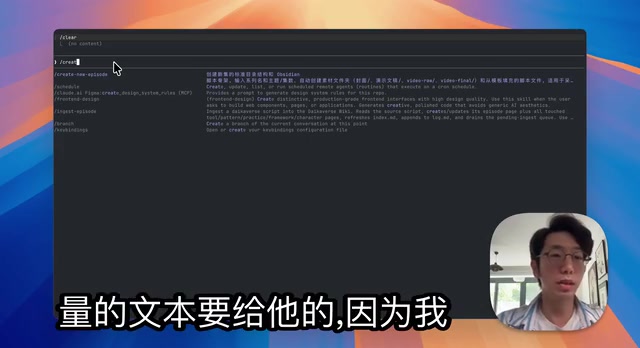
Voice Input Tips: Dramatically Improve Command Input Efficiency
Since creating scripts requires typing lengthy descriptions, manual input is inefficient. Here's a practical tip: use Claude Code's Voice command to enable voice support — just hold the spacebar to dictate. One caveat: voice recognition currently has poor Chinese support, so you'll need to communicate with Claude in English.
Once you have the script and presentation, you can start recording right away. You don't need to follow the script rigidly — feel free to improvise, because the smart editing stage will automatically handle any recording imperfections.
Step 2: Edit RAW Video — AI-Powered Smart Editing and Subtitle Generation
After recording, you have a RAW Video. This is the most critical automation stage of the entire workflow. In a real-world example, a 12-minute raw video was trimmed down to a 6-minute-56-second final cut.

The Edit RAW Video skill executes the following operations in sequence:
Speech-to-Text and Intelligent Content Filtering
- Speech-to-text: Converts the entire video's audio content into text
- Retake identification: Since you're not reading from a script, you'll inevitably make mistakes and redo sections. The AI automatically identifies these retake segments and keeps only the last correct version
- Filler word removal: Automatically removes unnecessary filler words and verbal tics
- Compliance review: Filters out content that's unsuitable for publishing
The underlying technology for this stage relies on ASR (Automatic Speech Recognition) models. Local ASR solutions like OpenAI's open-source Whisper can process audio in real-time on consumer-grade GPUs without uploading audio to the cloud, balancing both efficiency and privacy. The "retake identification" further relies on semantic similarity comparison: when the AI detects the same semantic content expressed multiple times, it marks the earlier instances as retakes and keeps the most semantically complete final version. This logic is similar to multi-camera sync in professional editing software, but is entirely driven by the language model's semantic understanding capabilities rather than timecodes or clapperboards.
The entire processing takes approximately 8–10 minutes, with all computation performed locally.
Visual Review Interface: Precise Control Over Editing Results
Once processing is complete, Claude Code generates a web-based review interface with the following features:

- Text preview: Displays the full transcribed text with suggested deletions highlighted
- Manual adjustment: You can remove additional content or restore segments that were incorrectly deleted
- Jump-to-playback: For segments you're unsure about keeping, you can jump directly to the corresponding timestamp and play it back to confirm
- Subtitle editing: The right-side tab displays subtitle line breaks, allowing you to adjust whether the segmentation is appropriate
Once you've confirmed everything, tell Claude to proceed, and it will automatically produce the final edited video file.
Step 3: Finalize Episode — Thumbnail Creation and Multi-Platform Publishing Info
The final skill, Finalize Episode, generates all the assets needed for publishing:

- Video thumbnail: Generates a DALL-E prompt and automatically creates a cover image
- Multi-platform titles: Generates platform-specific titles for different platforms (Bilibili, YouTube, etc.)
- Tag recommendations: Lists usable tags for each platform
The underlying logic of thumbnail generation is a "Prompt Chaining" approach: Claude first analyzes the edited video transcript, extracts core themes and keywords, then transforms them into an English prompt conforming to DALL-E style specifications (including composition, color tone, style parameters), and finally calls the DALL-E image generation API to output thumbnail candidates. This multi-step semantic transformation combined with tool invocation is a typical paradigm in current multimodal AI workflows.
This step is placed last intentionally — content may be cut during editing, causing the final transcript to differ from the initial script. The Finalize skill generates titles and thumbnails based on the post-editing transcript, ensuring consistency with the actual content.
The Trade-offs Around Auto-Uploading
Technically, you could use Playwright to automate uploads across platforms. Playwright is Microsoft's open-source browser automation framework supporting Chromium, Firefox, and WebKit, commonly used for end-to-end testing and RPA scenarios. It's entirely capable of simulating manual operations to complete video upload workflows on Bilibili, YouTube, and other platforms.
However, major content platforms widely deploy behavioral risk control systems that detect automation scripts by analyzing mouse trajectory regularity, operation time intervals, browser fingerprints, and other characteristics. Triggering these systems can result in throttling or even account bans. Manual uploading is therefore still recommended — automated operations risk triggering platform risk controls, making manual uploads the safer choice. This is the fundamental reason why, even when technically feasible, production environments still need to preserve human intervention for this "last mile."
Summary: Design Principles Behind the Claude Code Video Automation Workflow
This workflow embodies several important design principles:
- Modular design: Three Skills, each with a distinct role, can run independently or be chained together
- Human-AI collaboration: AI handles the heavy processing while humans handle creativity and final decisions
- Local processing: All computation is performed locally, protecting privacy without relying on network connectivity
- Progressive confirmation: Every stage offers a review opportunity — nothing is a complete black box
For creators who regularly produce video content, this approach of using Claude Code as an automation engine is well worth adopting. The goal isn't to fully replace human effort, but to automate 80% of repetitive work so creators can focus on the content itself.
Related articles
 Tutorials
ChatGPT Plus Subscription Guide: Are GPT-5.5, image-2, and Codex Worth the Upgrade?
A detailed look at ChatGPT Plus features — GPT-5.5, image-2, and Codex — with a Plus vs Pro comparison and a complete step-by-step subscription guide for users outside the US.
 Tutorials
Harness AI Engineering in Practice: Using Claude Code to Master Enterprise-Level E-Commerce Development
Deep dive into Harness AI Engineering: master enterprise e-commerce development with Claude Code using the Rules, Skills, Wiki, and Changes framework.
 Tutorials
Cursor + Codex Dual-IDE Collaboration: A Practical Methodology for Open-Source Project Customization
A complete methodology for open-source project customization based on real-world experience, detailing the Cursor+Codex dual-IDE workflow, seven-stage process, MVP validation, and AI source code reading techniques.