AutoShelf 2.6: Automate Your Mac Folders with Rules

AutoShelf 2.6 is a Mac automation tool that organizes folders via if-then rules.
AutoShelf 2.6 is a Mac file management automation tool launched on Product Hunt. Its core is an if-then rule engine: users set rules for any folder, and when new files meet specific conditions (type, name, date), actions like organizing, renaming, tagging, converting, or sorting run automatically. Version 2.6 adds token-based subfolders (%kind%, %date%), auto archive extraction, Finder color tags, and rules covering all or selected subfolders. Freemium: free version supports 1 rule; paid version is $19.99 one-time, rising to $29.99 after Nov 25. Requires macOS 14 Sonoma or later. Compared to Hazel, AutoShelf emphasizes simple rule construction and tokenized paths, ideal for lightweight automation.
AutoShelf 2.6 is a Mac automation tool that automatically organizes, renames, tags, converts, and sorts new files in folders using "if-then" rules. It just launched on Product Hunt, receiving 75 upvotes and ranking 15th in the Mac, Productivity, and Menu Bar Apps categories. Developer Orçun İlbeyli says users only need to set up rules once to keep folders like Downloads and Desktop organized.
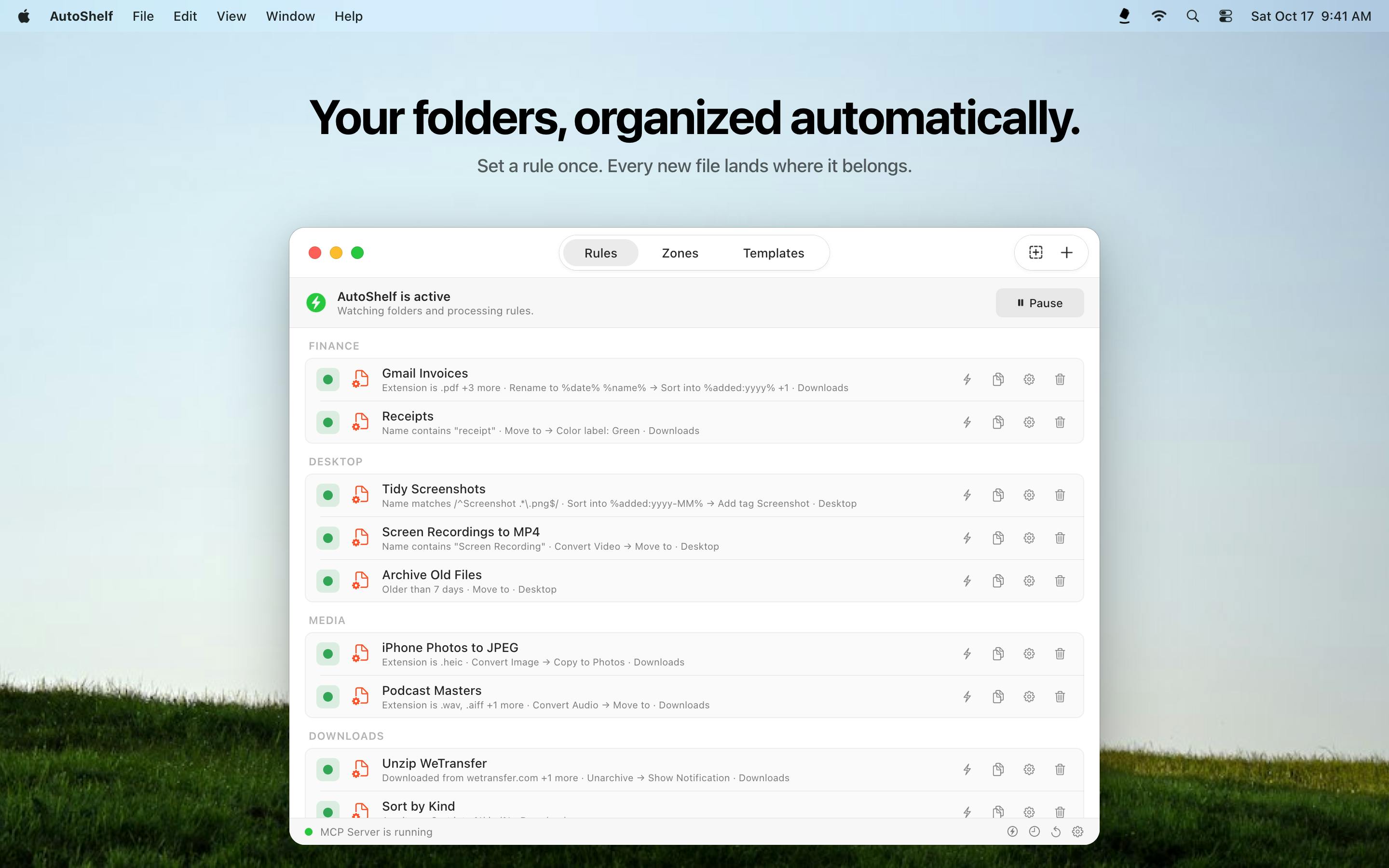
Core Feature: Rule-Driven Folder Automation
At the heart of AutoShelf is its "if-then" rule engine. You can create rules for any folder: when a new file meets specific conditions (such as type, name, or date), an action is automatically performed. Version 2.6 introduces several enhancements:
- Build subfolders with tokens: Use tokens like %kind% and %date% to automatically generate subfolder structures, for example categorizing by file type and date.
- Extract archives: Automatically unpack compressed files, eliminating manual steps.
- Finder color tags: Add Finder color tags to files for easy visual distinction.
- Apply to all or selected subfolders: Rules can be applied to the entire folder tree or specific subfolders, offering greater flexibility.
These features elevate AutoShelf from a simple file organizer to a lightweight automation platform, ideal for users who need to handle large volumes of downloaded files.
Hazel is a long-standing file automation tool for Mac, developed by Noodlesoft. It supports rule-based operations such as moving, renaming, tagging, and archiving files. Rule conditions can combine file type, name, date, content, and more, and it supports nested folder monitoring. Hazel's rule engine is more complex, suited for advanced users who need fine-grained control, but it has a relatively steep learning curve. Compared to AutoShelf, Hazel offers greater functional depth—for example, supporting script execution, pattern matching, and more complex conditional logic—but AutoShelf emphasizes simple rule construction and tokenized paths, lowering the barrier to entry for ordinary users.
Tokens in automation tools typically refer to dynamic placeholders that are replaced with actual values at runtime. In AutoShelf, tokens like %kind% and %date% are used to automatically generate subfolder paths: %kind% might be replaced with categories like "Images," "Documents," or "Videos" based on file extension or type, while %date% is replaced with the current date or the file's creation date (e.g., "2025-03-21"). This mechanism lets users avoid creating separate rules for each file type—simply embedding tokens in a path template enables dynamic categorization. Tokenized paths are a common pattern in rule engines, significantly reducing the number of rules and increasing flexibility.
Pricing and Availability
AutoShelf uses a freemium model: the free version supports 1 rule, while the paid version is a one-time purchase of $19.99 that unlocks unlimited rules. Starting November 25, the price will increase to $29.99. The app requires macOS 14 Sonoma or later.
Use Cases and Thoughts
For Mac users who frequently download files from browsers, receive attachments, or handle media files, AutoShelf can significantly reduce manual organization time. Compared to established tools like Hazel, AutoShelf emphasizes simple rule construction and tokenized paths, though its functional depth may fall short. However, its one-time purchase model and menu bar design make it appealing to users seeking lightweight automation.
Automated folder management is not a new concept, but AutoShelf lowers the barrier to rule setup, making it easy for ordinary users to get started. If you're tired of a cluttered Downloads folder, this tool is worth a try.
One-line Summary
AutoShelf 2.6 is a Mac automation tool that automatically organizes folders using "if-then" rules.
Paragraph Summary
AutoShelf 2.6 is an automated file management tool for Mac, now launched on Product Hunt. At its core is an "if-then" rule engine: users can set rules for any folder so that when new files meet specific conditions (such as type, name, or date), actions like organizing, renaming, tagging, converting, or sorting are automatically performed. Version 2.6 adds features like building subfolders with tokens (%kind%, %date%), automatic archive extraction, Finder color tags, and applying rules to all or selected subfolders. The app uses a freemium model: the free version supports 1 rule, while the paid version is a one-time purchase of $19.99 (increasing to $29.99 after November 25). It requires macOS 14 Sonoma or later. Compared to established tools like Hazel, AutoShelf emphasizes simple rule construction and tokenized paths, making it suitable for users seeking lightweight automation.
Related articles

A New Paradigm for Text Editing in Compose: TextFieldState Replaces the Old API
Jetpack Compose introduces the TextFieldState API to fix dropped characters and cursor jumps from async input. The old value/onValueChange callbacks will be deprecated in 1.13. This article covers InputTransformation, OutputTransformation, four state hoisting patterns, and new formatted text editing capabilities.

Remote Compose: A New Document-Driven Paradigm for Cross-Platform UI on Android
Remote Compose transmits compact binary documents instead of screen pixels, enabling efficient UI rendering on remote surfaces like Wear OS and widgets. This article covers its document creation API, expression animations, size optimization techniques, and Wear OS progress.

How Crashlytics Eliminates Android Memory and Responsiveness Issues
Through the Chroma Clip case study, this article explains how Firebase Crashlytics uses Application Exit Info, Profiling Manager, GWP ASAN, and ARM MTE to pinpoint ANRs, OOMs, memory limit terminations, and native memory corruption—solving the challenge of stack traces that don't point to the real culprit.