Batch-Producing AI Short Films with KLING 3.0: A Complete Workflow from Character to Final Cut

A complete workflow for producing multi-shot AI short films using KLING 3.0 and a unified workspace platform.
This article breaks down the complete workflow for creating multi-shot AI short films from scratch using KLING 3.0 on the Open Art Suite unified workspace platform. It covers character creation and consistency management, batch storyboard image generation, KLING 3.0's multi-shot image-to-video mode with synchronized audio generation, and final assembly—emphasizing how a unified platform eliminates tool-switching costs and how workflow proficiency matters more than model capability.
With the release of KLING 3.0, the quality of AI video generation has taken another leap forward. The AI video generation field experienced explosive growth between 2023-2025—from the early days of Stable Video Diffusion producing only a few seconds of low-resolution blurry footage, to Runway Gen-2 achieving basic usable text-to-video, to Sora, KLING, Veo, and other models pushing generation quality toward near-professional levels. KLING is developed by the Kling AI team under Kuaishou, and its 3.0 version achieves significant breakthroughs in motion consistency, physical realism, and multi-shot coherence—particularly in the naturalness of human movement, which the industry considers a new benchmark. This generation of models generally adopts the DiT (Diffusion Transformer) architecture, combining diffusion models with Transformer attention mechanisms, enabling better understanding of motion relationships in temporal sequences.
But for creators, the real pain point often isn't the capability of a single model—it's how to connect character design, storyboard creation, video generation, and audio synthesis into an efficient workflow. This article will break down in detail how to create a multi-shot AI short film from scratch using KLING 3.0, based on a practical case study.
Why a Unified Workspace Is More Efficient Than Tool-Switching
Traditional AI short film production workflows often require jumping back and forth between multiple tools—using Midjourney for concept art, RunwayML for video, and other tools for audio processing. Every switch means exporting, importing, and converting assets, resulting in extremely low efficiency. This fragmentation brings not only the technical cost of format conversion (as different tools have varying requirements for resolution, color space, and file formats), but more importantly, it breaks the creator's flow state. The unified workspace concept borrows from Adobe Creative Suite's integration philosophy—bringing multiple professional tools into the same ecosystem, improving efficiency through unified asset management and seamless data flow.
The demonstration uses Open Art Suite, a unified workspace platform that puts this philosophy into practice for AI-native creative tools. Its core advantage lies in integrating image generation (supporting Nano Banana Pro, KLING 3.0 image model, etc.), video generation (KLING 3.0, VO 3.1), character management, and audio generation all within the same interface. Creators can complete the entire process from character design to final output in a single window, with seamless drag-and-drop between assets, dramatically reducing friction in the workflow.
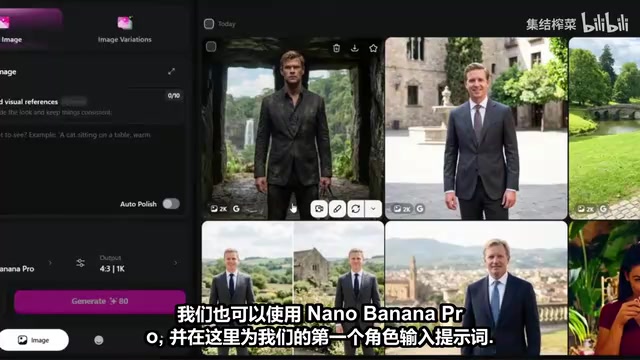
Character Creation and Consistency Management: The First Gate of AI Short Films
Character consistency is one of the biggest challenges in AI short film production. If the character's appearance differs in every shot, the film loses narrative coherence.
The technical root of this problem lies in the stochasticity of diffusion models. Each time an image is generated, the model starts from random noise and progressively denoises—even with identical prompts, different random seeds produce results with significant appearance differences. Currently, the industry addresses this through three main technical approaches: first, the IP-Adapter method, which encodes reference images as feature vectors injected into the generation process; second, LoRA fine-tuning, which trains lightweight adapters for specific characters; and third, face embedding-based approaches, such as InsightFace, which extract facial features and use them as conditional constraints during generation. Platform-level character profile systems typically combine these techniques, encoding a character's facial features, body proportions, and clothing style as a set of reusable reference vectors that are automatically injected during each generation to maintain consistency.
Locking Down Appearance with the Character System
The platform provides a dedicated character creation tool that supports not only character creation but also objects, backgrounds, and style templates. The workflow is as follows:
- Describe the character: Enter a detailed character description in the character creation panel
- Select model and style: Nano Banana Pro model is recommended, with the style set to Photorealistic
- Generate and select: The system batch-generates multiple character images; choose the most satisfactory one as the character baseline
- Create character profile: Name the character and add a backstory; the system saves it as a reusable character asset
Regarding model selection, Nano Banana Pro is an image generation model on the platform that focuses on high-quality photorealistic output. In the AI image generation field, "Photorealistic" style requires the model to achieve near-real photography levels in skin texture, light reflection, depth-of-field blur, and other aspects. This is fundamentally different from anime or illustration style generation—the latter allows a degree of stylistic abstraction, while photorealistic style has zero tolerance for any unnatural details. Choosing the right base model is crucial for storyboard quality, because these images will directly serve as starting frames for video generation, and any flaws in the images (such as unnatural fingers or blurry facial details) will be amplified and perpetuated in the video.
One key detail: when selecting the character baseline image, full-body images are usually more suitable as references than half-body shots, because they contain more complete clothing and body proportion information, helping maintain consistency in subsequent shots.
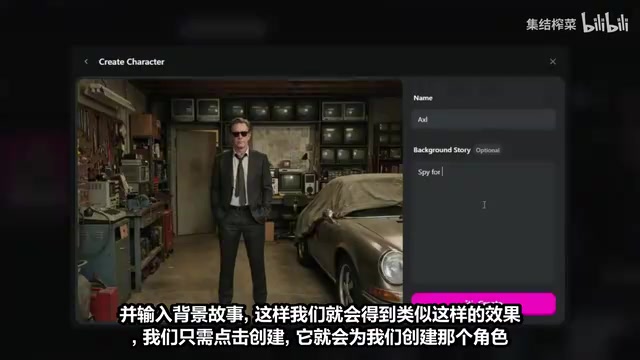
Once a character is created, you can directly tag it in any subsequent image generation, and the system will automatically reference the character profile to maintain appearance consistency.
Tips for Batch-Generating Storyboard Images
With characters ready, the next step is generating storyboard reference images for each scene. These images will serve as starting frames for KLING 3.0's image-to-video generation.
Practical Methods for Improving Storyboard Generation Efficiency
When generating storyboard images, several practical tips are worth noting:
- Resolution selection: The platform supports up to 4K output, but 2K (1080p level) is usually the best value choice, balancing image quality with generation time
- Aspect ratio: 16:9 is the standard ratio for short film production; using it consistently is recommended
- Character tagging: Every storyboard image should tag the created character to ensure character consistency
- Drag-and-drop functionality: This is a major highlight of the platform—you can directly drag images from the character library and other references into the generation panel, and the system automatically recognizes and uses them as reference inputs
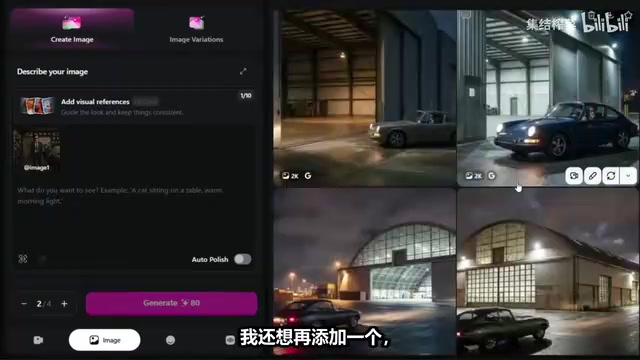
For example, when generating a storyboard for a warehouse scene, you can simultaneously drag in the character image and a warehouse environment reference image, and the system will synthesize both to generate a storyboard frame that meets requirements. This multi-reference input method greatly improves the controllability of generated results.
The entire short film requires approximately 4-6 storyboard images, each corresponding to a key scene.
Generating Multi-Shot Clips with KLING 3.0 Image-to-Video
With storyboard images ready, we enter the most critical video generation phase.
KLING 3.0 Multi-Shot Mode Explained
Image-to-Video (I2V) is one of the most practical modes in current AI video generation. Compared to pure text-to-video (T2V), I2V significantly reduces the degree of freedom the model needs to "imagine" by providing a starting frame image, thereby substantially improving output controllability and quality. The technical principle involves encoding the input image as an initial state in latent space, then having the video diffusion model expand along the temporal dimension, predicting motion and changes in subsequent frames.
In the video tool, select "Frame to Video" (image-to-video) mode with KLING 3.0 as the model. The platform offers two multi-shot modes:
- Multishot Auto: The system automatically plans shot transitions, suitable for rapid production
- Customizable: Manual control over each shot's content and transitions, suitable for refined creation
KLING 3.0's multi-shot mode allows users to specify separate starting frames and motion descriptions for different shots, with the model automatically handling transition effects between shots. Technically, this requires the model to possess cross-segment temporal understanding capabilities—one of the frontier abilities of current video generation models.
The Customizable mode is recommended for better narrative control. Specific steps:
- Drag the first storyboard image as the starting frame for the first shot, and enter the action description prompt for that shot
- Add a second shot and enter the corresponding prompt
- Enable Audio Output—KLING 3.0 can directly generate sound effects matching the visuals
- Set output resolution to 1080p
- Click generate
Regarding the synchronized audio generation feature, this represents an important trend in AI video production—multi-modal synchronized output. In traditional workflows, video and sound effects are produced completely independently: first generating silent video, then using Foley sound libraries or AI audio tools (such as ElevenLabs Sound Effects, Stability Audio, etc.) to separately generate sound effects, and finally manually aligning them in editing software. This is not only time-consuming but also makes it difficult to guarantee audio-visual synchronization precision. KLING 3.0's built-in audio generation capability means the model analyzes actions and environmental information in the visuals (such as footsteps, ambient noise, object collisions) while generating video frames, producing precisely time-aligned sound effects. While currently such auto-generated sound effects cannot fully replace professional sound design in terms of complexity and richness, they are already practical enough for rapid prototyping and short film creation.
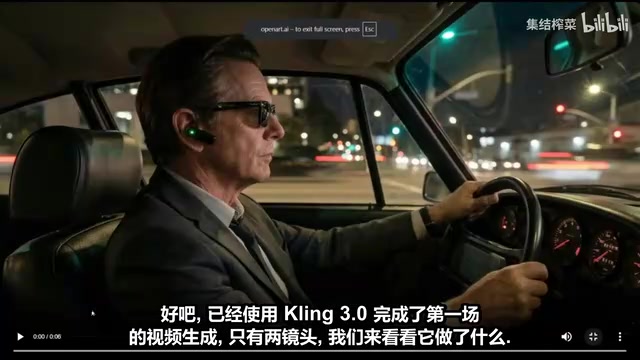
Scene-by-Scene Generation and Quality Checking
The entire short film is generated in batches by scene, with each scene containing 2-3 shots. After generation, each needs to be checked individually:
- Prompt accuracy: Does the visual content match the description?
- Distortion detection: Are there deformations in the character's face or limbs?
- Shot coherence: Do multiple shots within the same scene connect naturally?
Quality checking for AI-generated video differs significantly from traditional video production. Traditional video issues are typically at the exposure, focus, or composition level, while typical AI video defects include: faces suddenly deforming during movement (commonly called "face melting"), abnormal finger counts, limb clipping (e.g., arms passing through the body), objects suddenly disappearing or deforming between frames, and physically unrealistic motion (e.g., hair and clothing movement violating gravity). These issues stem from insufficient consistency constraints in the temporal dimension of diffusion models. While KLING 3.0 has made significant improvements in these areas, creators still need to check key segments frame by frame, especially facial close-ups and complex action scenes. When problems are found, the typical approach is to adjust prompts and regenerate, or select segments with fewer issues for editing and splicing.
From practical results, KLING 3.0 performs excellently in the naturalness of character movements and the realism of scene details. Particularly in complex environments like warehouses, the lighting effects and material textures reach a remarkably high standard.
Assembly and Final Output
Once all scene video clips are generated, download them one by one and assemble them in narrative order. The final result is a complete AI short film with multiple scenes, multiple shots, and synchronized sound effects.
The core advantages of this entire workflow are:
- Zero tool-switching: Everything from character design to video output is completed on one platform
- Reusable assets: Character profiles are created once and used throughout the film
- Drag-and-drop operation: Calling up references and character images is extremely convenient
- Batch production: Multi-shot mode supports generating multiple consecutive shots at once
Conclusion: Workflow Proficiency Matters More Than Model Capability
KLING 3.0's video generation quality has reached an impressive level, but what truly determines AI short film production efficiency is the workflow built around the model. The value of a unified platform isn't that it's more powerful than individual tools—it's that it eliminates the switching cost between tools, allowing creators to focus their energy on creativity itself.
For creators looking to try AI short film production, I recommend starting with a simple 2-3 scene story, first running through the complete process from character creation to video generation, then gradually increasing complexity. Workflow proficiency often determines the quality of the final work more than the model's capabilities themselves.
Key Takeaways
- KLING 3.0 supports multi-shot mode and synchronized audio generation, directly outputting 1080p video
- The unified workspace platform (Open Art Suite) integrates image, video, character, and audio tools, eliminating tool-switching costs
- Character consistency management is critical for AI short films; character profile systems enable uniform character appearance throughout the film
- Storyboard images are generated using the Nano Banana Pro model, supporting multi-reference input and drag-and-drop operation
- The complete workflow includes four stages: character creation → storyboard generation → KLING 3.0 video generation → assembly into final cut
Related articles
 Tutorials
ChatGPT Plus Subscription Guide: Are GPT-5.5, image-2, and Codex Worth the Upgrade?
A detailed look at ChatGPT Plus features — GPT-5.5, image-2, and Codex — with a Plus vs Pro comparison and a complete step-by-step subscription guide for users outside the US.
 Tutorials
Harness AI Engineering in Practice: Using Claude Code to Master Enterprise-Level E-Commerce Development
Deep dive into Harness AI Engineering: master enterprise e-commerce development with Claude Code using the Rules, Skills, Wiki, and Changes framework.
 Tutorials
Cursor + Codex Dual-IDE Collaboration: A Practical Methodology for Open-Source Project Customization
A complete methodology for open-source project customization based on real-world experience, detailing the Cursor+Codex dual-IDE workflow, seven-stage process, MVP validation, and AI source code reading techniques.