Beware of Third-Party ChatGPT Payment Traps: A Risk Breakdown of Three Methods

Why third-party ChatGPT top-up sites are riskier than they claim, and what your real options are.
This article examines the three most common ways to pay for a ChatGPT membership: third-party top-up sites, official foreign credit card payments, and mobile in-app purchases. It reveals that top-up sites' "no password required" pitch is misleading — users are actually handing over their session token, which grants full account access. Official credit card payment is the only compliant route, and mobile in-app purchases, while official, require GMS support and a residential IP that most users can't easily obtain.
Recently, a wave of tutorials has appeared across social platforms claiming you can "activate ChatGPT Plus/Pro in two minutes without a foreign card." These posts typically direct users to third-party top-up websites to purchase memberships. Based on a representative Bilibili tutorial, this article objectively reviews the three most common ways users pay for ChatGPT memberships and highlights the hidden account security and financial risks involved.
Disclaimer: This article is for informational and risk-awareness purposes only. We do not recommend or endorse any third-party top-up service. Using unofficial channels to pay for subscriptions may violate OpenAI's Terms of Service, result in account bans, and cause financial loss. Please exercise your own judgment.
How the Three Payment Methods Work
The three approaches mentioned in the source material represent the most common ways users currently access paid ChatGPT memberships.
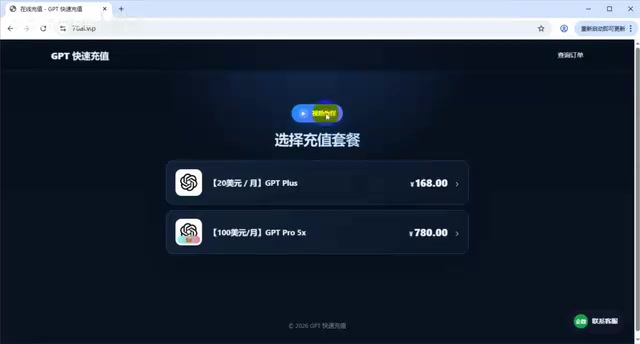
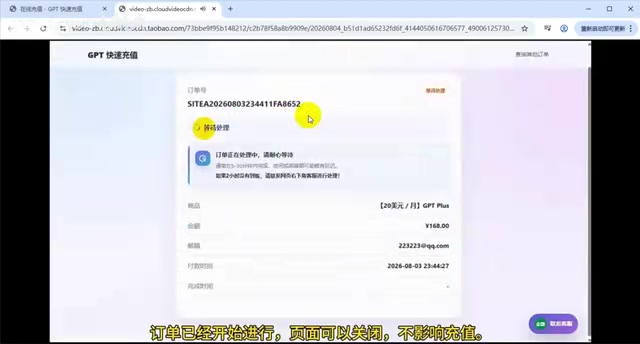
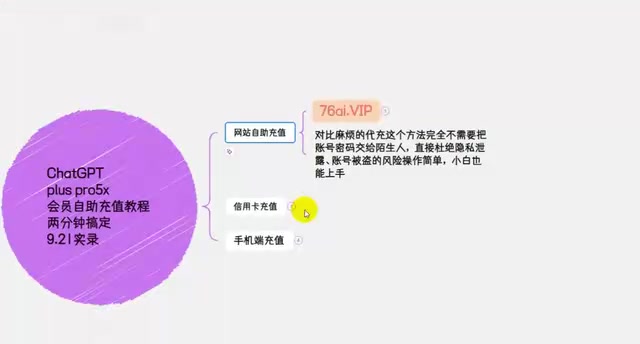
The first is third-party top-up websites. Users select a plan on the platform, enter their email address as an order reference, then follow instructions to copy their logged-in ChatGPT account's authorization data (described in the video as "copying all the code from start to finish") and paste it into the website, before completing payment via Alipay or another domestic payment method. The marketing pitch emphasizes "no need to hand over your account password" and "beginner-friendly."
The second is direct payment via a foreign credit card through official channels. If you have a foreign credit card, you simply enter your card details on the official OpenAI page and the payment clears in seconds.
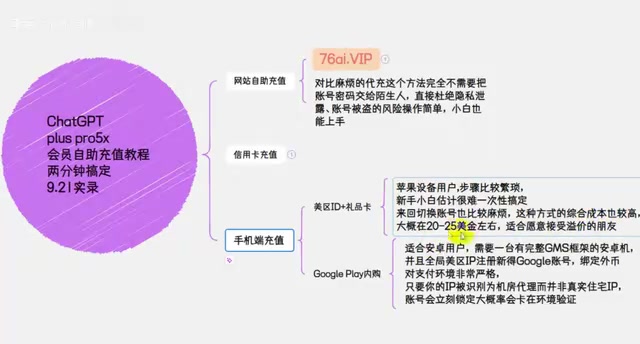
The third is in-app purchases on mobile. Apple users switch their App Store region and top up with a gift card from the corresponding region. Android users need a device with a full GMS framework, an end-to-end foreign IP, and a newly registered Google account linked to a foreign currency payment method.
Is a Top-Up Site Really "Safe" If You Don't Give Your Password?
The source material repeatedly stresses that third-party top-up services don't require you to hand your account password to a stranger, positioning this as their core selling point. This claim is significantly misleading.
When you "copy all the code and paste it in," you are actually handing over your account's login session credential (session token or authorization token). In terms of account security, a session token is just as sensitive as a password — whoever holds it can access your account directly as you during its validity period, reading your conversation history, changing settings, and even initiating payment actions. In other words, "not giving your password" does not mean "your account is safe." In fact, it may cause users to lower their guard precisely because they don't understand the technical details.
Furthermore, these sites ask users to pay through Alipay in a domestic environment to activate a foreign subscription service. The underlying mechanism typically involves shared accounts, bulk top-ups, or exploiting payment loopholes — all of which can trigger OpenAI's risk controls, leading to account restrictions or outright bans.
The Technical Basics of Session Tokens
A Session Token is a temporary identity credential issued by the server after a user successfully logs in with their username and password. It is typically stored in the browser as a Cookie or HTTP Header. From that point on, every interaction between the user and the server uses this token to verify that "the current actor has been authenticated" — the server does not check the password again. This means that as long as the token is valid, anyone who holds it can perform nearly every action as the account owner — including viewing conversation history, calling the API, and modifying payment methods — without ever knowing the original password. OpenAI's login tokens can remain valid for several days or longer. Within that window, if a third party has saved the token, they can repeatedly access the account. Even if the user later changes their password, they must actively log out all sessions on every device to invalidate old tokens. Handing a Session Token to an untrusted third party therefore carries essentially the same security risk as giving away your password directly.
The Real Cost of Paying Officially via a Foreign Credit Card
The source material's description of the second method is relatively straightforward: paying with a foreign credit card is the only official, compliant path, and the payment process is simple and fast.
However, there is a genuine barrier to entry. Obtaining a foreign credit card — virtual or physical — requires meeting certain conditions, and transactions are prone to regional fraud controls that can result in failed or declined payments. The source material notes that virtual cards also carry hidden costs such as issuance fees and maintenance fees, adding up to roughly an extra hundred yuan or so overall.
Despite the higher cost, this is the lowest-risk method from an account security perspective — both the funds and the authorization remain within OpenAI's official ecosystem, and you never have to hand credentials to a third party. For users who plan to use the service long-term and care about protecting their account, this is the option worth prioritizing.
The Barriers to In-App Purchases on Mobile
The third method targets mobile users and is also an official channel, but it involves a cumbersome setup process.
Apple users need to purchase through a foreign-region App Store using a matching region's gift card, which involves repeatedly switching accounts, with an all-in cost typically in the $20–$25 range. The requirements for Android users are even more demanding: a device with a full GMS framework, a global foreign IP, a newly registered Google account, and a foreign currency payment environment. The source material specifically notes that if your IP is identified as a datacenter IP rather than a genuine residential one, the account will "lock immediately" and you'll almost certainly get stuck at the environment verification step.
These descriptions largely match real-world experience. While in-app purchases are an official channel, the technical bar and trial-and-error costs for ordinary users are high.
Background on GMS and Datacenter IP Detection
GMS (Google Mobile Services) is a suite of core services Google provides for Android devices, including the Google Play Store, Google Play Protect, and various underlying APIs. Due to regulatory restrictions, Android phones sold in mainland China typically do not come pre-installed with GMS, relying instead on manufacturers' own app ecosystems — which means Google Play in-app purchases are not directly available on these devices. Users who want to go the Android in-app purchase route need a device that ships with a full GMS installation (such as an international-model phone or certain tablets), or must manually install the GMS package through additional steps, which is technically complex and carries compatibility risks.
Additionally, services like OpenAI use the ASN (Autonomous System Number) of an IP address alongside geolocation databases to distinguish "residential broadband IPs" from "datacenter/server IPs." Most proxy nodes sold to general consumers originate from commercial datacenters, and their IP ranges are widely flagged. When these trigger a platform's residency authenticity check, accounts may be flagged for additional review or locked outright. Only IPs from genuine residential networks (Residential IPs) can pass these checks with any consistency.
A Balanced View: Weighing Convenience Against Risk
Overall, the source material is fundamentally a piece of marketing content designed to funnel users toward a specific top-up website, and its claims of being "simple, safe, and affordable" warrant serious skepticism.
Users choosing a payment method should be clear on a few things: the "convenience" of top-up websites comes at the cost of surrendering control over your account and bearing the risk of a ban; official direct payment, while slightly more expensive, is the only path that doesn't violate the Terms of Service; and any operation that asks you to copy "authorization code" or a "session" and hand it to a third party should be treated as high-risk.
For users with a genuine, ongoing need for ChatGPT Plus or Pro, the recommended approach is to prioritize obtaining a compliant foreign payment method and going through official channels. If you do decide to use a third-party service, make sure to honestly assess the value of your account first — if it holds important conversation data or is linked to other services, having it compromised or banned to save a few dollars is simply not worth it.
Related articles

Gemini 4 Argon Hands-On: AI Builds Board Games, Constructs Temples, and Trains Robots Autonomously
Gemini 4 Argon hands-on roundup: AI autonomously builds a desk racetrack and temple in Blender, writes a ray tracing engine, trains a humanoid robot to sink 7 shots, plus API pricing and developer access.

The Magic Octagonal Coin: Why Only 9% of People Can Predict Its Flip?
Only 9% of people can correctly predict the Magic Octagon coin flip. This article explains its spatial rotation mechanism, common cognitive pitfalls, and a new hypothesis based on Relevance Theory, exploring the limits of human spatial reasoning.

Sam Altman: AI Is Entering the Era of Scientific Discovery — Math Breakthroughs Will Replicate in Biology and Energy
Sam Altman says AI is entering the era of scientific discovery — math breakthroughs will replicate in biology, materials science, and energy to help develop new drugs and energy sources.