Beyond Vibe Coding: A Practical Guide to Systematic AI Programming Workflows

AI programming demands rigorous workflows — developers must be architects, not bystanders.
AI is reshaping software development, but Vibe Coding — casually letting AI generate code — leads to uncontrollable technical debt. A workflow-driven methodology emphasizes that developers must have solid fundamentals and maintain the architect's role through a Plan → Prompt → Generate → Review → Iterate cycle, rather than letting AI take the wheel. This approach isn't tied to any specific tool or tech stack, offering cross-platform transferability. Its core value lies in cultivating an architect's mindset and the ability to flexibly handle AI's inherent uncertainty.
AI Is Reshaping Software Development, But Methodology Determines Success or Failure
The landscape of software development is rapidly changing because of AI — this is no longer a trend prediction, but a reality unfolding right now. Many major tech companies already require developers to have AI programming experience. Learning to collaborate with AI has shifted from a "nice-to-have" to a "must-have."
However, the vast majority of AI programming tutorials out there teach you how to "Vibe Code" — letting AI generate code at will while you have no idea what's happening in your codebase and aren't truly the architect of your application. This approach may seem efficient, but it accumulates massive technical debt and ultimately leads to projects spiraling out of control.

A senior full-stack development instructor recently proposed a fundamentally different methodology in their latest AI programming course: a workflow-centric approach that keeps the developer firmly in the role of project architect. The core philosophy and practical path of this methodology is worth every developer's attention.
Prerequisites: AI Can't Replace Foundational Skills
Before embracing AI programming, there's a harsh but unavoidable truth: If you lack the fundamentals of software development, AI programming tools won't save you — they'll actually hurt you.
Specifically, you need to master at least the following foundational skills:
- Basic programming language syntax: You must be proficient in the core syntax of whatever language or framework you're using
- Software design patterns: A grasp of fundamental design patterns and architectural thinking is essential
- Git version control: Code version management is the cornerstone of collaborative development
- End-to-end development process understanding: A comprehensive understanding of the full pipeline from requirements analysis to deployment
This point is critical. Many beginners mistakenly believe that AI lets them skip the learning phase and jump straight into building projects. The result is usually this: you don't know what the code is doing, you can't judge whether AI-generated code is correct, and you can't debug when things go wrong. AI programming without foundational knowledge is essentially stacking up code you can't understand, and technical debt snowballs out of control.
Core Methodology: Workflow-Driven, Not Syntax-Driven
From "Writing Code by Hand" to "Managing AI Workflows"
The biggest paradigm shift in this methodology is: you write almost no code by hand, but it's absolutely not Vibe Coding. The focus is entirely on workflow — how to communicate effectively with AI tools, how to iteratively refine output, how to identify and fix errors, and how to build complete projects faster.
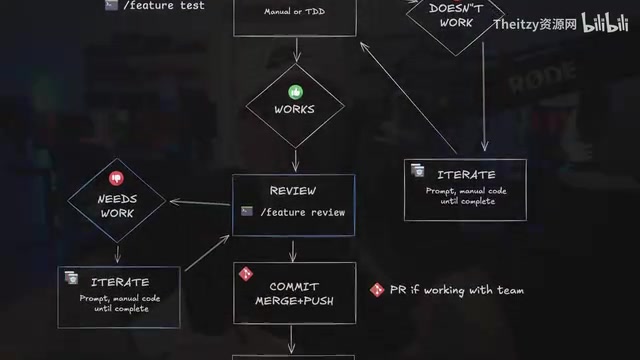
The complete AI programming workflow consists of five key stages:
- Context Management: Providing the AI with precise project context — this is the foundation for high-quality code output
- Custom Commands: Creating reusable instruction templates to standardize your interactions with AI
- Sub-agent Coordination: Breaking complex tasks into subtasks and leveraging multiple AI agents to work collaboratively
- Run & Test: Running and testing after every AI code generation to confirm correct functionality
- Code Review: Reviewing AI-generated code segment by segment to ensure you understand every line of logic and approve its quality
Planning First: From Project Planning to Product Launch
The workflow doesn't start by opening an editor and asking AI to write code. It starts with thorough upfront planning. This includes:
- Defining project requirements and feature boundaries to prevent scope creep
- Making technology choices and architectural decisions to establish technical direction
- Preparing detailed documentation and context materials to give AI sufficient information
- Designing a prompting strategy to improve AI output quality

This "Plan → Prompt → Generate → Review → Iterate" cycle ensures the developer remains the project architect while AI serves as the efficient executor. You decide what to build and how to build it; AI helps you get there faster.
Tool Selection: Flexible Adaptation, No Platform Lock-in
Primary Tools and Alternatives
While the course primarily uses Claude Code as its demonstration tool, it emphasizes an important principle: all workflows can be replicated in any Agentic AI tool. Whether you're using Cursor, Codex, Gemini CLI, or Windsurf, the core workflow steps are universal.

The course also provides a detailed comparison document showing the feature mappings between Claude Code and other mainstream AI programming tools (Cursor, Codex, Gemini CLI, Windsurf), helping developers using different tools quickly find equivalent operations.
Pragmatic Advice on Costs
Regarding AI programming tool expenses, here are several highly pragmatic recommendations worth noting:
- The lowest paid tier is sufficient for most development needs — you don't need the $100-$200/month Max plan
- Gemini CLI offers very generous free quotas and is an excellent choice when on a budget
- Free versions of AI tools typically come with significant limitations and deliver a poor development experience
- In the current tech landscape, a modest investment in tools is a necessary cost for boosting productivity
In short, you don't need to chase the most expensive tools, but a completely free setup will genuinely hold you back at critical moments. Choosing the first paid tier, or fully leveraging Gemini CLI's free quota, is the most cost-effective way to get started.
Why This AI Programming Methodology Deserves Your Attention
Cross-Platform Transferability
This workflow isn't tied to any specific tech stack. While the demo project uses Next.js and React, the methodology itself applies to any type of project — not even limited to web development. This means what you're learning is a universal AI collaboration skill, not just usage tips for a particular tool.
Handling AI Output Uncertainty
AI is inherently unpredictable — you can't precisely plan what results AI will generate. Therefore, rather than memorizing specific prompt templates, it's far more important to learn how to flexibly handle various situations — including incorrect code output, misunderstandings, and logical flaws. This is precisely the capability most needed in real-world work.
Cultivating an Architect's Mindset
The most fundamental value lies in emphasizing the developer's role as architect. AI is a powerful tool, but it's not your replacement. You need to understand code logic, review every piece of output, and make critical technical decisions. This architect's mindset is the key to developers maintaining their core competitiveness in the AI era.
Conclusion: From Using AI to Mastering AI
As AI programming tools grow increasingly powerful, there's an enormous gap between "being able to use AI to write code" and "being able to efficiently build projects with AI." The former might take just a few minutes to learn; the latter requires a systematic workflow, solid foundational knowledge, and architect-level thinking.
Leave Vibe Coding behind. Establish a rigorous AI programming workflow. Keep yourself in the architect's seat rather than being a bystander to AI — this is the core skill developers truly need to master in this era.
Related articles
 Tutorials
ChatGPT Plus Subscription Guide: Are GPT-5.5, image-2, and Codex Worth the Upgrade?
A detailed look at ChatGPT Plus features — GPT-5.5, image-2, and Codex — with a Plus vs Pro comparison and a complete step-by-step subscription guide for users outside the US.
 Tutorials
Harness AI Engineering in Practice: Using Claude Code to Master Enterprise-Level E-Commerce Development
Deep dive into Harness AI Engineering: master enterprise e-commerce development with Claude Code using the Rules, Skills, Wiki, and Changes framework.
 Tutorials
Cursor + Codex Dual-IDE Collaboration: A Practical Methodology for Open-Source Project Customization
A complete methodology for open-source project customization based on real-world experience, detailing the Cursor+Codex dual-IDE workflow, seven-stage process, MVP validation, and AI source code reading techniques.