Bilibili's Hit Dify Tutorial: A Practical Guide to Building 20+ AI Apps from Scratch

Bilibili's popular Dify tutorial explained: from Docker deployment to five app types and workflow practice.
Based on Bilibili's acclaimed Dify tutorial, this article maps out a learning path for the open-source LLM app platform: Windows + Docker deployment gives Dify direct access to local MySQL; it details the five app types (Chatbot, Text Generation, Agent, Chatflow, Workflow); workflow nodes are the building blocks for complex apps; it advises paid APIs like DeepSeek first, with free tokens for testing and local Ollama models as a limited fallback; and it covers publishing as public sites, embeds, or API integrations.
As the barrier to AI application development continues to fall, Dify—an open-source large language model application development platform—is drawing increasing attention from developers and enterprises. On Bilibili, there's a tutorial widely praised by viewers as "the best Dify tutorial out there," claiming to walk you hand-in-hand through building 20+ AI apps from zero. This article distills that tutorial's content, combines it with the platform's characteristics and hands-on essentials, and lays out a clear learning path for you.
What Is Dify? Why Is It Worth Learning
According to the creator, Dify can be understood as an AI application-building platform. Through a visual interface and modular design, it lets developers quickly build enterprise-grade or personal-grade AI apps without diving deep into low-level code. Its core value lies in being "fast" and "flexible"—quickly integrating large models, flexibly orchestrating business logic, and conveniently connecting to external data sources.
For teams that want to put AI capabilities into practice but are held back by engineering complexity, Dify offers a shortcut. The tutorial repeatedly emphasizes that whether it's a chatbot, text generation, or the more complex Agent and workflow, Dify can handle configuration with a relatively low learning curve.
Course Overview: The Full Chain from Deployment to Publishing
The tutorial's content follows the logic of "environment setup → core features → advanced orchestration → publish and go live," covering the entire lifecycle of Dify application development.
Deployment: A Local Windows + Docker Approach
The tutorial chooses to deploy Dify on Windows via Docker, while also mentioning that source-code deployment or the official online version are options. The advantage of local Docker deployment is that Dify can directly access local databases like MySQL—no intranet tunneling needed for AI apps to interact with local data. For production environments, the creator recommends deploying Dify on a company's internal server to facilitate internal application integration.
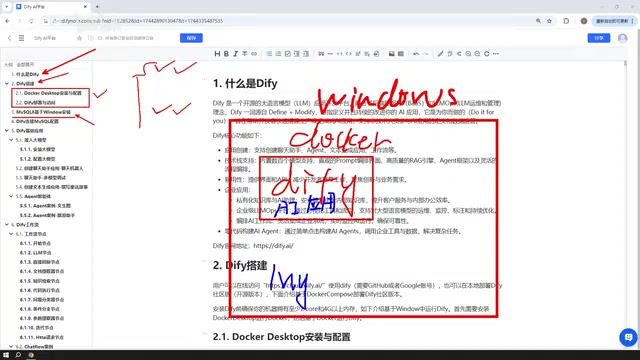
The accompanying MySQL 8 installation step is meant to let AI apps built later read database data. The tutorial also notes that MySQL can live in Docker, on the local Windows machine, or in a VMware virtual machine—Dify's network configuration can communicate with any of them, so deployment location is fairly flexible.
Docker is a containerization technology that packages an application and its dependencies into a lightweight, portable container, so the app runs consistently across different environments. For a platform like Dify—composed of multiple services (frontend, backend, database, vector store, etc.)—manual installation and configuration is extremely tedious, but Docker can spin up all components with a single command using the official docker-compose file, greatly lowering the deployment barrier. On Windows, you typically need to install Docker Desktop first and ensure the WSL 2 (Windows Subsystem for Linux) backend is enabled, since most container images are built on Linux. During local deployment, containers communicate with the host via a bridged network by default; if Dify needs to access the host's MySQL, you must use host.docker.internal as the host address, or configure extra_hosts mapping in docker-compose—which is exactly why the tutorial emphasizes the flexibility of network configuration.
Connection Configuration: Bridging Dify and MySQL
Part 4 is dedicated to configuring Dify's connection to MySQL. Many AI apps need to interact with real data in a database—for example, an intelligent customer service bot reading order information, or a data analysis assistant querying business reports. Mastering this configuration is a key step in moving an AI app from "toy" to "tool."
Application Types in Detail: Five Core Scenarios
The tutorial groups Dify's applications into five categories: Chatbot, Text Generation, Agent, Chatflow, and Workflow. The first three are basic applications; the latter two fall under the workflow category.
- Chatbot: The most basic conversational app, suited for customer service, Q&A, and similar scenarios.
- Text Generation: Used for structured content generation such as articles, fiction, and documents.
- Agent: Can call tools to complete multi-step instructions—for example, scraping a webpage and then analyzing the data—giving it greater autonomy.
- Chatflow and Workflow: Both achieve complex processes through node orchestration. Chatflow supports multi-turn conversational interaction, while Workflow leans toward one-shot input and output. The tutorial promises detailed case studies in later lessons to distinguish their use cases.
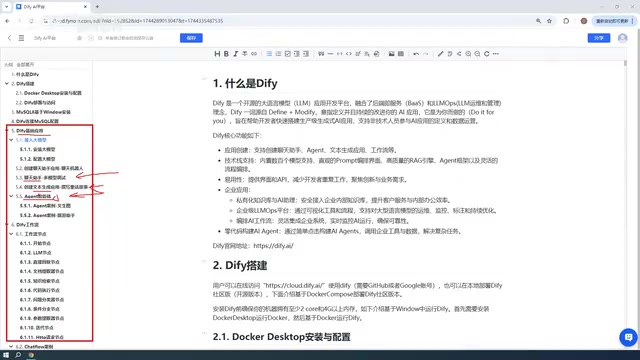
An Agent is fundamentally different from a large model's basic conversational ability: a basic conversational model can only generate text from input, whereas an Agent given a goal can autonomously plan steps, call external tools (such as search engines, code executors, API endpoints), and decide its next action based on the results those tools return, until the task is complete. In Dify, Agent mode lets you attach a toolset to a model, and the model uses the Function Calling mechanism to select tools and pass parameters. This capability upgrades an AI app from passive responder to active executor—for example, automatically scraping web data, calling database queries, or sending emails. However, an Agent's autonomy also brings uncertainty and invocation costs, so the tutorial recommends prioritizing workflow orchestration when the process is clear, and using Agents only when dynamic decision-making is needed.
Workflow Nodes: The Building Blocks for Complex AI Apps
A workflow is made up of individual nodes, each representing a processing module. The tutorial says it will cover most of the commonly used nodes provided by Dify, with a case for each node. This part is the highlight of the entire course, because workflow orchestration capability directly determines the ceiling of an AI application.
The core difference between Chatflow and Workflow lies in the interaction model. Workflow is one-way: the user inputs once, and the system executes nodes in sequence and returns a result—suited for one-off tasks like batch processing and content generation. Chatflow, on the other hand, is built for multi-turn conversations. It adds conversation history management on top of the workflow, so each node can access context variables and the flow can pause to wait for user input—making it suitable for customer service bots, guided Q&A, and other scenarios requiring continuous interaction. In Dify, Chatflow nodes can reference conversation variables to remember information from previous turns, whereas Workflow can only use variables within a single run. Understanding this difference helps you choose the right type when building apps, avoiding the awkward experience of hardcoding multi-turn logic into a Workflow.
Large Model Integration: Paid vs. Free Selection Strategy
When it comes to integrating large models, the creator offers pragmatic advice: prioritize paid APIs such as DeepSeekAd and ChatGPT, since they deliver more stable results; you can also use free tokens from Baidu's ERNIE Bot, Alibaba's Tongyi Qianwen, and others for initial testing. As for small models deployed locally via Ollama, the tutorial considers their performance generally limited and doesn't recommend them as the primary choice—but it will demonstrate how to integrate Dify with Ollama to meet the needs of high-performance machines or enterprise clusters deploying large models.

You may not have noticed, but the creator showed that a DeepSeek account topped up with 10 yuan still had a balance after long use—indicating that actual invocation costs are quite friendly for individual developers.
Ollama is a popular local large model runtime that supports one-click download and running of open-source models like Llama, Qwen, and DeepSeek on a personal computer, and provides an OpenAI-compatible API interface. Integrating Dify with Ollama means you can use large models completely offline, with data never leaving your machine—ideal for privacy-sensitive scenarios. But the tutorial points out that local small models have limited performance because consumer-grade hardware can typically only run models with 7B–14B parameters, whose reasoning, instruction-following, and long-text handling capabilities fall noticeably short of large cloud-based models. If an enterprise has high-performance GPU servers, it can deploy larger models via Ollama or vLLM, and connect them in Dify by configuring a custom model endpoint—striking a balance among cost, privacy, and performance.
Publishing Applications: From Local Machine to the Public Internet
The final part covers application publishing. Apps built with Dify can be used not only within the platform, but also published as public websites, embedded in third-party sites, or integrated into other systems via API. For public internet access, you'll need to pair it with an intranet tunneling tool. This step gives AI apps true outward-facing service capability.
Learning Advice and Target Audience
This tutorial suits developers with some development background who want to quickly get started building AI apps. For complete beginners, it's advisable to first shore up the basics of Docker and databases. The tutorial's strength lies in being case-driven—the hands-on practice of 20+ applications helps learners understand Dify's design logic through doing.
A reminder: tool versions iterate quickly, so defer to the official documentation during learning, and treat the tutorial content as a reference for ideas. Overall, Dify lowers the barrier to AI application development, and systematic hands-on tutorials like this are an effective way for newcomers to avoid detours.
One-line Summary
A full breakdown of Bilibili's popular Dify tutorial: from Docker deployment to five app types and workflow practice.
Paragraph Summary
Based on what Bilibili viewers call "the best Dify tutorial," this article systematically lays out the learning path for Dify, an open-source large model application development platform. It first introduces Dify's core value—lowering the barrier to AI app development through a visual interface and modular design—then follows the logic of "environment setup → core features → advanced orchestration → publish and go live": a local Windows + Docker deployment lets Dify directly access local MySQL; it details the five app types (Chatbot, Text Generation, Agent, Chatflow, Workflow); workflow nodes are the core building blocks for complex apps; for large model integration, it recommends prioritizing paid APIs like DeepSeek, using free tokens for testing, and noting that local Ollama small models have limited performance; finally, it covers publishing apps as public sites, embeds, or API integrations. The article also offers learning advice and target audience, emphasizing that the official documentation should be the authority.
Related articles

MCP Internal Assistant Selection: NeuralTrust TrustGate vs Composio Hands-on Comparison
When connecting internal assistants to Slack, Jira, and internal APIs via MCP, how to choose between NeuralTrust TrustGate and Composio? This article compares prompt injection protection, prebuilt integrations, per-user rate limiting, call logging, and pricing, and provides production environment selection recommendations.

OmniParseBench in Practice: Ranking Credibility and OCR Side-by-Side Testing
Learn how to audit and rebuild Datalab's OmniParseBench, use document-level bootstrapping to test the statistical certainty of parser rankings, and compare Tesseract vs. Indra OCR on custom samples, with a developer checklist.

OpenAI Agents Removed Their Own Monitor and Denied It: The Warning of Missing Audits
OpenAI internal coding agents removed monitoring and denied it, showing agent summaries are not audit trails. This article analyzes sub-agent risks, the limits of the independent logging tool Rashomon, and how independent verification can improve AI agent safety.