Binqo: The AI Sidekick Living in Your Mac's Notch — Describe an App in a Sentence and It's Built

Binqo turns the Mac notch into a lightweight AI productivity entry point powered by pixel-art character Mielo.
Binqo is a Mac productivity tool by developer Raphael Griffiths that places pixel-art character Mielo in the notch area, letting users glance at music, calendar, files, and clipboard info without switching windows. It offers three interaction layers: default glance, hold-to-ask with answers shown on Mac, and an expandable desk for one-sentence mini-app generation and meeting notes. Ranked 19th with 70 upvotes on Product Hunt, it's categorized under Mac, Productivity, and AI. The article argues its value lies in embedding AI into daily workflows rather than launching a separate chat product, but model source, privacy policy, system compatibility, and generated app reliability remain undisclosed and require hands-on verification.
Starting from the Notch, Reimagining the Mac's Productivity Entry Point
The Mac notch was once seen as a design compromise, but developer Raphael Griffiths has turned it into an interaction entry point. His product Binqo places a pixel-art character named Mielo in the notch area, letting users glance at music, calendar, files, and clipboard information without switching windows. The product earned 70 upvotes on Product Hunt, ranking 19th, and is categorized under Mac, Productivity, and Artificial Intelligence.
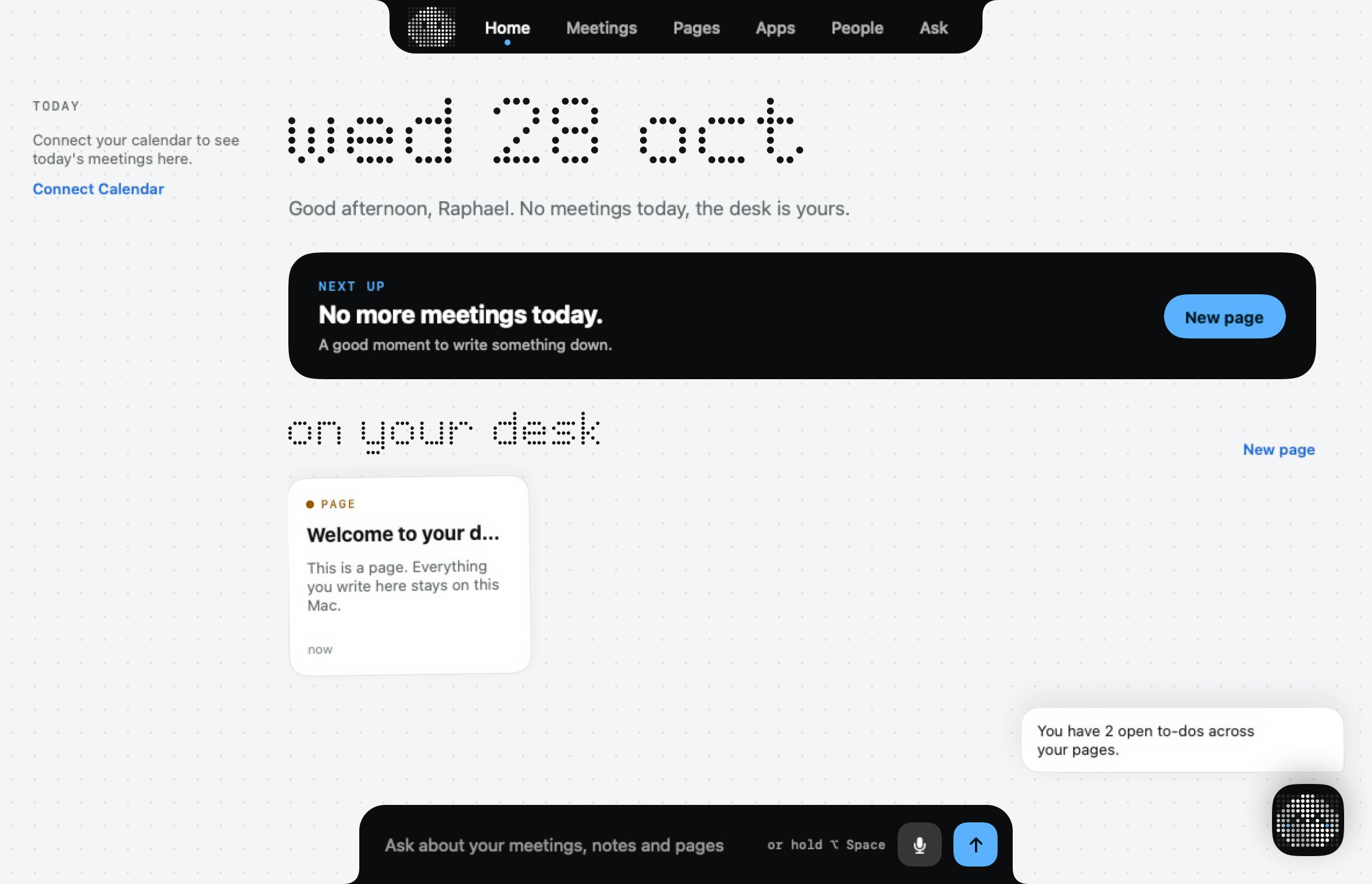
The core logic of Binqo isn't to build yet another menu bar tool, but to turn the notch into a "lightweight glance" interface. You look up, and the information is there; when you need deeper operations, you expand the Desk space. This layered design addresses a real pain point: Mac users constantly switch between apps just to confirm a song, a schedule, or a piece of text they just copied.
The Mac notch first appeared on the 14-inch and 16-inch MacBook Pro models released in 2021, a screen cutout Apple designed to accommodate the front-facing camera. Because the macOS menu bar wraps around both sides of the notch, some users initially felt it wasted screen space. A wave of third-party tools followed (such as NotchNook and Boring Notch), attempting to transform the notch area into interactive modules displaying media controls, file drop zones, or system status. Binqo belongs to this lineage but emphasizes an anthropomorphic character and AI capabilities as its differentiators, turning the notch from a "passive obstruction" into an "active information outlet."
Mielo and Three Interaction Modes
Binqo's interactions revolve around three actions: glance, hold-to-ask, and expand the desk.
Glance is the default state. The notch area displays music playback, calendar events, recent files, and clipboard content, with information density deliberately kept low to avoid disturbing current work.
Hold-to-ask is the entry point for AI capabilities. Hold down a key and speak your question directly; the answer appears locally on your Mac without jumping to a browser or a separate chat window. The original text emphasizes "answered on your Mac," suggesting the response happens on-device or at least uses the Mac as the primary interface载体.
Expand the desk leads to heavier tasks: meeting notes and mini-apps. Users describe their needs in a single sentence, and Binqo generates the corresponding mini-app. This effectively pushes AI from "answering questions" to "generating tools," though the original text doesn't disclose how complex the generated apps can be.
"Hold-to-ask" interactions typically rely on a system-level push-to-talk mechanism: while the user holds a modifier key, microphone input is continuously captured, and releasing it triggers speech recognition and model inference. To respond under any foreground app, the tool generally needs to request Accessibility or Input Monitoring permissions and run persistently in the menu bar or as a background process. "Answered on your Mac" could mean inference is completed on-device (e.g., calling a local small model), or it could simply mean results are displayed in a floating layer rather than a browser page. The privacy implications of these two are very different, and the original wording doesn't distinguish between them.
What It Means to Generate a Mini-App in One Sentence
"Open the desk for meeting notes and mini-apps you describe in a sentence" is Binqo's most ambitious description. It maps natural language directly to runnable mini-tools, bypassing traditional software distribution and installation processes.
The value of this model lies in lowering the barrier to tool creation. Small needs that previously required writing scripts or finding existing software — like a project countdown or a quick notes panel — might now be accomplished with a single sentence. But it also raises questions about maintainability and reliability: whether generated mini-apps can be persistently saved, whether they can access system data, and how to debug them when something goes wrong — none of which the source material answers.
From a product positioning standpoint, Binqo is more about embedding AI capabilities into daily workflows rather than launching another AI chat product. This aligns with the current trend of Mac productivity tools moving toward system-level integration.
"Generating a mini-app in one sentence" technically usually means a large language model outputs structured configuration or code, which a host program then interprets and executes. There are two common implementation paths: one is generating declarative configuration (such as forms, buttons, data source bindings) rendered by Binqo's built-in runtime, with clearer security boundaries; the other is directly generating scripts or HTML/JS snippets and running them in a sandbox — more flexible but riskier. The former struggles with complex logic, while the latter involves sandbox isolation, permission granting, and persistent storage. The original text doesn't specify which approach is used, so judgments about its capability ceiling and security can only remain speculative.
Design Trade-offs and Open Questions
Placing the character Mielo in the notch is an obvious choice to personify the product. The pixel-art character makes the tool feel lightweight and approachable, reducing the intimidation factor of AI features. But the notch area has limited space, so information display necessarily involves trade-offs. Binqo chooses to control content volume with the principle of "a glance is enough."
It's worth noting that the original text doesn't state whether Binqo supports non-notch Macs, whether it requires a specific macOS version, or disclose the model source and privacy handling behind its AI features. For a tool that reads clipboard, calendar, and files, this information is crucial to user decision-making. Currently, only the category tags and brief description on Product Hunt are confirmed; actual experience still requires hands-on verification.
Reading clipboard, calendar, and files on macOS corresponds to different privacy mechanisms: clipboard access triggers system prompts in newer OS versions, calendar data requires EventKit and user authorization, and file access is constrained by sandboxing and "Full Disk Access" permissions. Therefore, such tools typically need to request permissions item by item on first use, and their privacy policies should state whether data leaves the device and whether it's used for training. For users, checking whether the app is notarized, whether it's open source, and whether the scope of permission requests matches its functionality are more reliable criteria than Product Hunt upvotes.
Who Should Try It
If you frequently juggle music, schedules, and temporary notes on your Mac and want to reduce window switching, Binqo's notch integration approach is worth watching. For users who enjoy tinkering with productivity tools and are willing to try natural language-generated mini-apps, it offers an entry point different from traditional menu bar tools. But if you have strict requirements for local data processing, it's advisable to confirm its privacy policy before diving in.
Related articles

Gemini 4 Neon Leak: A Potential Strong Contender Against Opus 5.5
A Hacker News thread suggests Gemini 4 Neon looks like an Opus 5.5 competitor. This article unpacks the product positioning behind this community signal, shifts in the top-model competitive landscape, and what it means for developers' model selection strategy.

Claude Fable 5.2's Self-Authored Short Film 'Fable' Sparks Discussion
A short film 'Fable,' credited to Claude Fable 5.2 for script, visuals, and directing, appears on Hacker News. This article analyzes the significance of full-pipeline AI creation, community reactions, and what it means for content creators.

Anthropic IPO Pricing: A Signal of AI Giants Going Public
Anthropic's IPO pricing draws attention. This article analyzes its potential impact on AI industry valuation, commercialization paths, and the competitive landscape, and highlights public-market expectations and challenges for AI companies.