Build a Job-Hunting Portfolio Website in 5 Minutes with Lovable: From Zero to Landing a Google Interview

Build a job-hunting portfolio website in 5 minutes with AI tool Lovable and land a Google interview
This article details how a senior CS student at UVA used the AI website builder Lovable to create a job-hunting portfolio website from scratch in five minutes and secured a Google interview invitation. It covers the importance of personal websites in North American tech job hunting, and walks through the complete four-step process: preparing materials, generating high-quality Prompts with GPT using the Role-Context-Task structure, building the website in Lovable, and one-click publishing — highlighting Lovable's zero-code and one-click deployment advantages.
During job hunting season, a polished personal website might be the key factor that sets you apart from the crowd. This article shares how an international student used Lovable, an AI-powered website builder, to create a job-hunting portfolio website from scratch in just five minutes — and ultimately landed a Google interview invitation.
Why Do You Need a Personal Website for Job Hunting?
In the overseas tech industry, resumes are often limited to a single page of information. A personal website allows you to present your project experience, tech stack, and personal brand in a more comprehensive way — you can even embed GitHub links and project demos directly. For recruiters, a well-crafted portfolio website signals that a candidate has solid technical execution ability and self-presentation awareness — a clear advantage when screening for roles like SDE or AI Engineer.
It's worth noting that SDE (Software Development Engineer) is the most mainstream engineering title system in North American tech companies, widely used in the hiring processes at Amazon, Microsoft, Google, and others. AI Engineer is an emerging role that has risen over the past two years with the explosion of large model applications, focusing on integrating AI capabilities like LLMs (Large Language Models), vector databases, and RAG (Retrieval-Augmented Generation) into real products. Unlike traditional ML Engineers who focus on model training, AI Engineers are more concerned with AI Workflow orchestration and Agent system design — which is exactly why a personal website showcasing relevant projects is especially persuasive for this type of role.
In the North American tech industry, a personal technical portfolio website has become an unspoken standard for software engineers seeking jobs, especially given the fierce competition for junior positions. LinkedIn data shows that resumes with portfolio links receive approximately 40% more interview callbacks than text-only resumes. For international students on OPT/CPT status, a personal website can effectively compensate for lack of work experience by directly demonstrating engineering capabilities through project showcases.
The video author is a senior CS student at UVA (University of Virginia), targeting SDE and AI Engineer positions, with strong interest in AI Workflow and AI Agent directions. The personal website he built with Lovable includes modules for his profile photo, personal introduction, internship experience, project showcases, tech stack, and contact information — ultimately helping him secure a Google interview invitation.
Why Choose Lovable for Building a Personal Website?
There are many tools available for building personal websites, from developer-oriented tools like Cursor to general platforms like WordPress and Notion. However, the author specifically recommends Lovable for beginners with zero experience, for three core reasons:
- One-click deployment: The entire workflow from writing to publishing is completed within the platform — no need to purchase a domain or configure a server separately
- Zero coding barrier: Driven by natural language Prompts, the platform automatically generates complete front-end code
- Instant gratification: You can see a shareable online website within five minutes, dramatically reducing the frustration of getting started
Lovable belongs to the new generation of "AI-first" full-stack website building platforms. Under the hood, it relies on large language models to convert natural language Prompts into runnable front-end code (typically based on a React + Tailwind CSS tech stack), with an integrated cloud deployment pipeline that creates a complete loop from code generation to publishing. The core difference between these tools and traditional low-code platforms (like Webflow or Bubble) is that traditional low-code relies on drag-and-drop components where users need to understand UI component logic, while AI website builders are entirely conversation-driven — users only need to describe "what they want," and the platform handles "how to implement it."
By comparison, if you use developer tools like Cursor, you still need to select a domain and configure the deployment environment yourself — an additional hurdle for students without a front-end background.
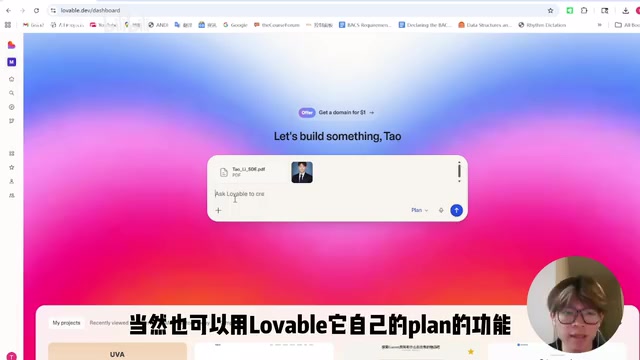
Complete Workflow for Building a Personal Website with Lovable
Step 1: Prepare Your Materials
Before opening Lovable, prepare the following materials:
- Your resume (PDF format is fine)
- A profile photo (for website display and favicon)
- A clear job target (determines the content focus of your website)
Upload your resume and photo directly to the Lovable platform as reference materials for subsequent AI content generation.
Step 2: Use GPT to Generate a High-Quality Prompt
This step is the most critical part of the entire building process. The author emphasizes: Don't just copy someone else's Prompt — learn the thinking framework behind writing Prompts.
Here's the specific Prompt writing framework:
Define the AI's role:
You are an experienced HR professional who knows what makes a resume and personal presentation stand out.
Define yourself:
I am a senior CS student at UVA, looking for SDE and AI Engineer positions, with strong interest in AI Workflow and AI Agents.
Attach your resume content, then clearly state the end goal:
Please generate a Prompt for Lovable to help me build a personal website that displays my profile photo, personal introduction, project experience, tech stack, Email, GitHub, and other information. The primary purpose is job-hunting presentation.
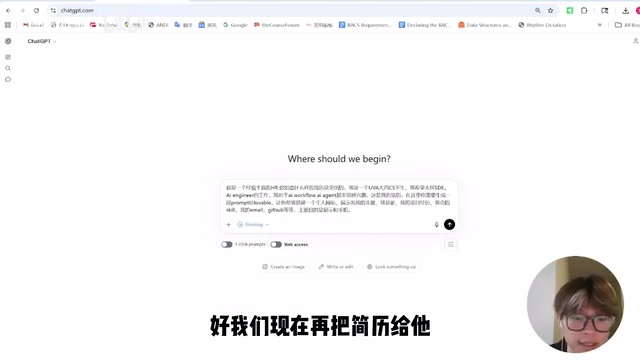
This framework is known in the Prompt Engineering field as the Role-Context-Task structure — a widely validated three-part methodology in the industry. By first assigning GPT the "senior HR" role, the model automatically activates knowledge weights related to recruitment screening, making the generated requirements document more aligned with an HR perspective rather than a purely technical one. This makes the final website's content priorities more targeted for job hunting. This is fundamentally different from simply telling GPT "help me write a website-building Prompt" — the role setting determines the "perspective" of the model's output, and the perspective determines the priority ranking of content.
The author used GPT-4.5 (the latest version mentioned in the video), and the generated Prompt is essentially a requirements document covering the website's content structure, display modules, and style requirements. If you have specific visual preferences (such as a dark theme, minimalist style, etc.), you can also tell GPT directly at this step.
Step 3: Build the Website in Lovable
Copy the GPT-generated Prompt into Lovable. The platform offers two building modes:
- Plan mode: Plans the architecture first before executing — suitable when your Prompt isn't detailed enough
- Build mode: Starts building directly — suitable when your Prompt is already clear enough (saves more Credits)
The author chose Plan mode. Lovable first displays the website's Architecture, Roles, and Component planning. After confirming everything looks correct, click Approve to begin automatic construction.
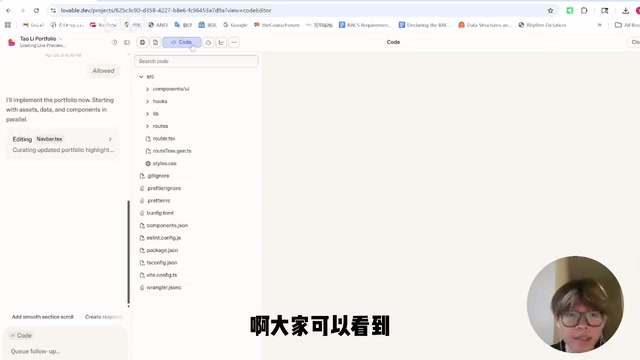
During the building process, you can view the amount of generated code and specific details of each step in real time. The final generated website includes complete personal information display, project lists, tech stack tags, and other modules — core content from the resume is accurately extracted and presented.
Step 4: Publish and Go Live
Once the website is built, the publishing process is equally simple:
- Choose a domain: Lovable provides a free
.lovablesuffix domain with a customizable prefix. If you need a professional domain (likeyourname.com), you can also bind a purchased domain — typically costing just a few dollars per year - Upload a Favicon: You can use your own profile photo as the small icon in the browser tab
- Run a security check: It's recommended to run a Security Check before publishing to ensure there are no security vulnerabilities
- One-click publish: After the Security Check passes, publish directly
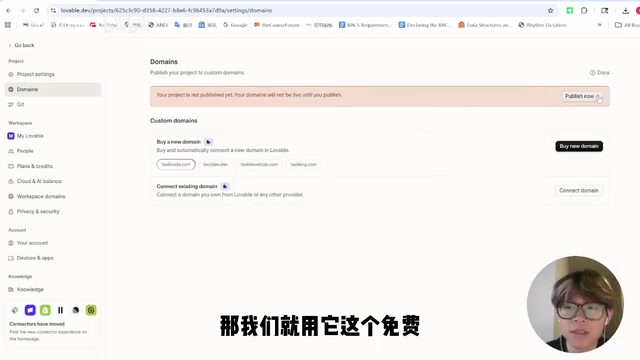
Once published, you have a shareable online personal website link that you can paste into your resume, LinkedIn, email signature, or anywhere else.
Practical Tips and Pitfall-Avoidance Guide for Building with Lovable
On Prompt optimization: If you're not satisfied with the first generation result, you can continue iterating with natural language in Lovable — for example, "change the project showcase to a card-style layout" or "add a dark mode toggle."
Related articles
 Tutorials
ChatGPT Plus Subscription Guide: Are GPT-5.5, image-2, and Codex Worth the Upgrade?
A detailed look at ChatGPT Plus features — GPT-5.5, image-2, and Codex — with a Plus vs Pro comparison and a complete step-by-step subscription guide for users outside the US.
 Tutorials
Harness AI Engineering in Practice: Using Claude Code to Master Enterprise-Level E-Commerce Development
Deep dive into Harness AI Engineering: master enterprise e-commerce development with Claude Code using the Rules, Skills, Wiki, and Changes framework.
 Tutorials
Cursor + Codex Dual-IDE Collaboration: A Practical Methodology for Open-Source Project Customization
A complete methodology for open-source project customization based on real-world experience, detailing the Cursor+Codex dual-IDE workflow, seven-stage process, MVP validation, and AI source code reading techniques.