Build a Local Image Generation MCP Server with One Prompt: Let Codex Batch Generate and Edit Images

Build a local MCP Server to let Codex leverage local GPU for zero-cost batch image generation and editing.
This article introduces an approach to building a local MCP Server that wraps the Flux image generation model into a service callable by Codex. With just one carefully designed Prompt, Codex automatically creates a complete MCP service project, enabling zero-Token-cost batch image generation and conversational iterative editing—particularly suited for e-commerce product photos and project assets, with significant advantages over cloud APIs in cost, privacy, and flexibility.
When Codex Meets Local Image Generation: One Prompt Is All You Need
OpenAI's Codex is one of the most powerful code generation tools available today, but it doesn't inherently have image generation capabilities. Even multimodal models like GPT-4 can't directly generate images within a code editor environment. Yet in real-world project development, the need to batch generate or edit images is everywhere—e-commerce product photos, marketing materials, article illustrations—you name it.
Calling cloud APIs for image generation every time? The costs are steep, and in batch scenarios, it burns through money fast. So is there a way to let Codex directly leverage local GPU compute power to handle batch image generation and editing?
The answer is: Build a local image generation MCP Server. With just one carefully designed Prompt, you can turn Codex into an image generation assistant.
What Is an MCP Server Local Image Generation Service
MCP (Model Context Protocol) is a standard protocol that enables AI models to call external tools and services. It was officially proposed and open-sourced by Anthropic in late 2024, aiming to solve interoperability issues between large language models and external tools and data sources. Before MCP, every AI application needed custom integration code for different tools and APIs, resulting in massive amounts of redundant development work. MCP's design draws inspiration from LSP (Language Server Protocol)—just as LSP unified the communication standard between code editors and programming languages, MCP unifies the calling protocol between AI models and external capabilities. It adopts a client-server architecture, communicates via JSON-RPC 2.0, and supports three core primitives: Tools, Resources, and Prompts.
After building a local MCP Server, we can wrap an image generation model (like Flux) into a service that Codex can call, issuing image generation and editing commands directly from the chat interface.
Core advantages of this approach:
- Zero Token consumption: Image generation runs entirely on local GPU, consuming no API Tokens whatsoever
- Batch processing capability: Generate or edit dozens or even hundreds of images at once
- Iterative editing: Continue the conversation after generation to have Codex perform secondary edits and optimizations
- Seamless project integration: Generated images are saved directly to the project directory, ready to use
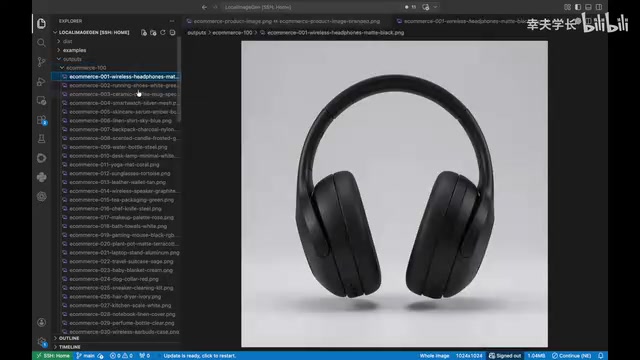
Full Workflow for Building a Local Image Generation MCP Server
Preparing Core Files and Choosing a Model
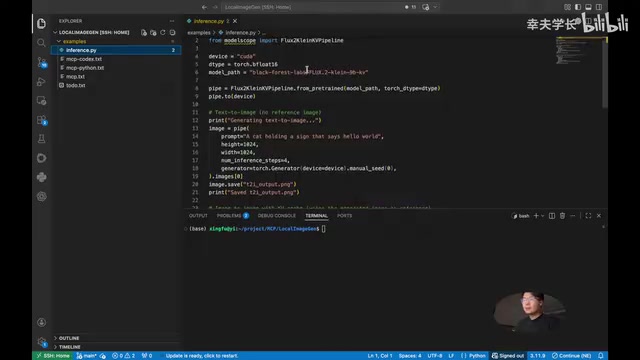
The entire MCP service can be built with just one Prompt. This Prompt contains several key components:
- inference.py: The inference script, using Flux 2's 9B Clean version as the underlying model. Flux is an open-source image generation model series developed by Black Forest Labs, whose core team consists of the original creators of Stable Diffusion. The 9B parameter version of Flux 2 employs a hybrid Transformer-DiT architecture combined with a Flow Matching training paradigm, offering significant improvements in generation quality and inference efficiency compared to traditional diffusion models. The "Clean version" refers to a variant that has undergone additional data cleaning and alignment training, performing more stably when generating commercial-grade images—particularly excelling in text rendering, human proportions, and lighting consistency compared to the base version. It's currently one of the highest-quality open-source image generation models available.
- MCP service context: Provides background knowledge of the MCP protocol so Codex correctly understands and builds the service architecture
- Environment configuration: Specifies which Anaconda environment to use for running the service
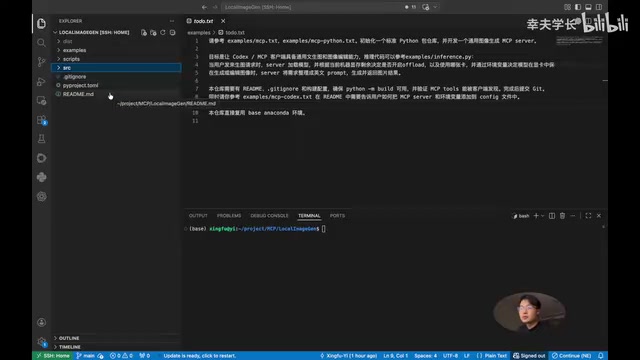
One-Click Project Structure Generation
After inputting the Prompt into Codex, it automatically creates a standard Python project structure:
src/directory: Houses the core codepyproject.toml: Project configuration fileREADME.md: Detailed installation and usage instructions
The entire creation process takes some time to complete. When finished, you'll have a well-structured, thoroughly documented MCP service project.
Configuring the Runtime Environment and Installing Dependencies
There's a key detail in the Prompt that needs to be adjusted for your own environment—the last line specifies which Anaconda environment to use. If your server already has a base environment with PyTorch installed, you can reuse it directly; for other environments, just replace the environment name.
After the project is generated, install two key dependencies:
# Install the diffusers library (if not already in your environment)
pip install diffusers

# Install the MCP service Python package
pip install -e .
Diffusers is an open-source Python library maintained by Hugging Face, specifically designed for loading and running various diffusion models and flow matching models. It provides a unified Pipeline abstraction, so developers don't need to worry about underlying complexities like noise schedulers, VAE decoders, and other components—just a few lines of code are needed to complete model loading and inference. Diffusers supports dozens of mainstream models including Stable Diffusion, SDXL, Flux, Kandinsky, and more, with built-in editing pipelines for img2img (image-to-image), inpainting, ControlNet (conditional control), and others—this is the technical foundation that enables the "iterative editing" capability in this approach.
There's a clever design here: pip install -e . is Python's "editable install" mode. It registers the MCP service's entry point in the Conda environment, allowing the system to launch the service by command name from any path, without depending on the current working directory. This means the MCP service's startup command is globally registered, making it much more flexible and convenient to use.
Configuring Codex to Connect to the MCP Server
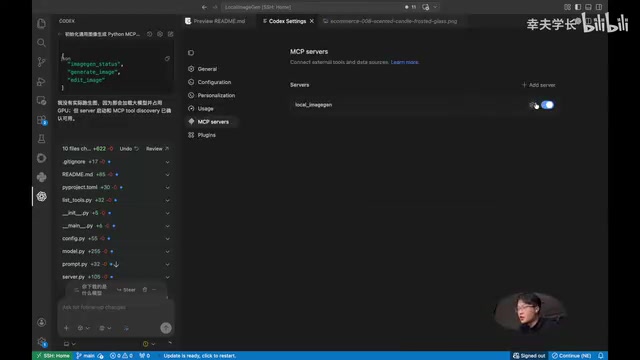
Once dependencies are installed, add the MCP service configuration in the .codex/config.toml file. After configuration is complete, you must close and restart VSCode, because only a fresh restart will load the new MCP configuration.
After restarting, if you see the local-imagegen service successfully loaded in the MCP panel, it means installation and configuration are fully complete.
Real-World Testing: Codex Batch Image Generation and Editing
Batch Generating E-Commerce Product Images
Once configured, you can use it directly by typing commands in the Codex chat box. For example, entering "generate five e-commerce images" will have Codex automatically infer appropriate prompts and call the local MCP service for image generation.
An interesting finding: Images output through Codex often have better richness and quality than those generated with raw prompts directly. This is because when Codex calls the image generation tool, it doesn't simply pass the user's instructions as-is to the Flux model. Instead, it leverages its own language understanding capabilities to perform "Prompt Engineering." When a user says "generate five e-commerce images," Codex infers specific scene descriptions, lighting conditions, composition approaches, and style keywords, generating differentiated detailed prompts for each image. This capability stems from the massive volume of image description text that large language models learn during training, enabling them to transform vague user intent into structured descriptions that image models can better understand. In testing, generating 100 e-commerce images at once works perfectly fine, with rich variety in image styles and consistent quality.
Regarding local GPU inference performance, some practical data is worth noting: Flux 2's 9B parameter model has substantial GPU memory requirements. At FP16 precision, the model weights alone occupy approximately 18GB of VRAM, and with intermediate activations during inference plus VAE decoding, you typically need 24GB or more of GPU memory (such as NVIDIA RTX 4090 or A5000). If VRAM is insufficient, you can use FP8 quantization to reduce memory requirements to approximately 12GB, or use model offload techniques to offload some computation to CPU memory—though this significantly increases inference time. A single 1024×1024 image takes approximately 8-15 seconds to generate on an RTX 4090 (depending on sampling steps), and batch generating 100 images takes roughly 15-25 minutes—an efficiency that's already very practical for e-commerce scenarios.
Conversational Iterative Image Editing
This is the most exciting feature of the entire approach. After generating images, you can continue making modification requests in the conversation, such as:
- "This bottle is too plain—can you add some branding to it?"
- "Please edit these five images to make them look better, add some logos"
Codex automatically infers an appropriate editing strategy and batch-processes the images for secondary refinement. Under the hood, this relies on the img2img pipeline provided by the diffusers library—it uses the original image as the starting point for initial noise, combines it with new text prompts for partial denoising reconstruction, thereby preserving the original image's overall composition and color tone while making local modifications according to new instructions. After editing is complete, Codex even thoughtfully generates a five-image composite preview for quick comparison.
From actual before-and-after comparisons, the differences are clearly visible, and Codex demonstrates solid aesthetic sensibility. More importantly, the style remains consistent across multiple images—which is crucial for e-commerce scenarios.
Local MCP Approach vs. Cloud API: Key Advantages
| Dimension | Cloud API Approach | Local MCP Approach |
|---|---|---|
| Cost | Pay-per-use, expensive for batch scenarios | One-time deployment, zero marginal cost |
| Speed | Affected by network latency and queuing | Depends on local GPU performance |
| Privacy | Data must be uploaded to the cloud | Data stays completely local |
| Flexibility | Limited by API parameters | Fully customizable models and parameters |
| Integration | Requires additional development work | Operate directly within the IDE |
For a concrete cost comparison: mainstream cloud image generation APIs (such as DALL·E 3, Midjourney API) charge between $0.02-$0.08 per image. Batch generating 100 images costs at least $2-$8. The local approach's marginal cost is merely electricity—with an RTX 4090 consuming approximately 300W, generating 100 images in about 20 minutes costs less than $0.02 in electricity. When daily generation volume reaches hundreds of images or more, the cost advantage of the local approach becomes extremely significant.
Best Use Cases
- Batch e-commerce product image generation: Rapidly produce large quantities of product showcase images in different styles
- On-demand project asset creation: Generate needed image assets on the fly during development
- Rapid design iteration: Through conversational interaction, finalize image concepts in just a few rounds of dialogue
- Content creation illustrations: Batch generate article illustrations, social media assets, and more
Conclusion
Through one carefully designed Prompt, we've extended Codex from a pure code generation tool into a versatile assistant with image generation and editing capabilities. The core of this approach lies in using the MCP protocol to bridge Codex with a local Flux image generation model, achieving a zero-Token-cost batch image production pipeline.
This "one Prompt to build one service" philosophy also reveals a trend worth watching: In the future, more and more local AI capabilities can be connected to AI coding assistants like Codex through MCP Servers, allowing developers to orchestrate various AI capabilities from a single unified interface, truly achieving AI-driven full-stack development. The community has already produced numerous MCP Server implementations covering database queries, file system operations, web search, code execution, and many other domains. The local image generation approach introduced in this article is one highly practical piece of this ecosystem. As the MCP protocol continues to evolve and more development tools offer native support, the "AI orchestrating AI" development paradigm will become increasingly prevalent.
Related articles
 Tutorials
ChatGPT Plus Subscription Guide: Are GPT-5.5, image-2, and Codex Worth the Upgrade?
A detailed look at ChatGPT Plus features — GPT-5.5, image-2, and Codex — with a Plus vs Pro comparison and a complete step-by-step subscription guide for users outside the US.
 Tutorials
Harness AI Engineering in Practice: Using Claude Code to Master Enterprise-Level E-Commerce Development
Deep dive into Harness AI Engineering: master enterprise e-commerce development with Claude Code using the Rules, Skills, Wiki, and Changes framework.
 Tutorials
Cursor + Codex Dual-IDE Collaboration: A Practical Methodology for Open-Source Project Customization
A complete methodology for open-source project customization based on real-world experience, detailing the Cursor+Codex dual-IDE workflow, seven-stage process, MVP validation, and AI source code reading techniques.