Build AI Agents Without Code: A Complete Beginner's Guide to Coze

A beginner's guide to building AI agents on Coze, ByteDance's no-code AI development platform.
Coze is a no-code AI application platform by ByteDance that lets anyone build and deploy AI agents without programming. It offers visual drag-and-drop workflows, 60+ plugins, custom knowledge bases, and persistent memory. This guide covers the domestic vs. international version differences, four core capabilities, and a three-step path from beginner to deployment.
What Is Coze: A Next-Generation AI Application Development Platform
As large language model technology becomes increasingly mainstream, more and more developers and non-technical users want to build their own AI applications. Coze, launched by ByteDance, is a next-generation AI application development platform built exactly for this purpose. Its defining feature: regardless of whether you have a programming background, you can quickly build large model-powered AI applications on the platform.
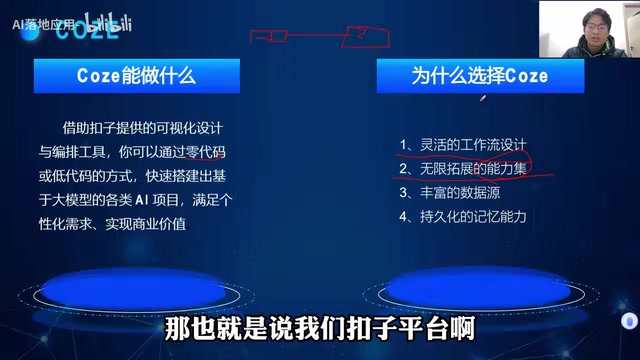
Coze's core value lies in dramatically lowering the barrier to AI application development. Through visual design and orchestration tools, users can build fully functional, personalized — even commercially viable — AI agents with zero or minimal code. Once built, these AI applications can be published to social platforms and messaging apps, or integrated into existing business systems via API or SDK.
Domestic vs. International Version: Which One Is Right for You?
Coze is available in two versions — a domestic (China) version and an international version — with notable differences in supported large language models.
Model Support Comparison
The domestic version is accessible without a VPN and supports leading Chinese models including ByteDance Doubao, Tongyi Qianwen, Kimi, MiniMax, Zhipu AI, and Baichuan. The international version supports models like the GPT series and Google Gemini, but typically requires a VPN and may have less stable connectivity.

In terms of raw model performance, the GPT series still holds an overall edge, giving the international version a slight advantage in model capability. That said, Chinese large models are catching up rapidly, and for the vast majority of use cases, the domestic version is more than capable. Given the differences in accessibility and learning curve, beginners are recommended to start with the domestic version.
Coze's Four Core Capabilities
Here are the key advantages that make Coze a compelling choice for building AI agents.

1. Visual Drag-and-Drop Workflow Builder
Traditional platforms often require writing code to design workflows. Coze offers a drag-and-drop visual orchestration interface — simply connect nodes to build complex logic flows. You can chain multiple processing steps together through drag-and-drop without writing a single line of code, making it dramatically easier to get started.
2. A Rich, Extensible Plugin Ecosystem
Coze comes with over 60 built-in plugins covering capabilities such as search, image processing, and data analysis. Beyond official plugins, users can also create custom plugins tailored to their specific business scenarios, giving agents virtually unlimited extensibility.
3. Flexible Knowledge Bases and Data Sources
Coze allows users to upload proprietary business data and knowledge bases, or crawl web content directly via URLs to build domain-specific knowledge repositories. Agents can then answer questions based on this specialized knowledge, delivering more accurate and professional responses.
4. Persistent Memory
Building a truly valuable AI assistant means remembering who your users are. Coze offers persistent memory functionality that stores user preferences, frequently asked questions, and communication styles over the long term — providing the foundation for personalized, context-aware AI applications.
A Three-Step Path to Getting Started
For beginners with no prior experience, this three-step learning path can take you from zero to hands-on practice quickly:
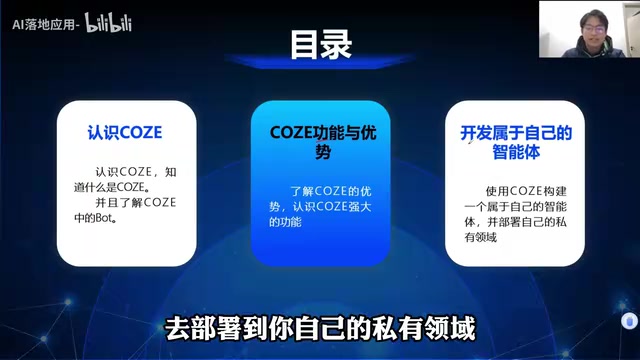
- Step 1: Get to Know Coze — Understand the platform's core concepts, the differences between the domestic and international versions, and the fundamental logic behind Bots (agents).
- Step 2: Master the Core Features — Get comfortable with workflow orchestration, plugin integration, knowledge base configuration, and persistent memory.
- Step 3: Build and Deploy — Create your own AI agent from scratch and publish it to social platforms, messaging apps, or integrate it externally via API/SDK.
This progressive learning path allows even users with zero programming experience to go from understanding the basics to deploying a real AI application in a short time.
Conclusion
Coze represents a shift in AI application development — from something only developers could do to something anyone can do. With its visual workflow builder, rich plugin ecosystem, flexible knowledge base support, and persistent memory, Coze gives everyday users a low-barrier path to building practical AI agents. For beginners looking to get started with AI application development, starting with the domestic version of Coze and following a "learn → master → build" progression is a clear and effective route forward.
Related articles

Should You Open Source Your Project? A Layered Open Source Strategy Using Project Replay as a Case Study
Should indie developers open source their projects? Using the game custom achievement tool Project Replay as a case study, this article analyzes the open source decision and offers a practical layered strategy.

130+ Open-Source Interactive Security Awareness Training: Reshaping Habit Formation Through 3D Office Scenarios
A project with 130+ free open-source interactive security awareness exercises using immersive 3D office scenarios to simulate phishing, vishing, MFA fatigue attacks and more, building employee security habits.

From Musk to Jefferson: Beware the Cognitive Trap of Cross-Domain Experts
Why do geniuses in one field often become overconfident in others? From Musk's controversial interview to Jefferson's blind spots, an exploration of cross-domain cognitive arrogance.