Build AI Automation Workflows with n8n (No Code): A Complete Guide from Getting Started to Monetization

n8n is the optimal tool for AI automation — the key is solving real business pain points, not chasing tech.
90% of AI automation entrepreneurs fail because they chase new technology while ignoring real business problems. This article recommends n8n as the core workflow automation platform, detailing its crushing advantages over Zapier and Make in pricing, features, and open-source ecosystem. It covers two deployment options (official hosting and self-hosting) and three core modules (workflows, credentials, and executions) to help zero-code users quickly start building automation workflows.
Why 90% of People Fail at AI Automation Entrepreneurship
As the AI wave sweeps across the globe, more and more people want to build AI automation services to start businesses or help companies cut costs and boost efficiency. But the reality is harsh: 90% of people who struggle with building or selling AI automation make the same fatal mistake — they constantly chase the latest AI models while ignoring the real business problems people are actually willing to pay to solve.
A seasoned practitioner who has built over 150 AI automation programs systematically dissected this problem in his 9-hour masterclass. His core message is clear: tools are just means to an end — solving real business pain points is what truly matters. And n8n is the core tool platform he recommends.
This article distills the most essential content from that course to help you understand what n8n is, why you should choose it, how to set up your environment from scratch, and how to take the critical first step toward building your first automation workflow.
What Is Workflow Automation
Workflow automation, simply put, is using technology to replace repetitive manual tasks. This concept originated from the BPM (Business Process Management) domain in enterprise IT, dating back to ERP systems in the 1990s. With the rise of cloud computing and the API economy, modern workflow automation platforms have dramatically simplified system integration work that previously required custom development — through standardized Webhooks, REST APIs, and OAuth protocols. Today's low-code/no-code automation tools represent the latest stage of this evolution — they encapsulate complex API calls into visual nodes, enabling non-technical users to build enterprise-grade integration solutions.
In enterprise scenarios, these tasks are everywhere:
- Customer form processing: After a customer submits a form on your website, the system automatically sends a confirmation email and logs the information into a database
- Invoice approval workflows: Automatically categorizes and routes invoices for approval upon receipt
- Employee onboarding management: Automatically creates accounts and assigns access permissions based on job roles
These are all widely deployed automation use cases in businesses today. The core advantages are obvious: saving time, reducing error rates (programs guarantee consistent results every time they execute), eliminating repetitive and tedious daily tasks, and freeing teams to focus on truly important business decisions.
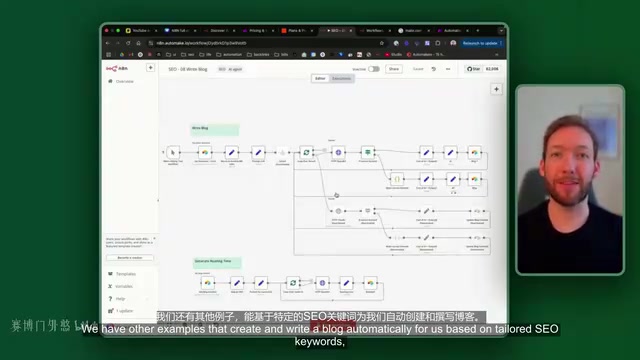
With no-code workflow automation tools like n8n, anyone without a programming background can build powerful automation workflows — from automatic LinkedIn posting and SEO blog generation to complete invoice management systems. The application scenarios are virtually limitless.
n8n vs. Zapier and Make: Why It's the Better Choice
There are quite a few workflow automation platforms on the market, with Zapier and Make (formerly Integromat) being the two most common competitors. However, n8n holds clear advantages across several key dimensions.
n8n's Open-Source Architecture Advantage
n8n (pronounced "n-eight-n," standing for "nodemation") is an open-source workflow automation tool built on Node.js, licensed under a hybrid Apache 2.0 and Commons Clause license. Its core architecture is based on a Directed Acyclic Graph (DAG) model, where each node represents an independent operational unit, and data flows between nodes in JSON format. The open-source nature means the community can continuously contribute new integration nodes — currently, over 400 integrations are maintained by both the official team and the community, covering a broad ecosystem from databases to SaaS services. This open ecosystem is a core competitive advantage that closed-source platforms like Zapier and Make simply cannot match.
Price Comparison: n8n's Crushing Advantage
| Platform | Monthly Cost | Execution Limits |
|---|---|---|
| Zapier Basic | Starting at $30, Enterprise $200+ | Limited |
| Make | Lower than Zapier, but feature-limited | Limited |
| n8n Official Hosted | ~£24 | 2,500/month |
| n8n Self-hosted | $15-17 | Unlimited |
For startup teams and individual developers, n8n's self-hosted solution offers unbeatable value.
More Powerful Features, Fewer Steps
n8n has over 400 pre-built integration components, covering mainstream services like Slack, the full Google Workspace suite, Outlook, and various databases. More importantly, n8n often achieves the same automation logic with fewer nodes, resulting in clearer workflows that are easier to maintain.
A True No-Code Platform
n8n is a completely code-free automation platform. You don't need to know Python, JavaScript, or any programming language — from day one, you can build complex automation workflows through visual drag-and-drop.
n8n Environment Setup: Two Hosting Options Explained
Option 1: Official Hosting (Fastest to Get Started)
Simply visit n8n.io to register an account and get a 14-day free trial. After the trial ends, you'll move to the starter plan at approximately £24 per month. This is the most hassle-free approach, ideal for users who want to quickly validate ideas.
Option 2: Self-Hosted Deployment (Most Economical Long-Term)
Self-hosting means deploying software on server infrastructure you control, rather than using the software provider's shared cloud environment. From a technical architecture perspective, n8n self-hosting typically involves Docker containerized deployment, paired with PostgreSQL or SQLite databases for storing workflow configurations and execution history.
The course recommends a hosting service called Elestio, which is essentially a PaaS (Platform as a Service) provider that abstracts away Docker orchestration, SSL certificate management, automatic backups, and other operational tasks. This lets users enjoy the data sovereignty and cost advantages of self-hosting while avoiding the technical barriers of DevOps:
- Register an Elestio account and enter the console
- Create a new service and select the pre-built n8n option
- Choose a cloud provider (Hetzner is recommended — its data centers are primarily located in Europe with lower operating costs than US cloud giants like AWS and GCP, and network quality is stable and reliable) and the nearest region
- Select the most basic plan, which is sufficient for startup business needs
- Wait 1-5 minutes for deployment to complete — once the service status shows green, you're ready to go
Self-hosting has an additional benefit: registering for the n8n community edition permanently unlocks workflow history, advanced debugging, execution log search, and other features that are extremely useful for later development and troubleshooting.
n8n Core Concepts: Three Fundamental Modules
Once you're inside the n8n dashboard, you need to understand three core modules:
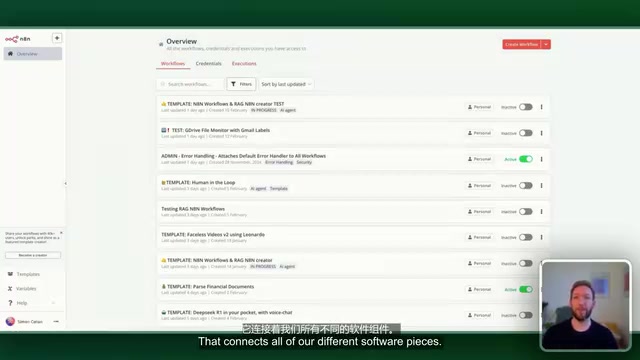
- Workflows: The framework of your entire automation logic, connecting all different software components and processing nodes
- Credentials: Various authentication keys used to securely connect your Google, Slack, and other third-party accounts
- Executions: Historical logs of all operations, including detailed records of both successes and failures
The relationship between these three is easy to understand: workflows define "what to do," credentials handle "whose account to use," and executions tell you "how it went."
Related articles
 Tutorials
ChatGPT Plus Subscription Guide: Are GPT-5.5, image-2, and Codex Worth the Upgrade?
A detailed look at ChatGPT Plus features — GPT-5.5, image-2, and Codex — with a Plus vs Pro comparison and a complete step-by-step subscription guide for users outside the US.
 Tutorials
Harness AI Engineering in Practice: Using Claude Code to Master Enterprise-Level E-Commerce Development
Deep dive into Harness AI Engineering: master enterprise e-commerce development with Claude Code using the Rules, Skills, Wiki, and Changes framework.
 Tutorials
Cursor + Codex Dual-IDE Collaboration: A Practical Methodology for Open-Source Project Customization
A complete methodology for open-source project customization based on real-world experience, detailing the Cursor+Codex dual-IDE workflow, seven-stage process, MVP validation, and AI source code reading techniques.