Build an AI Agent in 20 Lines of Python: OpenAI Agents in Action

Build an AI agent that scrapes and summarizes web pages in about 20 lines of Python with OpenAI Agents.
The article explains how to build a working AI agent with about 20 lines of Python using the OpenAI Agents library, demonstrating web scraping and summarization with a Hacker News example. It distinguishes chatbots from agents, outlines a three-step process (install and configure, register a tool via decorator, create and run the agent with runner.runsync), highlights tool calling as the core mechanism, and previews adding memory in part two.
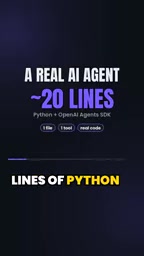
AI chatbots have become commonplace, but true agents can independently call tools and complete real tasks. A short YouTube video demonstrates how to build a working AI agent with roughly 20 lines of Python code that can scrape web pages and summarize their content. At the core is the OpenAI Agents library, which lets developers implement tool calling and task execution with minimal code.
From Chat to Action: The Essence of Agents
In the traditional chat model, AI only responds passively; an agent, by contrast, is given goals and tools and can make decisions and take action autonomously. The example in the video is very intuitive: you tell the agent "summarize the top story on Hacker News," and it decides on its own to call a web scraping tool, reads the page content, and then generates a summary. The entire process requires no human intervention, demonstrating the agent's autonomy.
This paradigm shift means AI goes from "conversationalist" to "executor." Developers can connect it to calendars, inboxes, or spreadsheets to build a true personal assistant.
Agents and Tool Calling
In the LLM context, an "agent" typically refers to a system with a large language model as its decision-making core that can loop through "observe—think—act." Unlike traditional single-turn Q&A, an agent maintains a goal and decides its next action based on environmental feedback. Its key technology is tool calling (also known as function calling): developers describe available functions (name, parameters, description) using JSON Schema, and when the model determines during reasoning that external capability is needed, it outputs a structured call request; the runtime executes that function and passes the result back to the model, which continues reasoning until the task is complete. This mechanism connects the model's language capabilities with the external world (web, databases, APIs), turning tasks like "summarize a web page" from mere generation into real execution. The quality of tool descriptions and the clarity of parameter constraints directly affect whether the model can correctly select and call tools.
Build Your First Agent in Three Steps
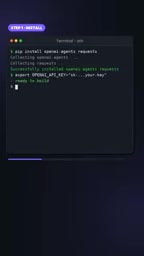
Step 1: Install and Configure
First, you need to install the OpenAI Agents library and set your API key. This is the foundation for everything that follows. The video completes installation with a simple pip command and reminds viewers to configure environment variables.
Step 2: Give the Agent a Tool
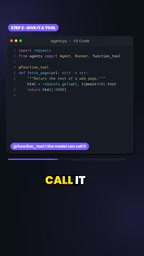
An agent's capability expansion depends on tools. The video defines a function to scrape a web page and uses a decorator to mark it as a callable tool. This way the model can automatically call that function when needed.
Tool definitions are very flexible—you can swap in any custom function, such as querying a database, sending email, or manipulating a calendar.
Step 3: Create the Agent and Run a Task
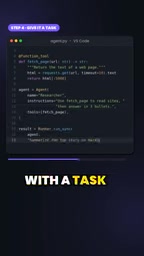
Finally, create an agent instance, specify instructions and available tools, then pass in a task via runner.runsync. The agent automatically plans steps, calls tools, and returns results.
The example task in the video is "summarize the top story on Hacker News," and the agent successfully scrapes the page and generates a summary.
Runner and Synchronous Execution
The Runner in the OpenAI Agents library drives the agent's execution loop: it passes the user task and agent configuration (instructions, tools, model) to the model, parses the model's returned tool call requests, executes the corresponding functions, feeds the results back to the model, and repeats until the model produces a final answer. runner.runsync is the library's synchronous run entry point, suitable for scripts and introductory examples; production environments typically use the asynchronous version (such as run with await) to avoid blocking and support concurrency. Instructions are essentially the agent's system prompt, defining its role, behavioral boundaries, and output style; the tool list determines what it "can do." Understanding the loop nature of the Runner helps troubleshoot common issues such as the agent repeatedly calling tools, terminating early, or getting stuck in infinite loops.
The Magic of Tool Calling and Extended Scenarios
Tool calling is the core mechanism of agents. Through decorators, ordinary Python functions are exposed to the model, which decides whether and how to call them based on task requirements. This design enables agents to interact with the external world rather than being limited to language generation.
The video mentions that you can replace tools with calendars, inboxes, or spreadsheets to build personalized assistants. For example, an agent that reads your inbox and automatically categorizes emails, or one that schedules meetings based on your calendar. The quality of tools directly determines the agent's usefulness.
Decorators and Tool Registration
A Python decorator is syntax that attaches additional behavior to a function without modifying its body (written as @something above the function definition). In the Agents library, decorators (such as @function_tool) read the function's name, type annotations, and docstring to automatically generate a model-understandable tool description and parameter schema, and register the function into the agent's tool set. Therefore, writing good type annotations and docstrings is not optional—they are the basis on which the model decides "when to call and how to pass parameters." This also explains why tool definitions are "very flexible": any ordinary Python function, as long as it has a decorator and a clear signature, can be called by the model without hand-writing complex interface protocols.
Next Steps: Memory and Continuous Evolution
At the end, the video previews part two: adding memory to the agent. Memory allows the agent to maintain context across multiple interactions, enabling more coherent task handling. This is crucial for building long-running assistants.
Although the video doesn't go into details, it's reasonable to infer that the memory mechanism will involve storing historical conversations or tool call results so the agent can reference them in subsequent tasks. This is a key step from simple scripts toward a true intelligent assistant.
Conclusion
This short video demonstrates a low-barrier way to implement AI agents: with the OpenAI Agents library, 20 lines of code can move AI from chatting to acting. The core is the tool calling mechanism, which gives agents the ability to execute real tasks. With features like memory being added, the possibilities for personal AI assistants will expand further. For developers, now is a great time to start experimenting.
One-line Summary
Build an AI agent that scrapes web pages and summarizes them with about 20 lines of Python using the OpenAI Agents library.
Paragraph Summary
The article explains how to build a working AI agent with roughly 20 lines of Python using the OpenAI Agents library, demonstrating its ability to scrape web pages and generate summaries with the example of "summarizing the top story on Hacker News." It first distinguishes traditional chatbots from agents: the former respond passively, while the latter are given goals and tools and can make decisions and execute tasks autonomously. It then presents a three-step process—install the library and configure the API key, use a decorator to register an ordinary Python function as a model-callable tool, and create an agent instance and run a task via runner.runsync. The article emphasizes that tool calling is the core mechanism, that tools can be replaced with calendars, inboxes, or spreadsheets to build personal assistants, and previews that part two will add memory to maintain contextual coherence.
Related articles

Tencent WorkBuddy Hands-On: How AI Agents Crush Traditional Chat Assistants
WorkBuddy vs Doubao tested: how AI Agents directly operate computers to convert PPT to PDF, archive files and more. Analysis of WorkBuddy's low barrier, domestic ecosystem, pricing and plugin marketplace, plus AI Agent selection advice.

Azure Cross-Tenant Attack Chain: Root Cause Analysis of Five Paths
Binary Security analyzes five full cross-tenant compromise paths in Azure, trending 271 points on HN. This article interprets their shared root cause perspective and offers defense recommendations for cloud tenant isolation and reflections on responsibility boundaries.

Recreating a Real Bubble Tea Station in Isaac Sim: Script-Driven Unitree G1 Brews Tea
Developers recreated a real self-service tea station in NVIDIA Isaac Sim, using scripts to drive a Unitree G1 through a five-step tea-brewing process, exploring whether physics simulation can be a source of synthetic robot demonstration data and discussing contact stability and imitation learning.