Build an App Without Code: A Hands-On Guide to AI Voice Reminders

Build a personal voice reminder app with Claude without writing code—the key is clear requirements and human checkpoints.
Based on a Bilibili creator's hands-on video, this article breaks down the complete workflow of building a voice reminder app from scratch with Claude Desktop. The core skill is no longer coding but describing requirements clearly: map out scenarios, interface, and operations, have Claude generate a plan and ask key questions, then use Git for version archiving, phased development, preview acceptance, and branch iteration. Four steps must be done manually: Gemini API key, Telegram bot, secret file, and Cloudflare account. Multi-source perspectives note that the barrier is lower but not zero—account authorization, cost control, and result acceptance still require human judgment.
An app you use every day is great—except it's missing the one feature you want most. In the past you just had to live with it; now things are different. A Bilibili creator proved through personal experience that even if you can't write a single line of code, you can have AI build an app that's all your own. He made a voice reminder tool: say "remind me to do laundry in two minutes" to your phone, and when the time comes, Telegram pushes the notification automatically—and it can remind your family members too. The entire process involved writing zero lines of code, relying instead on clearly describing requirements and personally clicking a few buttons at key moments.
This article is based on the complete workflow in that video, breaking down every step from zero to launch, and supplementing it with multi-source feasibility analysis and a troubleshooting guide.
Why Choose Claude as a Development Partner
The creator used the Claude desktop app with a Pro subscription ($20/month, or $17/month when billed annually). The free tier doesn't support code features—that's a hard requirement. Additionally, Claude, Gemini, and Telegram all require an overseas network environment, which is a prerequisite.
After installing the desktop app, open the code tab to start writing programs. Create a new empty folder on your computer as the project root directory, start a new conversation in Claude, and select that folder. Next to the send button you can choose a model—the default is usually fine; the higher the thinking intensity, the longer Claude thinks and the more quota it consumes, so medium is enough for everyday use. Quota is calculated on both a five-hour and a weekly cycle; when you run out, wait for the reset.
According to analysis from the YouTube channel "AI Programming in Practice," Claude's advantage in code generation tasks lies in its understanding of long contexts and grasp of project structure—especially suited for building a complete application from scratch rather than just writing a function snippet. This matches the creator's experience: Claude didn't start writing immediately but first checked the latest Gemini Live model, then suggested building a web app installable to the phone's home screen, avoiding the need to develop separate native iOS and Android apps.
Preparation: Icon, Security, and Requirement Clarification
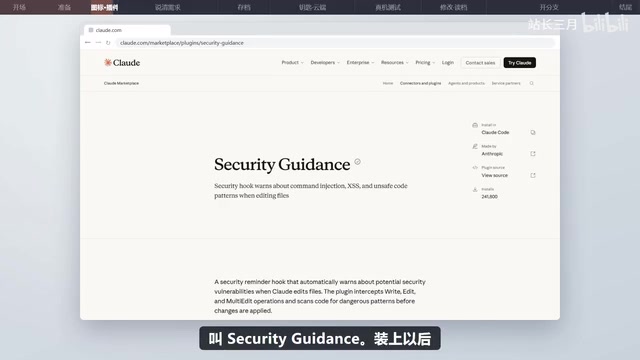
Before officially starting, the creator did two small things. First, he had AI draw an app icon—a small paper airplane next to a white microphone, meaning "speak it, send it"—saved as icon.png and placed in the project folder. Second, he installed Anthropic's official security guidance plugin, so that every time Claude modifies code it automatically checks for common security vulnerabilities.
More critical was requirement clarification. The mistake most first-timers make is saying only "help me make a reminder app"—AI can only guess, and what it builds is probably not what you want. The creator's approach was to think through a few questions first: what problem to solve, who it's for, where it's used, what the interface looks like, and exactly how it operates.
Taking his voice reminder app as an example, the requirement description included: create reminders by speaking; at the appointed time, send via Telegram to himself or family members; for personal use only, not published to an app store; usable on both computer and phone; clean interface with a large circular microphone icon in the center; require a password on open; after tapping the microphone, AI greets first, the user says what to be reminded of and when, and AI repeats it back for confirmation before creating the reminder; when the time comes, send automatically, even if the computer is off; use Google's latest Gemini Live model for voice; and for anything requiring user action, explain step by step in plain language.
After pasting in this complete requirement, Claude listed costs and a test plan, and asked nine questions in one go—Apple or Android, which time zone to use for reminders, whether being one minute late is acceptable, cost preferences, and so on. The creator answered each in plain language, and when unsure, let Claude decide. After answering, Claude wrote a development plan document and saved it to the project folder, clearly stating how to build it, how to test each feature, and which things the user must personally do.
The security guidance plugin mentioned in the article is a security review extension officially provided by Anthropic. Once installed, Claude automatically scans for common vulnerabilities every time it generates or modifies code—such as SQL injection, cross-site scripting (XSS), and hardcoded key leaks. For non-professional developers, this kind of automated check amounts to a built-in basic security defense, especially useful for personal projects exposed to the public internet. However, it's not foolproof; it still needs to be combined with practices like secret files and environment variables to protect API keys and login passwords.
Git Archiving: The "Game Save" Before Development
Once the plan document looked good, don't rush to start. The creator emphasized one very important step: put the project under Git management. Anyone who's played games understands—before fighting the final boss, you absolutely must save first; if you lose, just reload.
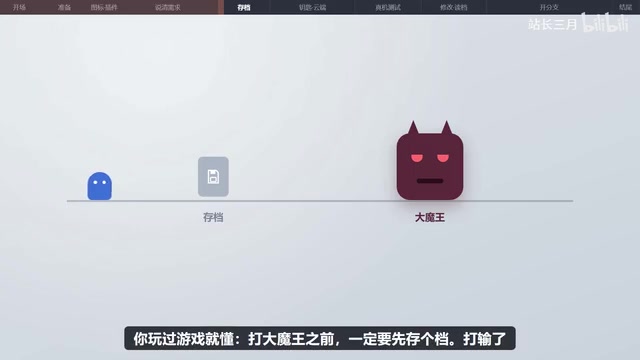
Git archives need to be stored in the cloud, so first register a free account on GitHub. To have Claude handle archiving and uploading itself, you need the GitHub CLI tool. The creator gave Claude the official website address to install it, only to find it was already installed on the computer—just not logged in. Logging in must be done yourself: run the command Claude provides in the terminal, an 8-digit verification code appears on screen, the browser automatically opens the GitHub verification page, enter the code, continue, and authorize. Then have Claude create a private repository on GitHub, name it, make the first archive and upload it—done in seconds.
According to experience shared by multiple developers in the SSPAI community, bringing a project under Git version control is the most easily overlooked yet most impactful step for long-term maintenance in AI-assisted development. Without version control, once AI breaks the code, it's hard to precisely roll back to a usable state.
Four Things You Must Do Yourself: Keys, Bot, and Deployment
Before starting, Claude listed four things the user needed to do personally—the parts of the entire workflow that AI cannot do on your behalf.
First: Apply for a Gemini API key. Open Google AI Studio, log in, click Create API Key, and copy the long string of characters you receive. The app uses it to call the Gemini voice model.
Second: Create a Telegram bot. The app can't send Telegram messages directly; it has to go through a bot. In Telegram, search for BotFather, send /newbot, choose a name and a username ending in Bot, and get a Token—this is the bot's key.
Third: Fill in the secret file. Put both keys plus the app login password into the secret file Claude created beforehand, so the keys don't need to be pasted into the chat and the file won't be uploaded to GitHub.
Fourth: Register a Cloudflare account. This is a cloud service; the app runs on it 24/7 without buying your own server—the free plan is enough. After registering, Claude pops up an authorization page; click Allow, and it can log in itself and set up the database.
With these four things done, the rest is up to Claude. It proceeds in five phases according to the plan: login, Telegram integration and scheduled sending, appearance, voice integration, and comprehensive checking. After completing each phase, it provides a URL for the creator to test on the phone; once confirmed, it automatically archives once and moves to the next phase. It also stops to ask questions along the way—for example, upon discovering an old reminder program in the account, it asks whether to delete it. Deletion can't be undone, so it needs the user's nod before acting.
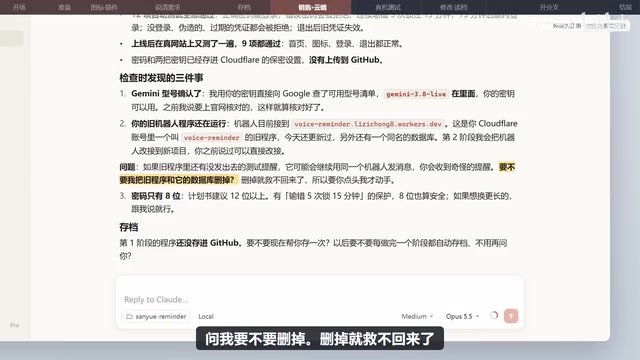
When everything is complete, Claude provides a URL. Open it in the phone browser, enter the password to log in, tap Share and "Add to Home Screen," and an icon appears on the desktop that looks just like a real app. Bring family members in: his younger brother opens the bot in Telegram and taps "Start," and he appears in the app's contacts, named "Little Brother." Try it: press the microphone, "remind me to do laundry in two minutes," AI repeats for confirmation, and two minutes later Telegram pops up the reminder right on time. Try another: "remind Little Brother to call Mom in ten minutes"—when the time comes, Little Brother's Telegram receives it.
Gemini API is a multimodal large model interface provided by Google, among which Gemini Live supports real-time voice conversation, suitable for the "press the microphone and speak" interaction scenario in this article. Google AI Studio is an online console for developers; after logging in you can directly create API keys, and the free quota is enough to support low-frequency personal use. Telegram Bot is created through BotFather—essentially an automated account hosted by Telegram; external programs call its interface with a Token to send messages to specified users or groups, with no need to build your own message push service. Cloudflare here plays the role of hosting and serverless runtime; its free plan includes capabilities like Workers, Pages, and databases, keeping a web app online 24/7 without purchasing a traditional server.
Maintenance and Iteration: Documentation, Preview Versions, and Branches
The app's core features are in place, but maintenance is the more important matter. The creator first had Claude write documentation for the project: type /init in the dialog box, and Claude scans the entire project to generate a cloud.md file explaining what technologies are used and how it's built. From then on, every new conversation it reads this documentation first and immediately picks up where it left off.
Before changing features, produce a preview version first. For example, to make the microphone button blue and 1.5 times larger, start a new conversation, write the requirements clearly, and add "after making the change, don't overwrite the official version yet—make a preview version for me to check on my phone." Claude provides a preview URL; the official version is untouched. After checking on the phone and finding it fine, say "publish it," and only then does it deploy to the official URL and sync the archive.
The creator decided the blue didn't look as good as the original, so he had Claude list all archives and picked the one before the blue change to restore. There are two ways to restore: discard all subsequent archives, or keep the record and add a new archive on top. He chose the latter, so the blue version is still preserved and can be recovered if he changes his mind.
The /init mentioned in the article is a project initialization command provided by the Claude desktop app. It scans the code structure of the current folder and generates a project documentation file (such as cloud.md) as a context anchor for subsequent conversations. Since AI conversations themselves have length limits and project details are easily lost across conversations, this documentation serves as "long-term memory" for the AI, letting it quickly recover its understanding of the tech stack, directory structure, and development progress in each new conversation. The distinction between preview and official versions relies on the deployment platform's isolated environment capability, ensuring experimental changes don't affect the live version in use.
Major Feature Expansion: Branch Development and AI Image Generation
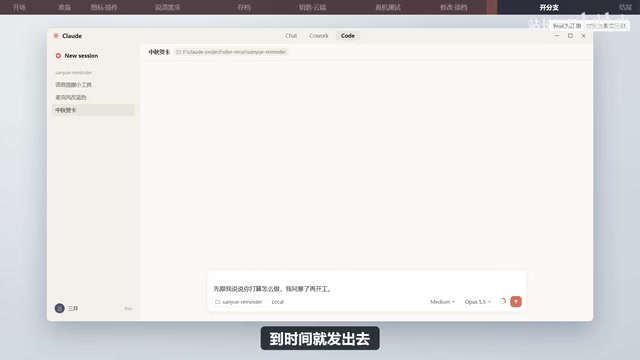
For bigger changes—such as adding a feature to "say 'make me a Mid-Autumn card and send it to Little Brother at 8 AM on Mid-Autumn Day'"—the safest approach is to have Claude create a separate branch alongside the official version. A branch is like opening another save slot in a game to experiment; when satisfied, merge it back into the main line, and when not, just delete it—the original app is completely unaffected.
For image generation, use Cloudflare's built-in AI image generation; the app is already hosted on Cloudflare, so integration is easiest, and there's a free daily quota. But such image models are bad at writing Chinese characters—forcing them to write "Happy Mid-Autumn" will most likely produce garbled text. So the creator had AI draw only the picture, with the greeting attached as text below the image when sending.
Claude first explained how it planned to do it, and even set up a separate test version with its own URL and database, not touching the official version at all. Before starting, it checked the account's image generation usage and found 6 images had already been drawn that day (not by it). To avoid spending money, it set a rule: this project draws at most 10 images per day.
After it was done, test on the test version first. The first image looked great, with no text; the second had a red banner at the bottom with a string of garbled characters. Throwing the image back to Claude, it investigated the cause: simply writing "no text" in the prompt doesn't stop it—when there are signs, books, or posters in the scene, the model writes on them itself. It switched to an image model that can explicitly specify "what not to draw," and specifically picked the scenes most prone to text—old streets full of shops, birthday cakes—and redrew several images with no text. Claude also admitted the truth: occasionally one might still slip through; if it happens, just say "draw another one."
After confirming everything was fine, commit once, deploy to the official URL, merge back to the main line, push to GitHub, and finally delete the branch. Try it on the official version: "make me a Mid-Autumn card and send it to Little Brother at 8 AM on Mid-Autumn Day"—the card is drawn and displayed on screen, the greeting reads "Wishing Little Brother a happy Mid-Autumn Festival—reunion round and full, may everything go smoothly," and Claude confirms it will send to Little Brother at the specified date and time. The new feature is officially live.
Multi-Source Perspective: The Barrier Is Lower, But Not Zero
According to common observations from the Bilibili creator and the YouTube channel "AI Programming in Practice," the biggest change in AI-assisted development isn't "no need to write code" but that "describing requirements clearly" has become the new core skill. The creator repeatedly emphasized in the video: the more specific the requirements, the less rework. The nine follow-up questions, the generation of the plan document, and phased acceptance are all processes of converting vague ideas into executable specifications.
However, a single source's experience can't represent everything. According to discussions among multiple developers on Hacker News, the step where non-programmers most often get stuck when building apps with AI is precisely the "four things you must do yourself" listed by the creator—applying for API keys, registering bots, and configuring cloud services. These steps involve account systems and authorization flows across multiple platforms, a significant barrier for those unfamiliar with overseas services. The creator's video also admits: "Registering accounts, authorizing, and applying for keys—you still have to do these yourself."
Another point of divergence is cost expectations. The creator used the Claude Pro $20/month plan, plus Cloudflare's free plan and Gemini API's free quota, keeping overall costs manageable. But some developers on Reddit point out that once usage rises or more AI image generation quota is needed, free-tier limits quickly become bottlenecks, and actual costs may be higher than expected. The creator's response was to set a hard rule of "at most 10 images per day" for the image generation feature—a pragmatic compromise.
Regarding AI errors, the creator's attitude is worth learning from: that garbled card was discovered by himself and thrown back to Claude to fix. AI isn't omnipotent; it makes mistakes and needs user acceptance and feedback. Compared to writing code from scratch in the past, the barrier is already much lower, but the "acceptance" step always requires human judgment.
Conclusion
The value of this hands-on case isn't in showing how powerful a particular tool is, but in presenting a reusable methodology: requirement clarification → plan document → version archiving → phased development → preview acceptance → branch iteration. Claude handles writing code and explaining steps; the human handles clearly stating what's wanted, making decisions at key authorization points, and accepting results. For people who want to build a personal tool but don't know how to program, this path has already been proven. The creator ended by asking viewers: what app would you most want to build for yourself? That question itself is the most interesting change brought about by AI lowering the development barrier—ideas are no longer blocked by "I can't write code."
One-line Summary
You don't need to write code to build your own voice reminder app with Claude—the key is describing requirements clearly and safeguarding the critical human touchpoints.
Related articles
world2vec: Building Mechanistic World Models with Latent Dynamics Learning
world2vec proposes a reward-free method for learning mechanistic world models via latent dynamics, faithfully reproducing systems over long horizons with at least an order of magnitude fewer parameters than DreamerV3, TD-MPC2, and LeWM, and achieving accurate system identification on 71 attractor benchmarks.

A New KL-DRO Paradigm: Adaptive Scenario Generation Around a Learned Density Model
KL-DRO research proposes centering the KL ball on a learned density model instead of the empirical distribution, with adaptive scenario generation guiding sampling toward the worst case. Experiments show lower cost under distribution shift when records are scarce and the model can extrapolate, with comparable in-distribution cost.

ODE Samplers for Discrete Diffusion Models: Exponential Residual Flows Accelerate Generation
Discrete diffusion models lack deterministic ODE sampling? This article introduces Exponential Residual Flows (ERFs), which introduce continuous residual variables per token to construct piecewise ODEs for deterministic sampling and support consistency distillation acceleration. Superior to prior methods on code and text generation tasks.