BuildBuddy Hands-On: An Unreal Engine AI Assistant That Can See Your Screen

BuildBuddy is an Unreal Engine AI assistant that analyzes your screen in real time for step-by-step guidance.
BuildBuddy is an AI floating-window assistant designed specifically for Unreal Engine developers. Its core capability is real-time screen content analysis that identifies your current operation stage and provides precise step-by-step guidance. Trained on official documentation, it supports Blueprint logic guidance and can execute simple operations via natural language commands. Compared to ChatGPT, it requires no window switching, automatically understands context, and significantly boosts development efficiency.
For Unreal Engine developers, getting "stuck" is a daily occurrence. Traditionally, there are only two solutions: either waste 45 minutes lost in search engines and forums, or pay top dollar to consult an expert. Now, an AI tool called BuildBuddy is trying to become the third option—an Unreal Engine AI assistant that stays floating on your screen and can see your operations in real time.
BuildBuddy's Core Capability: Real-Time Screen Analysis + Step-by-Step Guidance
BuildBuddy's core interaction logic is very intuitive: it stays as a transparent floating window at the forefront of your screen, ready for questions at any time. The biggest difference from ordinary AI assistants is that it can analyze your screen content in real time, accurately identifying what panel you have open and what stage of operation you're at, then providing targeted step-by-step guidance.
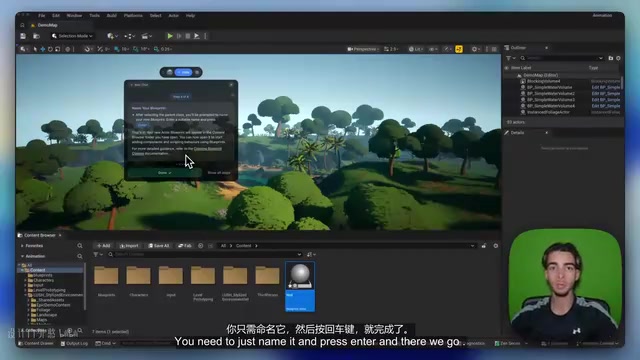
Here's a simple example: when you ask "How do I create an Actor-type Blueprint class," BuildBuddy won't throw generic documentation at you. Instead, it will:
- First analyze your screen and identify the location of the Content Browser
- Tell you to "click the Add button and select Blueprint Class"
- After you complete that action, analyze the screen again to confirm you've opened the selection panel
- Guide you to "select Actor as the parent class"
- Finally prompt you to name it and press Enter to complete creation
Each step only advances after confirming you've completed the previous one, truly delivering a "hand-holding tutorial" experience.
Blueprint Logic Guidance: Real-World Performance in Complex Scenarios
BuildBuddy's capabilities go far beyond simple operations like creating assets. In the video demonstration, the developer showcased a more complex scenario: implementing a "press a key to trigger ragdoll physics" effect in a third-person character Blueprint.
Throughout the process, BuildBuddy demonstrated several key capabilities:
- Context awareness: No need for the user to explain "I'm in the player Blueprint"—it already knows through screen analysis that you have the third-person character's Event Graph open
- Precise node guidance: Tells you what node to search for with right-click, which pin to connect, and which option to check
- Problem anticipation: After completing the basic logic, proactively reminds you that you may need to adjust collision settings to prevent the character from falling through the floor
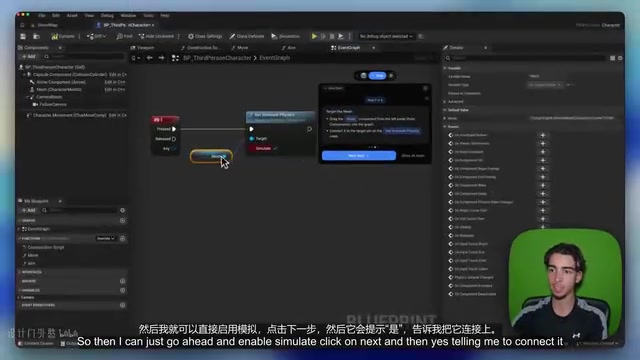
More importantly, when the user follows up with "how exactly do I adjust the collision," it continues analyzing the screen, locates the collision preset option on the mesh, and guides the user to change it to "Collision Enabled." The end result: the character actually achieves the ragdoll physics effect, all without ever leaving the Unreal Engine editor.
Trained on Official Documentation: Ensuring Accuracy of Operation Guidance
A noteworthy design decision is that BuildBuddy is trained on official Unreal Engine documentation. This means the operational guidance it provides is essentially the approach recommended by Epic Games, rather than community methods that may be outdated or non-standard.
This is especially important for Unreal Engine beginners—many people's biggest pain point during the learning phase isn't the inability to find tutorials, but finding tutorials for the wrong version, using non-standard methods, or even contradicting each other. By anchoring to official documentation, BuildBuddy addresses the problem of inconsistent information quality to a significant degree.
AI Automated Operations: From Guidance to Direct Execution
Beyond guidance, BuildBuddy also has the ability to directly execute operations within Unreal Engine. The setup process isn't complicated: select the project folder, specify the engine version, then enable a plugin in Unreal Engine, modify two parameters, and start the server to establish the connection.
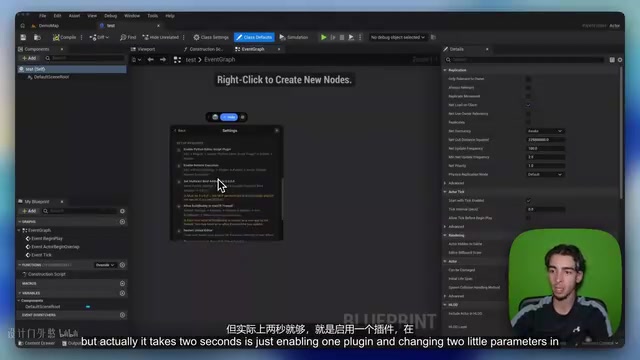
Once connected, you can issue commands directly in natural language, such as:
- "Scale the selected tree by three times" → BuildBuddy directly completes the scaling in the scene
- "Create an Actor Blueprint class named 'Enemy'" → Automatically creates the folder and Blueprint asset
However, the developer candidly points out that the remote control functionality is still quite limited at present, mainly supporting simple in-level operations like scaling objects and creating assets, and cannot yet handle complex operations like Blueprint editing. But this direction is undoubtedly worth watching—as iteration continues, the boundaries of automation capabilities will keep expanding.
BuildBuddy vs ChatGPT: Unreal Engine Development Efficiency Comparison
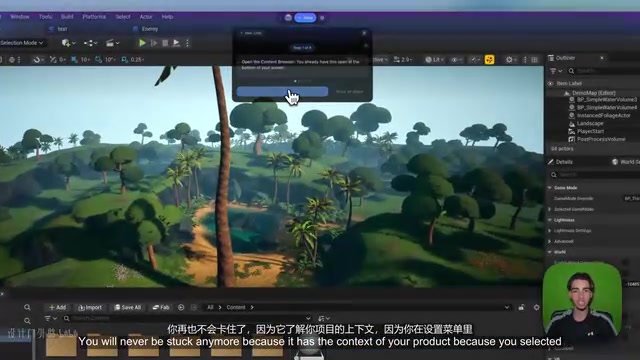
Many developers currently use ChatGPT alongside their work to assist development, but this approach has obvious efficiency bottlenecks:
| Dimension | ChatGPT Assistance | BuildBuddy |
|---|---|---|
| Context understanding | Requires manually describing current state | Automatically analyzes screen content |
| Operation guidance | Generic suggestions | Precise guidance for the current interface |
| Workflow interruption | Need to switch windows and copy-paste | Completed within floating window, no switching needed |
| Project adaptation | Unaware of project configuration | Knows project folder and engine version |
Similarly, while YouTube tutorials are content-rich, they aren't customized for your project. BuildBuddy's value lies in combining Unreal Engine's general knowledge with your personal project context to provide truly personalized development assistance.
Conclusion: The Future Direction of AI-Assisted Game Development
BuildBuddy represents a trend worth watching: AI assistants are evolving from general-purpose conversation tools into deeply integrated tools for specialized domains. They no longer just answer questions—they can see your work environment, understand your operational context, and even execute operations directly on your behalf.
The tool currently offers a free trial, and the developer states they're updating and adding new features daily. For Unreal Engine developers—especially those in the learning phase—this could be a tool that significantly improves learning efficiency and prototyping speed. According to the developer, using BuildBuddy can shorten prototyping cycles from weeks to days.
Of course, the tool's actual performance still needs validation in more complex scenarios, and the boundaries of its automation capabilities remain to be expanded. But as a directional product, BuildBuddy demonstrates the enormous potential of AI-assisted game development.
Related articles
 Tech Frontiers
A Rare Quiet Day in AI: Recursive Self-Improvement Stirs Beneath the Surface
A rare quiet day in AI sees multiple sources go silent simultaneously. Behind the calm, Recursive Self-Improvement (RSI) research continues. What this means for the industry.
 Tech Frontiers
Reve 2 vs. Ideogram 4: A Deep Dive into Layout Control in AI Image Generation
A deep comparison of Reve 2 and Ideogram 4's layout control capabilities, covering technical approaches, real-world use cases, and industry trends for designers and creators.
 Tech Frontiers
In the Weights: Check Your Influence Score in the AI World
In the Weights is an AI influence search engine that quantifies your presence in the AI world with a score. Explore how it evaluates practitioners and what it means for digital identity.