Building a Mac App from Scratch with Trae: Create a File Format Converter in 5 Minutes

A zero-experience user builds a functional macOS desktop app using AI tool Trae through Vibe Coding
This article documents how a user with zero programming experience used ByteDance's AI development environment Trae to build a Txt-to-Markdown format conversion tool entirely through natural language descriptions (Vibe Coding). The tool solves a real need of migrating notes from SimpleNote to Obsidian, and was ultimately packaged as an installable Mac application and published on GitHub, demonstrating the complete end-to-end workflow of AI-driven development.
Introduction: Vibe Coding Makes Zero-Experience Development a Reality
Can someone who has never written a macOS application develop a fully functional desktop tool in just a few minutes? The answer is yes. A Chinese content creator shared his complete process of using Trae (an AI-integrated development environment from ByteDance) to build a Txt-to-Markdown format conversion tool from scratch, demonstrating the real power of Vibe Coding.
Vibe Coding is a new programming paradigm proposed by OpenAI co-founder Andrej Karpathy in early 2025. The core idea is that developers no longer need to write code line by line. Instead, they describe their intent in natural language, let AI models generate, debug, and iterate on the code, while the developer simply "vibes" with the overall direction and validates the results. This concept quickly sparked widespread discussion in the tech community because it fundamentally redefines the threshold for "knowing how to code" — shifting from mastering syntax rules to being able to clearly express requirements and judge output quality.
The value of this case lies in the fact that it's not a toy demo — it solves a real need: batch-converting hundreds of txt notes exported from SimpleNote into Markdown format usable by Obsidian. SimpleNote is a lightweight note-taking app under Automattic (WordPress's parent company), known for its plain text storage. Obsidian is an emerging tool in the knowledge management space, building bidirectional-link knowledge graphs based on local Markdown files, and is highly popular among Personal Knowledge Management (PKM) enthusiasts. The need for format migration between these two tools is extremely common among note-taking users, which is exactly why this tool has real practical value. This is the core philosophy of Vibe Coding: let requirements drive development, and let AI handle the technical details.
Preparation Before Development
Hardware & Environment Requirements
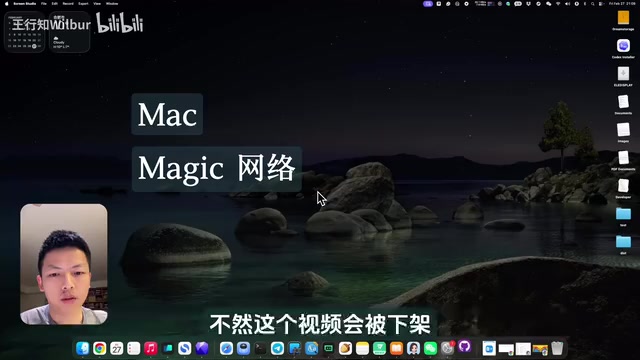
For Vibe Coding development, the author recommends Mac as the preferred platform for three reasons:
- Unix kernel: Naturally suited for programming, with good terminal command compatibility
- Clean and stable software ecosystem: Virtually no risk of blue screen crashes, reducing troubleshooting time
- Excellent display quality: MacBook screens render with fine detail, reducing eye fatigue during long coding sessions
Additionally, you'll need a VPN setup, which is essential for installing various toolkits and using Google to search English technical documentation.
Four Essential Software Tools
- Trae: An AI-native integrated development environment (AI-native IDE) launched by ByteDance. Its Solo mode is specifically designed for natural language-driven development scenarios, allowing users to complete the entire workflow from requirement description to code generation through conversation. Unlike code completion tools like GitHub Copilot, Trae focuses more on end-to-end generation capabilities for complete projects, with built-in conversational debugging and multi-round iteration mechanisms. It's the core tool for this project.
- GitHub Desktop: A visual code hosting client based on the Git version control system. Git's core value lies in distributed version control — every code commit generates a snapshot, allowing developers to roll back to any historical state at any time. GitHub Desktop visualizes these operations, significantly lowering the learning curve for command-line operations. Used for code synchronization and version management.
- Warp: A third-party terminal application that's much more user-friendly than the built-in macOS Terminal, supporting AI command completion and a modern interface.
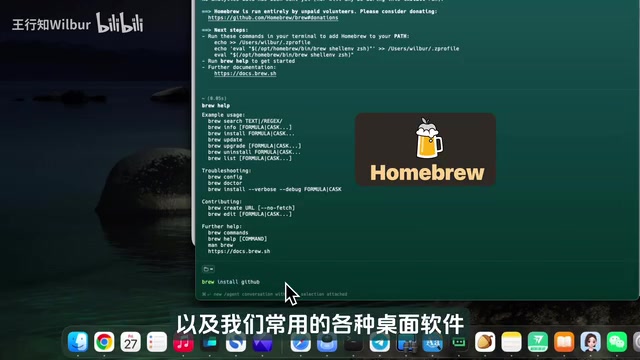
- Homebrew: The most mainstream open-source package manager for macOS, created by Max Howell in 2009 with the tagline "The Missing Package Manager for macOS." It manages various development tools via the command line and is standard infrastructure for macOS development.
The final "software" is actually a mindset — stay patient. Vibe Coding isn't always smooth sailing. Encountering errors and problems is normal, but as long as you persist with debugging, you'll eventually get a working result.
Hands-On Development Process
Step 1: Describe Requirements in Trae
After opening Trae's Solo mode, the author clearly described his requirements in the chat box:
I have a folder containing a large number of txt files (hundreds of notes exported from SimpleNote). I want to build a Python tool that converts all these txt files to Markdown files, and it needs a graphical user interface (GUI).
There are several key points worth learning here:
- State the background and problem first (why you need this tool)
- Specify the technology choice (Python)
- Define the interaction method (needs a GUI, not just command line)
- Provide specific information like file paths

Step 2: Iterative Problem Solving
Trae quickly wrote the Python script for txt-to-md conversion, but encountered macOS compatibility issues when building the graphical interface. This is a very typical scenario in Vibe Coding — AI won't give you a perfect solution on the first try, but it can help you quickly identify and resolve problems.
Specific problems encountered and resolution paths:
- GUI compatibility issues: Trae automatically tried multiple approaches before finding a viable implementation
- Command-line runtime errors: Pasting the error messages back into the Trae chat, the AI analyzed them and discovered that the macOS built-in Python version was too old. This is a classic macOS development pitfall — the system's bundled Python version is typically outdated, and Apple discourages directly modifying the system Python environment for stability reasons.
- Solution: Install an independent latest Python version via Homebrew (avoiding conflicts with system Python while gaining access to the latest language features and library support), and use PyInstaller as the packaging tool. PyInstaller can bundle Python scripts along with all their dependencies into standalone executables. On macOS, it can generate standard .app application bundles or .dmg installation images, allowing the target machine to run the application without having Python pre-installed.
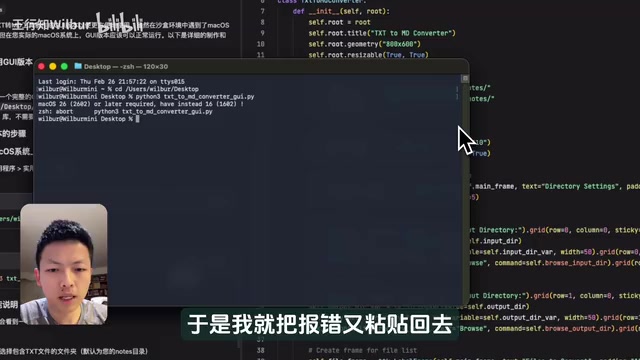
This process reveals the core Vibe Coding workflow: Describe requirements → AI generates code → Run and test → Encounter errors → Feed back to AI → AI fixes → Loop until successful.
Step 3: Package and Distribute as a Mac Application
Ultimately, the author successfully packaged the tool as a DMG installer that any Mac user can use after double-clicking to install. The final application features:
- An intuitive graphical user interface
- Batch file conversion capability
- A standard macOS application installation experience
PyInstaller played a key role in this step — it bundles the Python interpreter, script code, and all third-party libraries together, serving as the critical bridge that transforms a "developer tool" into a "consumer product."
Code Management & GitHub Publishing
The author published the project to GitHub. This isn't just code backup — it's about cultivating good development habits. Version control is especially important for Vibe Coding scenarios: since AI-generated code may introduce new issues during iteration, being able to quickly roll back to the last working version is a safety net that ensures development continuity. GitHub's core value includes:
- Version control: Every modification is recorded, and you can roll back to previous versions at any time — particularly crucial when AI iteratively modifies code across multiple rounds
- Code sharing: Other developers can view, learn from, and even contribute code
- Release publishing: Place the final installer on the repository's Release page so anyone can download and use it
This complete "develop-package-publish" workflow means Vibe Coding results are no longer just local experiments but tools that can truly be shared with others.
Lessons Learned & Reflections
Key Success Factors for Vibe Coding
- Clear requirements: Knowing what problem you want to solve is more important than knowing how to write code
- Tool selection: Trae's Solo mode is very beginner-friendly, lowering the entry barrier
- Patient debugging: Errors aren't scary — just hand the error messages to AI for analysis
- Complete workflow: From requirements to an installable application to GitHub release, forming a complete product delivery
Implications for Zero-Experience Users
This case proves that in the era of AI-assisted programming, "whether you can write code" is no longer the decisive factor.
Related articles
 Tutorials
ChatGPT Plus Subscription Guide: Are GPT-5.5, image-2, and Codex Worth the Upgrade?
A detailed look at ChatGPT Plus features — GPT-5.5, image-2, and Codex — with a Plus vs Pro comparison and a complete step-by-step subscription guide for users outside the US.
 Tutorials
Harness AI Engineering in Practice: Using Claude Code to Master Enterprise-Level E-Commerce Development
Deep dive into Harness AI Engineering: master enterprise e-commerce development with Claude Code using the Rules, Skills, Wiki, and Changes framework.
 Tutorials
Cursor + Codex Dual-IDE Collaboration: A Practical Methodology for Open-Source Project Customization
A complete methodology for open-source project customization based on real-world experience, detailing the Cursor+Codex dual-IDE workflow, seven-stage process, MVP validation, and AI source code reading techniques.