Building a Multi-Platform Video Distribution Tool with AI: Upload Once, Sync to Douyin, Bilibili, and Xiaohongshu

Use AI agents and open-source projects to build a one-click multi-platform video distribution tool.
This article follows a Bilibili creator who used an AI agent to build a multi-platform video distribution tool on top of an existing open-source project. The tool saves login credentials locally, provides a shared asset library and unified content entry, then uses browser automation scripts to publish to all platforms — completing the full workflow in about 5 minutes and 34 seconds. The core methodology: never ask AI to build from scratch; find an open-source project on GitHub first, then use natural language to deploy and iterate. No coding knowledge required.
A Tedious but Solvable Pain Point
After finishing a video, distributing it across Douyin, Bilibili, Xiaohongshu, and other platforms is an unavoidable chore for many content creators. The task itself isn't difficult — it's just opening each platform's upload page, dragging in the video, adding a thumbnail, filling in the title and description, and tagging it. But as the number of platforms grows, the entire process becomes incredibly tedious.
As one Bilibili UP主 put it: "Uploading a video is simple, but once you're doing it across multiple platforms, it becomes a huge hassle. You have to open each platform, find the upload button, drag the file in — and that's just the start. Then you still need to set the thumbnail, write the title, write the description, add tags, and on top of that, every platform has different requirements."
This kind of "not hard, just annoying" repetitive work is exactly what automation tools are built for. While paid tools exist for this, they tend to be expensive and overly complex. The UP主's approach: find a lightweight open-source solution, use AI to help deploy it locally, and build a small utility that gets the job done.
How the Tool Works
The core logic of this tool is: bind accounts + reuse assets + one-click distribution.
The first step is linking your platform accounts. The software opens a QR code login screen for each platform, and once you scan it, your login state (cookies and credentials) is saved locally. The UP主 emphasized: "All data is stored locally. I went through the code myself — it's all local storage. Nothing gets uploaded or leaked. It just handles distribution for you."
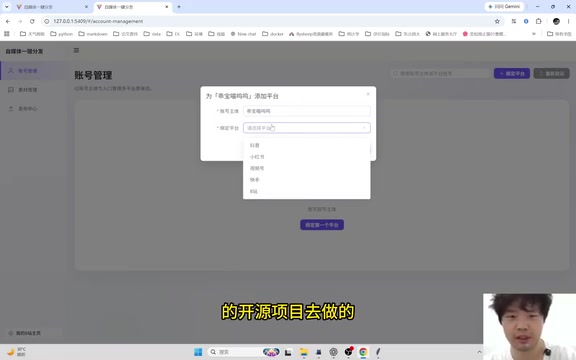
After binding accounts for Douyin, Bilibili, and Xiaohongshu, you simply drag your video into the tool. There's also a built-in asset library where you can store reusable materials like thumbnails (e.g., a standardized vertical cover template), so you don't have to hunt through your desktop every time.
Fill Once, Publish Everywhere
For content entry, the tool consolidates what would normally be repeated across multiple pages into a single interface.
One noteworthy detail is how it handles title length limits. Since all three platforms share the same title, the tool enforces the shortest platform's limit — Xiaohongshu caps titles at 20 characters, so anything longer simply won't publish. This reflects the real-world constraints of multi-platform compatibility.
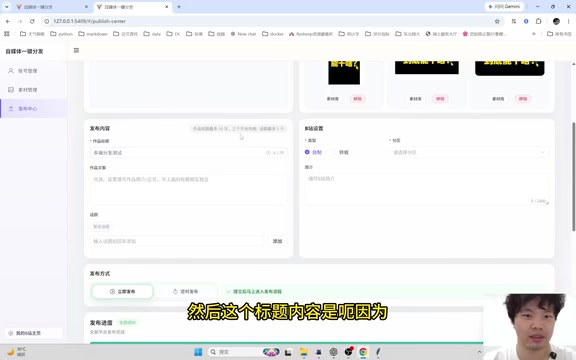
Hashtags and topic tags are what the UP主 finds most annoying: "Every platform has a different way of adding topics, and you can't even copy-paste them." You can also fill in separate descriptions for each platform and select a Bilibili category (such as the Knowledge section). The UP主 acknowledged that the current UI still has room for improvement — for instance, the description could default to being shared across platforms rather than requiring separate input — and noted these as areas for future refinement.
Fully Automated Publishing via Browser Scripts
Once everything is filled in, clicking the publish button in the bottom right kicks off the automated process.
The tool works through browser script automation: it sequentially opens each platform's publish page, uploads the video, sets the thumbnail, fills in the content, and even supports scheduled publishing. The UP主 noted that you shouldn't manually interact with the browser during execution, as it will interrupt the automated flow.
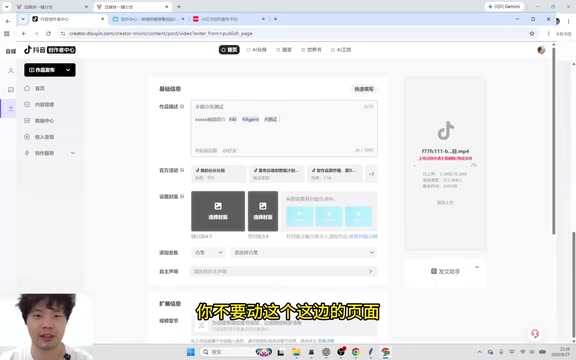
In testing, the full multi-platform publish took about 5 minutes and 34 seconds. Post-publish verification showed everything in order: Douyin's video, title, description, tags, and thumbnail all looked correct; Xiaohongshu's content was properly placed; and while Bilibili was still under review, the title, description, and thumbnail were all correctly submitted. For a workflow that would otherwise require three separate manual run-throughs, the efficiency gain is significant.
The underlying technology for browser script automation typically relies on tools like Playwright or Selenium. These frameworks can simulate real user interactions — mouse clicks, keyboard input, file uploads — allowing a program to "operate" a browser just like a human would. Compared to using official platform APIs, this approach requires no developer credentials or permissions, making it far easier to get started. The trade-off is that it depends on the stability of each platform's page structure — if a platform redesigns its UI, the scripts may break and need updating. Storing login cookies locally also means account security is entirely dependent on your local machine environment. It's best used on a personal computer and should never be run on public or shared devices.
The Right Way to Build Tools with AI
The most valuable part of this case study may not be the tool itself, but the methodology the UP主 shared for AI-assisted development.
His first principle: don't reinvent the wheel. "For small utility tools like this, don't just let an AI agent write everything from scratch. If you don't specify otherwise, it'll always start from zero — but there's no reason to. Tell it to search GitHub for an existing open-source project first." Even if you don't know how to use GitHub, just tell the agent to "go look on GitHub" and it'll handle it.
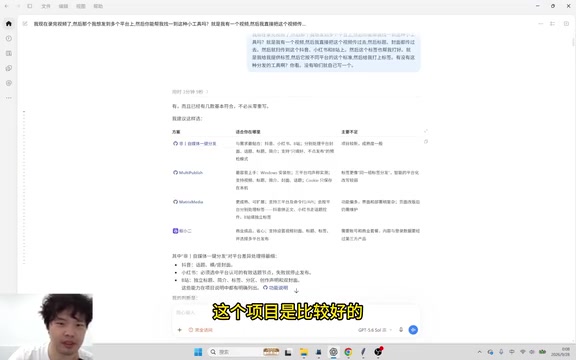
Once a suitable project is found (in this case built on an open-source project from another developer, whom the UP主 thanked), the next step is having the AI pull the code and deploy it locally: "You don't need to know how to deploy or understand the code. Just say 'pull it down, deploy it, and set up a new folder' — let it do whatever in a new directory."
Handling bugs is equally straightforward — just screenshot the error and tell the AI "something's wrong, fix it." The UP主 ran into plenty of small errors early on, along with issues like missing progress indicators. All of it was resolved through plain-language instructions like "add a progress display" or "fix this part," letting the AI iteratively improve the tool.
His takeaway: "Just tell the agent what you need. Make your wish. Approach it with a playful, curious mindset, and you'll find it's actually a lot of fun."
The "AI agent" mentioned here differs from a standard conversational AI in that agents can actively use external tools — searching the web, reading and writing local files, executing terminal commands — rather than just generating text responses. Popular agent tools today include Cursor, Claude Code, and various AI coding assistants with tool-calling capabilities. It's precisely this ability to "take action" that allows non-technical users to simply describe a goal in natural language, and have the agent autonomously search for open-source projects, clone repositories, install dependencies, and debug errors — dramatically lowering the barrier to local deployment.
A Final Thought
This case vividly illustrates a new paradigm: anyone can build their own tools. Even without coding knowledge, ordinary users can leverage AI agents and stand on the shoulders of open-source projects to quickly build practical utilities tailored to their specific needs. What matters isn't technical skill — it's the ability to clearly articulate what you need, make good use of existing resources, and stay willing to experiment.
For content creators, automating multi-platform distribution can save real, meaningful time. And for a broader audience, this approach of "find an open-source project first, then use AI for secondary development" is a mindset that can be applied to building almost any lightweight tool.
Related articles

Should U.S. College Fraternities Be Banned? A Researcher's Incisive Observations
Why not just ban U.S. college fraternities? A researcher finds the key resistance comes from decision-makers' own fraternity identities and schools' "willful ignorance."

Microsoft Discovery: Accelerating Scientific Discovery with AI Agents
Microsoft's Discovery platform runs specialized AI agents to help researchers screen and prioritize the most promising compounds and experimental paths, reducing experiments and accelerating scientific discovery.

Cambridge Heavy Industries Secretly Develops Desktop-Scale Nuclear Fusion Device
Cambridge Heavy Industries is secretly developing a desktop-scale laser-driven nuclear fusion device, targeting the equipment supply market for fusion power plants. This article analyzes its miniaturization technology path, commercialization logic, and unique positioning in the fusion startup wave.