Building a Smart Resume Optimization Assistant with Dify: A Hands-On Workflow Tutorial

A hands-on guide to building an AI-powered resume optimizer using Dify's visual workflow platform.
This tutorial walks through building a smart resume optimization assistant using Dify's visual workflow platform. The workflow supports both PDF and image uploads, uses conditional branching for file type detection, and leverages structured prompts to guide LLM analysis. It outputs module-by-module optimization suggestions with before-and-after comparisons, covering personal info, education, skills, and project experience.
Why Your Resume Needs AI Optimization
Many job seekers and career switchers share a common frustration: they've clearly laid out their work experience, yet their resumes seem to vanish into a black hole with no interview invitations in sight.
The answer is actually simple — your resume isn't written for yourself; it's written for HR managers and hiring leads. Its core purpose isn't to document what you've done, but to land you an interview.
What's even more important to realize is that in modern corporate recruiting, your resume often isn't reviewed directly by a human first. Most mid-to-large enterprises have deployed ATS (Applicant Tracking Systems), which automatically score and rank resumes through keyword matching, format parsing, and other methods. Only resumes that pass the system's filters ever reach a human recruiter. Statistics show that roughly 75% of resumes get filtered out at the ATS stage. This means your resume needs to be written not just for people, but also for machines — keyword coverage, format consistency, and content structure clarity all directly impact whether your resume clears the first hurdle.
If your resumes aren't getting responses, the issue usually comes down to a few common problems: highlights aren't prominent enough, experience doesn't align well with the target role, or even the timeline and formatting are disorganized. Based on this pain point, this article walks you through how to build a resume optimization workflow using Dify, letting AI efficiently handle resume analysis and optimization.
Overall Architecture of the Dify Resume Optimization Workflow
Before diving into the workflow details, let's briefly introduce the Dify platform. Dify is an open-source LLM application development platform designed to help both non-technical users and developers quickly build AI applications powered by large language models. It provides a visual workflow orchestration interface where users can design complex AI processing flows by dragging and dropping nodes, without writing extensive code. Dify supports integration with multiple mainstream large models (such as GPT-4, Claude, Tongyi Qianwen, etc.) and comes with built-in capabilities including a RAG (Retrieval-Augmented Generation) engine, Agent intelligence, and workflow orchestration. Its workflow feature allows users to chain multiple processing steps into automated pipelines, where each node can perform different operations such as document parsing, conditional branching, and LLM invocation.
The design philosophy behind this workflow is very clear, forming a complete processing chain from input to output. The overall flow can be summarized as: File Upload → Template Conversion → Format Detection → Branch Processing → LLM Optimization → Output Results.
Start Node: Dual Entry for Documents and Images
The first step in the workflow is the start node. It supports two upload formats — documents and images — so whether your resume is a PDF document or a screenshot image, you can upload it directly for processing.
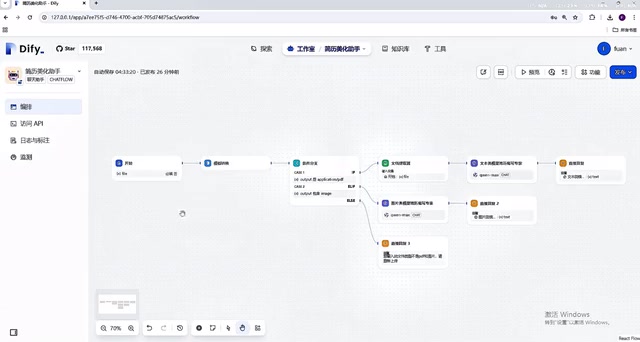
After the file is uploaded, the workflow first performs a template conversion, then enters a detection step to identify whether the uploaded file is a PDF document or an image file. This dual-entry design significantly broadens the tool's applicability, accommodating different user habits.
Conditional Branching: Intelligent File Type Detection
After the detection node, the workflow branches into three paths:
- PDF file branch: Uses a "Document Extractor" to extract file content;
- Image file branch: Leverages the LLM's multimodal capabilities to recognize content within the image;
- Other formats branch: If the file is neither an image nor a PDF, the workflow terminates directly.
This branching design reflects robustness thinking in workflow construction — it not only handles normal inputs but also provides fallback handling for edge cases, preventing invalid files from wasting computational resources. Robustness is a core design principle in software engineering, referring to a system's ability to function normally or degrade gracefully when facing abnormal inputs, boundary conditions, or unexpected situations. In the context of Dify workflows, this means not only considering the normal scenario where users upload PDFs or images as expected, but also handling cases where users upload unsupported file formats (such as .exe, .zip, etc.), preventing the workflow from crashing or producing uncontrollable outputs. This defensive design mindset is crucial in any production-grade application.
Core Processing Logic: Separate Handling for Documents and Images
Document Processing Path
When the user uploads a document, the workflow first extracts the content through a document extractor, then calls the LLM to analyze and optimize the content, pointing out shortcomings in the resume, and finally completing the resume rewrite.
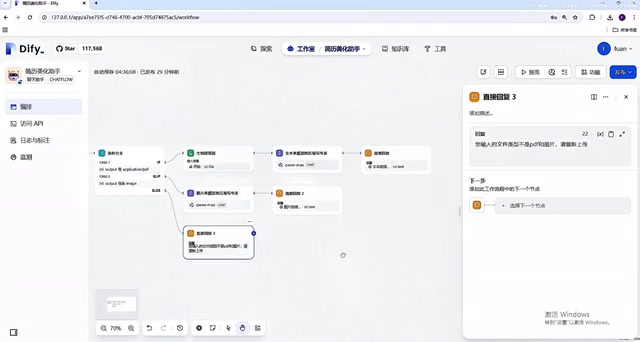
There's a design detail worth noting here: in the LLM prompt, the author uses a structured prompt approach, pre-defining all elements including the model's Role, Background, Skills, Goal, and Constraints.
Structured Prompting is an advanced practice in Prompt Engineering. Unlike casually written natural language instructions, structured prompts organize instruction content through predefined frameworks. Common frameworks include CRISPE (Capacity, Request, Insight, Statement, Personality, Experiment) and the Role-Background-Skills-Goal-Constraints model used in this article. The core value of this approach lies in reducing the randomness and uncertainty of LLM outputs, maintaining consistent output quality within specific professional domains. Research shows that well-designed structured prompts can improve LLM task completion accuracy by 30%-50%. This structured prompt design is a key technique for improving LLM output quality, making the model's responses more professional, stable, and focused.
Image Processing Path
For image-format resumes, the workflow directly leverages the LLM's multimodal recognition capabilities to read text content from the image, identify potential issues, and ultimately provide optimization suggestions. This path eliminates the need for a separate OCR extraction step, fully utilizing modern LLMs' ability to "see and understand" images.
It's worth elaborating on the difference between multimodal LLMs and traditional OCR here. Traditional image text recognition relies on OCR (Optical Character Recognition) technology, which converts text in images into editable text through image preprocessing, text detection, character segmentation, and recognition steps. Modern multimodal LLMs (such as GPT-4V, Claude 3, etc.) can directly understand image content — they can not only recognize text but also understand the layout, logical relationships, and semantic meaning of images. In a resume scenario, multimodal models can simultaneously perform both "text extraction" and "content understanding" tasks, eliminating the two-step process of traditional workflows where OCR extraction is followed by language model analysis. This significantly simplifies workflow complexity while also reducing downstream analysis bias caused by OCR recognition errors.
Real-World Test Results: From Upload to Optimization Suggestions
Now let's actually run this workflow. First, upload a pre-prepared job resume, then send an instruction to the agent. The prompt used here is: "Identify the shortcomings in the resume and fix them."
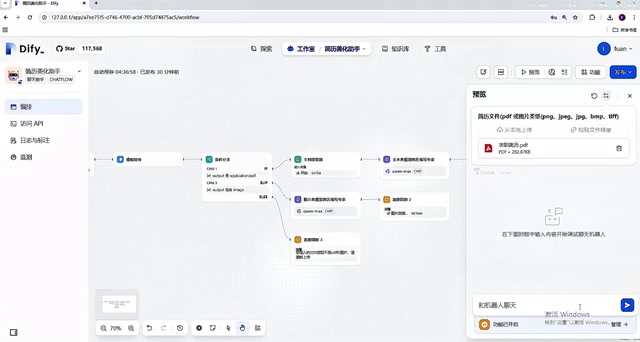
After running, the workflow first provides an overall assessment of the resume, analyzes its structure, and points out areas that have room for improvement. In the content optimization section, it uses a "before vs. after" comparison format, providing a very intuitive display of the differences before and after optimization.
Module-by-Module Granular Optimization Suggestions
The workflow's optimization output covers all core sections of a resume:
- Personal Information Optimization: Completing contact details, job objectives, and other basic information
- Education Background Optimization: Highlighting academic achievements and relevant coursework
- Professional Skills Optimization: Presenting skill stacks in layered order of importance
- Project Experience Optimization: Quantifying results and highlighting personal contributions
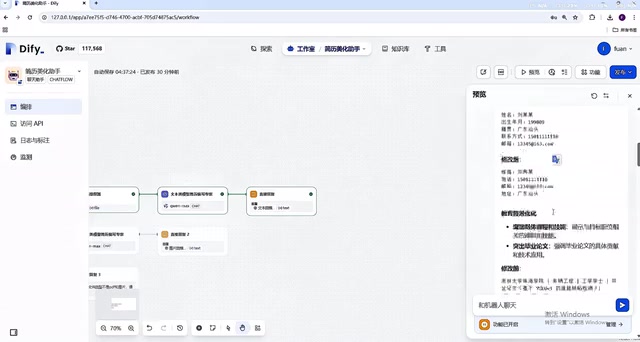
Taking project experience as an example, the model highlights quantifiable results and key points from projects — this is exactly the part of a resume that most impresses HR managers. There's a widely used framework in the recruiting field called the STAR method (Situation, Task, Action, Result). Excellent project experience descriptions should include all four elements, especially the Result portion, which should be quantified with data wherever possible (e.g., "improved page load speed by 40%" or "led a 5-person team to deliver the project"). Such expressions are far more compelling than "responsible for front-end development work." The core logic of AI optimization is precisely to help you transform vague descriptions into quantified expressions that follow the STAR method.
Similarly, internship and work experience also uses the before-and-after comparison format, letting users clearly see how they should adjust their descriptions.
Finally, the model provides a summary that clearly lists the key improvement points. With these optimization suggestions in hand, users can revise their resumes accordingly.
Summary: Design Thinking Behind the Dify Workflow and Extended Use Cases
This Dify-based resume optimization workflow may seem simple in function, but its design philosophy is well worth learning from:
- Multi-entry compatibility: Supports both document and image uploads, lowering the barrier to use;
- Conditional branch processing: Routes different file types along different paths, with fallback handling for edge cases;
- Structured prompts: Defines Role, Background, Skills, Goal, and Constraints to make LLM outputs more professional;
- Comparison-based output: Before-and-after contrasts with module-by-module optimization make everything clear at a glance.
For those looking to learn Dify workflow construction, this is an excellent introductory case study. It demonstrates how to combine "file parsing + conditional logic + LLM capabilities" into a practical application. Once you've mastered this approach, you can adapt it to many other scenarios such as contract review, document summarization, and content moderation. For example, a contract review scenario can reuse the same architecture: upload a contract file → extract clause content → LLM analyzes risk points clause by clause → output a review report. A document summarization scenario can simply replace the optimization prompt with a summary generation instruction to quickly distill key points from lengthy documents. This combination pattern of "templated workflows + scenario-specific prompts" is the essence of low-code AI application development.
It's important to note that AI-optimized resumes still require manual review and adjustment — it provides suggestions and direction, but the final expression and accuracy remain the job seeker's responsibility. AI is a tool for boosting efficiency, not a black box that replaces thinking.
Related articles

Apple Finally Launches a Touchscreen MacBook, But Touch Isn't the Point
Apple launches its first touchscreen MacBook Pro, but touch isn't the core selling point. The Vergecast digs into why Apple did it now, what macOS interaction changes were made, how touch-optimized apps actually feel, and the real challenges around pricing and the product line.

Agentic Engineering with Claude Code and Android CLI
Google's Android team shares how to do agentic engineering with Claude Code and Android CLI: build the right environment, keep context around 150K tokens, inject info precisely via hooks and skills, and use layered verification loops to raise benchmark pass rates from 22% to 90%.

XR Accessibility Design in Practice: Alchemy Labs' Rules for Inclusive Spatial Experiences
Alchemy Labs UX lead Jasmine Cano shares practical XR accessibility design lessons: strategies for four disability types, small-body mode, snap turning, environmental read-aloud, beam stabilization, and more.