Building an AI Pictionary Game in Scratch: An Image Recognition Programming Tutorial

A Scratch-based AI Pictionary game that uses multimodal models to recognize player doodles
This article introduces an AI Pictionary game built in Scratch: players freely draw on a canvas, the system captures the Stage image and sends it to a multimodal AI agent for image recognition, and the AI returns the guessed object name along with a similarity score. The project combines a pen drawing system, prompt engineering, and multimodal visual understanding — making it an excellent programming education case study that bridges low-code tools with AI capabilities.
Project Overview
Have you ever wondered if AI could guess what you're doodling? Today I'm sharing a Pictionary-style game built in Scratch that uses AI image recognition technology. Players draw simple images on the canvas (like apples, airplanes, or rabbits), and an AI agent identifies and guesses what they've drawn.
Scratch is a visual programming language and online community developed by MIT Media Lab. Since its release in 2007, it has become one of the most widely used programming education tools in the world, with over 100 million registered users. It uses block-based drag-and-drop programming, encapsulating complex code logic into intuitive colored blocks, allowing learners aged 8 and up to create interactive stories, games, and animations without memorizing syntax. Scratch's Stage is essentially a coordinate-based canvas where Sprites can move freely, and when combined with the Pen extension, it enables pixel-level drawing control. This low-barrier nature makes it an ideal platform for AI education experiments.
This project is not only fun but also helps beginners understand the basic principles of AI image recognition — making it an excellent practical case study for programming education.
Core Feature Breakdown
Pen Drawing System
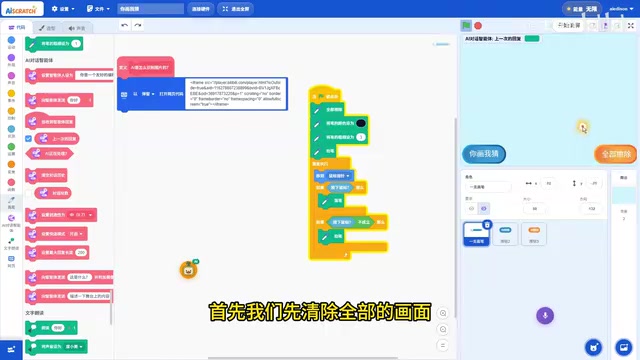
The foundation of the game is a pen drawing system, and the implementation logic is straightforward:
- Sprite setup: Create a pen sprite, hidden by default
- Mouse following: When mouse movement is detected, the pen follows the cursor to the specified position
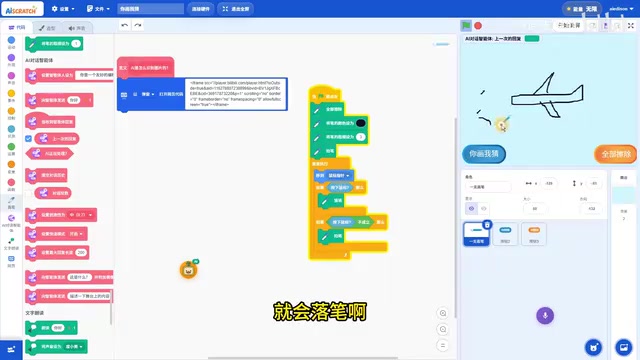
- Pen down & pen up: Pressing the mouse puts the pen down to start drawing; releasing the mouse lifts the pen to stop drawing
- Clear function: A "Clear All" button resets the canvas
With this simple logic, players can freely draw any pattern on the Scratch Stage, creating continuous strokes.
AI Image Recognition Module
This is the core component of the entire project. When the player finishes drawing and clicks the "Guess My Drawing" button, the system triggers the following workflow:
Step 1: Set the AI Agent Prompt
Prompt Engineering refers to carefully designing text instructions given to AI models to guide them toward producing results that match expected formats and quality. This technique has become a core skill in the era of large language models. An effective prompt typically contains three elements: role definition (telling the AI who it is), task description (specifying what to do), and output constraints (defining the response format). The prompt design for this project is:
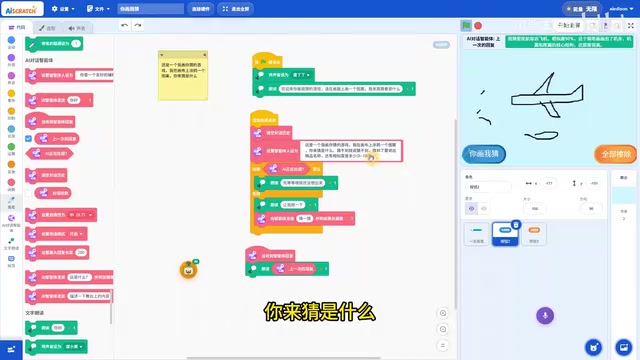
This is a Pictionary game. I'm doodling a pattern on the canvas, and you need to guess what it is. If you can't guess it, say you can't guess it. If you can, name the object and give a similarity score from 0 to 100.
The phrase "If you can't guess it, say you can't guess it. If you can, name the object and give a similarity score from 0 to 100" is a textbook example of output constraint design — it prevents the AI from over-elaborating while adding gameplay feedback through a quantified similarity score. It clearly defines the AI's role and output format, serving as a concise application of prompt engineering in an educational game context.
Step 2: Capture the Stage Image and Send It to the AI
The system checks whether the AI is currently processing:
- If processing, it reads aloud "Hold on" to prompt the user to wait
- If idle, it sends a "Take a guess" command to the agent, along with a screenshot of the Stage
The key technical point here is that Scratch can capture the entire Stage content as an image and send it to the AI agent for visual analysis. The AI receiving the screenshot is a Multimodal Large Language Model (MLLM) — a type of model capable of simultaneously processing multiple data types such as text and images. Modern multimodal models represented by GPT-4V, Claude 3, and Gemini use a Vision Encoder to convert images into high-dimensional vector representations, which are then fused with the language model's text comprehension capabilities to achieve "visual understanding" abilities.

Step 3: Receive and Read Aloud the Recognition Result
When the AI agent returns the recognition result, the system reads the response aloud via text-to-speech, telling the player the object name the AI guessed and its similarity score.
Technical Analysis
Why This Scratch AI Project Is Worth Learning
- Low barrier, high engagement: Scratch's visual programming lowers the implementation threshold, making it understandable and reproducible even for programming beginners
- Multimodal AI application: The project demonstrates the combination of AI visual recognition (image understanding) and natural language generation
- Prompt engineering practice: Through carefully designed prompts, it controls the AI's output format and behavioral boundaries
The AI Image Recognition Principles Behind It
This project essentially leverages the image understanding capabilities of multimodal large models. The workflow of modern image recognition models can be divided into two stages: feature extraction and semantic matching. During feature extraction, the model uses architectures such as Convolutional Neural Networks (CNN) or Vision Transformers (ViT) to convert raw pixels into abstract feature vectors containing information about edges, textures, shapes, and more. During semantic matching, these visual features are compared against millions of concepts learned during pre-training, ultimately outputting the category label with the highest confidence.
When a Stage screenshot is sent to the AI, the model:
- Performs feature extraction on the image, identifying the shapes and structures of the strokes
- Matches visual features against known object concepts
- Provides a guess and confidence level based on the degree of match
It's worth noting that for highly abstract images like simple sketches, the model relies not on pixel-level details but on a holistic understanding of shape outlines, topological structures, and semantic concepts — which closely mirrors how humans recognize simple drawings. Google's Quick, Draw! dataset released in 2016 contains over 50 million doodle samples, and training on this kind of large-scale data has made modern multimodal models quite proficient at recognizing abstract hand-drawn patterns — forming an important foundation for this project to run smoothly.
Extension Ideas: Making the Game More Fun
If you want to further enhance this Scratch AI Pictionary project, consider the following directions:
- Add a topic system: Randomly assign drawing themes to increase game challenge
- Scoring mechanism: Score based on the AI's similarity rating
- Multi-round interaction: When the AI can't guess, it can prompt "Draw more details" to support multi-turn dialogue
- Difficulty levels: Gradually progress from simple objects (circles, triangles) to complex scenes
Conclusion
This Scratch version of Pictionary cleverly integrates AI image recognition capabilities into an engaging game. The overall code logic is clear, requiring only two core modules: pen control and AI agent invocation. Behind it lies a fusion of multimodal large model visual understanding technology, prompt engineering output control principles, and Scratch's democratized approach to programming education. The combination of these three elements means that what appears to be a simple little game actually carries remarkably rich AI application knowledge. For learners looking to get started with AI application development, this is an excellent beginner project — it proves that even with a simple tool like Scratch, you can build surprisingly impressive AI interactive experiences.
Related articles
 Tutorials
ChatGPT Plus Subscription Guide: Are GPT-5.5, image-2, and Codex Worth the Upgrade?
A detailed look at ChatGPT Plus features — GPT-5.5, image-2, and Codex — with a Plus vs Pro comparison and a complete step-by-step subscription guide for users outside the US.
 Tutorials
Harness AI Engineering in Practice: Using Claude Code to Master Enterprise-Level E-Commerce Development
Deep dive into Harness AI Engineering: master enterprise e-commerce development with Claude Code using the Rules, Skills, Wiki, and Changes framework.
 Tutorials
Cursor + Codex Dual-IDE Collaboration: A Practical Methodology for Open-Source Project Customization
A complete methodology for open-source project customization based on real-world experience, detailing the Cursor+Codex dual-IDE workflow, seven-stage process, MVP validation, and AI source code reading techniques.