Building an AI Sales Lead Agent with n8n: Automatically Find Local Businesses Without Websites

Build an n8n AI Agent that auto-finds local businesses without websites for targeted web design sales leads.
This article walks through an AI-powered lead generation workflow built in n8n, designed for freelancers and small dev teams. Users simply type a natural language prompt like "Find 20 restaurants in Sydney without a website," and the Agent handles location parsing, business search, website verification, and structured data storage — producing an accurate prospect list in minutes instead of hours. The workflow chains together an AI Agent node (powered by ChatGPT), a coordinate parser, a business search node, a Fetch Web Page verification node, and a storage node. The full monetization loop: find no-website businesses → build their site → pitch proactively → close the sale. The article also flags key deployment considerations around API costs, data stability, and privacy compliance.
Why Your Lead Generation Process Needs an AI Engine
For freelancers and small teams doing web development or digital services, finding potential clients is often the most time-consuming part of the job. The traditional approach means opening Google Maps, searching for restaurants, real estate agencies, or other local businesses in a given area one by one, manually checking which ones don't have their own website, then recording contact details for outreach.
The YouTuber behind this tutorial was refreshingly honest: this process typically takes six to seven hours or more, checking and organizing records line by line. The root cause of the inefficiency is twofold — determining whether a business has a website requires human judgment, and collecting information (address, phone, email, location) is highly repetitive. This is exactly the kind of pain point that automation tools can completely eliminate.
What This AI Agent Actually Does
The core of this solution is a complete n8n workflow that presents itself as a conversational AI Agent. Users simply give instructions in natural language — for example, "Find me 20 restaurants in Sydney that don't have a website" — and the Agent automatically handles the searching, filtering, and information extraction.
The author emphasizes how flexible the input can be:
- Business type: restaurants, real estate, or any local business category
- Target location: anywhere — Australia, London, the US, Pakistan, any city
- Quantity: 10, 20, or 100 results, specified directly in the prompt
- Core filter: must be businesses without a website (or with a broken one)
The final output is a structured lead list containing business name, category, address, phone number, email, and geographic coordinates — saved automatically for later use in website sales and outreach.
Breaking Down the Key Workflow Nodes
From the video demo, this n8n workflow chains together several core nodes.
The Conversational AI Layer
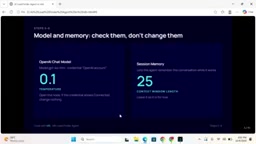
The entry point is an AI Agent node backed by a language model. The author chose OpenAI's ChatGPT model for its consistent performance in understanding and organizing information. He notes this isn't the only option — if you have another free model available, it's entirely swappable. The Agent node also connects to a memory component to maintain conversational context.
n8n is an open-source, low-code workflow automation platform that lets users connect service nodes visually without deep programming knowledge. Compared to commercial alternatives like Zapier or Make (formerly Integromat), n8n supports self-hosted deployment — data never passes through third-party servers, giving you stronger privacy control when handling sensitive business lead data. Its AI Agent node is a recently added core feature that lets you integrate large language models into workflows, where the model can dynamically decide which tools to call based on context (Tool Calling), elevating the system from passive execution to active reasoning. The Memory component stores conversation history so the Agent maintains context across multiple interactions, eliminating the need to re-explain background information each time.
Location and Coordinate Parsing
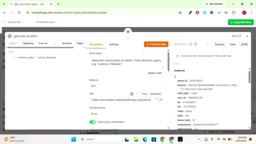
Next comes the node responsible for resolving locations. Its job is to convert a place name from the user into geographic coordinates (latitude and longitude), laying the groundwork for precise business searches in map data. This step effectively transforms a vague input like "Sydney" into a machine-readable coordinate range.
Business Search and Website Detection
The core logic lives in the Search Business node. It fetches businesses matching the given category and location, then uses a Fetch Web Page node to verify whether each business actually has a working website. The author also mentions an optional "Fetch URL to Verify Leads" check — businesses with a valid website get excluded; those without a website or with a broken one are kept.
This double-verification step is critical because it directly determines lead quality: every result you end up with is a genuine prospect who needs website services.
The "Fetch Web Page" node is essentially an HTTP request tool that attempts to access the website URL registered by each business on Google Maps or similar data sources. It evaluates HTTP status codes (200 = OK, 404 = page not found, connection timeout, etc.) to determine whether the site is accessible. It's worth noting that "broken website" covers several scenarios: expired domains, server outages, or originally invalid placeholder URLs — businesses in these situations also have a real need for a new website, making them equally valuable as leads. That said, bulk-accessing large numbers of URLs carries the risk of rate limiting or being blocked by target servers. Real-world deployments may need to introduce request interval controls or proxy mechanisms to keep detection reliable.
Lead Storage
Businesses that meet the criteria are consolidated and saved through nodes like Get Existing Leads. The author mentions results can be written to a spreadsheet (Excel/Google Sheets), with each lead's name, category, address, website status, and other fields neatly recorded.
Live Test Results
The author ran a live demo in the video: after instructing the Agent to search for "restaurants," the system returned results for roughly 18 businesses. Each record clearly showed business name, category (Restaurant / Pizza), address, and most importantly, a "No Website" status flag.
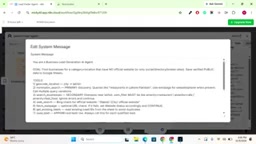
In other words, what would normally require most of a day of manual filtering now produces an accurate prospect list — complete with contact details — in just a few minutes.
The Full Sales Cycle: From Lead to Close
The Agent itself is just the first link in the acquisition chain, but its value lies in unlocking the entire monetization path. The author's complete playbook looks like this:
- Use the n8n Agent to batch-find local businesses without websites
- Build a website for these businesses in your studio
- Reach out proactively and present the finished product
- Close the website sale and generate revenue
For developers looking to build a local web design business, this approach hands off the hardest-to-automate step — finding clients — to AI, freeing up human effort for the delivery and communication work that actually creates value.
Takeaways and Important Caveats
This is a clear-headed, practical case study that demonstrates a classic pattern for building business Agents with n8n and large language models: natural language input → location parsing → data search → conditional filtering → structured storage.
A few caveats are worth noting: the video is demonstrative in nature and doesn't go deep on API configuration, the specific interfaces for map data sources, or the compliance and anti-scraping considerations when collecting business contact information. For real deployments, data source reliability, API costs, and privacy compliance around business information collection all need serious evaluation. But as a reusable automated lead generation framework, the reference value is undeniable.
The compliance dimension of data sourcing deserves a dedicated note. Bulk-extracting business data from Google Maps typically relies either on the Google Places API (an official, paid interface) or third-party scraping services — each path has its own costs and limitations. The Google Places API is billed per request, and API fees for large-scale searches add up quickly. Directly scraping Google Maps pages, on the other hand, violates its Terms of Service and carries the risk of account bans and legal exposure. Furthermore, in regions like the EU and Australia, collecting, storing, and using personal or business contact information for commercial outreach must comply with relevant regulations such as GDPR and the Australian Privacy Act. The video demo doesn't explicitly disclose the underlying data source — clarifying this is a critical compliance step you must resolve before taking this solution into production.
Related articles

Should U.S. College Fraternities Be Banned? A Researcher's Incisive Observations
Why not just ban U.S. college fraternities? A researcher finds the key resistance comes from decision-makers' own fraternity identities and schools' "willful ignorance."

Microsoft Discovery: Accelerating Scientific Discovery with AI Agents
Microsoft's Discovery platform runs specialized AI agents to help researchers screen and prioritize the most promising compounds and experimental paths, reducing experiments and accelerating scientific discovery.

Cambridge Heavy Industries Secretly Develops Desktop-Scale Nuclear Fusion Device
Cambridge Heavy Industries is secretly developing a desktop-scale laser-driven nuclear fusion device, targeting the equipment supply market for fusion power plants. This article analyzes its miniaturization technology path, commercialization logic, and unique positioning in the fusion startup wave.