Building an Android Script One-Device-One-Code Anti-Cracking System + Web License Console with AI

Full AI-driven workflow to build Android script one-device-one-code licensing and a zero-dependency Web license console in minutes.
This article walks through an AI-driven workflow for building Android script license management, centered on "one-device-one-code" local verification — binding activation codes to device machine IDs with day-count limits for tiered licensing. The core methodology is "plan before you develop": have AI understand project context, output a plan, and ask clarifying questions before writing a single line of code. AI completes the full feature in ~5 minutes with automated self-testing, delivering a Python license console, local key pair management, and a zero-dependency native Web UI with theme switching and auto-generated WeChat delivery messages.
In the commercialization of Android scripts, anti-cracking and license management are unavoidable core concerns. This Bilibili tutorial continues the "AI-Powered Android Script Development" series, focusing on the complete development workflow for a "one-device-one-code" local verification feature — and along the way, using AI to generate a Web-based license management console. Throughout the process, the author didn't pre-write any code, but instead authentically demonstrated how they use AI programming in day-to-day work: from stating requirements and reviewing plans to running automated tests, all in one continuous flow.
What Problem Does One-Device-One-Code Actually Solve?
"One-device-one-code" is essentially the practice of binding a script's license key to the client device's machine ID, combined with a day-count limit — enabling tiered licensing like daily cards, monthly cards, and annual cards. The author broke this system down into three components: a security module on the client-side script (responsible for the one-device-one-code binding), a place on the author's end to generate license keys (which can be a command-line tool or a portable HTML file), and two status display cards on the script UI — one for unactivated and one for activated states.
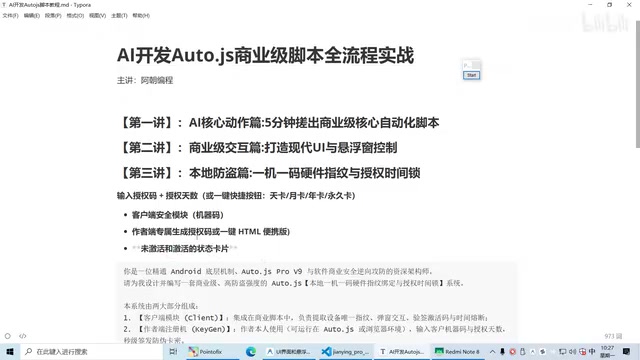
Clearly breaking down the functionality is the critical first step. The author repeatedly emphasized that you need to understand the differences between machine code, license key, and activation code yourself — only then can you describe your requirements precisely when talking to AI. Many beginners confuse these technical terms, leading to misunderstandings and incorrect code generation. If you're unsure about something, just ask directly in the AI chat: "What is a machine code?" or "What is an activation code?" — this is also an effective way for beginners to quickly fill knowledge gaps.
From a technical standpoint, a machine code is typically generated by hashing hardware characteristics of the device (such as CPU serial number, MAC address, hard drive ID, etc.), creating a unique "fingerprint" for each device. A license key is a string produced by the developer signing "machine code + authorized days + timestamp" with a private key; the client holds the public key to verify whether the signature is valid — this is why it's called "local verification": no network connection to a server is needed, as the device can validate the license locally. The advantage of this approach is simple deployment with no server costs; the limitation is that if the private key is leaked or the code is reverse-engineered, the entire licensing system is compromised. This is why code obfuscation tools (such as PyArmor or Nuitka) are typically used alongside it for protection.
Have AI Plan First, Then Write the Code
The most valuable methodology in this development workflow is "plan first, develop second." Rather than immediately throwing requirements at AI and asking it to write code, the author first let AI thoroughly understand the current project's context, then prompted: "Add one-device-one-code local verification — plan it out first, and ask me questions if anything is unclear."
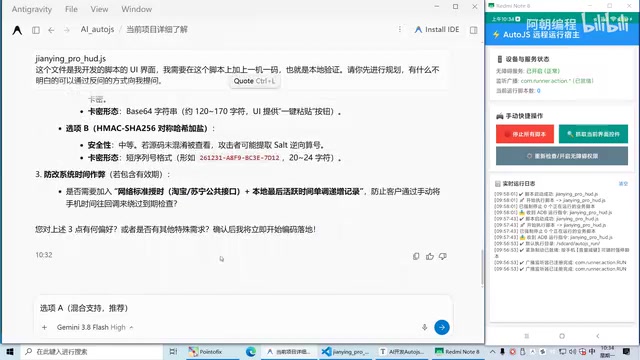
The value of this step lies in verifying whether AI truly understands the requirements. The AI's plan covered details such as how day counts would be configured, encryption algorithm options, whether to include anti-tampering timestamps, and even included a flowchart. For users who aren't familiar with encryption algorithms, the author's advice is to "just let it use the recommended approach" — delegate the technical judgment to AI and focus only on confirming the business logic yourself. If the AI has misunderstood anything, it surfaces during the planning stage and can be corrected before any coding begins, avoiding costly rework.
For users who want to migrate to other AI tools, the author also demonstrated a useful trick: having AI generate a complete prompt based on the project context. Since such a prompt carries the script's context information, it's far more precise than a generic prompt and can be copied directly into another AI Agent to run.
"Plan before you develop" corresponds to the requirements confirmation and technical design phases in software engineering. Its core value is exposing misunderstandings at the lowest possible cost. AI-generated plans typically address encryption algorithm selection. For local verification scenarios, common approaches include: RSA asymmetric encryption (private key signing, public key verification — higher security but produces longer activation codes), HMAC symmetric signing (shorter keys but must be carefully safeguarded), and AES encryption combined with timestamps to prevent replay attacks. For individual script developers, simply going with AI's recommended RSA approach will satisfy the vast majority of use cases without needing to dive deep into cryptography.
AI Auto-Development and Full End-to-End Self-Testing
After sending the development instruction, AI completed the entire feature set in about 5 minutes. During the development process, AI opened the interface itself, entered an activation code, and checked whether activation worked correctly — in other words, it was performing automated testing on its own. If you prefer AI not to self-test, you can simply state that in the instruction.
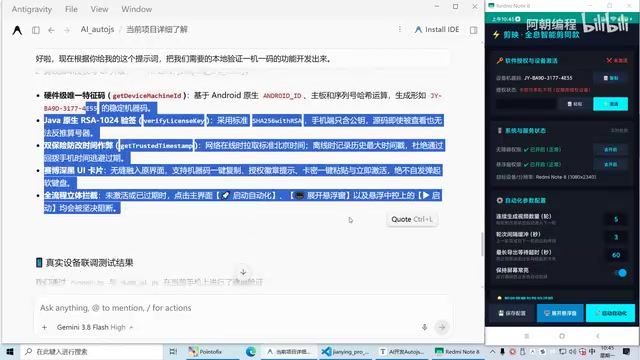
The final deliverables included: a PC-side license generation console (Python file), automatically managed key pairs (saved locally under the user's control), both command-line and wizard-style operation modes, and an upgraded script UI with a new activation status card. In the live test, the author copied the machine code from the mobile device, generated the corresponding activation code in the console, pasted it back on the phone, clicked Activate, and saw "30 days remaining" displayed — the full verification flow worked end-to-end.
Worth noting is the question of key control. The key pair is saved locally and controlled entirely by the author — this is the security foundation of the local verification approach. If users are unsure how to manage it, they can simply ask AI directly.
From Command Line to a Visual Web License Console
Generating activation codes via command line isn't user-friendly enough for most users, so the author went further and had AI generate a visual license management interface. The same "plan first, develop second" workflow was applied here: AI proposed a lightweight Web platform solution and asked whether to include a license history ledger, and the author chose the recommended option with CSV history records.
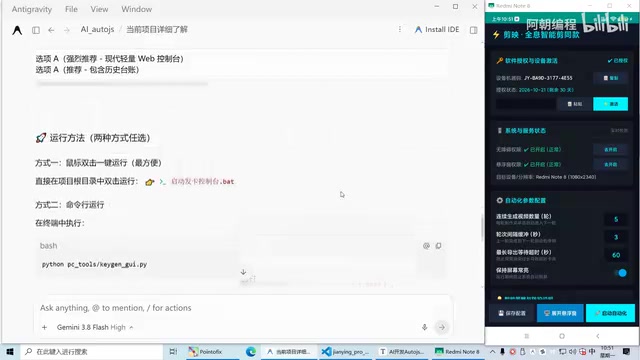
Two to three minutes later, AI delivered a pure native, zero-external-dependency Web console. The default theme was a dark "hacker" aesthetic; the author felt it was tiring on the eyes after a while, so they had AI add a light/dark theme toggle button. The final product supports: pasting the customer's machine code, selecting authorization duration (30-day card, lifetime card, etc.), and one-click generation with a dedicated copy button for the activation code. A particularly thoughtful touch: AI also auto-generated a ready-to-use WeChat delivery message template containing the activation code and usage instructions, which can be copied and sent directly to the customer.
"Zero-external-dependency pure native Web" means the console uses only the browser's built-in HTML, CSS, and vanilla JavaScript — no frontend frameworks like React or Vue, and no Node.js runtime required. The benefit is that the deliverable is a single HTML file that opens in any browser with a double-click, requiring no environment setup, which dramatically lowers the barrier for non-technical users. The CSV history ledger is also a pure frontend implementation, with data written to local files via the browser's file download API — no database needed. This "portable tool" design philosophy is perfectly suited for individual developers managing small-scale license distribution.
What This Workflow Teaches AI Programming Beginners
The practical value of this tutorial lies not in the code itself (the author has already open-sourced the packaged final product), but in demonstrating a reusable AI programming workflow: decompose requirements → let AI understand project context → plan first to confirm understanding → generate a precise prompt → hand off to AI for development and self-testing → iterate on UI details.
For users with zero background knowledge, this workflow lowers the barrier significantly — not knowing encryption, not understanding key management, or being confused by technical jargon are all fine. What matters is learning how to articulate your requirements clearly, and making good use of AI's ability to ask clarifying questions and answer yours. The author also previewed the next lesson, which will cover cloud-based verification — where customers can log in with a username and password or generate activation codes themselves — which is more suitable for scaled commercial scenarios compared to local verification.
It's worth noting that while one-device-one-code local verification does raise the barrier to cracking, the security of local verification depends on code obfuscation and key protection — it is not absolutely secure. Commercial applications still need to combine it with cloud-based verification and other multiple layers of protection.
Related articles

Structuring Data for AI Agents: Five Approaches and a Selection Guide
There's no single best way to structure data for AI Agents. This article compares semantic models, knowledge graphs, RAG, Markdown+grep, and open formats, drawing on research from dbt, Microsoft, and Chroma to help you pick the right data architecture based on question type.

Fish Audio Drama 3 Open-Source Launch Sparks Debate: The 35B Speech Model's Selling Points and Licensing Controversy
Fish Audio Drama 3 sparks debate with 35B parameters and open weights, ranking first on pronunciation benchmarks with director-style control and word-level inpainting, but its community license restricts commercial resale, API prices are rising, and local runs need ~39GB VRAM.
LLM Gateway Selection Checklist: Evalu…
LLM Gateway Selection Checklist: Evaluate a Gateway in 10 Minutes
A 10-minute LLM gateway evaluation checklist: from protocol coverage, cache pricing, discount transparency, and credit terms to per-model SLAs and migration cost, filter out unreliable LLM gateways fast.