Building an APP with AI from Scratch: A Practical Guide to Milestone Reviews and Iterative Development

A practical guide for non-programmers to build apps using AI tools with milestone reviews and iterative development.
This article shares practical experience from a zero-experience developer building an APP with AI coding tools. It covers the necessity of milestone reviews (solving AI context forgetting and project retrospectives), DeepSeek API environment configuration, small-step MVP iteration strategy, positive feedback techniques for improving AI collaboration efficiency, and the implementation and testing of an AI daily summary feature.
Introduction
For ordinary people without a programming background, developing a mobile APP used to be a distant dream. But with the maturity of AI coding tools, this barrier is being dramatically lowered. Based on the seventh episode of a zero-to-one APP development tutorial series, this article shares practical experience on how to use AI tools for milestone project reviews, bug fixing, and feature iteration.
Why AI-Assisted Development Requires Milestone Reviews
In AI-assisted development, conducting regular milestone reviews is a critical practice. This isn't simply "checking where we are" — it serves two core purposes:
First, it helps the AI tool understand the project's current status. AI tools may "forget" earlier context during long conversations. A review helps realign the AI with the current state.
This "forgetting" phenomenon is fundamentally caused by the Context Window limitation of large language models. Every AI model has an upper limit on how much text it can process simultaneously — for example, GPT-4's context window is approximately 128K tokens, while the Claude series can handle up to 200K tokens. When conversation content exceeds this window, earlier information gets truncated and the AI can no longer "see" previous content. Therefore, conducting regular milestone reviews is essentially manually compressing and re-injecting critical context, ensuring the AI always works from the correct information base rather than giving biased suggestions in an "amnesiac" state.
Second, it serves as a project retrospective. During the review process, the AI will proactively identify existing issues in the project and generate a task list for next steps.
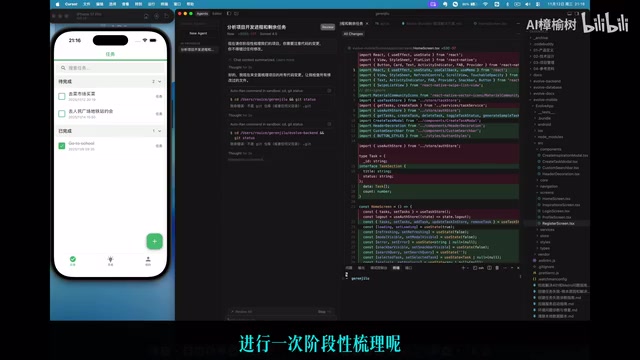
After the review, the AI tool outputs three sections: completed achievements, current issues, and the next-step task list. This structured output allows developers — even those without a technical background — to clearly understand the full project picture.
Bug Fixing and DeepSeek API Environment Configuration
After the review is complete, the highest priority task is having the AI perform systematic bug fixing. In this project, the developer communicated all discovered issues to the AI at once and supplemented it with critical environment information — the DeepSeekAd API Key had already been added to the environment variables, meaning AI functionality could officially enter the development phase.
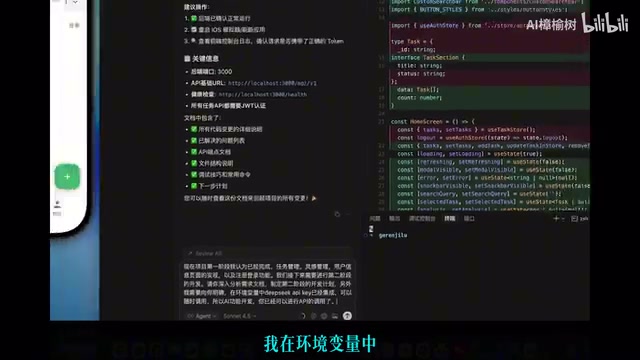
DeepSeek is a domestic large language model developed by DeepSeek (the company). Its API interface follows a standard format compatible with OpenAI, allowing developers to invoke model capabilities through HTTP requests. An API Key (Application Programming Interface Key) is the identity credential for accessing these services. It's typically stored as an environment variable in the development environment rather than hardcoded in the source code — this is a security best practice. Once the API Key is configured in environment variables, the application can dynamically read it at runtime, which both protects the key's security and facilitates flexible configuration switching between development, testing, and production environments, avoiding the security risk of key leakage.
Essential Interaction Tips for Zero-Experience Developers
When you don't know what to do next, always remember to proactively ask the AI. Let it tell you what work should come next. This is the most commonly overlooked point for beginners — many people get stuck in a "don't know what to ask" state, but simply asking "What should I do next?" is actually the best approach.
The Small-Step Iterative Development Strategy
The AI's development recommendation is to adopt a "small steps, fast pace" approach: first implement the Minimum Viable Product (MVP), then continuously iterate and optimize.
MVP (Minimum Viable Product) is a core concept from the Lean Startup methodology, systematically articulated by Eric Ries in The Lean Startup. The core idea is: use minimal resources to build a product version that can validate core hypotheses, quickly push it to users to gather feedback, then iterate based on that feedback. This aligns closely with Agile Development's philosophy of "short iteration cycles and continuous delivery." In AI-assisted development scenarios, the MVP strategy is particularly suitable — AI can rapidly generate foundational code, and developers don't need to wait for a "perfect version." Get the core flow working first, then gradually polish the details, dramatically reducing the cost of trial and error. This is why AI naturally applies this mature software engineering concept to project progression.
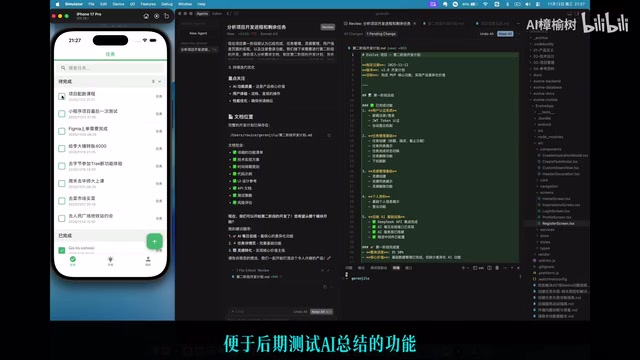
Positive Feedback Mechanism to Boost AI Collaboration Efficiency
A very practical tip: when the AI's suggestions are genuinely viable, give it some positive feedback. For example, tell it "This plan is great, please proceed." This positive feedback has been proven effective in practice — it helps the AI maintain better directional awareness in subsequent suggestions.
After confirming the plan, the AI will create a detailed task list and begin execution. At this stage, the developer simply needs to keep clicking "Run" and let the AI complete the code writing step by step.
AI Feature Implementation and Testing
During the waiting time while the AI executes tasks, developers can simultaneously test existing features and discover as many potential issues as possible. This is an efficient use of time.
The core feature implemented in this episode is "AI Daily Summary" — calling DeepSeek's API to intelligently summarize tasks created by the user.
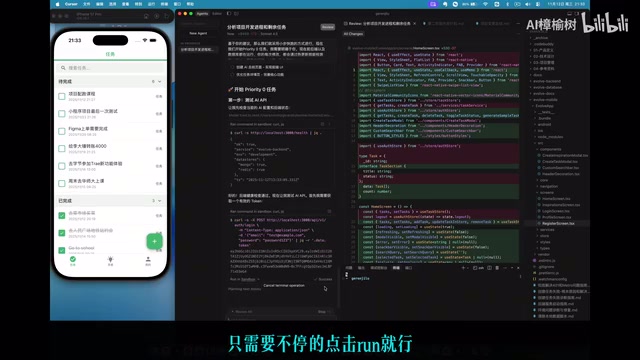
Test results show that the AI summary feature can output results normally, and the history saving function has also been implemented. Of course, the current summary quality is still quite basic, and later optimization through refining the Prompt will be needed to improve output quality.
Prompt Engineering refers to carefully designing the instructional text given to AI to guide the model toward producing results that better match expectations. It has developed into an independent discipline within AI application development. A high-quality Prompt typically includes: a clear role definition (e.g., "You are a professional task management consultant"), specific output format requirements, examples (few-shot learning), and necessary constraints. In features like "AI Daily Summary," the quality of the Prompt directly determines the depth, style, and usefulness of the summary. The industry widely endorses the approach of "get the flow working first, then optimize the Prompt."
Related articles
 Tutorials
ChatGPT Plus Subscription Guide: Are GPT-5.5, image-2, and Codex Worth the Upgrade?
A detailed look at ChatGPT Plus features — GPT-5.5, image-2, and Codex — with a Plus vs Pro comparison and a complete step-by-step subscription guide for users outside the US.
 Tutorials
Harness AI Engineering in Practice: Using Claude Code to Master Enterprise-Level E-Commerce Development
Deep dive into Harness AI Engineering: master enterprise e-commerce development with Claude Code using the Rules, Skills, Wiki, and Changes framework.
 Tutorials
Cursor + Codex Dual-IDE Collaboration: A Practical Methodology for Open-Source Project Customization
A complete methodology for open-source project customization based on real-world experience, detailing the Cursor+Codex dual-IDE workflow, seven-stage process, MVP validation, and AI source code reading techniques.