Building an iOS App from Scratch with AI: A Complete CodeBuddy Walkthrough

A hands-on tutorial for building a full iOS Todo app with Tencent CodeBuddy + CloudBase using only natural language.
This article details how to use Tencent's AI coding assistant CodeBuddy combined with CloudBase to develop an iOS Todo app called "Three Frogs" entirely through natural language descriptions. It covers tool preparation (Xcode, CodeBuddy, CloudBase), the frontend development workflow (project initialization, natural language requirement descriptions, iterative debugging), and version management, demonstrating how AI programming enables anyone to build full-stack applications without coding experience.
Introduction: The Era of Natural Language Development Is Here
Can you imagine developing a complete iOS application with a frontend interface, backend services, and a database — without writing a single line of code, purely through natural language conversation? This is no longer science fiction; it's the reality that today's AI programming tools have made possible.
This article provides a detailed breakdown of how to use Tencent CodeBuddy + CloudBase to develop a Todo app called "Three Frogs" from scratch. The "Three Frogs" theory originates from a classic time management concept, systematically articulated by American author Brian Tracy in his book Eat That Frog!. The core idea is: each day, prioritize completing the three most important and difficult tasks (i.e., "eating the frogs") rather than getting lost in a sea of trivial tasks. Hard-limiting tasks to three is essentially a "forced scarcity" cognitive design that compels users to make the most important decision at the point of entry: what truly deserves to be done today. This theory complements mainstream productivity methodologies like GTD (Getting Things Done) and is perfectly suited for conversion into a product prototype.
This app supports phone number login, cloud data synchronization, and even Apple's latest Liquid Glass visual effects.
Three Essential Tools to Prepare
The entire development workflow relies on three core tools:
- Xcode: The essential IDE for Apple ecosystem development, used for project creation, debugging, and simulator testing
- CodeBuddy: Tencent's AI programming assistant, responsible for code generation and modification (similar tools include Cursor, GitHub Copilot, etc.)
- CloudBase (Tencent Cloud Development): Provides backend services, including user authentication and database
CodeBuddy and CloudBase both belong to the Tencent ecosystem, making API integration very convenient. Tencent CloudBase is architecturally very similar to Google Firebase — both are BaaS (Backend as a Service) platforms offering identity authentication, real-time databases, cloud functions, file storage, and other one-stop backend capabilities, with the goal of enabling frontend developers to build full-stack applications without managing infrastructure. The key differences are: at the network level, Firebase is unstable or even blocked in mainland China, while CloudBase is deployed on domestic nodes with lower latency and regulatory compliance; for authentication, CloudBase natively supports WeChat login, phone number SMS verification, and other mainstream Chinese authentication methods; in terms of billing, CloudBase offers free tiers for new users, and its pay-as-you-go pricing better suits the cost expectations of small and medium Chinese developers. For iOS apps targeting Chinese users, CloudBase has structural advantages in compliance (local data storage) and user experience (domestic phone number login), with a lower barrier to entry than overseas solutions like Firebase.
Frontend Development: From Project Creation to Interface Completion
Xcode Project Initialization
Create a new project in Xcode, select the App template, and fill in the product name (e.g., 3Frogs). Key points to note:
- The Team option requires an Apple Developer account registration (publishing apps costs $99/year)
- Organization Identifier uses reverse domain format (e.g., fan.jbzy)
Describing Requirements in Natural Language
Open the Xcode project folder in CodeBuddy, then describe your requirements in natural language:
I want to create a Todo app based on the Three Frogs theory. Users can only input three todos per day. Each todo has a frog emoji in front. Completed items show a strikethrough with a semi-transparent gray effect. Include a calendar view to check daily completion status.
The Liquid Glass effect mentioned here deserves special explanation. Liquid Glass is a brand-new design language released by Apple at WWDC 2025 alongside iOS 26/macOS 26, representing the largest visual system overhaul since the iOS 7 flat design revolution. At its core is a glass material rendering system based on real-time refraction, transmission, and specular highlight simulation, using Metal shaders to apply dynamic blur, color refraction, and edge highlights to background content, creating a physical texture resembling real glass. Unlike the previous frosted glass (Frosted Glass/UIBlurEffect), Liquid Glass introduces a liquid fluidity and stronger refractive distortion. SwiftUI provides a native .glassEffect() modifier in the iOS 26 SDK, allowing developers to apply this effect without manually writing shaders — this is the technical prerequisite that enables AI to quickly generate the relevant code.
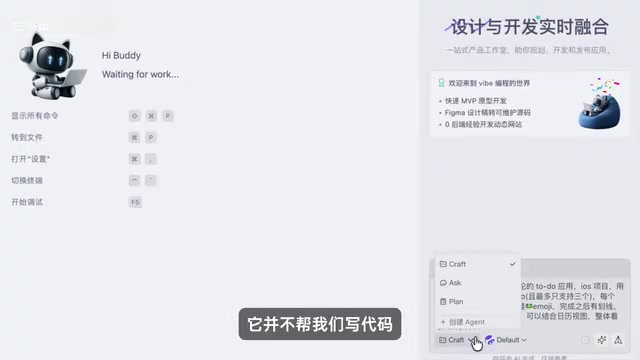
CodeBuddy offers three working modes:
- Craft (default): Directly generates code
- Ask: Q&A mode, only answers without writing code
- Plan: Deep planning mode, understands requirements first before taking action
For first-time development, the Plan mode is recommended. The AI will proactively ask questions to understand requirement details, formulate a complete development plan, and then execute step by step.
The Core Iteration and Debugging Loop
The development workflow for zero-experience AI programming forms a clear closed loop:
- Describe requirements in natural language in CodeBuddy
- AI automatically generates Swift code
- Run and test in the Xcode simulator
- When issues are found, return to CodeBuddy to describe the bug and fix it
After the first version is generated, the app already displays a complete interface with Liquid Glass effects. Issues discovered during testing — such as missing swipe-to-delete functionality or unlinked calendar data — can all be fixed by continuing to describe them to the AI in natural language.
Version Management: Git and GitHub
Why Version Management Is Necessary
Once the frontend is basically complete, version management is essential. Just like OneDrive automatically saves file version history, Git allows you to roll back to any point at any time, avoiding the risk of AI modifications "breaking things" with no way to recover.
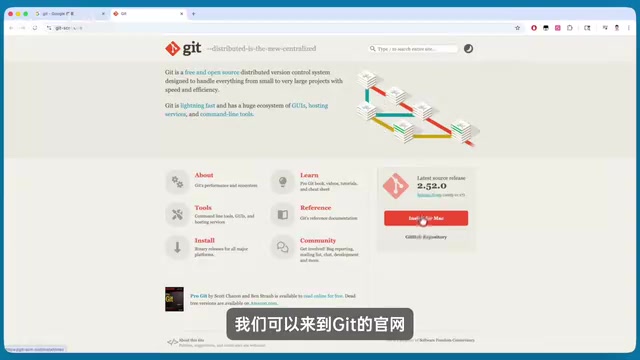
For installing Git, Homebrew is recommended: first install Homebrew, then install Git via command line. With AI assistance, you don't need to memorize complex Git commands at all — simply tell CodeBuddy "initialize a Git project for me" or "commit the current version for me"
Related articles
 Tutorials
ChatGPT Plus Subscription Guide: Are GPT-5.5, image-2, and Codex Worth the Upgrade?
A detailed look at ChatGPT Plus features — GPT-5.5, image-2, and Codex — with a Plus vs Pro comparison and a complete step-by-step subscription guide for users outside the US.
 Tutorials
Harness AI Engineering in Practice: Using Claude Code to Master Enterprise-Level E-Commerce Development
Deep dive into Harness AI Engineering: master enterprise e-commerce development with Claude Code using the Rules, Skills, Wiki, and Changes framework.
 Tutorials
Cursor + Codex Dual-IDE Collaboration: A Practical Methodology for Open-Source Project Customization
A complete methodology for open-source project customization based on real-world experience, detailing the Cursor+Codex dual-IDE workflow, seven-stage process, MVP validation, and AI source code reading techniques.