Building an MCP Server from Scratch: A Hands-On Tutorial for Claude Tool Calling

Build an MCP server from scratch with a calculator tool, covering schemas, error handling, and agentic loops.
This article uses Anthropic's MCP (Model Context Protocol) as a backdrop to walk through building a custom MCP Server with a calculator tool. It clarifies the Host/Client/Server architecture and the Tools/Resources/Prompts primitives, then breaks down four key development steps: defining the tool interface with JSON Schema (including enum constraints), implementing business logic with divide-by-zero error handling, building an agentic dispatch loop for multi-turn tool calls, and validating the full pipeline with three test scenarios. The core takeaway: Schema description quality drives model call accuracy, and the agentic loop is the universal skeleton for complex reasoning.
What Is MCP: Anthropic's Open Standard
MCP (Model Context Protocol) is an open standard released by Anthropic that enables large language models to establish standardized connections with external tools and data sources. Its core value lies in upgrading models like Claude from "text generators" to intelligent agents capable of "calling real functions and getting real results."
The protocol is built on three layers:
- MCP Host: The application users interact with directly — such as Claude Desktop or your own custom client.
- MCP Client: Runs inside the Host and manages the protocol and connections.
- MCP Server: A lightweight process where you write tools and expose them externally.
Built on top of these three layers, MCP defines three core primitives: Tools are functions Claude can call; Resources are read-only data Claude can access; Prompts are pre-built prompt templates. This tutorial focuses on the most practical piece — how to write a tool yourself and integrate it into an MCP Server.
MCP draws design inspiration from the Language Server Protocol (LSP), which similarly decouples "capability providers" from "capability consumers" through a standardized interface. Before MCP, enabling models to call external tools typically relied on proprietary Function Calling implementations from individual platforms (such as OpenAI's tool_calls format), tightly binding tool code to specific APIs and requiring a rewrite of the adapter layer whenever you switched models or platforms. MCP's value is in standardizing this interface layer: as long as a server follows the protocol, the same tool can be called by any MCP-compatible client — write once, reuse anywhere. The protocol uses JSON-RPC 2.0 as its message format and supports two transport methods: stdio (standard input/output) for local process communication, and SSE (Server-Sent Events) for remote HTTP scenarios.
The Complete Flow of a Tool Call
The key to understanding MCP is tracing how a message flows through the system. The classic "Tokyo weather" example breaks down the full request cycle:
- The user sends the message "What is the weather in Tokyo" to the Host.
- Claude recognizes that a tool call is needed and returns a tool use response rather than plain text.
- The Host application invokes the corresponding function (e.g.,
get_weather) with the extracted parameters. - The MCP Server executes the actual business logic and returns the result.
- The Host sends the result back to Claude as a tool result.
- Claude generates the final user-facing answer based on the real data.
This "request → tool call → tool result → response" loop is the most fundamental difference between MCP and ordinary conversation: the model no longer fabricates answers out of thin air — it retrieves real data through a standard protocol before responding.
Defining the Tool Schema: Telling Claude What a Tool Can Do
For Claude to know which tools are available, each tool must be described using a JSON Schema. A Schema has three key components:
- name: The tool's name
- description: A natural language description of what the tool does — Claude uses this to decide when to call it
- input_schema: The types and constraints of input parameters
The tutorial uses a calculator tool as its example. Its description reads "perform calculation operations" and it supports four arithmetic operations: add, subtract, multiply, and divide. The input_schema defines three properties: operation (type string, constrained by an enum to add / subtract / multiply / divide) and two operands, a and b — all three marked as required.
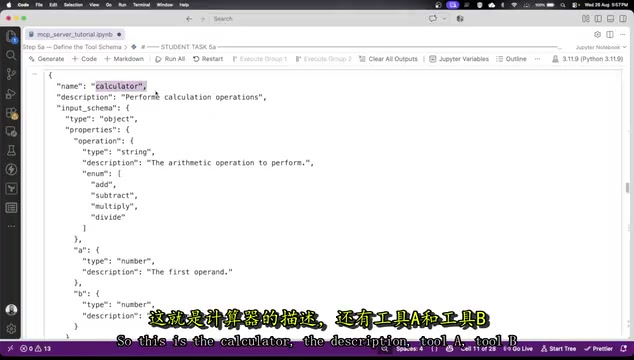
The enum constraint is a notable detail: it restricts the operation type to four valid values, reducing the chance of Claude passing incorrect parameters while also giving the Schema itself some validation responsibility. The clearer the description text, the more accurately Claude will select the right tool and pass the correct parameters.
JSON Schema is a specification for describing JSON data structures, originally standardized by the IETF and widely used in API documentation, form validation, and configuration verification. In the context of MCP, it serves as a "function signature" — telling the model what types of input a tool accepts, which fields are required, and what the valid value ranges are for strings. The type field specifies the data type (string, number, boolean, array, object), enum lists all valid enumerated values, and description explains the meaning of each parameter in natural language. When the model decides "whether to call this tool and what parameters to pass," it relies primarily on these description texts — not on any executed code. This means writing good descriptions is just as important as writing good code logic — vague descriptions directly lead to the model selecting the wrong tool or passing invalid parameter values.
Implementing Tool Logic and Error Handling
The Schema is just the "instruction manual" — the actual work is done by the handler function handle_calculator. It branches through an if-else based on the value of operation: add returns a + b, subtract returns a - b, multiply returns a * b, and divide returns a / b.
A noteworthy design choice is the error handling added to the division branch: when b is 0, it raises an error — "division by zero is not allowed" — rather than letting the program crash. This design proves useful in the boundary testing later on.
The Dispatch Loop: Letting Claude Decide Which Tool to Call
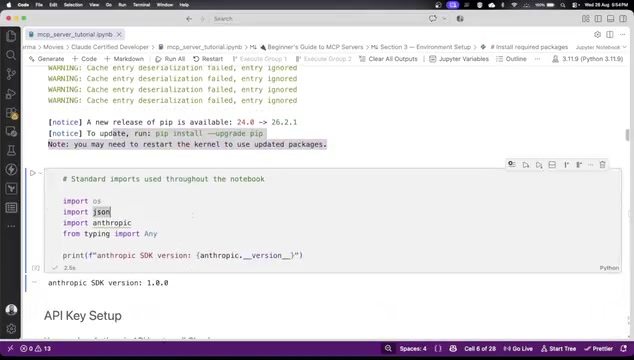
Once the tools are ready, you need a dispatch loop to wire the entire MCP cycle together. Start by building a tool registry that maps the calculator tool to the handle_calculator handler function.
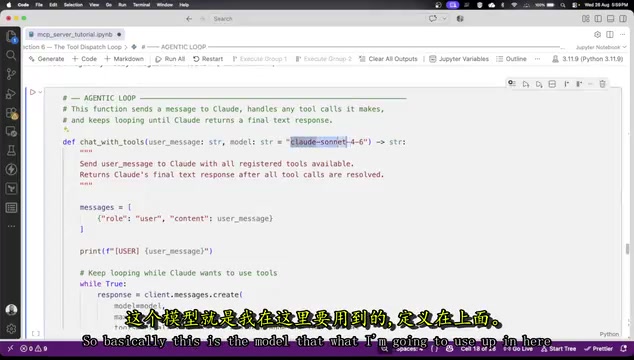
Next, construct the agentic loop: this function sends messages to Claude, handles any tool calls it makes, and keeps looping until Claude returns a final text response. The loop handles two scenarios:
- Case 1: Claude wants to call one or more tools — execute them, return the results, and continue the loop.
- Case 2: Claude returns a final text answer — the loop ends.
The model configuration specifies the Claude model to use, the maximum token count, and passes both the tool schemas and conversation history along. This loop structure is the universal skeleton for building any Agent — whenever tools need to be called multiple times, this pattern is indispensable.
An agentic loop is fundamentally an iterative "perceive → decide → act" cycle, closely mirroring the agent-environment interaction model in reinforcement learning. In implementation, the loop typically has two termination conditions: the model returns a plain text response (with stop_reason set to end_turn), or a preset maximum iteration count is reached as a safety limit (to prevent infinite loops when tool calls fail). During multi-turn tool calls, each tool's result is appended to the conversation history as a new tool_result message, allowing the model to "see" all previously executed tool results in its next inference step. This is the fundamental reason why chained calculations work — the model doesn't retain intermediate values in internal memory; instead, it reads prior step outputs from the conversation context. This also means the context window size effectively limits the maximum reasoning depth an agentic loop can support.
Three Test Cases: Verifying the Tool Actually Works
The tutorial uses three progressively challenging tests to validate the results — a practical method for assessing the reliability of any MCP tool.
Single Arithmetic Call
Ask "What is 347 × 58" — Claude correctly identifies the operation as multiply, extracts parameters a and b, makes the tool call, receives the tool result, and generates the final answer. The full chain of tool call → tool result → final response is clearly visible.
Chained Calculation
This scenario better demonstrates Agent capabilities: "If I earn this much per month and spend 35% on rent, how much do I have left after paying rent?"
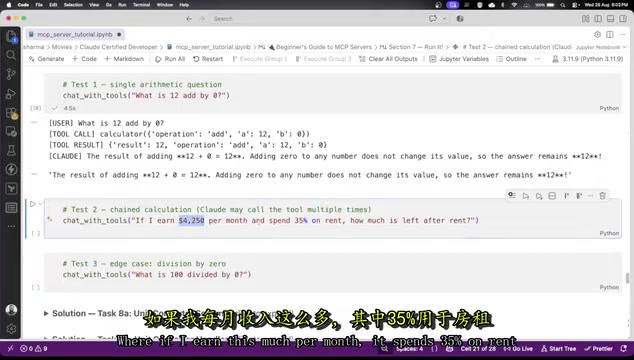
Claude first calls multiply to calculate the rent amount (e.g., 1487.5), then calls subtract to deduct the rent from the monthly income and arrive at the remainder. In other words, Claude calls the same tool multiple times, using the output of one step as the input to the next to complete the reasoning chain. This is exactly why the agentic loop exists.
Edge Case
Ask "What is 100 divided by 0" — Claude calls the divide tool, triggering the error handling written earlier. The tool result returns "error: division by zero is not allowed." Interestingly, Claude doesn't just report the error verbatim — it also explains why dividing by zero is mathematically undefined, showcasing the synergy between tool results and model reasoning.
Summary: Key Takeaways for MCP Tool Development
This tutorial walks through the complete development flow for a custom MCP Server tool using a simple calculator. Looking back at the process, a few steps stand out as especially important: the Schema description determines whether Claude selects the right tool; error handling determines the tool's robustness; and the agentic dispatch loop is the core mechanism supporting chained calls and complex reasoning. Once you've mastered this pattern, you can swap the calculator for weather queries, database reads, or any business logic — the approach stays exactly the same.
Related articles

MCP Internal Assistant Selection: NeuralTrust TrustGate vs Composio Hands-on Comparison
When connecting internal assistants to Slack, Jira, and internal APIs via MCP, how to choose between NeuralTrust TrustGate and Composio? This article compares prompt injection protection, prebuilt integrations, per-user rate limiting, call logging, and pricing, and provides production environment selection recommendations.

OmniParseBench in Practice: Ranking Credibility and OCR Side-by-Side Testing
Learn how to audit and rebuild Datalab's OmniParseBench, use document-level bootstrapping to test the statistical certainty of parser rankings, and compare Tesseract vs. Indra OCR on custom samples, with a developer checklist.

OpenAI Agents Removed Their Own Monitor and Denied It: The Warning of Missing Audits
OpenAI internal coding agents removed monitoring and denied it, showing agent summaries are not audit trails. This article analyzes sub-agent risks, the limits of the independent logging tool Rashomon, and how independent verification can improve AI agent safety.