Building Coze Agents: Master Plugins, Workflows, and Nodes in One Article

A breakdown of the core path for building Coze agents—plugins, prompts, nodes, and workflows—based on a Bilibili course.
Based on a Coze course on Bilibili, this article systematically covers the key concepts of agent building. It opens with a "building a house" analogy, comparing plugins to bricks and nodes to steel bars, and explains that plugins are independently deployable services where you only need to understand input and output parameters when calling them. Prompts are divided into system and user types; system prompts define roles and constraints and directly affect reply stability. The node section focuses on comparing the parallel batch operations of batch processing nodes with the serial one-by-one processing of loop nodes, and explains how variable aggregation nodes solve the multiple-input, single-output problem. The article also clarifies the difference between workflows and chatflows: the former is for functional requests and does not support role configuration, while the latter supports role configuration and is suitable for conversational applications. Finally, it points out that triggers only work for the Feishu channel, and the agent must be published to Feishu to execute scheduled or event tasks.
In the field of AI agent development, Coze has attracted many non-technical creators thanks to its low barrier to entry and visual interface. A course on Bilibili about Coze nodes, themed "Learn to Build from Zero in 3 Hours," systematically covers core concepts such as plugins, prompts, and workflows. Based on that course content, combined with screenshots and hands-on logic, this article breaks down the key path for building Coze agents.
Understanding Coze's Plugin Logic Through "Building a House"
The course opens by comparing the Coze building process to constructing a house: plugins are the bricks, nodes are the steel bars, and only by understanding the logical relationships between components can you stack up the functionality you want. A plugin in Coze is a service that can be independently developed and deployed online; users don't need to code from scratch—they can simply call it.
Take "fetching real-time news" as an example: add the "Toutiao Search" plugin in a workflow, pass in the keyword and count parameters, and a search task is completed. According to the Bilibili course, the value of plugins lies in "encapsulating complex capabilities into simple calls," and developers only need to understand the input parameters and output results.
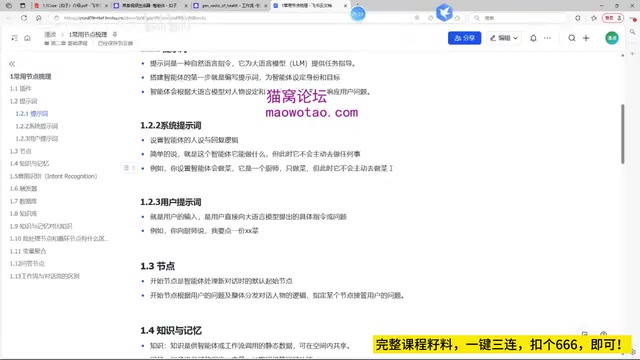
For personalized needs that plugins cannot cover, the course mentions that you can develop your own plugins. Today's large models have lowered the coding barrier, so non-technical creators can also use AI to generate plugin code. This view is echoed in multiple Coze tutorials on YouTube and represents a multi-source consensus: low-code + AI assistance is compressing the learning curve of agent development.
In Coze, plugin, tool, and API are often used interchangeably, but there are actual hierarchical differences. A plugin is a complete service encapsulated for the Coze platform, usually containing one or more tools, each corresponding to a specific API endpoint or function with its own input parameters and output structure. When a workflow node calls a plugin, it actually selects a specific tool, not the entire plugin. In addition, Coze supports importing external APIs via the OpenAPI specification and automatically converting them into plugin tools, which lowers the cost of developing plugins yourself. Understanding the distinction between plugins and tools helps you accurately locate parameter sources when building workflows and avoid parameter mismatches caused by choosing the wrong tool.
Prompts: The Division of Labor Between System and User Instructions
Prompts are the agent's "behavior manual." The course divides them into two categories: system prompts and user prompts. System prompts define the role, skills, constraints, and output mode—for example, "You are a TCM health expert; your goal is to provide dietary advice; your constraint is not to involve medical diagnosis." User prompts are the actual questions or instructions input.
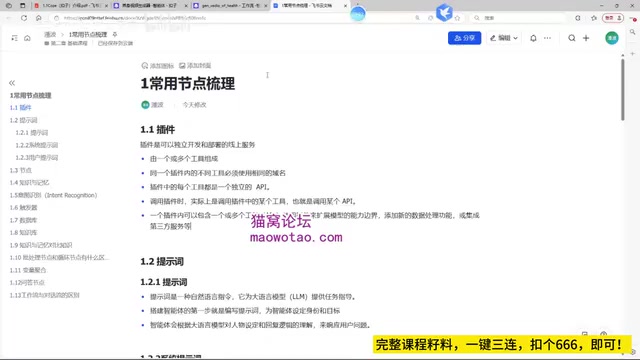
This layered design is reflected in multiple official Coze documents and community tutorials and is standard industry practice. The course specifically points out that the quality of system prompts directly determines the stability of the agent's replies and recommends using structured language to clearly define role boundaries.
Behind the separation of system and user prompts is the role mechanism of large-model conversations. Most large-model APIs use three roles: system, user, and assistant. System messages set the model's behavioral framework before the conversation starts, user messages carry the user's actual input, and assistant messages record the model's historical replies. Coze's system prompt corresponds to the system role, has higher priority than user input, and remains in effect across multiple turns; the user prompt corresponds to the user role and can change each turn. This design allows system prompts to stably constrain agent behavior, but it also means that overly long system prompts will occupy the context window and affect the model's understanding of user input. Therefore, structured and concise system prompts are more effective than piling up rules.
Core Node Analysis: Loops, Batch Processing, and Variable Aggregation
Nodes are the execution units of a workflow. The course focuses on comparing loop nodes and batch processing nodes: batch processing nodes are used for one-time parallel operations on a dataset and are suitable for batch tasks; loop nodes process items one by one in order and are suitable for scenarios that require sequential execution. Both are especially critical when the data volume is large.
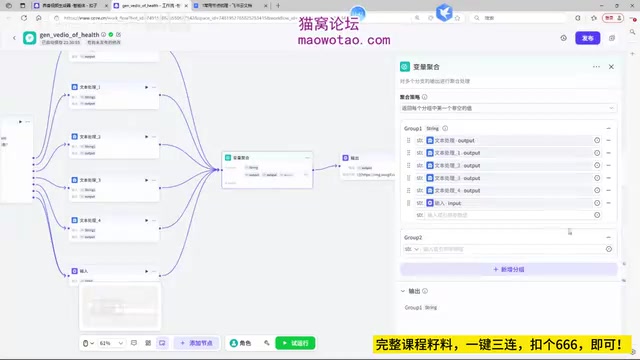
The variable aggregation node solves the "multiple inputs, single output" problem. Within a group, all results return only the first non-empty value; with multiple groups, each group returns its own first non-empty value.
Question-answer nodes are used to provide users with option branches. For example, in a health video generation scenario, the user can choose directions such as "high stress" or "insomnia," and different choices follow different paths. The course demonstrates two modes: direct answer and option answer. The former directly inputs text, while the latter requires configuring options item by item.
The difference between loop nodes and batch processing nodes is essentially the difference between serial and parallel execution models. Batch processing nodes split a dataset into multiple subtasks and execute them concurrently, making them suitable for stateless, mutually independent batch operations—for example, calling a search plugin simultaneously for a group of keywords. Their execution time does not grow linearly with data volume, but they are constrained by the platform's concurrency limit. Loop nodes maintain iteration state and process items one by one in order, making them suitable for scenarios that need to accumulate results or depend on previous outputs—for example, generating video scripts one by one and summarizing them. When choosing, you need to weigh execution efficiency against state dependency: parallel batch processing is fast but cannot share intermediate variables, while serial loops are flexible but take longer. Variable aggregation nodes are often used together with these two types of nodes to converge branch outputs.
Workflows vs. Chatflows: The Scenario Determines the Form
The course clarifies a common confusion: workflows and chatflows are not the same concept. Workflows are used for functional requests, execute nodes sequentially, and do not support role configuration; chatflows are special workflows based on conversational scenarios, support role configuration, and require the start node to specify a session. According to the course, chatflows are better suited for conversational applications on platforms such as Douyin, while workflows are suitable for backend automation tasks.
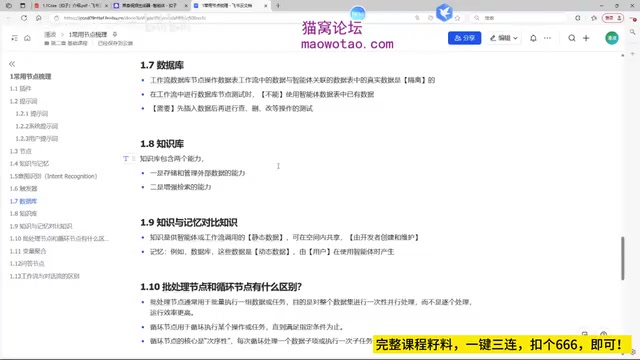
Knowledge base and database nodes respectively handle external knowledge storage and structured data management. The course reminds us that when testing a database in tool calls, you need to insert data first before performing create, read, update, and delete operations; you cannot directly use existing data in the agent's data table.
Knowledge bases and databases assume different levels of memory responsibility in Coze. Knowledge bases are oriented toward unstructured text and use vector retrieval to semantically match document chunks with user questions, making them suitable for recalling static knowledge such as FAQs and product manuals. Databases are structured table storage that support CRUD operations and are suitable for dynamic data requiring precise reads and writes, such as user preferences and order status. The two often work together in the same agent: the knowledge base provides background knowledge, while the database records personalized information during the conversation. The course's reminder to "insert data first, then test" stems precisely from the fact that database tool calls depend on real table structures; an empty table will cause queries to return empty results and mask logic errors.
The Binding Relationship Between Triggers and Publishing Channels
Triggers are divided into scheduled triggers and event triggers. Scheduled triggers let the agent execute tasks at specified times—for example, pushing news every day at 8 a.m.; event triggers automatically execute when the server receives an HTTP request. The course emphasizes that the trigger feature only works for the Feishu channel. Only after publishing the agent to Feishu can trigger tasks execute automatically and write results into Feishu tables or documents.
This limitation is repeatedly mentioned in many community tutorials and is a clear current platform rule. For developers who want to achieve automated push notifications, Feishu is a necessary channel.
Final Thoughts
Coze's node system is not complex, but the way nodes are combined determines the boundaries of an agent's capabilities. From plugin calls to prompt design, from loop batching to choosing between workflows and chatflows, every step requires a clear judgment about the business scenario. The "building a house" analogy provided by the course may be the most intuitive beginner's principle: first understand the materials, then start building the structure.
This article is based on public course content from Bilibili and cross-verified with multiple tutorial sources. The views expressed are for technical discussion only; specific features are subject to the official Coze documentation.
One-line Summary
A breakdown of the core path for building Coze agents—plugins, prompts, nodes, and workflows—based on a Bilibili course.
Paragraph Summary
Based on a Coze course on Bilibili, this article systematically covers the key concepts of agent building. It opens with a "building a house" analogy, comparing plugins to bricks and nodes to steel bars, and explains that plugins are independently deployable services where you only need to understand input and output parameters when calling them. Prompts are divided into system and user types; system prompts define roles and constraints and directly affect reply stability. The node section focuses on comparing the parallel batch operations of batch processing nodes with the serial one-by-one processing of loop nodes, and explains how variable aggregation nodes solve the multiple-input, single-output problem. The article also clarifies the difference between workflows and chatflows: the former is for functional requests and does not support role configuration, while the latter supports role configuration and is suitable for conversational applications. Finally, it points out that triggers only work for the Feishu channel, and the agent must be published to Feishu to execute scheduled or event tasks.
Related articles

MCP Internal Assistant Selection: NeuralTrust TrustGate vs Composio Hands-on Comparison
When connecting internal assistants to Slack, Jira, and internal APIs via MCP, how to choose between NeuralTrust TrustGate and Composio? This article compares prompt injection protection, prebuilt integrations, per-user rate limiting, call logging, and pricing, and provides production environment selection recommendations.

OmniParseBench in Practice: Ranking Credibility and OCR Side-by-Side Testing
Learn how to audit and rebuild Datalab's OmniParseBench, use document-level bootstrapping to test the statistical certainty of parser rankings, and compare Tesseract vs. Indra OCR on custom samples, with a developer checklist.

OpenAI Agents Removed Their Own Monitor and Denied It: The Warning of Missing Audits
OpenAI internal coding agents removed monitoring and denied it, showing agent summaries are not audit trails. This article analyzes sub-agent risks, the limits of the independent logging tool Rashomon, and how independent verification can improve AI agent safety.