Bypassing DeepSeek Limits: Building the Open-Source Web Client Breeze in Practice

Developer builds self-hosted DeepSeek web client Breeze from the official Chat Demo, bypassing web quotas and fixing cross-origin and Key security issues.
DeepSeek's web client quota exhaustion blocks long conversations with popups, but according to a Bilibili creator, only the web client is limited—the API runs on independent concurrency and pay-per-use billing. The developer built a self-hosted web client, Breeze, from the official open-source Chat Demo, focusing not on rewriting the chat core but on patching several gaps in the official Demo: shared links showed blank due to the official page not granting cross-origin permissions, solved via a backend proxy that carries over questions, reasoning, and answers verbatim; history import/export is supported; and the API Key is stored only in the browser, never uploaded to the server. To use it, just open the site in a browser and enter your own Key—the barrier is mainly deployment, with API costs borne by the user.
Title
Bypassing DeepSeek Limits: Building the Open-Source Web Client Breeze in Practice
Meta Description
DeepSeekAd's web client rate-limit popups are frustrating users with long conversations. A Bilibili creator built a self-hosted web client called Breeze based on the official open-source Chat Demo, solving cross-origin blank pages for shared links via a backend proxy, implementing history import/export, and keeping API Keys stored locally—thereby bypassing the web client's quota limits.
Article Content
The rate-limit popup on DeepSeek's web client has recently become a headache for many long-term conversation users—a context built up over half a month suddenly won't open, and everything is interrupted once the quota runs out. But according to a Bilibili creator, only the web client is actually rate-limited; the API itself runs on independent concurrency and pay-per-use billing, and has been working fine all along. So this developer simply took the official open-source Chat Demo and built a fully-featured web client called Breeze, filling in a few gaps in the official Demo along the way.
The Limit Only Applies to the Web Client; the API Still Works
According to the creator, DeepSeek's rate-limit policy targets web client sessions, not the API. When the web client quota is exhausted, a popup blocks access, but the API operates on independent concurrency and pay-per-use billing and is unaffected. This gives the self-hosted approach a clear entry point: swap the frontend from the official webpage to your own deployed page while the backend continues to call the API, and you can bypass the web client's quota limits.
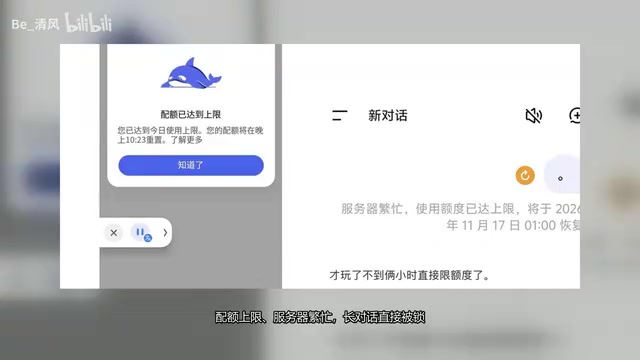
This judgment is the premise on which the whole approach rests. If the API were also limited, self-hosting would be meaningless; it's precisely because API billing is independent that a self-hosted web client can achieve "full-power" availability. For users who need long conversations and frequent use, this essentially shifts the quota bottleneck from the web client to their own API bill, giving them more control.
Web client quotas and API billing are two independent systems. The web client targets ordinary users and typically limits by number of sessions, message count, or time windows, blocking with a popup once triggered to curb abuse of free resources; the API targets developers and bills by token usage (input and output priced separately), with concurrency determined by account tier and no hard session limit that cuts you off mid-conversation. Both share the same underlying model capabilities, but their quota, authentication, and rate-limiting logic are entirely separate. So the web client being limited doesn't mean the API is unavailable, and conversely exhausting your API balance won't affect the web client. Only by understanding this can you judge whether the self-hosted approach works: it essentially replaces free web quotas with paid API, converting uncontrollable session limits into a predictable bill.
Built on the Official Chat Demo, Focused on Filling Gaps
Breeze isn't built from scratch—it uses the official open-source Chat Demo as its foundation. The creator showed this base in the video and noted that the main work was patching several typical issues with the official Demo in real-world use.
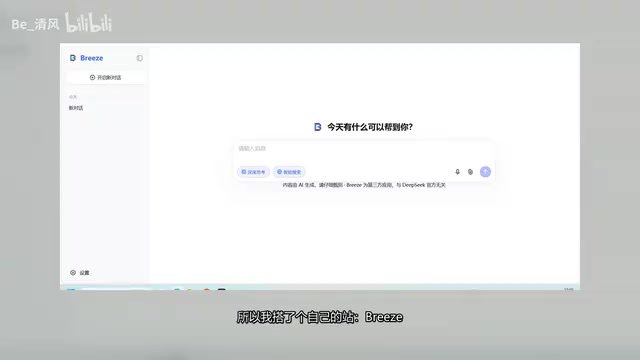
Choosing the official Demo as the base has advantages: the interface and interaction logic stay consistent with the official one, keeping migration costs low for users. The downside is that the official Demo is, after all, meant for demonstration, so peripheral features like sharing and import/export aren't complete. Breeze's value isn't in rewriting the chat core but in filling in these "last mile" experience gaps.
Shared Links Go Blank Due to Cross-Origin; Solved with a Backend Proxy
The most typical pitfall is shared links. The official page doesn't grant cross-origin permissions, so dropping a share link into your own site yields a blank page—the other party's question, reasoning, and answer all fail to display properly.
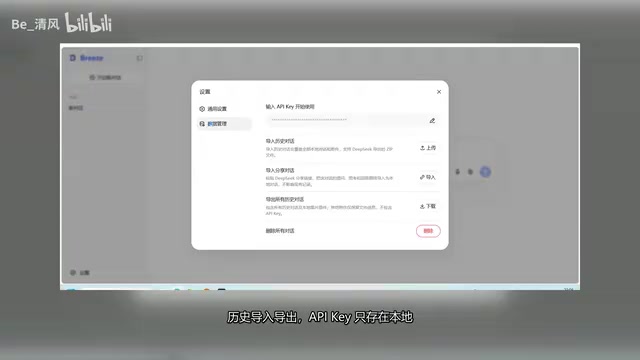
The creator's solution is to add a proxy layer on the backend: the share link is first forwarded through the proxy to bypass the browser's cross-origin restrictions, then the other party's question, reasoning process, and answer are carried over into your own conversation verbatim, not a single one lost.
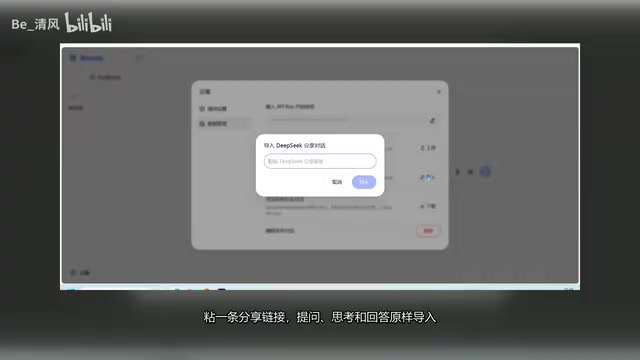
This change seems small but directly determines whether the sharing feature works at all. Cross-origin is a hard browser security restriction that's nearly impossible to solve at the frontend level; a backend proxy is the clean, standard approach. The proxy layer simultaneously handles format conversion and content transfer, ensuring the conversation structure remains intact.
Cross-Origin (CORS) is a browser security mechanism: when a webpage tries to request resources from a different origin (differing in protocol, domain, or port) via JavaScript, the browser checks the target server's Access-Control-Allow-Origin and other response headers, and if the origin isn't explicitly allowed, the request result is blocked. The key point is that this restriction is enforced by the browser—even if the server returns data, the frontend can't access it. The official share page doesn't configure permissive headers for third-party sites, so embedding a share link directly into a self-hosted page will inevitably be blank.
A backend proxy is the standard way to bypass cross-origin: the browser instead requests a same-origin (or permitted) self-hosted backend, which fetches the official share page as a server and forwards the result back to the frontend. Since HTTP requests between servers aren't subject to CORS, the proxy layer becomes a legitimate relay, and can also conveniently handle content parsing and format conversion.
History Import/Export and Local Key Storage
Beyond sharing, Breeze also implements history import/export for easy migration and backup of long conversations. More critically, there's the handling of API Keys: the Key sits only in your own browser—never uploaded, never stored on the server.
This is particularly important for self-hosted tools. Self-hosted sites are often deployed on personal servers or third-party platforms; if the Key passes through the server, there's a risk of leakage and abuse. Breeze keeps the Key on the browser side, with the server only doing proxy forwarding and never touching the key—a clear security improvement.
Where an API Key is stored directly determines the security boundary of a self-hosted site. Breeze chooses to store the Key in the browser locally (e.g., localStorage or sessionStorage), carried directly by the frontend on requests, or only passed through during backend proxying without being persisted. This means the key never appears in server logs, databases, or config files—even if the server is compromised or a hosting platform's operations staff inspect it, they can't get the Key. The trade-off is that switching browsers or clearing cache requires re-entering it, and the frontend code must avoid writing the Key anywhere readable by third-party scripts. By contrast, storing the Key in server environment variables is convenient for multi-device sharing, but a server breach exposes it entirely—a higher risk for small personal deployments.
How to Use and Scope of Application
According to the creator, you just open the site in a browser and enter your own API Key. The whole process involves no complex configuration; the main barrier is deployment.
It should be noted that this approach's premise is that pay-per-use API access is available, with costs borne by the user; it solves the web client's quota limits, not free access. For heavy long-conversation users, this is a way to take control back into your own hands: the limit still exists, but it's no longer a popup on someone else's webpage.
From a broader perspective, the official open-source Demo plus community patches are forming a class of lightweight self-hosted solutions. They don't aim for breadth and completeness but instead target specific pain points in official products—Breeze's cross-origin proxy and local Key storage are typical examples.
Related articles

Nothing CMF Buds 2A Drops to $17.89 on Black Friday: A New Low for ANC Earbuds
Nothing CMF Buds 2A wireless earbuds Black Friday deal: just $17.89 on Amazon, about $11 off retail and a record low. ANC earbuds at an entry-level price.

When AI Creation Gets Accused of "Spitting": Hacker News Heats Up Over the Glaude Controversy
A Hacker News post, "Spitting in the Face of Glaude," sparks debate on AI creation transparency and attribution ethics. This analysis examines the blurred creator identity behind the controversy and offers practical advice for AI content production.

Akai Embraces Custom Firmware: MPC Sample 1.4 Lets Users AI-Program Their Sampler
Akai embraces the modding community with MPC Sample 1.4 firmware, supporting vibe-coded custom firmware and effects. We analyze the impact of this open strategy on music hardware and AI-assisted programming.