CameraX and On-Device AI: A Full Upgrade for Cross-Device Camera Experiences

CameraOne is being disabled; CameraX—with preview adaptation, feature combination, and on-device AI—is now the main path for camera development.
Google announced that the classic CameraOne API will be gradually disabled starting with Android 18 via Play policy, requiring developers to migrate to CameraX or the lower-level CameraTwo. The article outlines the three: CameraOne is deprecated, CameraTwo targets complex scenarios needing low-level control, and CameraX is built on CameraTwo and automatically handles device differences, making it the recommended choice for most developers. It then covers CameraX capabilities: Adaptive Viewfinder solves preview distortion on foldables and XR glasses, with version 1.7 adding tap-to-focus, pinch-to-zoom, and screen fill light; Projected Context distinguishes phone and glasses cameras for audio & display glasses; the Feature Group API enables reliable combinations of HDR, 60fps, and stabilization; plus DNG RAW, night mode extensions, Motion Photo, high-speed slow motion, and concurrent camera enhancements, along with ML Kit's Gemini Nano generative capabilities and MediaPipe gesture recognition.
From CameraOne to CameraX: API Migration Is Inevitable
Android camera development is facing a major API transition. According to Google's technical presentation, the classic CameraOne API will be gradually disabled, enforced through Play policy starting with Android 18 next year. This means developers still using CameraOne must migrate to CameraX or CameraTwo.
The positioning of the three camera libraries is clear: CameraOne is deprecated; CameraTwo targets complex scenarios requiring low-level control, but developers must handle device-specific configurations themselves; CameraX is built on top of CameraTwo, provides a consistent API, and automatically handles device differences—making it the recommended choice for most developers.
CameraX's advantages span four areas: support for Android 7 and above, covering nearly all active devices; concise APIs for common use cases like preview, capture, and recording; fewer device-specific issues, such as preview stretching on foldables and tablets; and simplified access to OEM advanced capabilities (such as night mode and portrait mode).
The relationship between CameraOne, CameraTwo, and CameraX: CameraOne refers to the legacy android.hardware.Camera API, marked deprecated since Android 5.0 (API 21), whose design struggles to accommodate modern hardware like multiple cameras and high frame rates. CameraTwo is android.hardware.camera2, a low-level framework that maps directly to the camera HAL, offering per-frame control and manual parameters, but requiring developers to handle vendor differences, session configuration, and compatibility fallbacks themselves. CameraX is a Jetpack library built on top of CameraTwo that abstracts common scenarios with UseCases (Preview, ImageCapture, VideoCapture), encapsulates device compatibility logic internally, and guarantees consistent API behavior across versions. The three are not replacements but layers: CameraX ultimately still calls CameraTwo, so migrating to CameraX usually requires no changes to low-level hardware adaptation code.
Adaptive Viewfinder: Making Previews Fit Every Screen
The diversity of device form factors makes camera previews tricky. When a foldable is unfolded, the inner screen camera is mounted horizontally while the rear camera is mounted vertically; if developers assume all sensors are vertical, this leads to spatial misalignment and distorted images.
CameraX's Adaptive Viewfinder is designed to solve this complexity, ensuring previews work seamlessly on phones, foldables, tablets, and even laptops. Developers simply declare a SurfaceRequest variable, bind the lifecycle in LaunchedEffect, install the camera, then hand the valid SurfaceRequest to CameraXViewfinder and choose fit or crop mode via the scale parameter.
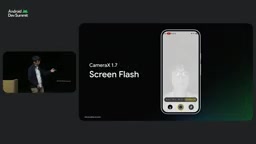
In CameraX 1.7, Viewfinder adds gestures such as tap-to-focus and pinch-to-zoom, plus a Screen Flash selfie feature that uses the screen as a fill light. Implementation is simple: enable tap-to-focus and zoom, obtain an instance from ScreenFlash's ready callback, and set the flash mode to ScreenFlash.
Camera Capture on XR Devices
Android XR devices fall into three categories: fully enclosed XR headsets, see-through XR glasses (such as the XR Aura announced in the keynote), and lightweight audio & display glasses. The first two support Camera2 and CameraX like ordinary phones, while the audio & display glasses are the focus of this session.
In the audio & display glasses scenario, the Android phone acts as the host device, with access to both the phone camera and the glasses camera. Distinguishing them is intuitive: with a standard Context, CameraX accesses the phone camera; with a Projected Device Context, it accesses the glasses camera. Permissions are also independent and must be requested separately.
If using a Projected Activity (UI projected onto the glasses), the rules are reversed: a standard Context accesses the glasses camera, and accessing the phone camera requires the host Context. At the code level, first check connection status via isProjectedDeviceConnected, then obtain the Projected Context, and use LifecycleCameraProvider instead of ProcessCameraProvider so you can switch Contexts at any time; additional duplicate streams must also be disabled (the glasses currently support only a single stream).
Projected Context and the host device: In Android XR's audio & display glasses form factor, the glasses themselves have limited compute; the app actually runs on an Android phone connected via Bluetooth or Wi-Fi, with the glasses handling only display and some sensor input. The system introduces the Projected Device Context for this, exposing the glasses' camera, display, and other capabilities as a virtual device; the corresponding Projected Activity renders the UI into the glasses' field of view. A regular Context and a Projected Context each correspond to their own independent set of camera permissions and device identifiers, so switching Contexts is equivalent to switching camera sources. Compared with ProcessCameraProvider, LifecycleCameraProvider adds awareness of Context changes, allowing lifecycle rebinding between phone and glasses—which is exactly why it must be used in XR scenarios.
Feature Group API: Unlocking the Real Potential of Hardware Combinations
Modern cameras support many features—HDR, 60fps, video stabilization, and more—but checking each feature's support individually doesn't guarantee they can work together. This uncertainty forces developers to play it safe, limiting what users can experience on high-end devices.
Feature Group API offers two usage modes: check and enable supported combinations via Required Feature Group, or provide a priority list of features via Preferred Feature Group and let CameraX select the best combination the device supports. In the demo, enabling HDR, 60fps, and video stabilization together noticeably improved brightness, smoothness, and image quality.
CameraX 1.6 and above have brought 4K recording and video stabilization into the Feature Group API, and many high-end devices support both simultaneously. In addition, developers can now apply real-time effects through this API—something that wasn't possible before.
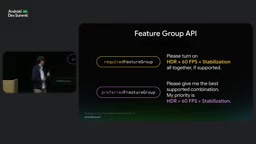
Camera2's Stream Combination and Feature Group: In CameraTwo, whether a set of simultaneously working streams is valid depends on the Stream Combination declared by the device through StreamConfigurationMap—it lists the stream sizes, formats, and frame rate combinations the hardware truly supports, and the number of combinations explodes as camera specs grow, making manual enumeration impractical. The Feature Group API wraps this low-level constraint in feature-oriented declarations: developers describe needs like "HDR + 60fps + stabilization," and CameraX searches the underlying combination table for a feasible solution, falling back to a suboptimal combination when needed. The Preferred Feature Group's priority-list mechanism is especially suited to scenarios that must balance image quality and smoothness, because device capability differences are absorbed inside the library and app code needs no per-model branching.
Advanced Image Capture and Video Recording Capabilities
CameraX adds DNG RAW capture, letting developers obtain unprocessed, uncompressed images directly from the sensor to meet professional editing needs. Night mode extensions are also upgraded: a new integrated API can detect whether the environment is dim enough to suit night mode, and supports Ultra HDR for wider dynamic range and more vivid colors.
Motion Photo will arrive in CameraX in Q1 2027; developers simply set motion photo mode in ImageCapture.builder.
For high-speed video recording, CameraX supports 120 or 240fps capture with two encoding approaches: encode at the same frame rate for true high-frame-rate video, or encode at 30fps to produce slow-motion video that plays directly. For example, recording 1 second at 120fps and playing back at 30fps takes 4 seconds, creating a slow-motion effect. When slow motion is enabled, Google Photos automatically recognizes it and adds a slow-motion badge.
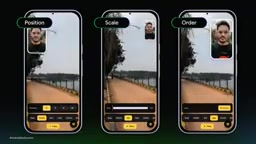
The concurrent camera API has also been enhanced: after binding the lifecycle and opening the camera, you can now dynamically update the composition—including position, size, corner radius, border width and color—and adjust rendering order via setZOrder.
It is strongly recommended to upgrade to CameraX 1.6 or above to avoid crashes on devices supporting new video formats and to ensure continued operation in future PSO updates. To support migration, Google has also launched a CameraX skill, a migration guide, and a camera samples repository.
On-Device Machine Learning: Making Cameras Smarter
After image capture, on-device machine learning can enhance image quality or generate descriptions. ML Kit mainly addresses common problems in the visual and natural language domains, such as text recognition, face detection, and translation. The GenAI API introduced last year leverages Gemini Nano to enable capabilities like text summarization and image description. In the demo, after passing in an image bitmap and a text prompt, the model returned an accurate image description—entirely on-device.
Adobe Photoshop already uses the Prompt API to improve user experience: automatically renaming disorganized layers and generating captions and hashtags for images. The code flow: create a generative model client, check whether Gemini Nano is available or downloadable, combine the image and text prompt into a content request, and finally call generateContent to run inference.
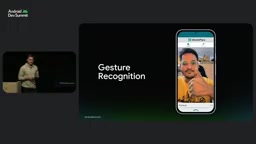
MediaPipe and ML Kit solve similar problems but have different positioning: MediaPipe spans Android, iOS, Web, and Python, supports model customization, and is open source; ML Kit supports only Android and iOS and provides out-of-the-box APIs. MediaPipe's gesture recognition API can detect gestures in camera input in real time—for example, controlling recording start or stop from a distance with a hand gesture.
On-device image and video enhancement provided through Google Play Services APIs enables tone mapping, deblurring, and super-resolution on most high-end devices. Developers first check device support and install enhancement modules as needed, then create enhancement options and a client session, and finally call the process function to handle bitmaps. The video enhancement API is already integrated into Jetpack Media 3.
Low Light Boost comes in hardware and software versions: the hardware version uses OEM hardware to brighten low-light frames, while the software version (Google Low Light Boost) uses an on-device ML model. To integrate into CameraX, simply wrap Google's low-light enhancement pipeline as a CameraEffect, and CameraX handles Surface lifecycle and routing automatically. The effect will launch in CameraX in Q4 2026; at that point, creating a low-light enhancement object and adding it to the session configuration enables it on supported devices.
Gemini Nano vs. ML Kit: Gemini Nano is Google's small-parameter model designed for on-device deployment, distributed with the AICore system component and not taking up app bundle size, but available only on some high-end devices and requiring an availability check or an on-demand download trigger. ML Kit, by contrast, is a task-oriented SDK: text recognition, face detection, translation, and other capabilities are provided with fixed models and stable APIs, covering a broader range of devices. The GenAI API is the entry point in ML Kit for connecting to Gemini Nano, wrapping generative capabilities in call patterns consistent with traditional vision tasks (create a client, build a content request, call generateContent). This layering means: use ML Kit's traditional APIs for deterministic recognition tasks, and only use the GenAI API for open-ended generative tasks, with fallback paths prepared for unsupported devices.
One-line Summary
CameraOne is being disabled, and CameraX—with preview adaptation, feature combination, and on-device AI—has become the primary path for camera development.
Paragraph Summary
Google has announced that the classic CameraOne API will be gradually disabled starting with Android 18 via Play policy, requiring developers to migrate to CameraX or the lower-level CameraTwo. The article outlines the positioning of the three: CameraOne is deprecated, CameraTwo targets complex scenarios needing low-level control, and CameraX is built on CameraTwo, automatically handling device differences, and is the recommended choice for most developers. It then covers several CameraX capabilities: Adaptive Viewfinder solves preview distortion on foldables and XR glasses, with version 1.7 adding tap-to-focus, pinch-to-zoom, and screen fill light; for audio & display glasses, Projected Context distinguishes phone and glasses cameras; the Feature Group API enables reliable combinations of HDR, 60fps, and stabilization; plus DNG RAW, night mode extensions, Motion Photo, high-speed slow motion, and concurrent camera enhancements, along with ML Kit's Gemini Nano generative capabilities and MediaPipe gesture recognition.
Related articles
Build a Reasoning Model from Scratch: An 11-Hour Open-Source Course Breakdown
Sebastian Raschka releases a free 8-episode, ~11-hour video course teaching you to build a reasoning model from scratch with Python and PyTorch—from a small Qwen3 model through Verifier, Inference Time Scaling, GRPO, and distillation, with open-source code on GitHub.

An 11-Hour Reasoning Model Course in Practice: How Small Models Learn to Think
Starting from Sebastian Raschka's 11-hour reasoning model course and HN buzz, this analyzes small-model training, legal text version control, Anthropic data policy, and product reliability reviews.

Lightpanda: A Headless Browser Built for AI and Automation
Lightpanda is a headless browser built from scratch in Zig for AI and automation, with 37,852 GitHub stars. This analysis covers its technical approach, design choices, and use cases.