CapCut AI Ad Creation Tutorial: Full Workflow from Poster Design to Finished Video

CapCut AI connects the full ad creation pipeline so one person can produce a complete advertisement.
CapCut AI integrates image design, Image-to-Video, and digital human voiceover into a single platform, enabling a complete ad creation pipeline from concept to finished product. One creator used CapCut alone to accomplish what previously required multiple professional tools and a full team — signaling a shift from isolated AI features to fully connected creative workflows that dramatically lower the barrier to content creation.
Can One Person Make an Ad? CapCut AI Connects the Entire Creative Pipeline
Can one person independently produce a complete advertisement — from creative concept and poster design to video production and digital human voiceover? In the past, this required a whole team working for weeks. Now, with CapCut AI's suite of features, one person can handle it all.
Recently, a creator shared their end-to-end process of making an ad for a "Sunglasses Monologue Voice Recorder" using CapCut AI. The case not only demonstrates how mature AI ad creation tools have become, but also reveals a clear trend: creative tools are evolving from isolated breakthroughs to fully connected pipelines.
Ad Concept and Visual Direction
The creator developed a tagline for a fictional product — the "Sunglasses Monologue Voice Recorder 2046 Limited Edition" — with the line "What lingers in the mind will always find its echo," building the creative around the core concept of "preserving memories."
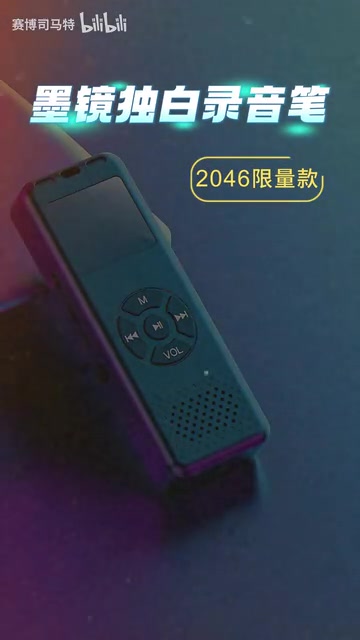
Interestingly, the entire creative process never left CapCut. The creator opened CapCut's newly launched "AI Image Design" feature, which is available on mobile, desktop, and web — with a very low barrier to entry.
Generating Ad Posters with CapCut's AI Image Design
Prompt-Driven Generation, Human Aesthetic Judgment
The creator entered a pre-written prompt into CapCut's AI image design tool, and the system automatically generated multiple candidate images based on the text description. After selecting the most satisfying one and adding it to the canvas with some manual fine-tuning, a polished AI-generated poster was complete.
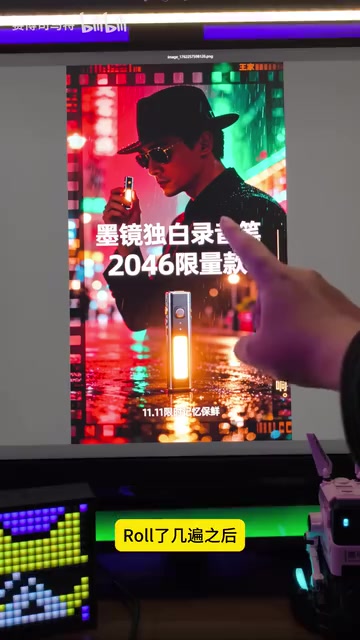
This process reflects the typical workflow for AI poster design today: AI handles the initial draft, while humans make aesthetic judgments and refine the details. You don't need to know complex Photoshop operations — as long as you can clearly express your creative intent, CapCut AI can turn it into a visual piece.
CapCut's AI image design feature is powered by Text-to-Image generation technology. The core principle behind this technology is the Diffusion Model — noise is progressively added to an image until it becomes pure noise, then a neural network is trained to reverse this process, generating new images from text prompts. Stable Diffusion, DALL-E, and Midjourney are all representatives of this technical approach. ByteDance's proprietary image generation capabilities have been deeply integrated into CapCut, so users don't need to understand the underlying technology — they simply describe the scene they want in natural language. It's worth noting that Prompt Engineering is critical at this stage — the same tool can produce wildly different results depending on how the prompt is written, which is why a creator's ability to articulate ideas and exercise aesthetic judgment remains irreplaceable.
As the creator themselves remarked: "I never thought I'd be doing design work inside CapCut." This sentiment resonates with many content creators — AI is fundamentally redefining the boundaries of what tools can do.
CapCut Image-to-Video: Bring Static Posters to Life with One Click
A Right-Click Away — Posters Instantly Become Dynamic Videos
After finishing the poster, the creator didn't stop there. By selecting the image in CapCut's timeline and right-clicking to choose "Image to Video", they entered the AI video generation interface.

In CapCut's Image-to-Video interface, you can:
- Write a prompt: Describe how you want the image to move and transform
- Choose a generation model: Different models correspond to different visual styles
- Set the duration: Control the length of the generated video
With a single click, a static poster becomes a dynamic video clip. The Image-to-Video capability is powered by AI video generation models, but CapCut wraps it in a simple right-click menu operation — no video production experience required.
Image-to-Video has been one of the most active areas in AI video generation since 2024. A milestone in this space was OpenAI's release of the Sora model in February 2024, which demonstrated AI's remarkable ability to generate high-quality video directly from text and images, triggering an industry-wide race. Since then, Runway's Gen-3, Pika Labs, Stability AI's Stable Video Diffusion, and Chinese models like Kling and Jimeng have all launched or upgraded. Most of these models are based on video diffusion models or DiT (Diffusion Transformer) architectures, trained on massive video datasets to help AI understand object motion, cinematographic language, and the basic logic of the physical world. CapCut's integrated Image-to-Video capability is closely related to ByteDance's Jimeng AI video generation technology. Its key advantage lies in packaging professional-grade generation capabilities into an extremely simple interaction, making cutting-edge AI technology accessible to everyday users.
CapCut Digital Human Voiceover: Completing the Finished Ad
The creator also demonstrated a "more vivid version" — using CapCut's Digital Human feature to make the character in the video speak, then layering in sound effects to produce a complete AI advertisement.

Digital Human technology involves the convergence of multiple AI sub-fields. In CapCut's use case, digital humans primarily encompass two core capabilities: first, Text-to-Speech (TTS) synthesis — converting text into natural, fluid human-sounding voice. Current mainstream neural TTS models can generate speech that closely resembles real human voices, with support for emotional control and multiple voice styles. Second, Lip Sync and facial animation driving — ensuring the digital human's mouth movements and expressions precisely match the spoken content. Deeper underlying technologies include 3D facial modeling, motion capture, and real-time rendering. In commercial applications, digital humans are already widely used in e-commerce livestreaming, corporate training, and news broadcasting. By integrating digital human capabilities into the video editing workflow, CapCut enables creators to add expressive on-screen narrators to their ads without needing real people on camera or professional voice actors — significantly reducing the cost of video content production.
From static image to dynamic video to a fully voiced and visualized advertisement — every step was completed within a single piece of software. This kind of all-in-one AI ad creation experience would have been almost unimaginable just two years ago.
Breaking Down CapCut AI's Full-Pipeline Capabilities: From Editing Tool to Creative Platform
Looking back at the entire production process, what's most noteworthy isn't how powerful any single feature is — it's the seamless connection between every stage.
In the past, producing an ad might require switching between five or six different applications. With CapCut AI, the entire workflow is dramatically simplified:
| Production Stage | Tools Needed Before | With CapCut AI Now |
|---|---|---|
| Concept image generation | Midjourney / DALL-E | CapCut AI Image Design |
| Poster refinement | Photoshop | CapCut canvas editing |
| Image to video | Runway / Pika | CapCut Image-to-Video |
| Footage editing | Premiere / Final Cut | CapCut timeline |
| Narration voiceover | Professional VO or third-party TTS | CapCut Digital Human |
CapCut has integrated AI image generation, Image-to-Video, digital human voiceover, and more into a single platform, achieving a fully connected pipeline from concept to finished product.
CapCut's evolution from an editing tool to a full-pipeline creative platform reflects a deeper transformation across the entire creative software industry. Traditional creative workflows are highly fragmented — while Adobe Creative Suite offers a comprehensive product line, Photoshop, Premiere Pro, After Effects, and others remain separate applications with steep learning curves, and collaboration between them still requires manual import and export. AI-era creative platforms pursue an "end-to-end" experience — completing every step from concept to finished product within a unified environment. This trend isn't unique to CapCut: Canva is also moving toward a full-pipeline approach through acquisitions and AI integration, while Adobe has launched its Firefly AI features in an attempt to connect its own product line. For creators, the core value of a full-pipeline platform isn't just efficiency gains — it's also the elimination of the "tool tax." In the past, you needed to pay for separate software subscriptions for each stage of the workflow. Now, one platform covers most needs, fundamentally changing the cost structure of creative work.
The practical benefits of this integration are clear:
- Lower barrier to entry: No need to learn five or six professional tools — CapCut alone is enough
- Higher production efficiency: Eliminates time spent switching between tools and converting file formats
- Maintained creative continuity: Going from concept to finished product in the same environment means inspiration doesn't get lost in constant context-switching
Who Is CapCut AI Ad Creation Right For?
The core takeaway from this case is: AI is making the "one-person ad team" a reality. A person with a good idea no longer needs to assemble a full team of designers, videographers, and post-production specialists to produce quality ad content with CapCut AI.
The rise of the one-person ad team isn't accidental — it has a clear economic logic. Traditional ad production involves multiple roles: creative strategy, graphic design, photography and videography, post-production editing, voiceover, and music. A 30-second brand ad typically costs anywhere from tens of thousands to hundreds of thousands of dollars and takes weeks to months to produce. For small businesses and individual creators, this cost structure means they're inherently at a disadvantage in content marketing. AI tools are reshaping this cost curve — when the marginal cost of generating a commercial-grade poster approaches zero, and when video production no longer requires expensive equipment and professional crews, the democratization of content production becomes genuinely possible. This follows the same logic as early internet tools like WordPress lowering the barrier to building websites — only this time, what's being redefined is how video and advertising content is produced.
Of course, AI-generated content still can't fully replace the output of professional teams in terms of refinement and creative depth. But for the following scenarios, CapCut AI is already an extremely cost-effective solution:
- Small and medium-sized businesses creating product promotional videos
- Individual creators doing content marketing
- Social media operators producing everyday content assets
- E-commerce sellers making short product showcase videos
More importantly, as creative tools evolve from "single-point features" to "full-pipeline platforms," the bottleneck in creation is no longer technical skill — it's the idea itself. Whoever has better concepts and sharper aesthetic sensibility will produce better work with the same tools. That may be the most profound change that tools like CapCut AI are bringing to the creative world.
Related articles
 Tutorials
ChatGPT Plus Subscription Guide: Are GPT-5.5, image-2, and Codex Worth the Upgrade?
A detailed look at ChatGPT Plus features — GPT-5.5, image-2, and Codex — with a Plus vs Pro comparison and a complete step-by-step subscription guide for users outside the US.
 Tutorials
Harness AI Engineering in Practice: Using Claude Code to Master Enterprise-Level E-Commerce Development
Deep dive into Harness AI Engineering: master enterprise e-commerce development with Claude Code using the Rules, Skills, Wiki, and Changes framework.
 Tutorials
Cursor + Codex Dual-IDE Collaboration: A Practical Methodology for Open-Source Project Customization
A complete methodology for open-source project customization based on real-world experience, detailing the Cursor+Codex dual-IDE workflow, seven-stage process, MVP validation, and AI source code reading techniques.