CC Switch Practical Guide: Multi-API Auto-Switching to Keep Claude Code Running Non-Stop

CC Switch enables one-click multi-API switching, protocol conversion, and automatic failover for Claude Code.
CC Switch is an open-source API management tool that solves the hassle of switching between multiple LLM providers. Its core features include multi-Agent tool support, automatic OpenAI-to-Anthropic protocol conversion (routing), and HTTP request-level automatic failover. Combined with OpenRouter free models (DeepSeek V4 Flash recommended), a multi-account strategy enables stable, low-cost Claude Code operation.
The Pain Points of Multi-API Management and the Solution
With the growing number of LLM API providers, many developers find themselves juggling two or three API Keys from different services simultaneously. But the problems that follow are very real: every time you want to switch between providers, you have to manually edit configuration files—tedious and error-prone.
The open-source project CC Switch was built to solve exactly this problem. It not only enables one-click switching between multiple API providers but also includes built-in interface protocol conversion and automatic failover capabilities, ensuring your AI Agent tasks never get interrupted.
CC Switch Core Features Explained
Multi-Agent Tool Support
CC Switch supports more than just Claude Code. It also works with:
- Codex
- OpenCode
- OpenCraw
- Gemini CLI
- Hermes Agent
Regardless of which mainstream Agent tool you use, CC Switch can provide unified API configuration management.
Interface Protocol Conversion (Routing)
This is one of CC Switch's most practical features. To understand its value, you first need to grasp the current format fragmentation in the LLM API ecosystem.
Since GPT-3's release in 2020, the REST API specification defined by OpenAI—including the /v1/chat/completions endpoint, message structure, streaming output format (Server-Sent Events), etc.—has been widely adopted by numerous vendors, gradually becoming the industry's de facto "OpenAI-compatible" standard. Platforms like OpenRouter, NVIDIA NIM, and Together AI all follow this specification. However, Anthropic maintains an independent API specification for its Claude model series, with significant differences from the OpenAI format in message structure, Tool Use format, streaming event types, and more. This format fragmentation is the core technical barrier developers face in multi-provider scenarios.
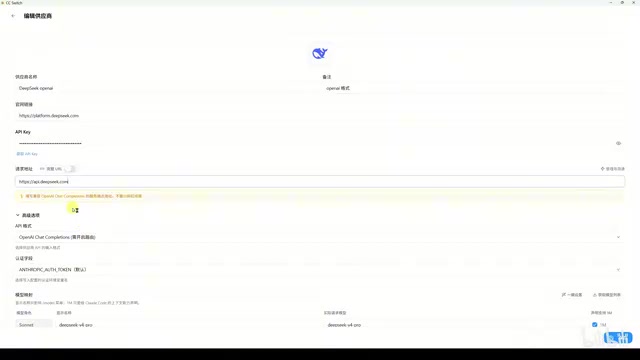
CC Switch's routing feature is designed precisely for this: it starts a local HTTP proxy service that automatically converts OpenAI-format responses to Anthropic format in real-time, allowing Claude Code to seamlessly connect with any OpenAI-compatible API, completely eliminating format barriers.
Steps to enable routing:
- Click Settings → Routing → Toggle routing on
- Enable routing for Claude Code
- Launch Claude Code via command line (not through CC Switch's built-in launch button)
Here's a critical detail: after enabling routing, do NOT launch the client through CC Switch's UI button, because the request address in the configuration file won't point to the local routing service. The correct approach is to launch Claude Code directly from the command-line terminal—it will read the global configuration file, and requests will automatically be forwarded through the routing service.
Automatic Failover
This is CC Switch's killer feature, designed based on the classic Automatic Failover pattern from distributed systems.
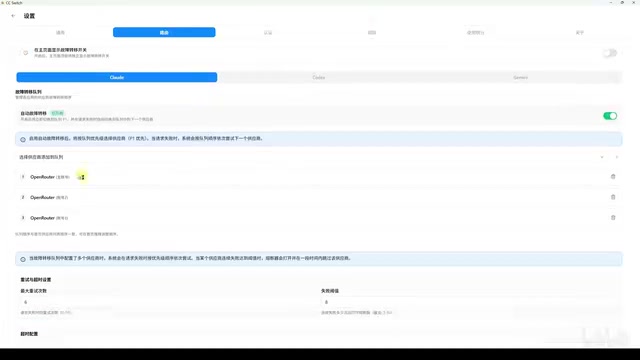
In API call scenarios, common triggers for failover include: HTTP 429 (rate limit exceeded), HTTP 503 (service unavailable), connection timeout, account quota exhaustion, etc. CC Switch implements failover at the HTTP request granularity, meaning it acts as a transparent proxy layer between client and server—capable of immediately switching to the next provider for retry after a single request failure, without waiting for the upper-layer application (Claude Code) to detect the error, interrupt the task, and manually restart. This dramatically improves continuity for long-running tasks.
How failover works:
- Claude Code sends multiple HTTP requests when completing a task
- CC Switch independently handles provider selection and failover for each HTTP request
- When a request fails, CC Switch automatically selects the next provider and resends
- Completely transparent to the Claude Code client—it only receives successful responses
- The client only receives a failure response when ALL providers have failed
Installation and Basic Configuration Guide
Installation Steps
Installing CC Switch is straightforward:
- Go to the project's GitHub Release page
- Download the version for your operating system (Windows users download the MSI file)
- Ready to use once installation is complete
Adding API Service Providers
Using DeepSeekAd configuration as an example, here are the specific steps:
- Select the Agent tool to configure (e.g., Claude Code)
- Click the plus button to add a service provider
- Choose a preset provider (e.g., DeepSeek)—the system auto-fills the API address
- Enter the API Key and model name
- Configure the test model separately (if not configured, it uses the global default model, which may cause test failures)
- Click Test to verify the configuration is correct
- Enable the configuration
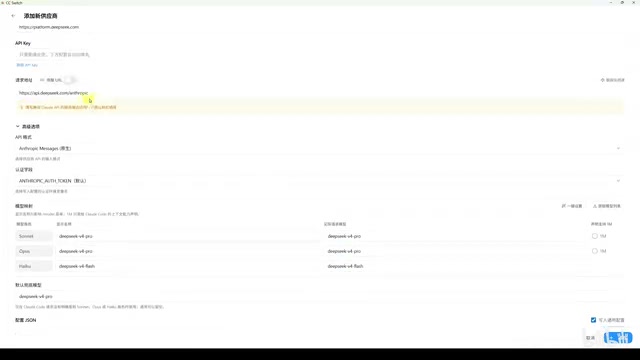
About the "Million Context" option: when checked, an EM identifier is appended to the model name. Make sure your provider actually supports this naming format—for example, DeepSeek's official documentation explicitly supports it—otherwise API calls will return errors.
Hands-On: OpenRouter Free Models + Failover
OpenRouter Platform Overview and Free Models
OpenRouter is an LLM API aggregation platform that provides access to dozens of model providers (including Anthropic, Google, Meta, Mistral, etc.) through a unified OpenAI-compatible interface. Its business model involves adding a small service fee on top of the model's original pricing. The free models available on the platform typically come from model vendors willing to trade free quota for exposure, or from the platform's own promotional strategies. Rate Limiting is the core constraint mechanism for the free tier, designed to prevent abuse and ensure service quality for paying users—this is also the design rationale for the multi-account approach discussed below.
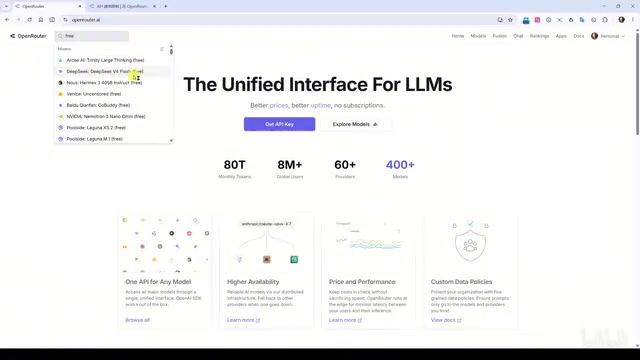
Searching for "free" on the OpenRouter website reveals models with the free label. Notable ones include:
- DeepSeek V4 Flash: Performs well in practice, recommended as the primary choice
- MiniMax 2.5: Also produces decent results
- Free Modes Router: Automatically switches between all free models, less likely to trigger rate limits, but may route to lower-quality models
Free model rate limiting rules:
- Maximum 20 requests per minute
- Less than 10 credits deposited: maximum 50 requests per day
- 10 or more credits deposited (approximately $10): daily request quota increases to 1,000
- Using free models does not consume credits
Real-World Test Results
The author tested with three OpenRouter accounts (none topped up, totaling 150 daily requests):
Free Modes Router model: Frequent errors. The underlying models produced improperly formatted tool calls, sometimes Claude Code stopped without any output, and the automatic failover mechanism was barely triggered.
DeepSeek V4 Flash model: Significantly better results, with automatic failover successfully triggered. During testing, there were no task interruptions caused by per-minute rate limits. Although all three accounts eventually hit their daily limits before completing all tasks, the failover mechanism itself operated reliably.
Low-Cost Usage Strategy
Based on test results, a viable cost optimization approach is:
- Register 5 OpenRouter accounts
- Top up each account with $10 (approximately $50 total, or about 400 RMB)
- Get 5,000 free requests per day
- More than sufficient for most developers' daily usage
A few important notes:
- OpenRouter's rules may change at any time, so the strategy carries some uncertainty
- Test stability thoroughly with free accounts before deciding whether to top up
- OpenRouter supports refunds within 24 hours, keeping the cost of experimentation low
Summary and Usage Recommendations
As an API management and routing tool, CC Switch effectively addresses three major pain points: multi-provider switching, interface protocol conversion, and automatic failover. Combined with OpenRouter's free models, it can genuinely keep Claude Code running stably at low cost.
Key considerations for actual use:
- After enabling routing, you must launch Claude Code from the command line—don't use CC Switch's built-in launch button
- Free model quality varies significantly—prioritize stable-performing models like DeepSeek V4 Flash
- Multi-account strategies carry rule-change risks—avoid large one-time deposits
- Increasing the number of accounts (5 or more) effectively reduces the probability of all nodes failing simultaneously
Key Takeaways
- CC Switch supports API configuration management for multiple Agent tools, enabling quick switching between providers
- Built-in routing automatically converts between OpenAI and Anthropic interface protocols, making Claude Code compatible with more API providers
- Automatic failover handles provider selection independently for each HTTP request, completely transparent to the client
- Among OpenRouter's free models, DeepSeek V4 Flash performs well while Free Modes Router is error-prone
- Five accounts each topped up with $10 provides 5,000 daily requests, costing approximately 400 RMB total
Related articles
 Tutorials
ChatGPT Plus Subscription Guide: Are GPT-5.5, image-2, and Codex Worth the Upgrade?
A detailed look at ChatGPT Plus features — GPT-5.5, image-2, and Codex — with a Plus vs Pro comparison and a complete step-by-step subscription guide for users outside the US.
 Tutorials
Harness AI Engineering in Practice: Using Claude Code to Master Enterprise-Level E-Commerce Development
Deep dive into Harness AI Engineering: master enterprise e-commerce development with Claude Code using the Rules, Skills, Wiki, and Changes framework.
 Tutorials
Cursor + Codex Dual-IDE Collaboration: A Practical Methodology for Open-Source Project Customization
A complete methodology for open-source project customization based on real-world experience, detailing the Cursor+Codex dual-IDE workflow, seven-stage process, MVP validation, and AI source code reading techniques.