ChatGPT and Codex Share a Quota: How Dual-Use Users Should Split the Bill

Multiple ChatGPT plans will share a token budget with Codex, with Instant chats excluded.
According to Decoder, starting in December, ChatGPT's Plus, Pro, and Business plans will share a token budget with Codex, so chat and coding draw from the same pool and complex tasks compete for it. Instant model chats are excluded; users can check balance and reset time in settings, and can wait for a reset, upgrade, or buy extra quota. Specific quota amounts are undisclosed, so don't assume a price hike. Also, too many paid accounts on the same card and device will be limited, and logging out won't release a seat.
According to a report by tech media outlet Decoder, starting in December, ChatGPT's Plus, Pro, and Business plans will share a single "token budget" with Codex. This means that under the same subscription account, chat-based writing and coding will draw from the same quota pool. The news was first spotted by product observer Typer on October 29, when a shared-quota preview had already appeared; Decoder's report now adds details such as trial plans, the Instant model exception, and how to check your balance.
What Does Merged Accounting Mean?
The most direct change from a shared quota is: the more complex tasks you do, the faster you burn through it. In the past, users may have treated ChatGPT chat as a "nearly unlimited" service, while Codex coding calls were metered separately; after the merge, workloads on both sides will compete for the same budget.
According to Bilibili creator "AI Storm," citing Decoder's report, this adjustment covers the Plus, Pro, and Business tiers. For users who write with ChatGPT and code with Codex at the same time, budget allocation will become something they need to actively manage day to day.

Token is the basic unit of measurement for text processed by large language models. For English, one token roughly corresponds to a part of a word (for example, "unbelievable" may be split into three tokens: "un", "believ", and "able"); for Chinese, one character usually corresponds to 1 to 2 tokens. Both model input and output are counted in tokens, and API billing and subscription quota limits generally use tokens as the unit. Therefore, a "token budget" can be understood as the total amount of text the model is allowed to process within a certain period. Each round of chat consumes historical context and generated replies, and coding tasks consume the code files read and the code produced—all deducted from this total.
The Key Exception: Instant Model Chats
The report points out an important exception: chats with the Instant model are not counted against this shared budget. This means everyday simple communication—such as quick Q&A and short text processing—can still be used relatively freely, while complex analysis, long-form writing, and coding tasks are what consume the shared quota.
This design effectively guides users to distinguish between scenarios: lightweight conversations go to Instant, and only heavy workloads draw on the budget pool. For dual-use users, the strategy can be to prioritize Instant for everyday communication and reserve the shared quota for tasks that truly require deep reasoning or code generation.

The Instant model is the fastest-responding and lowest-compute-cost model tier in the ChatGPT product line, typically used for lightweight scenarios such as simple Q&A and short text rewriting. It contrasts with models that are stronger at reasoning but more resource-intensive (such as GPT-4o and the o-series reasoning models). Different model tiers are often treated differently in billing: lightweight model calls cost less, so they are often excluded from quota limits or given higher call caps. This also explains why Instant chats can be excluded from the shared budget—it is not "free," but rather so cheap that the platform is willing to offer it as a basic capability.
How to Check Your Balance and Reset Time
Decoder's report fills in how to check your balance and reset. Users can view their current quota balance and the time of the next reset in settings. This is the first step in managing a shared budget—first know how much is left and when it will be restored, then decide task priorities.
In practice, it is advisable to confirm your balance before starting a heavier coding or writing task, to avoid the task being interrupted midway because the quota runs out. For Business plans shared by teams, this is especially important.

A Budget Allocation Checklist for Dual-Use Users
The report provides a checklist for users who work on both sides: first check the balance and reset time in settings, then allocate budget by task type. Once the quota is used up, you can choose to wait for the reset, upgrade your plan, or purchase additional quota.
The specific quota amounts for each plan have not yet been disclosed, so it would be unwise to infer a price increase from the word "merge" alone. In the original thread, a user named Frank worried that the advantage of his plan's near-unlimited chat would be weakened—this is indeed a trade-off point after merged accounting, but what ultimately influences renewal decisions is still the actual total quota each tier provides.
Multi-Account Users: Watch Out for Device Limits
The same reporter also covered another restriction: too many paid accounts linked to the same card and the same device will be limited, and logging out of an account does not automatically release a seat. For users with multiple subscription accounts, check device limits before opening a new subscription to avoid account restrictions caused by too many linked accounts.
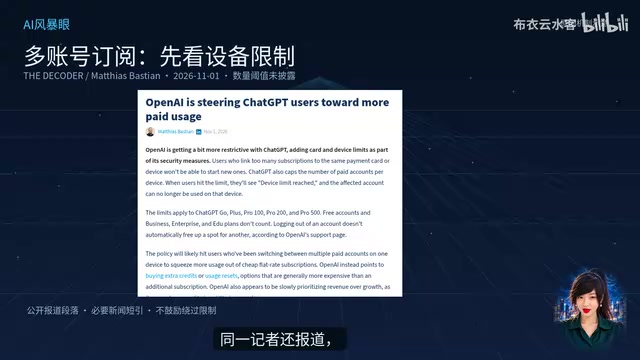
Seat is a common licensing unit in subscription-based SaaS products; one seat represents one user account that can log in and be used independently. Team plans such as Business are usually billed by the number of seats, with each seat corresponding to one member. "Logging out does not automatically release a seat" means that even if a member logs out, the account still occupies an authorized slot, and an administrator must manually remove or reassign it in the backend. Together with "too many accounts linked to the same card and device being restricted," this forms an account risk-control mechanism: the platform uses device fingerprints and payment-method associations to identify sharing, resale, or abuse, preventing a single subscription from being split among multiple people.
What to Watch Next
At present, the quota amounts for each tier and the actual effective date remain unknown. For users who rely on ChatGPT and Codex working together, it is advisable to keep following official disclosures about quota details and to map out your task distribution in advance—which tasks go through the Instant exception and which consume the shared budget. Merged accounting does not necessarily mean higher costs, but it does require users to shift from "passive use" to "active bill-splitting."
One-line Summary
Multiple ChatGPT plans will share a token budget with Codex, with Instant chats excluded.
Paragraph Summary
According to tech media outlet Decoder, starting in December, ChatGPT's Plus, Pro, and Business plans will share a single token budget with Codex, with chat and coding drawing from the same quota pool and complex tasks competing with each other. The report adds key details: Instant model chats are not counted against the shared budget, users can check their balance and reset time in settings, and once the quota is used up they can wait for a reset, upgrade their plan, or purchase additional quota. The specific quota amounts for each plan have not yet been disclosed, so it would be unwise to infer a price increase from the merge alone. In addition, too many paid accounts linked to the same card and device will be restricted, and logging out will not automatically release a seat.
Related articles

VERS: Editing Activation Explanations to Halve Reasoning Model Tokens
VERS guides reasoning models by editing activation explanations, cutting 45.8% of tokens on GSM8K with only a 0.82 pp accuracy drop and transferring to larger models, but losing accuracy on competition problems.

Finding Errors Is Not Enough: Selective Model Escalation for Entity-Targeted Sentiment Analysis
This study explores selective model escalation for entity-targeted sentiment analysis, comparing data collection ordering, uncertainty-driven re-examination, and model routing—finding that minority-class priority only helps at very small data volumes, the oracle upper bound far exceeds actual gains, and escalation must be tailored to each dataset.
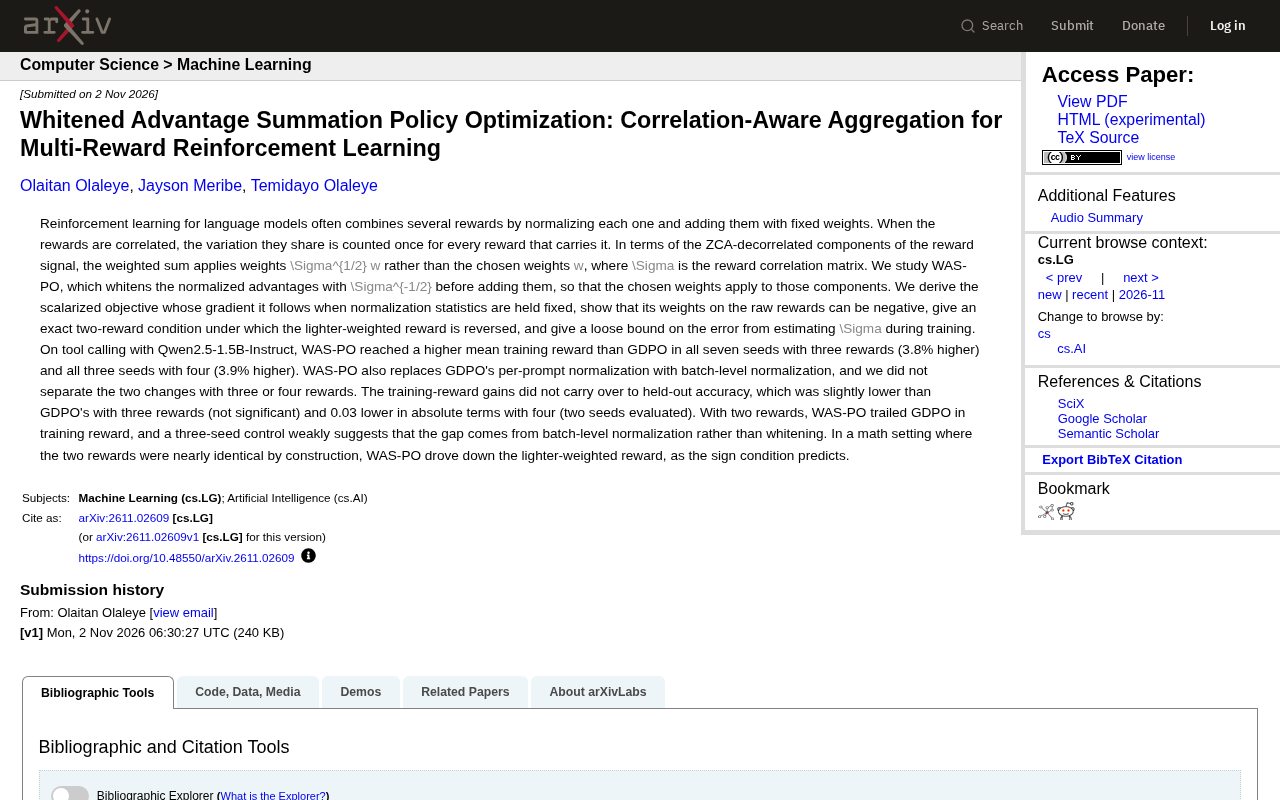
WAS-PO: Using Whitened Advantages to Solve the Correlation Trap in Multi-Reward Reinforcement Learning
WAS-PO paper proposes whitening advantages to correct correlation bias in multi-reward RL: when rewards are correlated, naive weighted summation effectively applies Σ^{1/2}w instead of w. Experiments show training reward improves steadily, but held-out accuracy does not improve in sync, and under two rewards it actually falls behind.