Claude AI Practical Guide: 5 Automated Workflow Case Studies Explained

Claude has become a full-stack AI workbench for building landing pages, automating workflows, and managing businesses.
Based on an AI entrepreneur's hands-on experience, this article systematically introduces Claude's core features as a productivity tool: model selection and web search, MCP protocol connections to external tools, Artifacts for instant preview and publishing, zero-code landing page creation, and the Projects feature as a dedicated automation workstation. Claude has evolved from a chatbot into a full-stack AI workbench covering content creation, social media operations, and team management.
Why Claude Is the Most Powerful AI Productivity Tool Right Now
Claude is no longer just a chatbot. From building landing pages and automating social media content to writing code and controlling browsers, Claude is becoming a true full-stack AI workbench. This article is based on the hands-on experience of an AI entrepreneur, systematically covering Claude's core features and methods for building automated workflows — helping you go from beginner to expert.
This creator runs an SEO agency while managing multiple content platforms. He built an entire automation system with Claude, covering everything from content creation and social media operations to team management. Below is the core methodology he shared.
Claude's Fundamental Features: More Than Just Conversation
Model Selection and Connectivity
Claude supports switching between multiple models, with Opus 4.5 considered one of the most powerful models currently available — particularly excelling in code generation and long-form writing. Claude now has web search capabilities, allowing it to retrieve the latest information in real time, making it extremely useful for scenarios like news research and competitive analysis.
More importantly, Claude supports rich external connections: Google Drive, Gmail, Google Calendar, Zapier, PayPal, and even custom connectors for various MCP (Model Context Protocol) services.
MCP Protocol Background: MCP is an open protocol standard released by Anthropic in late 2024, designed to solve the fragmentation problem of connecting AI models with external tools and data sources. Before MCP, every AI application needed to develop separate integration interfaces for different tools, resulting in extremely high maintenance costs. MCP defines a unified communication specification that allows AI models to access any MCP-compatible service like calling a standard API — whether it's a database, file system, or third-party SaaS tool. This design philosophy is similar to how the USB interface unified the hardware ecosystem. Developers only need to implement an MCP server once, and it can be called by any AI client that supports MCP. Currently, hundreds of MCP servers have been contributed by the open-source community, covering scenarios ranging from GitHub and Slack to local file operations.
This means Claude can directly operate your business tools, not just generate text.
Artifacts: Instant Preview and Publishing
Artifacts is a killer feature of Claude. When you ask Claude to create a webpage, application, or spreadsheet, it generates a real-time preview window alongside the conversation. You can directly publish this Artifact to get a shareable link, or download the HTML file for deployment to platforms like Netlify or WordPress.
Technical Principles of Artifacts: Artifacts are essentially an isolated iframe execution context that can safely run HTML, CSS, and JavaScript code generated by Claude while preventing malicious scripts from affecting the host page. This design draws from the security isolation principles of Code Sandbox. Artifacts support not only static web pages but can also render React components, SVG graphics, Mermaid flowcharts, and various other formats. When a user clicks "Publish," Anthropic hosts the Artifact on its CDN and generates a unique URL — this is essentially a lightweight serverless deployment. For non-technical users, this effectively skips the entire traditional workflow of "write code → test locally → configure server → deploy."
Case Study 1: Building Landing Pages with Zero Code
Workflow
The process of building a landing page with Claude is remarkably simple:
- Copy product or service information from your existing website
- Paste it into Claude and specify your goal (e.g., "improve conversion rate")
- Specify the CTA button link
- Claude automatically generates a complete HTML/CSS landing page
Even with zero coding knowledge, you can get a professional-grade landing page within minutes. The author used this method to build multiple high-converting marketing pages, including AIprofitboardroom.com and others.
Deployment Options
There are three deployment methods for generated landing pages:
- Direct Publishing: Get a shareable link through Artifacts — ideal for quick testing
- Netlify Deployment: Download the file, deploy to Netlify, and bind a custom domain
- CMS Integration: Copy the HTML code and paste it into WordPress or GoHighLevel
Case Study 2: Projects — Your Dedicated Automation Workstation
What Are Projects
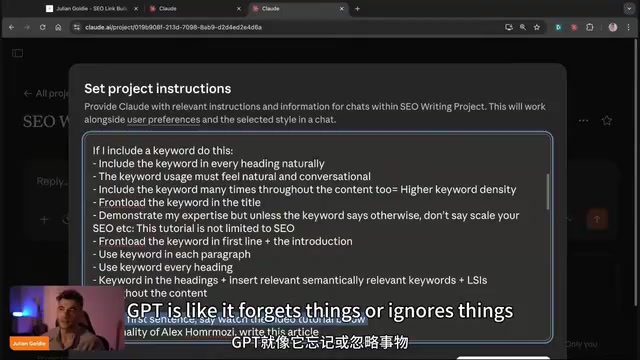
Projects are essentially Claude's "Custom GPTs." Each Project contains three core components:
- Instructions: Rules that tell the AI what to follow during every creation
- Files: Attached knowledge base files that can be imported from GitHub or Google Drive
- Memory: Preference records that automatically accumulate across multiple conversations
Projects and RAG Technology: Claude's Projects feature is closely related to RAG (Retrieval-Augmented Generation) technology in its underlying implementation. RAG is the mainstream architecture for current enterprise AI applications: it vectorizes and stores external knowledge bases (such as company documents and product manuals), dynamically retrieves the most relevant fragments to the current question during inference, and injects them into the model's context window. The Files feature in Projects is a productized encapsulation of this mechanism — uploaded reference articles and brand guidelines are processed into retrievable knowledge fragments. Unlike relying purely on the model's pre-trained knowledge, RAG architecture allows AI to access private, real-time updated proprietary information while significantly reducing hallucinations.
Related articles
 Tutorials
ChatGPT Plus Subscription Guide: Are GPT-5.5, image-2, and Codex Worth the Upgrade?
A detailed look at ChatGPT Plus features — GPT-5.5, image-2, and Codex — with a Plus vs Pro comparison and a complete step-by-step subscription guide for users outside the US.
 Tutorials
Harness AI Engineering in Practice: Using Claude Code to Master Enterprise-Level E-Commerce Development
Deep dive into Harness AI Engineering: master enterprise e-commerce development with Claude Code using the Rules, Skills, Wiki, and Changes framework.
 Tutorials
Cursor + Codex Dual-IDE Collaboration: A Practical Methodology for Open-Source Project Customization
A complete methodology for open-source project customization based on real-world experience, detailing the Cursor+Codex dual-IDE workflow, seven-stage process, MVP validation, and AI source code reading techniques.