Claude Code Advanced Tutorial: Subagent Parallel Processing, MCP Tool Integration & Skills Automation

Three advanced Claude Code features: Subagent parallelism, MCP external tools, and Skills workflow reuse
This article explains three advanced Claude Code features in detail: Subagent enables parallel task processing through cloning to avoid context overflow; MCP protocol connects external tools like Playwright and GitHub to expand capability boundaries; Skills packages repetitive workflows into one-click commands for prompt reuse. Together they form a complete AI Agent workflow framework, upgrading Claude Code from a coding assistant to a full-featured automation platform.
Claude Code is one of the most powerful AI programming terminal tools available today, and its basic features already cover most daily needs. But if you want to truly unlock its potential, you need to master three advanced features: Subagent, MCP, and Skills. This article breaks down the principles, configuration methods, and practical techniques for each, helping you evolve from a Claude Code beginner to a power user.
Subagent: Let Claude Clone Itself for Parallel Task Processing
When Do You Need Subagent?
Imagine a real scenario: you're building a product and need to research three directions simultaneously—competitive analysis, technology selection, and user personas. If you ask Claude to handle them one by one in a single conversation, you'll run into two critical problems:
- Extremely slow: Three tasks executed sequentially multiply the time cost
- Context explosion: By the time it finishes reading the third topic, earlier information may have been compressed or even lost
The essence of Subagent is letting Claude "clone itself"—three directions processed in parallel without interference.
This design philosophy stems from the classic architectural concepts of Multi-Agent Systems (MAS). In the large language model domain, each inference call is constrained by the Context Window length limit. Although Claude's context window has expanded to 200K tokens, when handling multi-dimensional complex tasks, excessive information density still causes the model's attention to scatter and key information to be forgotten or compressed. Subagent solves this bottleneck fundamentally by decomposing tasks into multiple independent inference instances, each with its own context space. This pattern is similar to the fork-join parallel model in operating systems: the main process handles task distribution and result aggregation, while child processes execute independently.
How to Use Subagent?
The usage is very intuitive—just tell Claude in natural language. For example, you can input a prompt like this:
Help me launch three Subagents simultaneously to execute the following tasks:
- Clone A: Analyze the current project's directory structure
- Clone B: Compare the pros and cons of several technical solutions
- Clone C: Summarize the project's common functional modules
After execution, the terminal will display a Main (primary context) along with multiple sub-task clones. The three clones work in parallel, and once completed, their results are aggregated back to the main context.
Three Key Considerations for Using Subagent
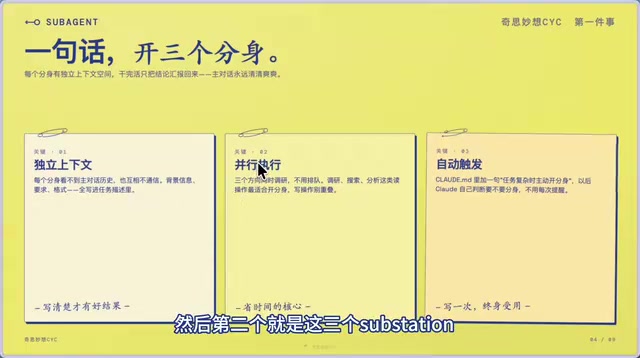
First, each sub-agent has its own independent context. It cannot see the main conversation's history, and sub-agents cannot communicate with each other. Therefore, when assigning tasks, you must clearly specify the background information and output format requirements—don't rely on "it should already know."
Second, all Subagents execute in parallel. They research simultaneously without queuing, making them several times faster than sequential execution.
Third, you can proactively remind Claude to spawn clones in CLAUDE.md. Sometimes Claude will identify complex tasks on its own and proactively launch Subagents, but this doesn't happen every time. Adding instructions like "proactively spawn clones when encountering complex tasks" in your project's CLAUDE.md configuration file makes this behavior more stable and reliable.
It's worth elaborating on how CLAUDE.md works. CLAUDE.md is Claude Code's project-level configuration file—essentially a Markdown-formatted System Prompt that's automatically loaded into Claude's context at the start of each conversation. Its role is similar to .editorconfig or .eslintrc in traditional development, but it targets AI behavior standardization. CLAUDE.md supports multi-level configuration: the CLAUDE.md in the project root applies to the entire project, while CLAUDE.md files in subdirectories can override or supplement parent configurations. Additionally, users can place a global CLAUDE.md in their home directory that applies to all projects. By writing coding standards, architectural conventions, and common commands into CLAUDE.md, developers can significantly reduce repetitive explanations in each conversation, letting Claude "understand" the project's context and constraints from the very start.
MCP Protocol: Connecting External Tools to Claude Code
What Exactly Is MCP?
MCP (Model Context Protocol) can be understood as the standard protocol for connecting various external tools to Claude Code. Through MCP, Claude Code is no longer limited to code editing and terminal operations—it can reach broader capabilities including browsers, databases, and third-party platforms.
From a technical perspective, MCP is a standardized protocol officially open-sourced by Anthropic in late 2024, designed to solve interoperability issues between large language models and external tools. Before MCP, different AI tool integration methods were fragmented—some used Function Calling, others used custom API wrappers, lacking a unified standard. MCP adopts a client-server architecture: Claude Code acts as the MCP client sending requests, while various tools (like Playwright, GitHub CLI) serve as MCP servers providing capabilities. The protocol communicates via JSON-RPC 2.0, supporting standardized workflows for tool discovery, parameter passing, and result returns. This design means any developer can write their own tool server following the MCP specification, allowing Claude Code's capabilities to expand infinitely. Currently, the MCP ecosystem encompasses hundreds of community-contributed tools, covering a wide range of scenarios from file system operations to cloud service management.
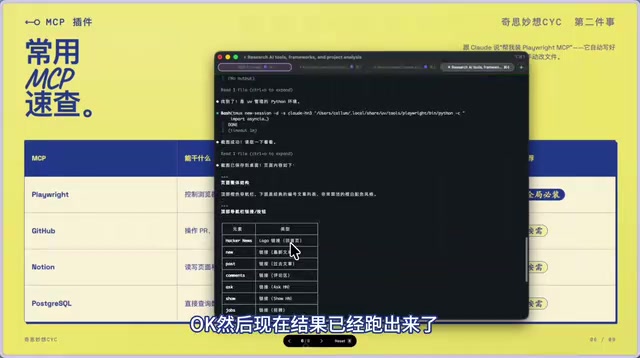
Commonly used MCP tools include:
| Tool | Capability |
|---|---|
| Playwright | Control browsers, take screenshots, fill forms, execute browser automation |
| GitHub | Manage PRs, Issues, and other GitHub workflows |
| Notion | Read/write Notion pages and databases, auto-publish articles or extract notes |
| PostgreSQL | Query and manipulate databases |
Among these, Playwright is one of the most commonly used MCP tools—it gives Claude Code "eyes" and "hands" to directly perform operations in the browser.
Practical Demo: Capturing Web Pages with Playwright MCP
Installing an MCP tool is very simple—just tell Claude:
Help me install the Playwright MCP tool
Once installed, you can use it directly. For example:
Use Playwright to open YC Combinator's Hacker News website, take a screenshot, and save it to my desktop
Claude will automatically launch a browser, navigate to the target webpage, capture a screenshot, and save it to the specified location. Moreover, it will also read the current page's content for subsequent analysis.
Here's some technical background on Playwright. Playwright is a browser automation framework developed and open-sourced by Microsoft, supporting three major browser engines: Chromium, Firefox, and WebKit. Compared to the earlier Selenium, Playwright offers faster execution speed, more stable waiting mechanisms, and more powerful network interception capabilities. In the MCP ecosystem, the Playwright MCP server launches a local Headless Browser instance, and Claude Code sends instructions to it via the MCP protocol (such as navigating to a specified URL, clicking elements, or capturing screens). After execution, Playwright returns results (such as base64-encoded screenshots or page DOM content) back to Claude. This architecture means Claude can not only "see" the visual rendering of a webpage but also access the page's structured data, providing dual information sources for subsequent content analysis and decision-making.
The MCP usage pattern can be summarized in two steps:
- First, have Claude install the corresponding MCP tool
- Then simply tell it in natural language what to do with the tool
This pattern greatly extends Claude Code's capability boundaries, transforming it from a code assistant into an all-purpose automation Agent.
Skills: Package Repetitive Workflows into One-Click Commands
Why Skills Is the Most Worthwhile Feature to Invest In
Have you ever encountered this situation: every time you ask Claude to do something, you have to describe the detailed requirements all over again? For example, publishing a WeChat official account article, you have to say every time:
Convert this Markdown to WeChat-formatted HTML, use a clean style, center H2 headings, don't use certain tags...
These repetitive prompts not only waste time but also risk missing details. Skills packages these repetitive workflows into a single command—write once, use infinitely.
The design of Skills is essentially a productized encapsulation of Prompt Engineering best practices. In the prompt engineering field, researchers have long discovered that structured prompts containing clear steps and constraints produce more stable, higher-quality outputs than vague natural language instructions. Skills crystallizes this insight into a reusable file format—each Skill file is essentially a carefully designed structured prompt template containing task definitions, execution steps, output formats, and boundary constraints. This approach mirrors the "Infrastructure as Code" philosophy in software engineering: making implicit operational knowledge explicit, version-controlled, and shareable. Team members can share Skills files via Git, ensuring everyone follows the same workflow standards when using Claude Code.
How to View and Trigger Skills?
In the Claude Code terminal, type a forward slash / to see a list of all installed Skills.
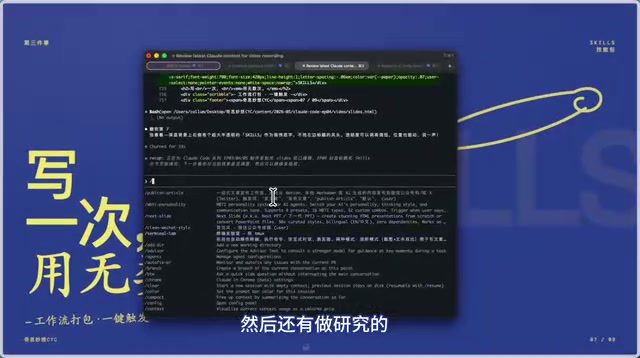
There are two ways to trigger Skills:
- Keyword trigger: Mention the trigger word directly in conversation, such as "publish to WeChat" or "publish wechat article"—Claude will automatically recognize and execute the corresponding Skill
- Command trigger: Type
/, select the corresponding Skill, and press Enter to execute
How to Create Custom Skills?
Creating Skills can also be done with Claude's help. The key is that you need to think through the workflow first, then let Claude organize it into a standard format. For example:
I want to create a Skill whose workflow is publishing an HTML article to the WeChat official account. Name it publish-wechat-article, and help me outline the process and overall steps.
Claude will automatically generate a complete Skill configuration file for you.
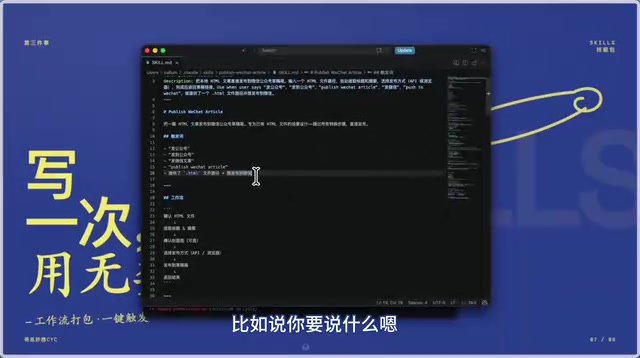
A Skill is essentially a Markdown document containing these core elements:
- Name: The Skill's unique identifier
- Trigger words: You can set multiple triggers, such as "publish to WeChat", "publish wechat", or even custom symbols like A1, A2
- Workflow steps: Complete execution process description
- Notes: Code standards, publishing methods, and other detailed constraints
Recommended Skills for High-Frequency Use Cases
Here are some practical Skills ideas that you can customize based on your needs:
- publish-article: One-stop article publishing to WeChat official accounts or various content platforms
- generate-cover: Automatically analyze article content and generate cover images
- insert-ai-images: Automatically insert AI-generated illustrations into articles
- xiaohongshu-style: Generate Xiaohongshu (Little Red Book) style image content
- terminal-recording: Terminal operation recording and screenshots
The core value of these Skills is: crystallizing your professional experience and workflows so that AI executes optimally every time, without relying on you to manually describe everything each time.
Summary: The Synergistic Value of Subagent, MCP, and Skills
Looking back at these three advanced features, each solves efficiency problems at different levels:
- Subagent solves the problem of parallel processing—complex tasks no longer wait in sequence, while protecting the main context from overflow
- MCP solves the problem of capability boundaries—extending Claude Code from a code editor to an all-purpose Agent that can operate browsers, databases, and third-party platforms
- Skills solves the problem of reuse efficiency—packaging repetitive workflows into one-click commands, write once and use infinitely
When used together, their combined effect is even more powerful. For example, you can create a Skill that calls MCP tools for browser operations while using Subagents to process multiple sub-tasks in parallel. This combination is the true essence of advanced Claude Code usage.
From a broader perspective, the combination of these three features actually constructs a complete AI Agent workflow framework: Skills define "what to do" and "how to do it," MCP provides "what tools to use," and Subagent determines "how to do it efficiently." This aligns closely with current trends in the AI Agent field—the industry is evolving from single conversational AI toward autonomous Agents with planning, tool usage, and parallel execution capabilities. Mastering these three features is essentially learning how to design and orchestrate AI Agent workflows—a skill whose value extends far beyond Claude Code as a single tool.
Once you've mastered these three features, Claude Code is no longer just an "assistant that helps you write code"—it becomes an intelligent Agent platform capable of automating complex workflows.
Related articles
 Tutorials
ChatGPT Plus Subscription Guide: Are GPT-5.5, image-2, and Codex Worth the Upgrade?
A detailed look at ChatGPT Plus features — GPT-5.5, image-2, and Codex — with a Plus vs Pro comparison and a complete step-by-step subscription guide for users outside the US.
 Tutorials
Harness AI Engineering in Practice: Using Claude Code to Master Enterprise-Level E-Commerce Development
Deep dive into Harness AI Engineering: master enterprise e-commerce development with Claude Code using the Rules, Skills, Wiki, and Changes framework.
 Tutorials
Cursor + Codex Dual-IDE Collaboration: A Practical Methodology for Open-Source Project Customization
A complete methodology for open-source project customization based on real-world experience, detailing the Cursor+Codex dual-IDE workflow, seven-stage process, MVP validation, and AI source code reading techniques.