Claude Code CLI in Practice: Generating a Complete Weather Dashboard App in 20 Minutes

Claude Code CLI completes a weather dashboard in 20 minutes that traditionally takes 3 days of frontend work.
This article demonstrates Claude Code CLI's agentic coding capabilities through a weather dashboard case study: simply describe requirements in natural language, confirm the technical approach through interactive dialogue, and get a fully functional project auto-generated in 20 minutes. However, AI-generated code still requires human intervention for error handling, performance optimization, and security compliance — best suited for rapid prototyping rather than direct production deployment.
3 Days of Traditional Development Done in 20 Minutes with AI
In everyday frontend development, building a fully-featured weather dashboard typically takes a frontend engineer about 3 days — UI design, data integration, chart rendering, responsive layout — each step requiring iterative refinement. Now, with Claude Code CLI, an AI programming tool, you only need to describe your requirements in a single sentence, wait 20 minutes, and get a fully functional weather dashboard application.

This isn't a concept demo — it's a real revolution in development efficiency. This article walks through a complete case study showing how Claude Code CLI compresses complex frontend project development to the extreme.
What Is Claude Code CLI? Understanding Its Capabilities Through Technical Architecture
Claude Code CLI is a command-line interface programming assistant released by Anthropic, built on the Claude large language model. Unlike traditional code completion tools (such as GitHub Copilot), Claude Code CLI adopts an "Agentic Coding" architecture — it not only understands natural language requirements but also proactively plans tasks, invokes tools, reads and writes the file system, and executes terminal commands, forming a complete "perceive-plan-execute" loop.
This architecture enables it to handle complex projects spanning multiple files and modules, rather than just single-line or single-function code completion. In simple terms, traditional IDEs (like VS Code or WebStorm) are passive response tools that wait for developer input; Claude Code CLI is an active "collaborator" that proactively identifies ambiguities in requirements and asks clarifying questions. This proactivity stems from the model's deep understanding of software engineering best practices.
Since 2024, tools like GitHub Copilot Workspace, Cursor, and Devin have launched similar capabilities, marking AI programming's official transition from "code completion" to "task execution." Industry analysts predict that by 2026, over 30% of new code will be generated by AI agents (Gartner, 2024).
Claude Code CLI Workflow: Complete Project Generation in Four Steps
Step 1: Launch Claude Code CLI
The entire workflow is extremely simple. Open a terminal in the project directory where you want to generate code, and type the claude command to start the CLI tool.
Step 2: Describe Your Requirements in Natural Language
Directly input your requirement description, for example: "Build me a weather dashboard." No need to write a detailed PRD document, no need to draw wireframes — one sentence is enough.
Step 3: Interactive Confirmation of Technical Approach
Claude Code doesn't blindly generate code. It engages in intelligent interaction:
- Asks which tech stack you want to use (React/Vue/vanilla, etc.)
- Confirms whether the current file structure meets requirements
- Asks if additional files need to be added
- Confirms where data sources should come from

This interactive development approach is essentially a "requirements clarification dialogue" — similar to an agile development requirements refinement meeting compressed into a few rounds of conversation. The model knows that a weather dashboard project inevitably involves key decisions like tech stack selection and data source configuration, so it proactively confirms these to ensure the generated code matches the developer's actual needs rather than producing cookie-cutter template output.
Step 4: Automatic Generation of the Complete Project
After confirming requirements, Claude Code begins outputting code at high speed. The entire process takes about 20 minutes, during which it automatically creates the file structure, writes component code, handles styling, configures routing, and more. The developer just needs to sit back and watch it work.
Why is it so fast? The core reason Claude Code CLI can compress 3 days of work into 20 minutes lies in the large language model's "pattern memory" of massive amounts of open-source code. During training, the model has already "seen" hundreds of millions of frontend projects — the component structures, API call patterns, and responsive layout solutions needed for a weather dashboard have all been internalized as retrievable knowledge. During generation, the model isn't creating from scratch but performing high-speed retrieval and combination from its existing pattern library, combined with tool-calling capabilities to write directly to the file system, eliminating the enormous time humans spend looking up documentation and debugging syntax errors.
Generated Results: A Fully-Featured Weather Dashboard Application
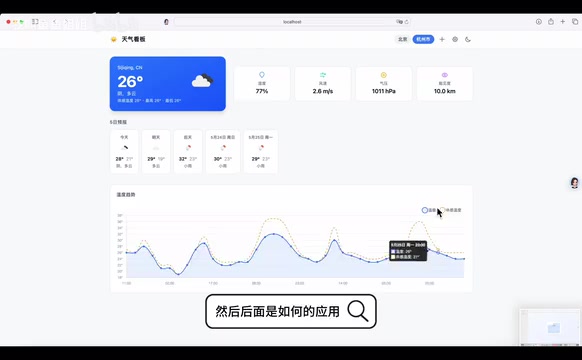
After generation is complete, running the project on localhost reveals a fairly complete weather dashboard page.
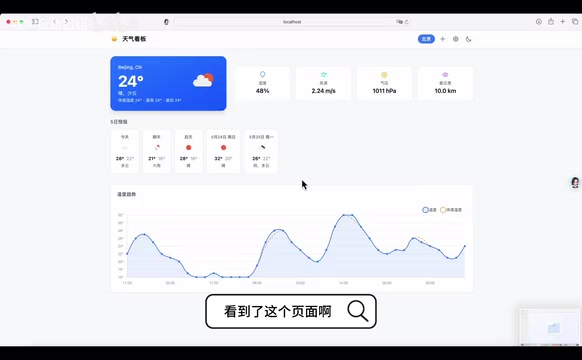
Looking at the actual results, this AI-generated weather dashboard has the following characteristics:
- Complete overall functionality: Data display and interaction logic across all modules are implemented
- Clear page structure: Contains multiple functional pages with well-configured navigation and routing
- Strong manageability: Supports adding admin panels with basic backend management capabilities
Considering the requirement description was extremely brief (just "build me a weather dashboard"), producing these results within 20 minutes represents an obvious efficiency improvement.
What AI Code Generation Means for Developers
Not Replacing Developers, But Accelerating the Development Process
It's important to clarify that code generated by Claude Code CLI is not production-ready out of the box. It's more like a rapid prototyping tool — helping you build the project skeleton and core functionality in minimal time, while subsequent optimization, debugging, and business adaptation still require developer intervention.
There is a systematic gap between AI-generated code and production-grade code, and this isn't a tool deficiency but an objective limitation of current AI programming. Production-grade code needs to satisfy:
- Error boundary handling: Fault-tolerance logic for network timeouts, data anomalies, and edge cases
- Performance optimization: Lazy loading, caching strategies, rendering performance tuning
- Security compliance: XSS protection, API key management, data masking
- Accessibility: Barrier-free design conforming to WCAG standards
- Enterprise integration: Deep adaptation with internal systems and historical technical debt
These requirements are highly dependent on specific business context, and AI lacks understanding of a particular enterprise's internal standards and user behavior data, making human intervention still irreplaceable.
Best-Suited Use Cases
- Rapid prototype validation: When product ideas need quick implementation for validation, Claude Code CLI lets you see results in minutes
- Standardized project kickoff: For standardized needs like admin panels and data dashboards, saving time on repetitive scaffolding
- Learning reference: Quickly generate code frameworks to learn project structure and best practices
Current Limitations
- The more detailed the requirement description, the higher the quality of generated code
- Complex business logic still requires manual writing and fine-tuning
- Generated code needs code review and performance optimization before going to production
Conclusion: AI-Assisted Programming Is Changing Frontend Development Patterns
Claude Code CLI represents an important direction in AI-assisted programming: evolving from "completing a line of code for you" to "generating an entire project for you." Completing 3 days of traditional work in 20 minutes — this efficiency gap is enough to change the working model of frontend development.
This trend is reshaping software engineers' responsibility boundaries: repetitive coding work will decrease significantly, while the importance of architectural decisions, requirements analysis, and quality control will increase markedly. For developers, rather than worrying about being replaced by AI, it's better to master tools like Claude Code CLI early, free yourself from repetitive coding work, and focus your energy on more valuable architectural design and business innovation.
Related articles
 Tutorials
ChatGPT Plus Subscription Guide: Are GPT-5.5, image-2, and Codex Worth the Upgrade?
A detailed look at ChatGPT Plus features — GPT-5.5, image-2, and Codex — with a Plus vs Pro comparison and a complete step-by-step subscription guide for users outside the US.
 Tutorials
Harness AI Engineering in Practice: Using Claude Code to Master Enterprise-Level E-Commerce Development
Deep dive into Harness AI Engineering: master enterprise e-commerce development with Claude Code using the Rules, Skills, Wiki, and Changes framework.
 Tutorials
Cursor + Codex Dual-IDE Collaboration: A Practical Methodology for Open-Source Project Customization
A complete methodology for open-source project customization based on real-world experience, detailing the Cursor+Codex dual-IDE workflow, seven-stage process, MVP validation, and AI source code reading techniques.