Claude Code + Cline in Practice: Building a Meeting Summary Agent Skill from Scratch

Build a specialized Meeting Summary Agent Skill using Claude Code and Cline
This article explains how to build a Meeting Summary Agent Skill from scratch using Claude Code as the reasoning engine and Cline as the interaction orchestration tool. The Skill solves LLM format drift through System Prompt engineering and output Schema constraints, automatically extracting meeting summaries, key points, action items, and sentiment analysis. The solution integrates the MCP protocol to connect external tools, with practical advice on defining capability boundaries, designing output formats, and continuous iteration.
What Is an Agent Skill? Why Does Meeting Summarization Need One?
Meeting summarization is one of the most frequent repetitive tasks in the workplace—large volumes of meeting output need to be quickly distilled into actionable information every day. While traditional AI conversations can handle simple text summarization, their output format is unstable and they lack deep analytical capabilities. This is exactly the problem that Agent Skills are designed to solve.
In the AI Agent ecosystem, an Agent Skill is a specific capability module that an Agent possesses. From a technical perspective, it's a "specialized encapsulation" of large language model capabilities—general-purpose LLMs often suffer from Format Drift due to a lack of task constraints, resulting in unpredictable variations in output structure and quality. The Skill mechanism constrains the model's generalization capabilities to a specific task domain through System Prompt engineering, output Schema constraints, and Few-shot example injection, achieving industrial-grade stability. Through predefined format specifications, processing workflows, and output templates, it enables AI to perform more professionally and consistently on specific tasks.
A well-designed meeting summary Agent Skill should:
- Automatically extract core topics and key decisions from meetings
- Output summaries, key points, and action items in a fixed format
- Provide deep insights like sentiment analysis on meeting content
This article will walk you through how to build such a meeting summary Agent Skill from scratch using Claude Code and Cline together.
Technical Architecture: How Claude Code + Cline Work Together
Claude Code: Handling Reasoning and Structured Output
In this solution, Claude Code serves as the core reasoning engine. As Anthropic's developer-facing AI coding assistant, Claude Code's key advantage lies in "code-aware reasoning"—it can not only generate code but also understand code execution context, debug errors, and iteratively correct them. In the Agent Skill scenario, this capability enables it to dynamically generate structured data processing logic rather than relying solely on static Prompt templates, significantly improving parsing accuracy for complex meeting content.
Specifically, Claude Code handles three critical tasks here:
- Content Understanding: Performing semantic analysis on meeting text to distinguish between discussions, decisions, and small talk
- Information Extraction: Identifying key people, topics, decisions, and to-do items
- Formatted Output: Generating standardized results according to the preset Skill template

Cline: Managing Interaction and Orchestrating Workflows
Cline serves as the client-side tool, playing the role of both interaction layer and orchestration layer in the workflow. Users invoke Agent Skills through Cline, which also manages Skill configuration files, including core configurations like agent.me.md and summary.
This solution also integrates the MCP (Model Context Protocol) tool protocol. MCP is a standardized tool-calling protocol open-sourced by Anthropic in late 2024, defining communication specifications between AI models and external tools—similar to the REST API standard in web development. MCP's core value lies in "tool ecosystem interoperability"—developers only need to package a tool once according to MCP specifications, and it can be directly invoked by any MCP-supporting AI client (such as Cline or Claude Desktop), avoiding the fragmentation problem of repeatedly developing integration code for each AI platform. This enables Agent Skills to interact with external data sources like calendars and email, greatly expanding their capability boundaries.

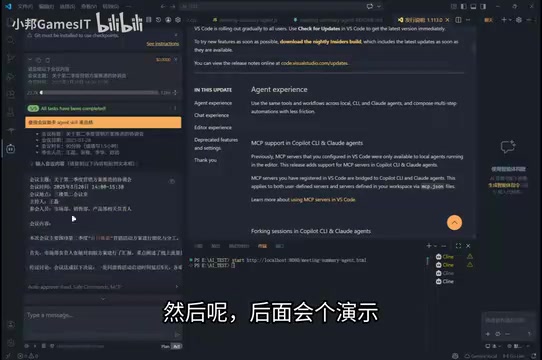
Meeting Summary Agent Skill: Demo of Actual Results
Basic Functionality: Summary and Key Point Extraction
When a user inputs meeting content, the Agent Skill automatically processes it and outputs results in three parts:
- Meeting Summary: A concise overview of the entire content, typically kept to 3-5 sentences
- Key Points: Critical information arranged by priority for quick scanning
- Action Items: Specific tasks requiring follow-up, including responsible parties and deadlines
These outputs strictly follow predefined format specifications, ensuring consistency and readability in every generated result.

Advanced Functionality: Meeting Sentiment Analysis
Beyond information extraction, this Agent Skill also includes a built-in sentiment analysis module that can determine the overall emotional tone of a meeting—positive, negative, or neutral.
Meeting sentiment analysis belongs to the "fine-grained sentiment recognition" subfield of natural language processing. Unlike consumer review sentiment analysis, workplace meeting text is highly context-dependent—the same sentence can convey completely opposite emotional signals in different meeting contexts. Modern LLMs, through the vast conversational corpus accumulated during pre-training, can identify implicit emotional cues such as tone words, transitional sentence patterns, and silence markers, providing managers with team status insights that go beyond the surface of the text.
In the actual demo, the analysis results showed a particular meeting's sentiment as "neutral." This feature provides valuable reference for managers to quickly understand team status and identify potential communication issues.
Web-Based Display Planning
Future plans also include web-based presentation of the output, displaying meeting analysis results through a visual interface to make information delivery more intuitive and efficient.
Practical Tips for Building a Meeting Summary Agent Skill from Scratch
If you want to build a similar Agent Skill, here are four lessons worth noting:
1. Define Clear Capability Boundaries for Your Skill
Don't try to make one Skill cover all scenarios. Focusing on "meeting summarization" as a single task and doing it well enough is far more valuable than building a generalist Skill that can do everything but excels at nothing.
2. Design Output Format in Advance
Before writing Skill logic, design configuration files like agent.me.md first. The clearer the output structure, the more stable Claude Code's generation quality becomes. It's recommended to include three fixed modules: summary, key points list, and action items table. This step is essentially output Schema design—defining data types, length constraints, and required field rules for each field is the fundamental approach to controlling format drift.
3. Use MCP Protocol to Connect External Tools
Connecting calendars, email, and project management tools through MCP enables more complete workflows. For example, automatically syncing action items to a task management system after a meeting ends reduces manual operations.
4. Continuously Iterate on Prompts and Processing Logic
Continuously adjust the Skill's prompts based on actual output quality. Focus on three dimensions—information omission, format deviation, and sentiment judgment accuracy—and gradually refine until you reach a satisfactory state.
Conclusion and Outlook
The combination of Claude Code and Cline provides a clear and viable path for building specialized Agent Skills. Meeting summarization is just an entry point—the same methodology can be extended to scenarios like code review, document generation, and data analysis.
As the Agent ecosystem continues to evolve, this application pattern of "Skill-ifying" AI capabilities—transforming general model capabilities into reliable specialized tools through format constraints, tool protocols, and continuous iteration—is becoming an important direction for improving team productivity. If you're exploring AI office automation, consider starting with a meeting summary Skill as your hands-on practice project.
Related articles
 Tutorials
ChatGPT Plus Subscription Guide: Are GPT-5.5, image-2, and Codex Worth the Upgrade?
A detailed look at ChatGPT Plus features — GPT-5.5, image-2, and Codex — with a Plus vs Pro comparison and a complete step-by-step subscription guide for users outside the US.
 Tutorials
Harness AI Engineering in Practice: Using Claude Code to Master Enterprise-Level E-Commerce Development
Deep dive into Harness AI Engineering: master enterprise e-commerce development with Claude Code using the Rules, Skills, Wiki, and Changes framework.
 Tutorials
Cursor + Codex Dual-IDE Collaboration: A Practical Methodology for Open-Source Project Customization
A complete methodology for open-source project customization based on real-world experience, detailing the Cursor+Codex dual-IDE workflow, seven-stage process, MVP validation, and AI source code reading techniques.