Claude Code DeepSeek Configuration Tutorial: Get Running in 3 Steps with settings.json

A complete guide to connecting Claude Code to DeepSeek and other Chinese LLMs via settings.json configuration.
Claude Code often fails to start after installation due to settings.json configuration issues. This article provides a three-step solution: download a pre-made template, fill in your API Key, and place it in the .claude directory before restarting. It covers troubleshooting high-frequency issues including file extensions (.json.txt), directory paths, Chinese punctuation, and BOM encoding, recommending you get DeepSeek running first before switching to other Chinese LLMs.
Many developers install Claude Code with high expectations, only to be greeted by errors right at launch—connection failures, login prompts, or unreadable configurations. The problem usually isn't the installation itself, but rather a seemingly simple file: settings.json.
This article systematically addresses configuration challenges after Claude Code installation, providing template-based solutions to help you get DeepSeek, Zhipu, MiniMax, and other Chinese LLMs connected in three steps.
Installed Claude Code But Can't Run It? The Problem Is settings.json
After installation, Claude Code defaults to connecting to the official service. But if you want to connect to Chinese LLMs (like DeepSeek V4, Zhipu, or MiniMax), you need to tell Claude Code through settings.json: Don't use the default service—read our configured Chinese LLM API endpoints instead.
Unlike AI coding assistants embedded in IDEs such as GitHub Copilot or Cursor, Claude Code is a command-line native tool from Anthropic that runs directly in the terminal. It doesn't depend on any specific editor but interacts with your entire project codebase through the command line, with system-level capabilities like reading files, executing commands, and modifying code. Because it operates at the terminal level rather than as an editor plugin, its configuration approach is more like traditional command-line tools—managing connection parameters through standalone configuration files rather than graphical interfaces.
This file does far more than ordinary text configuration—it determines which server Claude Code connects to, which API Key it uses, and which model it calls. From a technical standpoint, Claude Code scans configuration sources in a fixed priority order at startup: environment variables, user-level configuration files, and project-level configuration files. As a user-level configuration file, settings.json carries the core responsibility of API endpoint redirection. When the file specifies a custom apiBaseUrl, Claude Code forwards all requests originally destined for Anthropic's official API (api.anthropic.com) to your specified Chinese LLM gateway address. This is essentially an API proxy mechanism that leverages the OpenAI-compatible API protocol—which defines a unified request format including the /v1/chat/completions endpoint, messages array structure, role/content fields, etc., and has become the de facto industry standard for LLMs. Path, file extension, encoding, punctuation—any single detail gone wrong can prevent Claude Code from reading the configuration at all, causing a complete startup failure.

Based on extensive user feedback, the vast majority of configuration issues center around this file. So rather than teaching you to write configurations from scratch, it's better to provide verified template files directly.
Three Steps to Success: Connecting Claude Code to DeepSeek and Other Chinese LLMs
The entire configuration process boils down to three steps:
Step 1: Download the Corresponding settings.json Template
Download the appropriate settings.json template for the model you want to use. The default version comes pre-configured for DeepSeek; download the corresponding version if you want Zhipu or MiniMax.
The reason Chinese LLMs like DeepSeek, Zhipu GLM, and MiniMax can be called by Claude Code is that their API interfaces all follow the OpenAI API's universal specification. DeepSeek V4 is DeepSeek's flagship model released in 2025, excelling in code generation and reasoning tasks; the Zhipu GLM series is built by the Tsinghua technology team, specializing in Chinese comprehension and multi-turn dialogue; MiniMax has advantages in long-context processing. Which model you choose depends on your specific use case and budget.
Key reminder: Right-click and "Save As" to download the file—do not copy the content and paste it into a new file. Manual copying is the most common way to introduce hidden characters and encoding issues, which is the root cause of many Claude Code configuration failures.
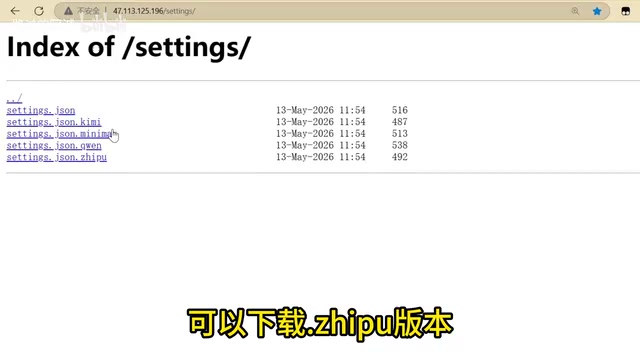
Step 2: Fill in Your API Key
Open the downloaded template file, find the API Key field, and replace it with your own key. There's one extremely common pitfall here: JSON files must use English quotation marks, English colons, and English commas. Never edit any punctuation while your input method is set to Chinese.
Chinese quotation marks “” and English quotation marks "" look almost identical to the naked eye, but programs don't recognize Chinese punctuation at all. A single Chinese comma can cause the entire JSON parsing to fail.

Step 3: Place It in the .claude Folder and Restart Claude Code
Put the configured settings.json in the correct directory:
C:\Users\YourUsername\.claude\settings.json
Once placed, press Ctrl + C twice in the terminal to exit the current process, then type claude to restart. If everything is configured correctly, Claude Code will successfully connect to DeepSeek or other Chinese LLMs.
Claude Code Configuration Failed? High-Frequency Error Checklist
If it still won't run after following the steps above, troubleshoot in the following order. These are the most frequently reported Claude Code error issues from the community:

Check 1: Is the File Extension Correct?
Windows hides file extensions by default, which means you might think you created settings.json, but the actual filename could be settings.json.txt.
Solution: Open File Explorer, click "View" → check "File name extensions," and confirm the filename is actually settings.json rather than a version with a double extension.
Check 2: Is the settings.json Directory Path Correct?
The correct path is C:\Users\YourUsername\.claude\. Note the following:
- Not the "Downloads" folder
- Not the Desktop
- Not the project directory
.claudeis a hidden folder starting with a dot
If the folder doesn't exist, you need to create it manually. To create a dot-prefixed folder in Windows, run mkdir .claude in the command line.
Check 3: Have JSON Punctuation Characters Been Corrupted?
This is the most insidious issue. Beyond the Chinese punctuation mentioned earlier, manually creating text files for configuration can also encounter:
- BOM (Byte Order Mark): BOM is a special character (U+FEFF) in Unicode encoding used to identify the file's encoding method. In UTF-8 encoding, BOM manifests as three invisible bytes at the beginning of the file:
EF BB BF. Windows Notepad inserts a BOM by default when saving UTF-8 files, while most JSON parsers strictly require files to begin with{or[. The presence of BOM characters is treated as an illegal character by the parser, immediately throwing a syntax error. This is the fundamental reason why "unexpected character" errors frequently occur after editingsettings.jsonwith Notepad. Use modern editors like VS Code or Notepad++, which save files in BOM-free UTF-8 format by default. - Line ending differences: Windows'
\r\n(CRLF) and Unix/macOS'\n(LF) are two different line break representations. CRLF originates from the "carriage return + line feed" operation of early typewriters, while modern Unix-like systems use only the line feed character. Although most JSON parsers can handle both formats, in edge cases (especially when processing configuration files through scripts) this may cause issues. - Trailing commas: JSON does not allow a comma after the last element—a common syntax mistake for beginners. Unlike JavaScript objects, the JSON specification (RFC 8259) has extremely strict syntax requirements and does not permit trailing commas.
This is exactly why it's strongly recommended to download the settings.json template directly rather than writing it by hand—the template file has already avoided all hidden encoding and punctuation traps.
Get DeepSeek Running First, Then Switch to Other Chinese LLMs
If you're just getting started with connecting Claude Code to Chinese LLMs, don't rush to configure multiple models simultaneously. Make sure DeepSeek is fully working first, verify the entire pipeline has no issues, and then try switching to Zhipu, MiniMax, or other models.
The "pipeline" here refers to the complete path from Claude Code sending a request to receiving a model response: Claude Code client → HTTPS request → Model API gateway → Model inference service → Response returned. Any issue at any point in this chain (network, authentication, model name, interface format) will cause the call to fail. Verifying the entire pipeline with a single model first helps you quickly identify whether the problem lies in local configuration or the remote service.
The switching method is also straightforward: download the settings.json template file for the corresponding model, replace the original file, and restart Claude Code.
What to Learn After Getting Claude Code Configuration Working
Getting the configuration working is just the first step. Claude Code's real value lies in its actual programming capabilities:
- Read projects, modify code: Have Claude Code understand your codebase and make changes. Claude Code can recursively scan project directory structures, build contextual understanding of the entire codebase, and then precisely locate files and code segments that need modification based on natural language instructions.
- Create SubAgents: Build dedicated AI assistants to handle domain-specific tasks. SubAgent is an advanced feature in Claude Code that allows users to create specialized AI sub-agents. Think of it as "an AI assistant's assistant"—the main Claude Code instance can delegate some work to pre-configured SubAgents, each with independent system prompts, tool permissions, and context scope. For example, you could create a SubAgent dedicated to code review, one for database operations, and one for writing test cases. This division of labor draws on the "separation of concerns" principle in software engineering and can significantly improve the efficiency and accuracy of AI-assisted programming in complex projects.
- Complete project practice: Build a complete project from scratch using Claude Code
It's recommended to progress in the order of "Installation → Configuration → Workflow → SubAgent → Project Practice" rather than piecing together fragmented tutorials from various sources.
Configuration issues may seem trivial, but they form the foundation for all subsequent operations. Getting the settings.json step right will make the rest of the Claude Code learning curve much smoother.
Key Takeaways
- The core reason Claude Code fails to start after installation is errors in the settings.json configuration file's path, extension, encoding, or punctuation
- Downloading pre-made templates rather than writing configurations by hand effectively avoids common issues like BOM hidden characters and Chinese punctuation
- The correct configuration path is C:\Users\Username.claude\settings.json; Windows' hidden extensions may result in the actual filename being .json.txt
- JSON files must use English quotation marks, colons, and commas—Chinese punctuation is visually hard to distinguish but completely unrecognizable by programs
- Beginners should get a single model running first (DeepSeek recommended), verify the pipeline works, then try switching to other Chinese LLMs
Related articles
 Tutorials
ChatGPT Plus Subscription Guide: Are GPT-5.5, image-2, and Codex Worth the Upgrade?
A detailed look at ChatGPT Plus features — GPT-5.5, image-2, and Codex — with a Plus vs Pro comparison and a complete step-by-step subscription guide for users outside the US.
 Tutorials
Harness AI Engineering in Practice: Using Claude Code to Master Enterprise-Level E-Commerce Development
Deep dive into Harness AI Engineering: master enterprise e-commerce development with Claude Code using the Rules, Skills, Wiki, and Changes framework.
 Tutorials
Cursor + Codex Dual-IDE Collaboration: A Practical Methodology for Open-Source Project Customization
A complete methodology for open-source project customization based on real-world experience, detailing the Cursor+Codex dual-IDE workflow, seven-stage process, MVP validation, and AI source code reading techniques.