Claude Code Desktop Tutorial: Build Apps with Zero Coding Experience

Claude Code launches a desktop app enabling anyone to build apps using natural language
Claude Code is now officially integrated into a desktop application, transforming command-line operations into graphical interface interactions. It supports both local development and GitHub cloud development modes, with three network security configurations available. Users simply describe their requirements in natural language, and the AI automatically handles code generation and project building, lowering the barrier to AI programming to an unprecedented level.
Introduction
Claude Code has long operated exclusively as a command-line tool, creating a significant barrier for users unfamiliar with terminal operations. Now, Claude Code has been officially integrated into a desktop application that not only supports working with local code repositories but also connects directly to GitHub remote repositories — enabling users with zero programming experience to build applications with AI assistance.
Technical Background: Claude Code is an AI programming assistant built by Anthropic on top of the Claude large language model. Unlike code completion tools such as GitHub Copilot, Claude Code employs an "Agentic Coding" architecture — it doesn't just generate code snippets but autonomously plans tasks, invokes tool chains, manages file systems, and completes the entire development loop from requirements analysis to code deployment. This capability relies on the LLM's "Function Calling" and "context window" technologies, enabling the AI to continuously track project state and make multi-step decisions.
Core Changes in Claude Code Desktop
The Command Line Interface (CLI) was the earliest form of human-computer interaction, where users communicate with the system by typing text commands. While CLI is extremely efficient for developers, its steep learning curve has long kept ordinary users at bay. In 1984, the Apple Macintosh brought the Graphical User Interface (GUI) to the mainstream, fundamentally changing the trajectory of computer adoption.
Previously, using Claude Code required entering command-line instructions in a terminal — for people without a technical background, just seeing the black screen with white text was enough to feel intimidated. The desktop release completely changes this situation — essentially, the AI programming tool has undergone a similar "GUI transformation," with all operations completed through a graphical interface. Users only need to describe their requirements in natural language and leave the rest to AI.
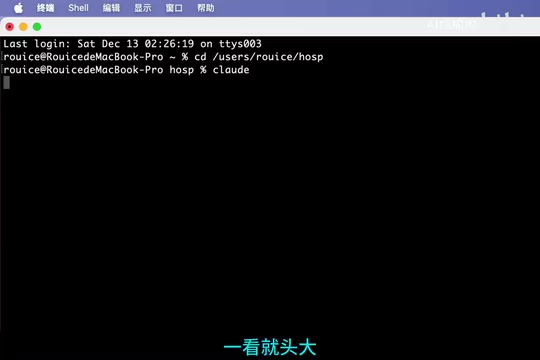
The two core capabilities of the desktop version:
- Local Development: Directly operate on project folders on your computer
- Cloud Collaboration: Connect to GitHub repositories, edit existing projects or create new ones
Step-by-Step Guide to Getting Started with Claude Code Desktop
Step 1: Installation and Login
Download the appropriate version of the Claude desktop app for your operating system (Windows/Mac/Linux), complete the installation, then register and log in. A guided prompt will appear on first launch — click "Get Started," then follow the instructions to install necessary components and wait for the installation to complete before entering the main interface.
Step 2: Local Project Development
If you choose to develop locally, you'll first need to create a project storage directory on your computer. In the desktop app, click to select a directory, choose "Local" mode, then write your requirements description in natural language in the input box and send it to Claude.
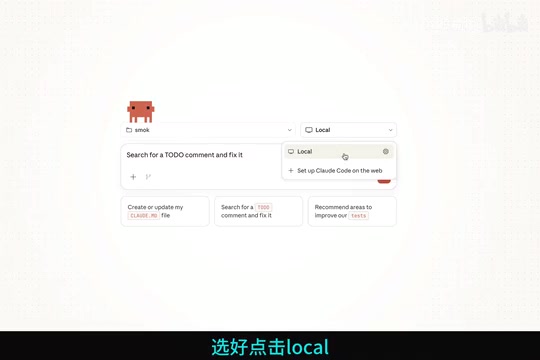
Claude will automatically generate code, create file structures, and configure project dependencies based on your requirements — no manual coding required throughout the entire process.
Step 3: GitHub Cloud Development
GitHub is the world's largest code hosting platform, built on the Git distributed version control system, with over 100 million developer users. A "Repository" is the basic unit on GitHub, used to store all code files and their historical change records for a project.
If you need to host your project on GitHub or edit code in an existing GitHub repository, select the "On the Web" mode. Once on the page, click to connect a repository and complete GitHub authorization.
After successful authorization, Claude will create a dedicated cloud development environment for you — essentially a sandboxed remote container (similar to the technical approach of GitHub Codespaces). The AI executes code operations in an isolated environment, protecting your local system security while directly performing Git operations like Push/Pull with GitHub repositories, enabling version management and team collaboration. You'll need to name this environment, and you can continue to add and manage multiple cloud environments later for easy switching between different projects.
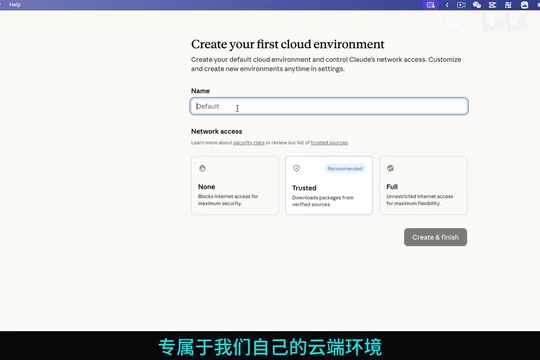
Three Network Security Configuration Modes
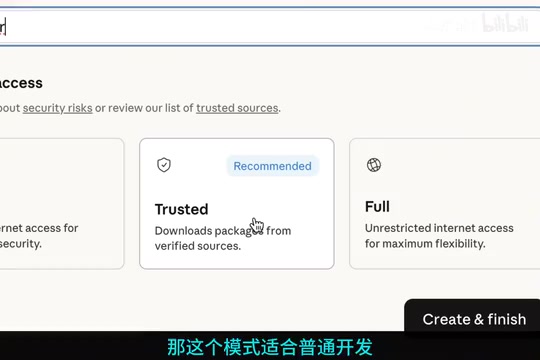
When creating a cloud environment, Claude Code Desktop offers three network security policies that users can choose based on their actual needs:
1. No Network
Completely offline mode with the highest security level, but all features requiring network access are unavailable. Suitable for scenarios with extremely strict network security requirements, such as code review and internal audits.
2. Trust (Trusted Sources Mode)
NPM (Node Package Manager) is the most popular package manager in the JavaScript ecosystem, hosting over 2 million open-source packages. The core value of a "package manager" is that developers don't need to write all functionality from scratch — they can directly call community-verified code libraries (for handling dates, encryption, network requests, etc.).
Trusted sources mode only allows access to official trusted sources, such as NPM package managers and system packages. This means the AI can normally install project dependencies without worrying about downloading malicious code from untrusted third-party websites — a key design choice that balances development efficiency with security. Suitable for typical development scenarios, this is the most recommended choice for most users.
3. Full (Fully Open)
No network restrictions whatsoever — Claude can access any external network resource. Suitable for complex development scenarios requiring extensive third-party API calls and automated workflows.
Practical Value for Zero-Experience Users
The significance of this update is that it lowers the barrier to AI programming to an unprecedented level. Previously, even with Claude Code's capabilities, users still needed basic command-line skills and project management knowledge. Now, the entire workflow has been simplified to:
- Open the desktop app
- Choose project location (local or cloud)
- Describe what you want to build in natural language
- Wait for the AI to complete development
For zero-experience users who want to develop a mobile app and publish it to an app store, this genuinely provides a viable path. It's worth noting that publishing to the App Store (Apple) or Google Play (Android) involves multiple technical and compliance steps: after code writing is complete, quality verification through unit tests and UI tests is required; followed by "code signing" — digitally signing the application with a developer certificate to prove its source is trustworthy; then packaging to generate IPA (iOS) or APK/AAB (Android) installation files; and finally submitting to the app store for manual review (Apple's review cycle typically takes 1-3 days). AI tools can currently significantly accelerate the coding phase, but signing certificate applications, privacy policy compliance, and app store account registration still require users to handle themselves. From code generation to final publication, the most critical technical barrier — coding itself — has been substantially reduced.
Conclusion
The launch of Claude Code Desktop marks AI-assisted development tools transitioning from "productivity tools for developers" to "creative tools for everyone." The combination of graphical interface + natural language interaction + GitHub integration enables non-technical users to participate in application development. We look forward to complete demonstrations with real projects to see how it performs in actual scenarios.
Related articles
 Tutorials
ChatGPT Plus Subscription Guide: Are GPT-5.5, image-2, and Codex Worth the Upgrade?
A detailed look at ChatGPT Plus features — GPT-5.5, image-2, and Codex — with a Plus vs Pro comparison and a complete step-by-step subscription guide for users outside the US.
 Tutorials
Harness AI Engineering in Practice: Using Claude Code to Master Enterprise-Level E-Commerce Development
Deep dive into Harness AI Engineering: master enterprise e-commerce development with Claude Code using the Rules, Skills, Wiki, and Changes framework.
 Tutorials
Cursor + Codex Dual-IDE Collaboration: A Practical Methodology for Open-Source Project Customization
A complete methodology for open-source project customization based on real-world experience, detailing the Cursor+Codex dual-IDE workflow, seven-stage process, MVP validation, and AI source code reading techniques.