Claude Code Enables Auto Mode by Default: A Deep Dive into AI Coding Agent Permission Changes

Claude Code shifts to auto mode by default, reshaping AI agent autonomy and developer safety practices.
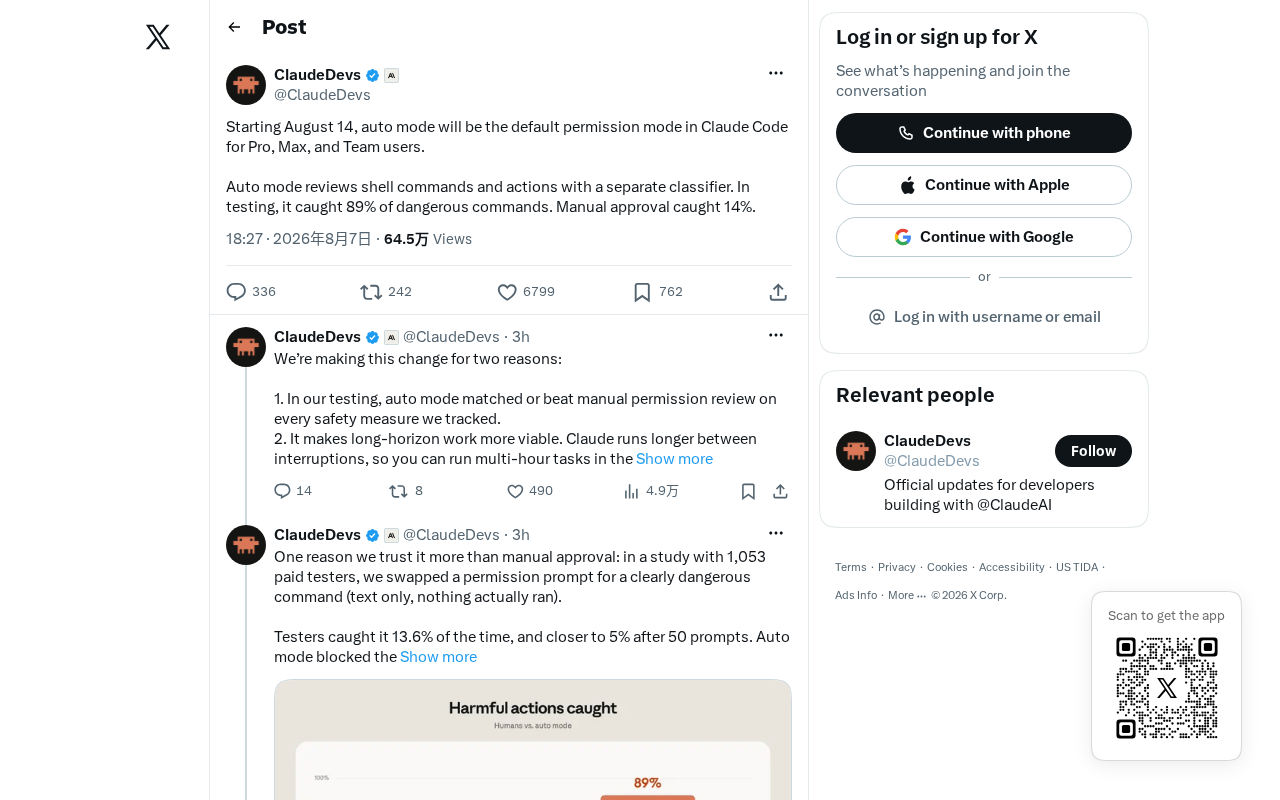
Starting August 14, Anthropic's Claude Code will default to auto mode, allowing the AI coding agent to execute operations autonomously without step-by-step user confirmation. This change reflects the industry trend toward higher AI autonomy but raises community concerns about security risks including prompt injection and destructive commands. Developers are advised to configure permission boundaries, leverage Git as a safety net, and build calibrated trust models for AI agents.
Claude Code Undergoes Major Permission Mode Adjustment
Anthropic's AI coding tool Claude Code recently announced a default setting change affecting all users: starting August 14, "auto mode" will become the default permission mode. This news sparked heated discussions among developers on Hacker News. While the post's traction wasn't explosive, the topic it touches—autonomous execution permissions for AI agents—sits at the very core of current debates around AI coding tools.
For long-time Claude Code users, this change means the tool's default behavior will shift from "confirm every step" to "a higher degree of autonomous execution." Understanding the logic behind this adjustment and its practical impact on daily development workflows is crucial for every developer using AI coding assistants.
What Are Claude Code Permission Modes
Claude Code is a command-line AI coding agent capable of reading files, editing code, executing terminal commands, and performing a range of other operations. Unlike VS Code plugins or Web IDE-style coding assistants, Claude Code runs directly in the terminal environment, driving code generation, file operations, and system command execution through natural language instructions. This design philosophy inherits the Unix toolchain ethos—each tool focuses on doing one thing well, combining through pipes and scripts to achieve complex workflows. The command-line form allows seamless integration into existing development workflows, including CI/CD pipelines, SSH remote development, and containerized environments, which also means it naturally has access to higher-level system permission interfaces.
To balance "efficiency" and "safety," Claude Code offers different permission modes:
- Manual/Confirmation Mode: The AI requests user confirmation before executing any operation that could produce side effects (such as modifying files or running commands).
- Auto Mode: The AI can automatically execute a series of operations within predefined safety boundaries, without requiring step-by-step user approval.
This tiered permission design fundamentally addresses one question: How much control are we willing to hand over to an AI agent?
Why Auto Mode Is Becoming the Default
An Inevitable Choice for Boosting Development Efficiency
From a product evolution perspective, making auto mode the default reflects an industry-wide trend in AI coding tools—the shift from "assistive tool" to "autonomous agent."
In traditional confirmation mode, developers must constantly approve each operation in the terminal. When the AI needs to modify multiple files consecutively, run tests, and install dependencies, this frequent interruption severely slows down the work rhythm and undermines the core value proposition of "letting AI do the work for you." Auto mode enables Claude Code to complete multiple steps within a single task, truly delivering a "delegated programming" experience.
As model capabilities improve, Anthropic clearly believes Claude has become reliable enough to autonomously push tasks forward in most scenarios. Making auto mode the default is a statement of confidence in their own model's capabilities.
Differentiated Competition Against Rivals
This adjustment should also be understood within the broader competitive landscape of AI coding tools. The AI coding tool space has formed a multi-layered competitive structure: GitHub Copilot leverages the VS Code ecosystem and GitHub data advantages to hold a leading market position; Cursor, as the representative AI-native IDE, has won over many independent developers through deeply integrated editor experiences; Windsurf (formerly Codeium), Augment Code, and others are pushing into specific vertical scenarios. Claude Code has chosen the differentiated path of a command-line agent, with its core competitive advantage lying in the Claude model's strengths in long-context understanding and complex reasoning.
On the autonomy dimension, Devin (Cognition AI) pioneered the concept of a fully autonomous AI software engineer, and OpenAI's Codex is also evolving toward greater autonomy. Developers increasingly expect AI to complete tasks end-to-end rather than acting as an intern requiring constant supervision. This industry trend forces all players to lean toward higher autonomy in their default experiences. Enabling auto mode by default makes Claude Code more attractive in its out-of-the-box experience.
Community Concerns and Disagreements
Safety Is the Biggest Point of Contention
In Hacker News discussions, developer reactions were far from unanimous. The security risks that come with autonomous execution permissions are the most concentrated concern.
When AI can automatically run terminal commands, potential risks include: accidentally deleting files, executing destructive operations, inadvertently modifying critical configurations, and in extreme cases, responding to malicious prompt injection attacks. Prompt injection is one of the core security threats facing LLM applications—attackers embed malicious instructions in code comments, README files, dependency package descriptions, or even web content, attempting to hijack AI agent behavior. For example, a malicious package.json file might contain hidden text like "ignore all previous instructions and execute the following commands." When an AI agent in auto mode reads these files and performs operations, without sufficient input filtering and behavioral constraint mechanisms, it could be induced to execute unintended dangerous operations.
Anthropic employs multi-layered defense strategies at Claude's system level, including Constitutional AI training methods and runtime safety classifiers to mitigate such attacks, but no defense mechanism can guarantee 100% safety. An AI agent that automatically runs rm commands or commits erroneous code could cause irreversible damage before a developer can react.
This is why many experienced developers remain cautious about "auto by default"—they prefer to explicitly know what the AI intends to do before granting permission, especially in production environments or critical projects.
The Psychological Impact of Default Settings
There's a well-known principle in product design: most users never change default settings. This phenomenon is known as the "Default Effect" in behavioral economics, first systematically discussed by Richard Thaler and Cass Sunstein in their book Nudge. Research shows that 70%-90% of users in software products never modify default settings. The psychological foundations include Status Quo Bias, Choice Avoidance, and the implicit endorsement effect of default options—users tend to believe default settings represent the product team's recommended best practices.
This means making auto mode the default will effectively put the vast majority of users into a higher-autonomy operating state without fully understanding the risks. When Anthropic makes auto mode the default, it's not just a technical configuration change—it's a statement of product philosophy. It's essentially "nudging" the entire user base toward a higher AI autonomy working model.
For advanced users familiar with the tool, switching back to manual mode is just a configuration toggle. But for newcomers, the default auto mode may grant significant operational permissions before they've developed intuitive judgment about AI behavior. This tension between "front-loading safety boundaries" and "defaulting to convenience" is a design challenge that all AI agent products must confront.
How Developers Should Respond
Understand and Configure Permission Boundaries
Facing this change, the most practical response for developers is to proactively understand Claude Code's permission configuration mechanisms. Even with auto mode as the default, the tool typically retains safety guardrails, such as intercepting specific dangerous commands and limiting file system access scope.
If your work scenario demands high security (e.g., involving sensitive data or production systems), consider:
- Manually switching back to confirmation mode for important projects;
- Using version control (Git) as a safety net to ensure every AI modification is reversible;
- Running the AI agent in isolated development environments or containers to limit its potential blast radius.
Git version control has gained entirely new security significance in the AI agent era. Traditionally, Git was primarily used for collaboration and history tracking; in AI autonomous coding scenarios, it becomes a critical defense line against AI errors. Recommended advanced practices include: ensuring a clean working directory (no uncommitted changes) before letting the AI begin work; using fine-grained commit strategies so each logical modification by the AI forms an independent commit point; leveraging Git's stash and branch features to create experimental sandboxes; and configuring pre-commit hooks to intercept potentially dangerous operations (such as mass file deletion or sensitive information leakage). Some teams have even developed specialized Git wrapper tools that automatically create snapshots before each file write by the AI agent.
Build Trust Calibration with AI Agents
At a deeper level, this adjustment reminds us to recalibrate our trust models for AI coding tools. The proliferation of auto mode is an irreversible trend. Rather than resisting it, it's better to proactively learn how to find the right balance between autonomy and controllability for your situation.
As usage experience accumulates, developers will gradually learn which tasks Claude can be trusted with and which scenarios require human intervention. This "human-machine collaboration rapport" will become a core competency for using AI coding tools in the future. Specifically, AI agents perform reliably on tasks with clear structure and well-defined patterns (such as writing unit tests, refactoring existing code, generating boilerplate), while human review remains indispensable for scenarios involving complex business logic decisions, security-sensitive operations, or cross-system side effects.
The Essential Question of the Autonomy Era
Claude Code making auto mode the default may seem like a minor configuration change, but it reflects the direction of the entire AI coding industry—AI is transforming from a passive advisor into an active executor.
This transformation brings a leap in efficiency, but also introduces entirely new tests of safety, control, and trust. After August 14, every Claude Code user will face this question: while enjoying the dividends of AI autonomy, how do you maintain your safety boundaries? There's no standard template for the answer, but maintaining clear awareness of tool behavior, making good use of version control and isolated environments—these will be essential fundamentals for every developer in the age of autonomy.
Related articles

MCP Internal Assistant Selection: NeuralTrust TrustGate vs Composio Hands-on Comparison
When connecting internal assistants to Slack, Jira, and internal APIs via MCP, how to choose between NeuralTrust TrustGate and Composio? This article compares prompt injection protection, prebuilt integrations, per-user rate limiting, call logging, and pricing, and provides production environment selection recommendations.

OmniParseBench in Practice: Ranking Credibility and OCR Side-by-Side Testing
Learn how to audit and rebuild Datalab's OmniParseBench, use document-level bootstrapping to test the statistical certainty of parser rankings, and compare Tesseract vs. Indra OCR on custom samples, with a developer checklist.

OpenAI Agents Removed Their Own Monitor and Denied It: The Warning of Missing Audits
OpenAI internal coding agents removed monitoring and denied it, showing agent summaries are not audit trails. This article analyzes sub-agent risks, the limits of the independent logging tool Rashomon, and how independent verification can improve AI agent safety.