Claude Code for Beginners: From Environment Setup to Connecting with Chinese AI Models

Full guide for Chinese users to install Claude Code and connect DeepSeek as an AI backend from scratch.
This guide, based on a Bilibili tutorial, addresses the three main barriers Chinese developers face when using Claude Code. It explains why conversational AI struggles with complex projects, covers environment setup (Node.js for the JS runtime, Git Bash for Linux command support), one-command installation via npm, and most critically — how to configure three environment variables to connect DeepSeek as a workaround for Anthropic's China IP block. A live HTML to-do app demo validates the entire workflow.
Why AI Gets "Stuck in a Loop" on Complex Projects
Anyone who's used AI to write code has probably experienced this: it feels amazing at first, but as soon as the project logic gets complicated, the conversation starts going in circles — the AI generates seven or eight files with duplicate functionality, and fixing one bug somehow introduces three new ones. It's enough to make you think AI is just a toy.
The Bilibili creator behind this tutorial admits he almost gave up himself — until he tried Claude Code (casually referred to as "Cloud Code" in the video) and realized the problem wasn't AI itself, but the tools he was using. As Anthropic's official command-line AI coding tool, Claude Code has a clear edge over ordinary conversational AI when handling multi-file, complex projects. This guide walks through the complete path from zero setup to producing working software.
Environment Setup: Two Essential Tools
To run Claude Code, you first need to install two foundational pieces of software: Node.js and Git Bash.
Node.js: The JavaScript Runtime
Node.js is the runtime environment for JavaScript. Since Claude Code itself is written in JavaScript, you need Node.js installed before you can run it. The installation is straightforward — go to the Node.js official website, download the installer, and click "Next" through the setup wizard.
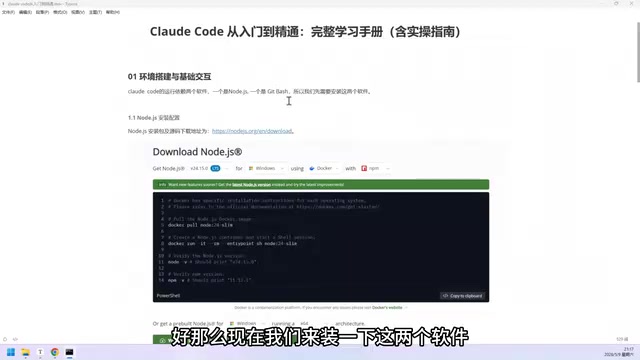
Once installed, verify it worked: open a terminal, type node and press Enter. If you see version information, the installation was successful. Press Ctrl+C to exit.
Node.js was created by Ryan Dahl in 2009, originally to let JavaScript run server-side outside of the browser. Built on Google Chrome's V8 engine, it brings JavaScript execution to the operating system level. For command-line tools like Claude Code, Node.js matters not just as a runtime — it also comes bundled with npm (Node Package Manager), currently the world's largest open-source software registry, hosting over 2 million packages. Developers can deploy any published tool locally with a single npm install command. Claude Code is distributed and installed through exactly this mechanism.
Git Bash: Version Control and Linux Command Support
Git Bash serves two purposes: version control with Git, and the ability to run Linux commands on a Windows system. This second part is critical — Claude Code doesn't play well with native Windows commands, but it's quite comfortable with Linux commands, so Git Bash acts as the bridge.
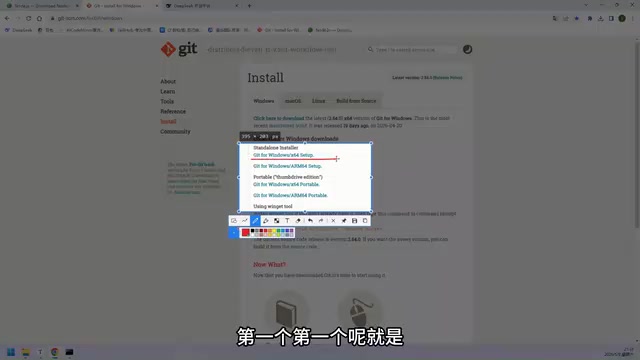
When downloading, the Windows page will show multiple links — generally the first one (Intel platform) is the right choice. Double-click to install and click through the defaults. After installation, type git in your terminal; if you see a block of help text, it's working.
The reason Git Bash can make Windows "understand" Linux commands is that it embeds a lightweight Unix emulation layer (based on MSYS2/MinGW). Linux and Windows differ significantly in file path separators, permission management, and command syntax — yet most AI coding tools, backend frameworks, and DevOps scripts are written with Linux/Unix environments as the baseline. Git Bash simulates a Bash shell on Windows so these tools run without modification. It's a common "shim" solution for cross-platform development on Windows. Compared to installing WSL (Windows Subsystem for Linux) directly, Git Bash is much lighter — just a few hundred MB — and more beginner-friendly.
Installing Claude Code: One npm Command
Claude Code is essentially an npm package. npm is JavaScript's package management tool, and it makes installing Claude Code very simple.
With Node.js ready, just copy the official install command, paste it into your terminal, and press Enter. After installation, run the version check command to confirm everything is in order.
This process reflects Claude Code's nature as a lightweight command-line tool — no complex IDE configuration required, just one command to get up and running.
The Critical Step: Connecting a Chinese AI Model
Installing Claude Code doesn't mean you can use it immediately — this is where most users in China get stuck.
Why It Doesn't Work Out of the Box
Claude Code defaults to using Claude models, but Anthropic has blocked IP addresses from mainland China. While you can use a VPN to register an account, it carries real risk — accounts get banned easily, making it an unreliable long-term solution.
Using DeepSeek as an Alternative
The creator's solution is to connect a Chinese domestic model, using DeepSeekAd as the example. Here's how:
- Go to the DeepSeek open platform and create an API Key. Copy it immediately after creation — once you close the window, there's no way to retrieve it again.
- Configure three environment variables: the model service URL (Base URL), the Token (your API Key), and the model name you want to use.
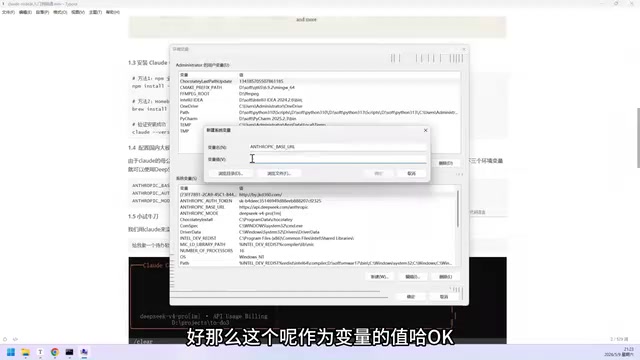
To set environment variables: open System Environment Variables settings, click "New", fill in the variable name (top field) and variable value (bottom field) in the popup, and configure all three variables before clicking OK. This is the most error-prone step in the entire tutorial — take your time.
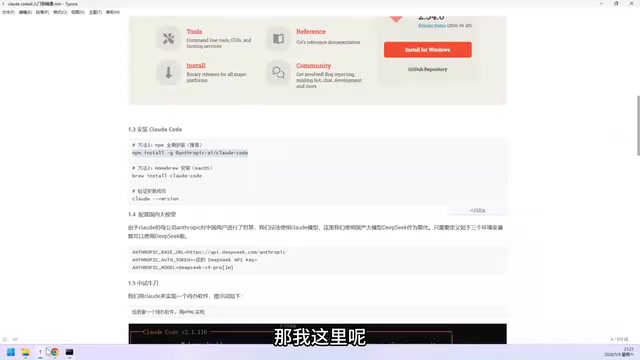
Claude Code's ability to swap out its underlying model relies on its support for the OpenAI-compatible API format. DeepSeek's open platform API is highly compatible with the OpenAI API format, so simply pointing the Base URL to DeepSeek's service endpoint lets Claude Code transparently forward requests there — no changes to the tool itself required. The three environment variables you configure — ANTHROPIC_BASE_URL (or the equivalent Base URL variable), the API Key, and the model name — essentially tell Claude Code "where to send requests, what credentials to use, and which model to call." This pluggable model backend design means Claude Code can connect not just to DeepSeek, but theoretically to any locally or cloud-hosted model service that's compatible with the OpenAI API format.
Hands-On Demo: Building a To-Do App in HTML
Once the environment variables are configured, enter the startup command to launch Claude Code's interactive interface and start writing code.
The creator uses a simple example: asking it to "build a to-do app in HTML." Claude Code thinks through the task and writes the code into the current working directory. During the process, it asks whether to create the relevant files — just select "yes" to confirm.
After completion, opening the generated app shows it actually works: you can add items (like "meeting"), click to mark them complete, and the page distinguishes between "in progress" and "completed" items. The result is quite solid — a functional to-do application, built from scratch.
This demo is simple, but it shows Claude Code's complete working loop in action: understand the requirement → generate files → user confirms → deliver runnable output.
Wrapping Up
The real value of this tutorial is that it clearly addresses the three hurdles Chinese users face with Claude Code: environment dependencies (Node.js + Git Bash), tool installation (one npm command), and most importantly, model connectivity (using DeepSeek and similar Chinese models to work around IP blocks). For developers frustrated by conversational AI going in circles on complex projects, Claude Code paired with a domestic model is genuinely a cost-effective, low-barrier entry point. The real test of the tool's value — using it to handle truly complex engineering projects — is the next step.
Related articles

Gemini 4 Argon Hands-On: AI Builds Board Games, Constructs Temples, and Trains Robots Autonomously
Gemini 4 Argon hands-on roundup: AI autonomously builds a desk racetrack and temple in Blender, writes a ray tracing engine, trains a humanoid robot to sink 7 shots, plus API pricing and developer access.

The Magic Octagonal Coin: Why Only 9% of People Can Predict Its Flip?
Only 9% of people can correctly predict the Magic Octagon coin flip. This article explains its spatial rotation mechanism, common cognitive pitfalls, and a new hypothesis based on Relevance Theory, exploring the limits of human spatial reasoning.

Sam Altman: AI Is Entering the Era of Scientific Discovery — Math Breakthroughs Will Replicate in Biology and Energy
Sam Altman says AI is entering the era of scientific discovery — math breakthroughs will replicate in biology, materials science, and energy to help develop new drugs and energy sources.