Claude Code Hands-On Tutorial: Installation, DeepSeek Integration & Programming Tips - Complete Guide
Complete guide to Claude Code setup, DeepSeek integration, and practical AI programming techniques
This article comprehensively covers Anthropic's AI coding assistant Claude Code, which reads entire project codebases and achieves a complete loop of auto-generation, debugging, and fixing. Since Anthropic doesn't serve mainland China, DeepSeek V4 Pro is recommended as a cost-effective alternative. In a hands-on demo, Claude Code delivered a complete full-stack project in just 30 minutes. The article also details permission modes, the Skill system, MCP tool integration, and ten practical tips, noting that programmers' roles are shifting from writing code to architectural oversight and requirement articulation.
What Is Claude Code? Why Is It Better Than Other AI Coding Assistants?
Claude Code is an AI coding assistant developed by Anthropic. Unlike pasting code snippets into DeepSeekAd or ChatGPT's web interface, it can read through all code files in your project, feed the complete context to a large language model, then automatically generate business code, debug errors, and deliver a version that runs out of the box.
Looking at the evolution of coding assistants: Copilot (2023, auto-completion) → Cursor (auto-coding) → Trae (Chinese optimization) → Claude Code (deep programming + auto-debugging). Each generation represents a quantum leap in capability. This evolution actually reflects three paradigm shifts in AI programming. Copilot, based on OpenAI's Codex model, is essentially "line-level completion"—predicting the next line of code based on context. Cursor introduced Agent mode, capable of understanding entire files or even cross-file context to generate code at the function or module level. Claude Code goes further still: using the terminal command line as its medium, it can directly manipulate the file system, execute shell commands, invoke compilers and package managers, forming a complete loop of "understand requirements → generate code → compile and run → read errors → auto-fix." The root of this capability difference lies in the expansion of context windows (Claude models support 200K Token context) and the maturation of Tool Use capabilities.
From hands-on experience, Claude Code's biggest advantage is code generation accuracy. Whether a coding assistant is any good ultimately depends on the underlying model's quality, and Claude Code's Sonnet and Opus models are genuinely in the top tier for code quality. That said, it's worth noting that in comparative testing, DeepSeek V4 Pro's coding performance actually surpasses Sonnet, and it's much cheaper.
Installation & Configuration: Practical Solutions for Region Restrictions
Claude Code Installation Requirements
- OS Support: MacOS, Windows, and Linux
- Hardware Requirements: 4GB+ RAM
- Network Requirements: VPN needed during installation; not required afterward if using domestic models
Windows users can complete the installation with a single command in PowerShell—the entire process takes about 3 to 5 minutes. Once installed, Claude Code auto-updates via Git.
The Reality of Anthropic Accounts
Here's an unavoidable fact: Anthropic does not offer services to mainland China and Hong Kong. I don't recommend buying accounts. Even if you successfully register with a foreign phone number, once IP jumping or a restricted region is detected, your account will be immediately banned. I personally had friends buy four accounts overseas—all were banned.
Recommended Solution: Connect to DeepSeek V4 Pro
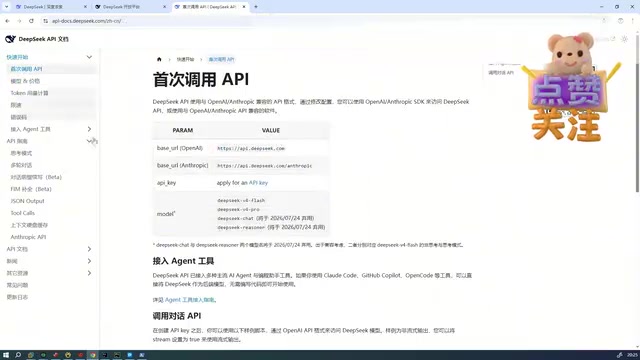
The most practical solution currently is to connect Claude Code to DeepSeek V4 Pro. You just need to configure the API Token and Base URL in your environment variables:
ANTHROPIC_API_KEY=your_DeepSeek_API_Key
ANTHROPIC_BASE_URL=DeepSeek_API_address
The reason Claude Code can connect to third-party models like DeepSeek is that most mainstream LLM APIs follow the OpenAI-compatible format (OpenAI-Compatible API). This is a de facto standard: request bodies use the same JSON structure containing fields like model, messages, and temperature, with consistent response formats. Therefore, you only need to modify the Base URL and API Key to switch the underlying model from Claude to DeepSeek, Qwen, or other domestic models. DeepSeek V4 Pro uses a MoE (Mixture of Experts) architecture, activating only a subset of parameters during inference, which dramatically reduces computational costs—this is the technical foundation enabling it to provide high-quality code generation at extremely low prices.
DeepSeek V4 Pro is currently offering a 75% discount, with one million output tokens costing only 6 RMB. Let me explain the concept of tokens: a Token is the basic billing unit for LLMs, but it doesn't equal one Chinese character or one English word. For Chinese text, one character is typically encoded as 1.5 to 2 tokens; for code, one token corresponds to roughly 3 to 4 characters. "One million output tokens for 6 RMB" means the model generates approximately 500,000 Chinese characters of content for just 6 RMB. In actual programming scenarios, a complete conversation (including requirement descriptions, code generation, and debugging) typically consumes thousands to tens of thousands of tokens, so a single conversation costs just a few cents. However, note that input tokens and output tokens are usually priced separately, with output token prices typically 3 to 4 times higher than input. In practice, each coding conversation costs only a few cents—12 RMB is enough to write two complete projects. By comparison, Qwen Coder once cost me 37 RMB in just two conversations.
IDE Integration: Using Claude Code in PyCharm & VS Code
Claude Code is not an IDE itself—it's a plugin that can be embedded in various development tools. Currently supported IDEs include:
- PyCharm: Go to Settings → Plugin → search "Claude" and install the official Anthropic plugin
- IntelliJ IDEA: Install through the plugin marketplace
- VS Code / Trae: Search and install from the extensions marketplace
I personally recommend using Claude Code in VS Code or Trae, as it outputs detailed execution processes so you can see what AI is doing at each step. If you prefer PyCharm for Python, you can run both—chat with Claude Code in Trae on one side while viewing and running code in PyCharm on the other.
Hands-On Demo: Generating a Complete Full-Stack Project in One Conversation
Requirement Documents Determine Delivery Quality
Here's a real case: developing an "inquiry and quotation" module for a B2B trading platform. The most critical lesson is that requirement documents must be extremely detailed, including at minimum:
- Database design (table structures, field descriptions)
- Technology stack choices (Java version, MySQL address and password)
- API specifications and examples
- Frontend page structure
- Business rules and validation logic
- Test data and deployment instructions
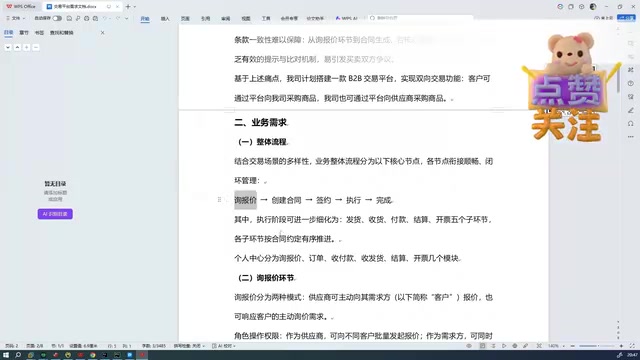
Include Java environment paths, Maven location, and database connection details in the requirement document—Claude Code will automatically find these environment configurations during programming, automatically creating databases, tables, and test data.
Stunning Results Delivered in 30 Minutes
Through just one conversation, Claude Code completed all of the following in approximately 30 minutes:
- Complete backend code (Controller, Service, Config, and other layered structures)
- Complete frontend code (TypeScript + Vue)
- Automatic database table creation and test data population
- Multi-user login system (buyer/supplier roles)
- Complete business workflows for inquiry, quotation, and quotation acceptance
- Windows one-click startup script
If a programmer were to write this by hand, it would take at least one to two weeks. AI delivered a runnable version in half an hour—frontend and backend connected, with complete multi-user business logic.
Three Permission Modes & the Skill System Explained
Claude Code's Three Permission Modes
Claude Code offers three operation modes, switchable at any time via keyboard shortcuts:
- Default Mode: Every operation requires your manual confirmation
- Accept Edits Mode: File modifications execute automatically, but command execution and database operations still require confirmation
- Plan Mode: Plans implementation steps first; after you confirm the plan, it automatically enters Accept Edits mode to execute
These three modes embody the trade-off between "safety and efficiency" in AI programming. Default mode is the safest but least efficient, suitable for high-risk operations like database deletion or file overwrites. Accept Edits mode is the best balance for daily development—code modifications can be safely delegated to AI while system command execution retains human review. Plan Mode suits complex tasks, having AI output a complete implementation plan for your review, avoiding wasting tokens in the wrong direction.
Skill: Encapsulating Repetitive Work into Reusable Capabilities
The essence of Skills is encapsulating repetitive work into capabilities that Claude Code can automatically invoke when needed. Creating one is simple: create a directory, add a skill.md file, and describe the trigger conditions and execution steps according to the specification.
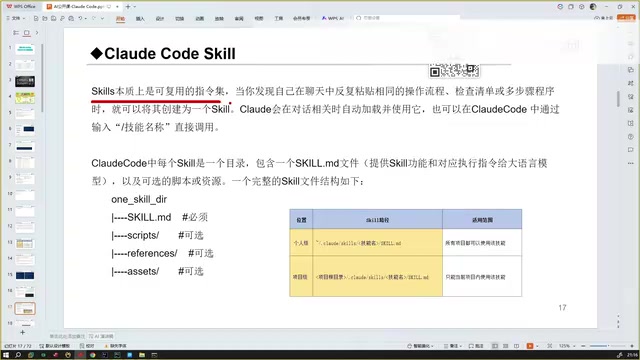
Skills have two levels:
- Personal Level: Placed in the
~/.claude/skills/directory, available across all projects - Project Level: Placed in the project's
.claude/skills/directory, available only to the current project
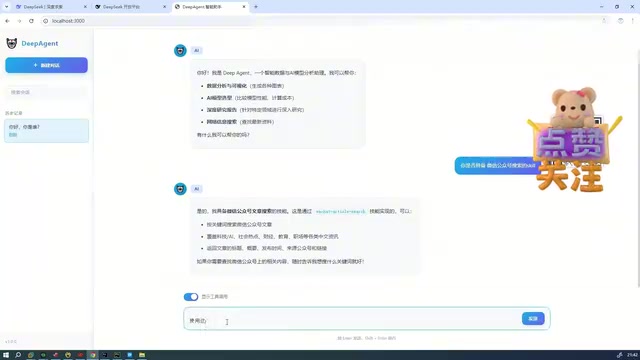
Common Skill applications include: code vulnerability detection, automated packaging and deployment, searching specific platform content, etc. You can also download community-shared Skills directly from Claude Hub. From a technical implementation perspective, Skills are essentially a structured System Prompt injection mechanism—the content in skill.md is automatically concatenated into the prompt sent to the LLM when trigger conditions are met, guiding the model to execute tasks according to predefined steps and specifications. This is conceptually aligned with "script automation" in traditional software engineering, except the executor has changed from a deterministic script engine to a probabilistic large language model.
MCP Tool Integration & Ten Practical Tips
MCP Configuration
MCP (Model Context Protocol) enables Claude Code to call external tools to extend its capabilities. MCP is a standardized protocol open-sourced by Anthropic in late 2024, designed to solve the connection problem between LLMs and external tools/data sources. Before MCP, every AI application needed custom adapter code to call external tools, creating M×N integration complexity. MCP reduces this to M+N by defining a unified client-server communication protocol—any tool server following the MCP specification can be called by any MCP client. It uses JSON-RPC 2.0 as its transport format and supports two transport methods: stdio (standard input/output) and SSE (Server-Sent Events).
The configuration method is to create an mcp.json file in the project root directory and write in the tool's connection address. As an MCP client, Claude Code automatically discovers and invokes tool capabilities provided by configured MCP servers, such as querying weather, searching web information, operating databases, etc.
Ten Practical Tips for Claude Code
- Be as detailed as possible in requirement descriptions—explain the business logic completely in one go to avoid wasting tokens across multiple conversation rounds
- Avoid vague language—words like "maybe," "roughly," or "perhaps" make AI produce uncertain code. Use definitive, explicit instructions
- Break down complex tasks—tell it step by step what to do first, what to do second
- Use images to convey information—paste screenshots via
Ctrl+Vfor more accurate requirement understanding. This leverages the multimodal capabilities of models like Claude, which can recognize UI layouts, error messages, tabular data, and other visual elements in screenshots, converting them into structured understanding more efficiently and with less ambiguity than pure text descriptions - Give positive feedback when code is correct—say "Excellent, this is exactly the style I want," and it will maintain that style going forward. This leverages the model's In-Context Learning characteristic: the model treats positive feedback in conversation history as implicit style constraints, automatically aligning subsequent generations
- Provide reference examples for niche technologies—let it expand from correct examples rather than generating from scratch
- Have AI read all code before making modifications—tell it "fully understand the project before making changes, don't miss a single detail"
- Don't vaguely say "fix the error"—describe the specific error symptoms and your assessment of the likely cause
- Provide official documentation to AI—place it in the project root for AI to read before coding, which significantly improves results
- The programmer's role is that of an architect—you're responsible for direction, understanding the business, and directing AI execution
The Impact of AI Programming on the Developer Industry & Coping Strategies
A real case happening right now: a frontend team that originally had 6 to 7 people now has only one project manager and one developer for daily maintenance—all other work is handled by AI. This isn't fear-mongering; it's already happening.
The core competitiveness of future programmers is no longer "how fast you write code" but rather requirement articulation ability, depth of business understanding, and architectural oversight. Technical fundamentals remain the foundation, but programming execution itself is being taken over by AI. Token costs will become cheaper like mobile data, with computing power continuously dropping in price—although the traditional Moore's Law (transistor density doubling every 18-24 months) has slowed in general-purpose CPUs, in AI inference, the price drop is actually faster than Moore's Law. This is mainly due to three factors: first, architectural optimization of AI-specific chips like GPUs/TPUs (such as NVIDIA's generational performance leaps from A100 to H100 to B200); second, advances in model compression techniques (quantization, distillation, sparsification, etc., dramatically reducing the operational cost of equivalent-quality models); and third, engineering optimization of inference frameworks (frameworks like vLLM and TensorRT-LLM significantly improve GPU utilization through techniques like PagedAttention and continuous batching). Overall, AI inference costs drop approximately 50% to 70% every 12 months, and the barrier to AI programming will only get lower.
The only reliable coping strategy: proactively embrace AI tools and make yourself among the last to be replaced.
Key Takeaways
- Claude Code can read through entire project codebases and auto-debug, with coding accuracy far exceeding traditional conversational AI coding
- DeepSeek V4 Pro is recommended as the backend model—currently at 75% off, each conversation costs only cents, offering exceptional value
- The level of detail in requirement documents directly determines AI coding accuracy; describing everything clearly at once dramatically reduces token consumption
- The Skill system encapsulates repetitive work into reusable instruction sets, supporting both personal-level and project-level configurations
- The programmer's role is shifting from "writing code" to "architectural oversight + requirement articulation"—embracing AI tools is the only viable strategy
Related articles
 Tutorials
ChatGPT Plus Subscription Guide: Are GPT-5.5, image-2, and Codex Worth the Upgrade?
A detailed look at ChatGPT Plus features — GPT-5.5, image-2, and Codex — with a Plus vs Pro comparison and a complete step-by-step subscription guide for users outside the US.
 Tutorials
Harness AI Engineering in Practice: Using Claude Code to Master Enterprise-Level E-Commerce Development
Deep dive into Harness AI Engineering: master enterprise e-commerce development with Claude Code using the Rules, Skills, Wiki, and Changes framework.
 Tutorials
Cursor + Codex Dual-IDE Collaboration: A Practical Methodology for Open-Source Project Customization
A complete methodology for open-source project customization based on real-world experience, detailing the Cursor+Codex dual-IDE workflow, seven-stage process, MVP validation, and AI source code reading techniques.