Claude Code Hooks: The Ultimate Solution for Replacing Prompts with Deterministic Control

Claude Code Hooks replace probabilistic prompts with deterministic mechanisms to guarantee critical rules always execute.
Claude Code's Hooks mechanism solves the pain point of probabilistic prompt execution by running programmatic logic outside the LLM reasoning loop, ensuring critical operations trigger every time. It provides five lifecycle events (prompt submission, pre/post tool use, notification, stop) supporting auto-formatting, dangerous command blocking, and compliance auditing. Project-level configurations can be committed to repositories for team sharing. The core principle: use Hooks for hard rules that must execute, and prompts for flexible preferences.
Why You Need Hooks Instead of Prompts
The Hooks mechanism in Claude Code solves a core pain point: determinism. You can tell Claude in your Claude.md file to run prettier after every file edit, and most of the time it will comply—but occasionally it won't. That's the nature of AI—it's probabilistic, not 100% reliable.
Hooks are different. They're deterministic—they execute every single time, no exceptions. If something needs to happen every time and cannot fail, don't put it in a prompt—put it in a Hook.
In software engineering, determinism means that given the same input, the system produces exactly the same output every time. This is a fundamental characteristic of traditional programming—if-else statements, loops, and function calls are all deterministic. Large Language Models (LLMs), however, are fundamentally next-token predictors based on probability distributions. Even with temperature set to 0, model behavior can still exhibit subtle differences under different context window states. This is why instructions written in Claude.md sometimes get "forgotten"—it's not that the AI is deliberately disobeying, but rather that in complex reasoning chains, certain instructions' weights may be diluted by other contextual information. The Hooks mechanism bypasses this problem entirely—it runs outside the LLM reasoning loop as traditional programmatic logic, providing absolute reliability.
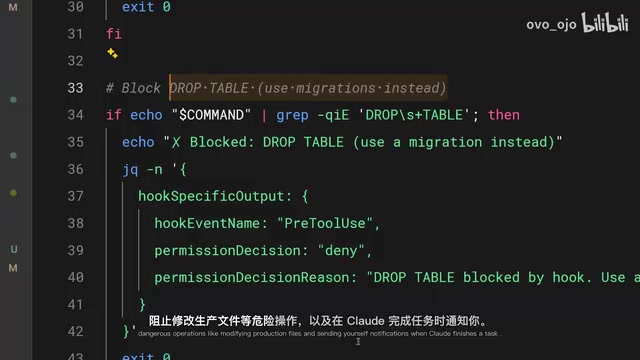
Common use cases include:
- Automatically formatting code after file edits
- Logging all executed commands for compliance auditing
- Blocking dangerous operations (e.g., modifying production environment files)
- Sending notifications when tasks complete
The Five Lifecycle Events of Hooks Explained
Hooks trigger at different points in the Claude Code lifecycle and are configured in settings.json. You choose an event type, optionally set a matcher to specify which tools it applies to, then provide the command to execute.
Claude Code uses the Tool Use pattern (also called Function Calling) from Agent architecture. In this architecture, the LLM doesn't execute actions directly—instead it generates structured tool call requests (like editing files, running commands, reading directories), and the outer Agent Runtime handles actual execution. This design creates natural interception points—custom logic can be inserted at both the request phase and completion phase of tool calls. Hooks leverage these interception points, similar to Middleware in web frameworks or Triggers in databases, injecting additional behavior without modifying core logic.
The five event types:
| Event | Trigger Timing |
|---|---|
| User Prompt Submit | When a prompt is submitted, before Claude processes it |
| Pre-tool Use | Before a tool call executes |
| Post-tool Use | After a tool call completes |
| Notification | When Claude sends a notification |
| Stop | When Claude finishes its response |
Practical Example: Auto-Formatting Code with a Post-tool-use Hook
This is the most common Hook usage. Set up a post-tool-use Hook with a matcher for the edit or multi-edit tools, so it triggers whenever Claude modifies a file.

The command script checks the file extension and runs the appropriate formatting tool:
- TypeScript/JavaScript → Prettier
- Go → go fmt
- Python → Ruff
- Other languages → corresponding formatters
This ensures that no matter how Claude edits code, the output conforms to your project's code style standards without manual post-hoc fixes. Notably, these formatting tools are themselves deterministic—Prettier always produces the same formatted output for the same code, and go fmt is Go's only officially recognized formatting standard. Combining the deterministic Hook trigger mechanism with deterministic formatting tools creates end-to-end consistency guarantees.
Practical Example: Blocking Dangerous Commands with a Pre-tool-use Hook
A pre-tool-use Hook can block tool calls before they execute. The Hook script receives the tool name and input parameters (in JSON format) via STDIN, then uses exit codes to determine whether to allow execution:
- Exit code 0: Allow execution
- Exit code 2: Block execution
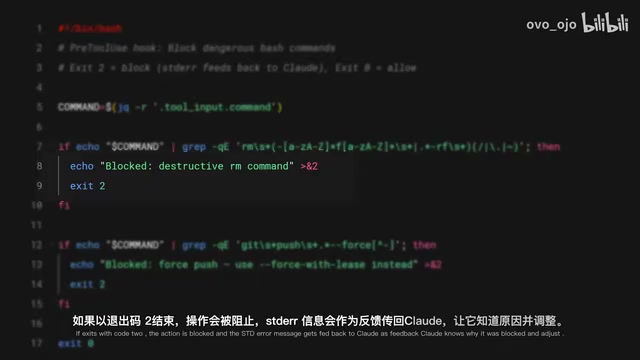
In Unix/Linux systems, process exit codes are the most fundamental communication method between parent and child processes. Per the POSIX standard, exit code 0 means success, while non-zero values indicate various error states. Claude Code's Hooks extend this convention: exit code 0 means allow, exit code 2 specifically means "actively block." It also uses standard error (stderr) to pass the blocking reason—an elegant design that reuses existing OS process communication mechanisms without introducing additional IPC protocols. Any developer who can write shell scripts can immediately start writing Hook logic.
Key detail: When a Hook exits with code 2, the stderr content is passed as feedback to Claude, letting it know why it was blocked so it can adjust its strategy. This isn't a simple "rejection"—it's an intelligent interception with context.
Typical blocking rules:
- Block writes to production configuration directories
- Block bash commands containing
rm -rf - Block direct commits to the main branch
These are hard rules (guaranteed), not suggestions. The difference: rules in prompts may be ignored by Claude, but rules in Hooks will absolutely never be bypassed.
Team Sharing: Project-Level Hooks Configuration Management
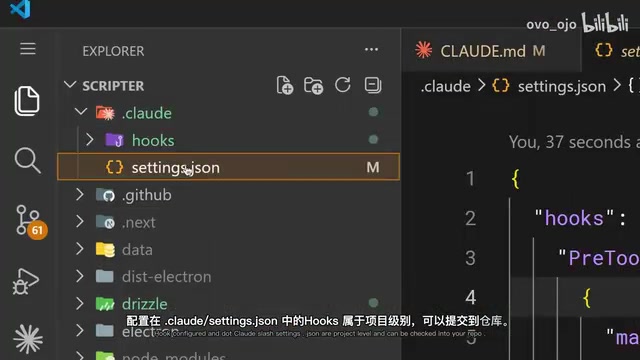
When Hooks are configured in .claude/settings.json, they become project-level and can be committed directly to the code repository. This means the entire team automatically gets the same Hook rules without individual configuration.
This approach embodies the Infrastructure as Code philosophy. Just as teams share linting rules via .eslintrc and unify editor settings via .editorconfig, .claude/settings.json makes AI-assisted programming behavioral constraints into version-controlled, code-reviewable, traceable team assets. This solves a key challenge when rolling out AI tools across teams: ensuring every member follows the same security and quality standards when using AI, without relying on individual manual configuration.
A practical tip: Use the $CLAUDE_PROJECT_DIR environment variable in commands to reference scripts stored in the project, so script paths resolve correctly regardless of Claude's current working directory.
Hook vs Prompt: Best Practice Selection Guide
| Scenario | Recommended Approach | Reason |
|---|---|---|
| Code formatting | Hook (post-tool-use) | Must execute every time |
| Security rules | Hook (pre-tool-use) | No exceptions allowed |
| Coding style preferences | Prompt/Claude.md | Flexibility matters more |
| Compliance logging | Hook (post-tool-use) | Cannot be missed |
The core principle is simple: if failing even once could cause problems (security, compliance, consistency), use a Hook; if it's just a preference or suggestion, prompts are sufficient.
This layered strategy also reflects the "Defense in Depth" concept from security engineering: prompts serve as the first soft guidance layer covering most normal scenarios; Hooks serve as the second hard guarantee layer, backstopping critical paths that absolutely cannot fail. Used together, they maintain the flexibility of AI interaction while ensuring engineering rigor.
The Hooks mechanism transforms Claude Code from an assistant that "mostly listens" into an engineering tool that can be strictly governed. For team collaboration and production environment use, this is an indispensable capability.
Related articles
 Tutorials
ChatGPT Plus Subscription Guide: Are GPT-5.5, image-2, and Codex Worth the Upgrade?
A detailed look at ChatGPT Plus features — GPT-5.5, image-2, and Codex — with a Plus vs Pro comparison and a complete step-by-step subscription guide for users outside the US.
 Tutorials
Harness AI Engineering in Practice: Using Claude Code to Master Enterprise-Level E-Commerce Development
Deep dive into Harness AI Engineering: master enterprise e-commerce development with Claude Code using the Rules, Skills, Wiki, and Changes framework.
 Tutorials
Cursor + Codex Dual-IDE Collaboration: A Practical Methodology for Open-Source Project Customization
A complete methodology for open-source project customization based on real-world experience, detailing the Cursor+Codex dual-IDE workflow, seven-stage process, MVP validation, and AI source code reading techniques.