Claude Code Installation Guide: One-Click Integration with DeepSeek V4, Direct Connection in China Without Overseas Accounts

Replace Claude Code's backend with DeepSeek V4 via CC Switch for direct use in China without a VPN.
This article explains how to use the third-party tool CC Switch to replace Claude Code's backend model with DeepSeek V4 Pro for direct access from China. The complete workflow covers: using Watt Toolkit to resolve GitHub access issues, installing the Node.js runtime, configuring the CC Switch proxy tool, obtaining a DeepSeek API Key, and completing the model switch—achieving a command-line AI coding experience without any overseas account or credit card.
Introduction
Claude Code is a command-line AI programming assistant developed by Anthropic, highly praised by developers for its powerful code comprehension and generation capabilities. Unlike plugin-based tools such as GitHub Copilot, Claude Code uses an Agent architecture that can directly operate on local file systems, execute Shell commands, and understand project structures at the entire repository level. It autonomously plans multi-step tasks like reading files, modifying code, running tests, and committing to Git—without requiring step-by-step user intervention. However, due to network and account restrictions, direct usage presents significant barriers for users in China.
The good news is that with the third-party tool CC Switch, we can replace Claude Code's backend model with DeepSeekAd V4 Pro, enabling direct connection from China—no overseas account required, no credit card needed.
This article will walk you through the entire installation and configuration process step by step. Even if you've never touched a command line before, you can get everything set up in just a few minutes.
Preparation: Resolving GitHub Connection Issues
The installation process requires downloading dependency packages from GitHub, so the first step is ensuring your computer can properly access GitHub.
If you don't have a VPN tool, we recommend using Watt Toolkit to accelerate GitHub connections:
- Download and install Watt Toolkit
- Open the software and click "Network Acceleration"
- Find GitHub in the acceleration list and check it
- Click "One-Click Accelerate"
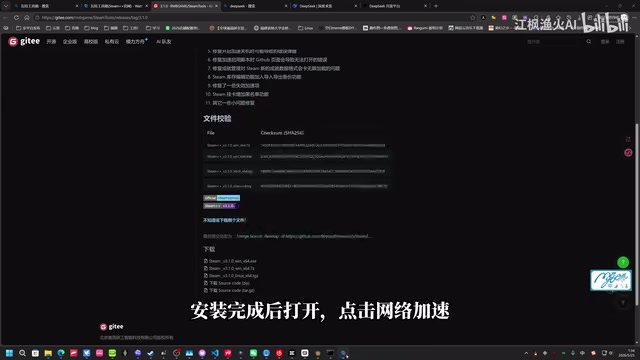
After completing this, open GitHub in your browser to confirm the page loads normally. This step is the foundation for all subsequent operations—make sure to verify the connection is successful.
Installing the Node.js Runtime Environment
Claude Code is built on Node.js, so we need to install the runtime environment first. Node.js is a JavaScript runtime built on Chrome's V8 engine. Claude Code is published as an npm package and requires Node.js to run locally. Installing Node.js automatically includes npm (Node Package Manager), which is used to install Claude Code itself. Currently, Claude Code requires Node.js version 18.x or higher—we recommend choosing the LTS (Long Term Support) version for optimal stability.
Installation can be completed quickly via PowerShell:
Steps:
- Type "PowerShell" in the Windows search bar (bottom-left corner)
- Right-click and select "Run as Administrator"
- Copy the Node.js installation command (provided in the original video's comment section), paste it into the window with
Ctrl + V - Press Enter and wait for the automatic download and installation to complete
⚠️ Note: You must run PowerShell as Administrator, otherwise the installation may fail due to insufficient permissions.
After installation, type node -v to verify success—seeing a version number means everything is fine.
Installing and Configuring CC Switch
CC Switch is an open-source third-party tool. Its core mechanism is launching a local proxy server that intercepts requests from Claude Code destined for Anthropic's official API, converts them to the target model's (e.g., DeepSeek) API format, and forwards them. This "API format conversion proxy" technique works because domestic models like DeepSeek and Qwen provide standard interfaces compatible with OpenAI's specification, allowing CC Switch to achieve multi-model switching at relatively low cost without modifying any of Claude Code's own code.
Download and Installation
- Visit the CC Switch GitHub repository page
- Scroll down to the Releases section, expand Assets to find the Windows
.msiinstaller - Download and double-click it, then follow the prompts to install normally

Select the Model
After installation, CC Switch will launch automatically. Click the plus button in the upper-right corner, find and select DeepSeek from the model list.
Obtaining and Configuring the DeepSeek API Key
To call DeepSeek's model service, you need a valid API Key. Before diving into configuration details, it's helpful to understand the token billing mechanism: A token is the basic unit of text processing for large language models. In English, approximately 4 characters equal 1 token; in Chinese, approximately 1-2 characters equal 1 token. The DeepSeek API charges separately for input tokens and output tokens—understanding this mechanism helps you manage costs effectively.
Steps:
- Open the DeepSeek Open Platform, register or log in
- If your account balance is zero, make a small top-up (a few yuan will last a long time)
- Go to the "API Keys" page and click "Create"
- Enter an easily identifiable name and confirm
- Copy the generated API Key and paste it into the corresponding input field in CC Switch
Key Configuration Recommendations
- ✅ Enable the "1 Million Context" option: "Context" here refers to the maximum number of tokens the model can process in a single conversation. With 1 million context enabled, the model can read and understand multiple files from large codebases at once, significantly improving its analysis capability for complex projects.
- ⚠️ "Maximum Thinking Intensity" is recommended to leave off initially: This option corresponds to DeepSeek's Chain-of-Thought deep reasoning mode, where the model generates a large number of internal reasoning tokens before producing the final answer. While it can improve accuracy for complex problems, token consumption per request increases significantly—it's unnecessary for everyday use.

In practice, disabling deep thinking mode already meets the vast majority of programming assistance needs. Once you're familiar with your usage patterns, you can enable it on-demand for complex tasks.
Launching Claude Code and Verifying Configuration
With all preparations complete, return to PowerShell for the first launch:
- Type
claudeand press Enter - On first launch, you'll be asked to choose an interface theme—the default dark theme is fine, just press Enter
- Once in the interactive interface, type
/modelto check whether the current model has been switched to DeepSeek
Seeing a DeepSeek-related model name confirms that your Claude Code + DeepSeek V4 configuration is fully complete.
Practical Test: Verifying the Complete Workflow
After configuration, let's do a simple functional verification:
- Create a new working folder on your desktop or any location
- Type
cmdin the folder's address bar and press Enter to open a command-line window - Type
claudeto launch Claude Code - On first entry to this directory, it will ask whether to trust this folder—press Enter to confirm
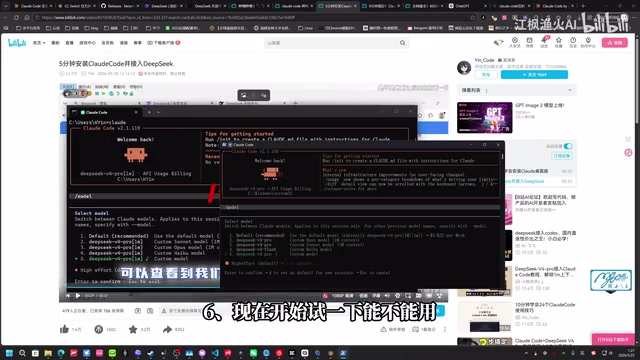
Try giving it a simple task, for example:
Write a short article about artificial intelligence, output as a markdown document saved to the current folder
If the file is successfully generated and appears in the folder, the entire workflow is fully operational and ready for production use.
Usage Tips and Considerations
Cost Control Tips
- DeepSeek API charges by token—daily programming assistance costs are very low
- Disabling "Maximum Thinking Intensity" can reduce per-request costs by several times (avoiding large amounts of internal reasoning tokens)
- We recommend setting usage alerts or daily limits on the open platform to prevent unexpected overspending
Recommended Use Cases
- Code generation, refactoring, and bug fixing
- Batch file processing and format conversion
- Rapid project scaffolding
- Technical documentation writing and organization
- Shell script writing
Limitations to Be Aware Of
- DeepSeek V4 is highly capable, but there are still differences compared to the original Claude Sonnet/Opus on some complex programming tasks
- As a third-party open-source tool, CC Switch's stability and update cadence require ongoing attention
- Some of Claude Code's advanced features (such as MCP tool calling) may behave differently with a replaced model. MCP (Model Context Protocol) is an open protocol introduced by Anthropic to standardize interactions between AI models and external tools like browser control and database queries. Since different models vary in their support for tool-calling formats, some MCP features may not be fully replicated.
Conclusion
The core idea behind this entire solution is straightforward: use Watt Toolkit to solve network issues, use CC Switch's local proxy conversion mechanism for model replacement, and use the DeepSeek API to provide actual compute power. Together, these three components enable users in China to experience Claude Code's command-line programming workflow with zero barriers.
The entire deployment process requires no overseas phone number, no international credit card.
Related articles
 Tutorials
ChatGPT Plus Subscription Guide: Are GPT-5.5, image-2, and Codex Worth the Upgrade?
A detailed look at ChatGPT Plus features — GPT-5.5, image-2, and Codex — with a Plus vs Pro comparison and a complete step-by-step subscription guide for users outside the US.
 Tutorials
Harness AI Engineering in Practice: Using Claude Code to Master Enterprise-Level E-Commerce Development
Deep dive into Harness AI Engineering: master enterprise e-commerce development with Claude Code using the Rules, Skills, Wiki, and Changes framework.
 Tutorials
Cursor + Codex Dual-IDE Collaboration: A Practical Methodology for Open-Source Project Customization
A complete methodology for open-source project customization based on real-world experience, detailing the Cursor+Codex dual-IDE workflow, seven-stage process, MVP validation, and AI source code reading techniques.