Claude Code Installation & Setup Guide: Comparison with Cursor/TRAE and Solutions for Users in China

Claude Code is a next-gen AI programming assistant that understands full project context and auto-codes with debugging.
Claude Code is Anthropic's AI programming assistant that differs from traditional conversational coding by reading all project files, leveraging a 200K-token context window to understand entire project architectures, and automatically generating and debugging code. It's not an IDE but integrates as a plugin into Cursor, VS Code, and other development tools. Its underlying Sonnet model leads on major programming benchmarks with superior code accuracy over competitors. Users in China need to configure third-party models like DeepSeek due to regional restrictions.
What is Claude Code?
Claude Code is an AI programming assistant developed by Anthropic. It differs fundamentally from conversational AI coding approaches like ChatGPT or DeepSeekAd. There's no need to log into a web interface—you install it directly on your local machine and integrate it into your familiar development tools.
Traditional conversational coding only gives you code snippets that you must manually copy into your project, run, test, and debug—a tedious back-and-forth process. Claude Code's core capability is this: It reads all files in your project, feeds the complete project context to the large language model, automatically generates business code, and auto-debugs until it outputs a directly runnable code version. This end-to-end automated development experience far surpasses simple conversational coding.
The technical foundation for this capability is that Claude series models support an ultra-long context window of up to 200,000 tokens—equivalent to processing thousands of lines of code simultaneously. The model doesn't just see individual files; it understands cross-file function call relationships, data structure definitions, and business logic dependencies, generating code that's highly consistent with the entire project architecture rather than isolated code snippets.
The Evolution of AI Programming Assistants
Looking back at the development of AI programming tools, there's a clear trajectory of continuously advancing capabilities:
The Leap from GitHub Copilot to Cursor
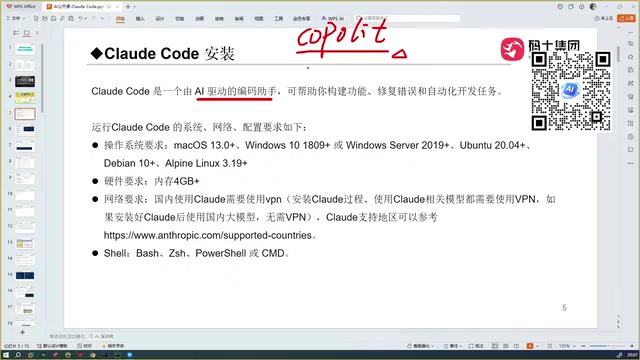
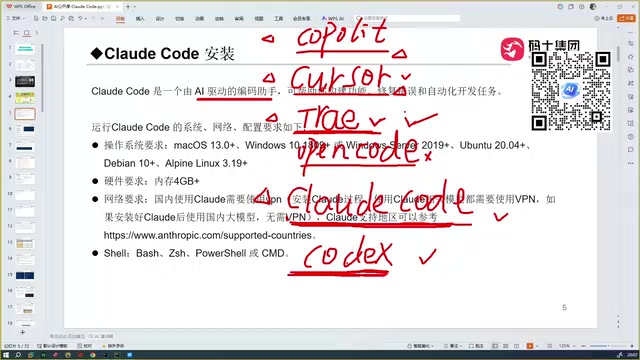
Around 2023, GitHub Copilot was the first code completion plugin to break through, delivering a revolutionary experience for developers. Then Cursor emerged, capable of not only completing code but performing more intelligent automated coding—a clear step up in capability.
TRAE and the Domestic AI Programming Ecosystem
TRAE comes in international and domestic versions. The domestic version features deep optimization for Chinese language understanding and is free to use—that's its core competitive advantage. However, when dealing with niche technology stacks, TRAE's code generation accuracy drops noticeably.
Why Claude Code Stands Out
The market also includes tools like OpenCode and Codex, with Codex paired with GPT-5 reportedly matching Claude Code's programming capabilities. But after hands-on horizontal comparisons—including TRAE, Cursor, and various domestic models—Claude Code delivers the most outstanding code accuracy.
The fundamental reason: every programming assistant's capability ceiling depends on the underlying large language model's strength. Claude Code is powered by Anthropic's Sonnet model, built using the Constitutional AI training methodology, which consistently leads on mainstream programming benchmarks like HumanEval and SWE-bench, performing particularly well in code reasoning, multi-step task planning, and error self-correction. Additionally, Claude Code supports switching to more powerful model versions, further expanding its capability ceiling.
Core Differences Between Claude Code and Cursor/TRAE
Many developers confuse the positioning of Claude Code with Cursor and TRAE. Here's the key distinction:
Cursor and TRAE are IDEs (Integrated Development Environments) themselves, built on VS Code's open-source core (Monaco Editor + LSP protocol)—download and double-click to use. Claude Code is not an IDE. It uses a lightweight CLI (Command Line Interface) + API call architecture, communicating with various IDEs through the standardized Language Server Protocol, allowing it to integrate as a plugin into multiple development tools:
- Integrate with Cursor
- Integrate with VS Code
- Integrate with IntelliJ IDEA
- Integrate with PyCharm
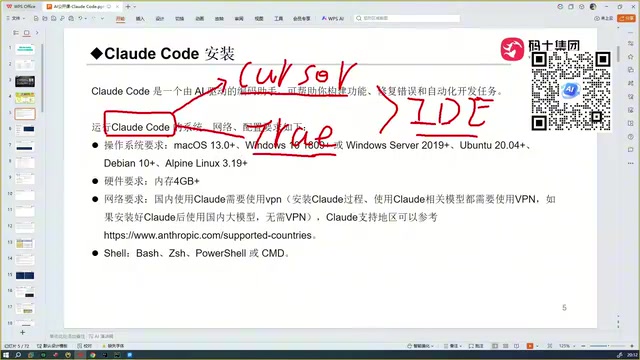
This architectural difference means you don't need to switch your existing development environment. Claude Code seamlessly integrates into your existing workflow as a plugin, and the official team recommends this integration approach.
Claude Code Installation Guide
System and Environment Requirements
| Item | Requirement |
|---|---|
| Operating System | macOS, Windows, Linux |
| Memory | At least 4GB |
| Network | VPN required during installation |
| Prerequisites | Windows users must pre-install Git |
Detailed Installation Steps
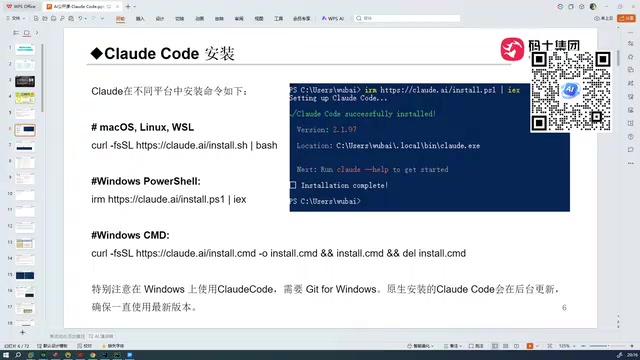
macOS users: Open Terminal and run the official installation command.
Windows users: Open PowerShell and run the corresponding installation command. Note that Git must be installed beforehand, as Claude Code has a deep dependency on Git—not only for its own version updates but as a core component of its workflow. During automated coding, Claude Code uses Git's diff mechanism to track every code change, compares pre- and post-modification differences during debugging loops, and rolls back to stable versions when necessary. This deep integration with version control is the technical foundation for Claude Code's "auto-debugging" closed loop—every AI modification has a complete change record that developers can review or revert at any time.
The entire installation process takes approximately 3-5 minutes.
Troubleshooting Common Installation Issues
If red error messages appear during installation, the vast majority of cases are network issues—the VPN isn't working properly and cannot connect to external servers. Confirm that VPN global proxy is enabled and retry.
After successful installation, versions update automatically with no manual action required. For example, an initially installed version 2.1.97 will automatically upgrade to newer versions like 2.1.116.
Essential Reading for Users in China: Account and Model Configuration
Important notice: Due to regional compliance requirements, Anthropic does not offer services to mainland China and Hong Kong. Even if you successfully register with an overseas phone number, usage from within China may result in account bans.
The correct approach for users in China is: Do not purchase or register an official Anthropic account. Instead, use Claude Code's custom API endpoint feature to configure third-party models (such as DeepSeek V3/V4 and other domestically available models). These models support the OpenAI-compatible API format—configuration only requires modifying two parameters: base_url and api_key for seamless switching. DeepSeek's benchmark scores on code generation tasks approach Claude Sonnet's, making it currently the best value alternative for users in China. After configuration, daily use of Claude Code doesn't require a VPN—as long as you're calling domestic models, everything works normally.
Basic Claude Code Workflow
After installation and configuration, usage is very intuitive:
cdinto your project directory in the terminal- Type the
claudecommand to start - On first launch, select "Yes I trust this folder" to trust the current directory
- Then describe your requirements in natural language directly in the terminal, and the AI begins coding immediately
Claude Code automatically reads all project files in the current directory as context, writing generated code directly to the corresponding locations in your project—truly achieving one-stop development from requirement description to code delivery.
Summary: Is Claude Code Worth Adopting?
Claude Code represents a new paradigm in AI programming assistants—not simple code completion or conversational Q&A, but a full-process development tool that understands complete project context, auto-codes, and auto-debugs. Its underlying Sonnet model consistently leads on mainstream programming benchmarks, the ultra-long context window grants it genuine project-level understanding, and deep Git integration ensures the reliability of its auto-debugging closed loop. Although there are certain network barriers for use in China, configuring third-party models like DeepSeek completely bypasses these restrictions, enabling efficient use in the domestic environment.
For programmers pursuing development efficiency, whether you currently use Cursor, TRAE, or VS Code, Claude Code is worth adding to your toolbox as a programming assistant.
Related articles
 Tutorials
ChatGPT Plus Subscription Guide: Are GPT-5.5, image-2, and Codex Worth the Upgrade?
A detailed look at ChatGPT Plus features — GPT-5.5, image-2, and Codex — with a Plus vs Pro comparison and a complete step-by-step subscription guide for users outside the US.
 Tutorials
Harness AI Engineering in Practice: Using Claude Code to Master Enterprise-Level E-Commerce Development
Deep dive into Harness AI Engineering: master enterprise e-commerce development with Claude Code using the Rules, Skills, Wiki, and Changes framework.
 Tutorials
Cursor + Codex Dual-IDE Collaboration: A Practical Methodology for Open-Source Project Customization
A complete methodology for open-source project customization based on real-world experience, detailing the Cursor+Codex dual-IDE workflow, seven-stage process, MVP validation, and AI source code reading techniques.