Claude Code MCP Protocol Explained: Configuration, Optimization, and Practical Tips

MCP protocol connects Claude Code to external tools, with key context window optimization strategies.
Model Context Protocol (MCP) is an open standard released by Anthropic based on JSON-RPC 2.0 that enables AI Agents to connect with external tools and data sources. MCP servers come in two types: HTTP (remote) and STDIO (local), supporting three scope configurations: Local, User, and Project. When using MCP, context window management is critical: tool definitions continuously occupy context space, so you should promptly disable inactive servers, prefer CLI tools as alternatives, and leverage Skill Sets for on-demand loading.
Complete Guide to Model Context Protocol (MCP): Principles, Configuration, and Context Optimization
Model Context Protocol (MCP) is an open standard that enables Claude Code to connect with external tools and data sources. When you ask a question, Claude automatically determines when to use these tools to better understand your needs. This article systematically covers how MCP works in Claude Code, configuration methods, and context optimization techniques.
Why Does Claude Code Need MCP?
When using Claude Code, context is one of the most critical elements. However, much of your context is often scattered across various places—databases, productivity apps, public code repositories, and more. MCP was created to solve exactly this problem.
Technical Origins of MCP: Model Context Protocol was released by Anthropic in late 2024 as an open protocol based on JSON-RPC 2.0. Its design was inspired by LSP (Language Server Protocol)—the same protocol that enables editors like VS Code to seamlessly communicate with language servers for various programming languages. MCP extends this approach to the AI domain, defining a standardized communication method between AI models and external tools, allowing any tool provider to integrate with AI systems following a unified specification without developing a separate adapter for each AI platform.
To understand MCP, you first need to understand the concept of "Tools" in AI Agents. Tools give Agents like Claude Code the ability to perform specific operations, enabling them to better accomplish tasks. This is fundamentally different from traditional AI that simply returns text output—Agents can proactively invoke tools, retrieve real-time data, and execute operations, rather than just generating text.
Underlying Mechanism of Tool Calling: Tool Calling (also known as Function Calling) is one of the core capabilities of modern large language models. During the reasoning process, the model determines whether it needs to call external tools based on user intent, and generates structured call requests (containing tool names and parameters) that are executed by the runtime environment, with results returned to the model for continued reasoning. This "perceive—decide—act—feedback" loop transforms AI from "passive answering" to "active acting," which is the core characteristic that distinguishes AI Agents from ordinary chatbots.
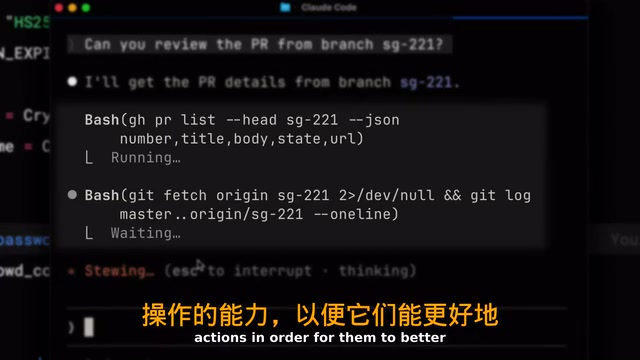
Here are some practical examples:
- If your team uses Linear as a project management tool, you can add a Linear MCP server to let Claude Code directly retrieve detailed information about specific issues
- If you need the latest documentation for a dependency library, the Context7 MCP server can provide real-time documentation to Claude Code
- There are hundreds of different connectors available at cloud.com/connectors
Two Types of MCP Servers: HTTP and STDIO
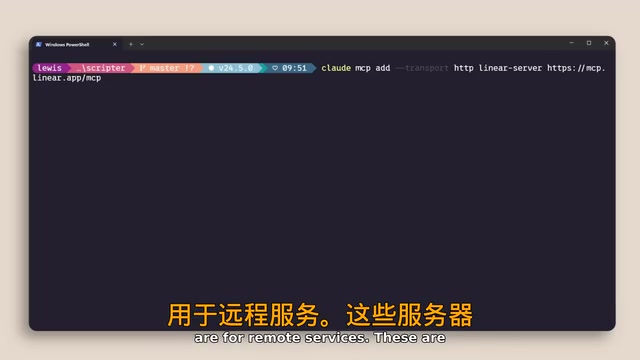
You can add MCP servers using the claude mcp add command. Based on the connection method, MCP servers are primarily divided into two types:
HTTP Servers (Remote Services)
HTTP servers connect to remote services hosted by service providers and communicate over the network. They're suitable for scenarios requiring access to cloud APIs or third-party SaaS services. HTTP servers typically implement persistent connections through SSE (Server-Sent Events) or WebSocket. When using them, you need to properly handle secure storage of authentication information like API keys, avoiding hard-coding sensitive credentials in configuration files committed to version control systems.
STDIO Servers (Local Processes)
STDIO servers are for local processes that run directly on your machine. They're suitable for scenarios requiring access to the local file system, local databases, or local development tools.
Core Differences Between STDIO and HTTP: STDIO (Standard Input/Output) is an OS-level inter-process communication method where the parent process exchanges data with child processes through standard input/output streams, with extremely low latency and no network stack involvement. This means STDIO servers inherently have access to local resources (file system, local databases, system commands), start up faster, but are limited to local-machine use only. HTTP servers are better suited for cloud service scenarios that need to be shared across machines or teams. In terms of security, STDIO server permission boundaries are determined by operating system user permissions, while HTTP servers require additional authentication and authorization mechanisms.
You can use the /mcp command within a Claude Code session to manage servers, view connection status, and disable servers you don't need.
Three Scope Configurations for MCP
MCP servers can be configured with three different scopes, which is a very important design for team collaboration:
- Local: Available only to you personally in the current project
- User: Available across all your projects
- Project: Uses a
.mcp.jsonfile committed to version control, so anyone working on the codebase automatically gets the exact same server configuration
Among these, Project scope is the best practice for team collaboration. By including the .mcp.json file in version control, you ensure consistency across team members' development environments, avoiding the "it works on my machine" problem.
Deeper Value of Version Control and Configuration Consistency: The .mcp.json file design draws from the frontend ecosystem's approach with tool version locking files like .nvmrc and .tool-versions, as well as the development environment standardization philosophy of devcontainer.json. Once tool configuration is committed to Git, new members can get the complete toolchain configuration simply by cloning the repository. This is analogous to how package.json locks dependency versions—an extension of the "Infrastructure as Code" philosophy to the AI toolchain layer. It's important to note that .mcp.json should only contain non-sensitive configuration information (such as server addresses and tool names). API keys and other sensitive information should be injected through environment variables or secret management services rather than written directly into the file.
Context Window Management: Critical Optimization Tips for MCP Usage
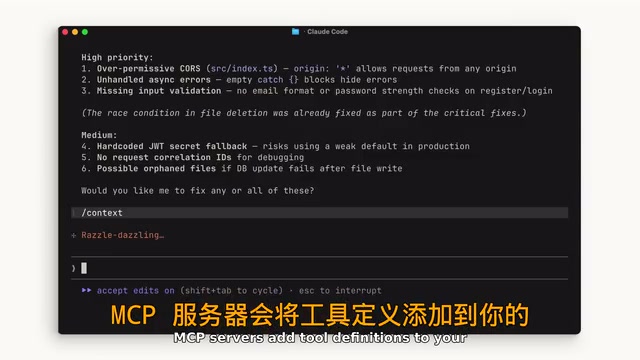
This is the most easily overlooked yet most important point when using MCP: MCP servers add tool definitions to your context window, even when you're not actively using them. If you have many servers configured, these tool definitions consume your valuable available context space.
Understanding the Nature of the Context Window: The context window is the maximum number of tokens a large language model can process in a single inference. Tokens are the basic units the model uses to process text—roughly every 3-4 English characters or 1-2 Chinese characters correspond to one token. Claude series models have a context window of up to 200,000 tokens, which sounds very generous, but each MCP tool's definition description, parameter schema, usage examples, etc., combined can consume hundreds or even thousands of tokens. When you have a dozen MCP servers configured simultaneously, each exposing multiple tools, tool definitions alone can consume tens of thousands of tokens, directly compressing the space available for code, conversation history, and actual task content.
Optimization Tip 1: Promptly Disable Inactive MCP Servers
Run the /mcp command to view currently connected servers and disable any you're not currently using or don't expect to use. Regular cleanup effectively frees up context space. This is similar to closing unnecessary browser tabs—each open tab consumes memory, even if you're not looking at it.
Optimization Tip 2: Prefer CLI Tools Over MCP When Possible
If a tool has a corresponding command-line interface (like GitHub's gh command or AWS's aws command), the CLI approach is more context-efficient because it doesn't add persistent tool definitions to the context window. CLI tools only consume context when invoked (limited to command output), while MCP tool definitions continuously occupy space from the moment the server connects. For tools used infrequently but occasionally needed, the CLI approach is often the more economical choice.
Optimization Tip 3: Leverage Skill Sets for On-Demand Loading
Skill Sets are another optimization strategy. A Skill contains a name and description that gets loaded into the context. Similar to MCP, only when Claude determines it needs to use a particular Skill does it load the complete content into the context window. You can place command-line interface tools in Skill Sets to achieve on-demand loading.

Related articles
 Tutorials
ChatGPT Plus Subscription Guide: Are GPT-5.5, image-2, and Codex Worth the Upgrade?
A detailed look at ChatGPT Plus features — GPT-5.5, image-2, and Codex — with a Plus vs Pro comparison and a complete step-by-step subscription guide for users outside the US.
 Tutorials
Harness AI Engineering in Practice: Using Claude Code to Master Enterprise-Level E-Commerce Development
Deep dive into Harness AI Engineering: master enterprise e-commerce development with Claude Code using the Rules, Skills, Wiki, and Changes framework.
 Tutorials
Cursor + Codex Dual-IDE Collaboration: A Practical Methodology for Open-Source Project Customization
A complete methodology for open-source project customization based on real-world experience, detailing the Cursor+Codex dual-IDE workflow, seven-stage process, MVP validation, and AI source code reading techniques.