Claude Code + NotebookLM: Breaking Knowledge Base Limitations to Build Smart Applications

Connect Claude Code to NotebookLM to fix its computation gaps and build shareable knowledge base apps.
NotebookLM is powerful but suffers from two major flaws: no numerical computation and complete data lock-in. This article shows how to connect Claude Code to NotebookLM, leveraging its programming and browser automation capabilities for batch knowledge base operations, injecting a data layer via APIs like YouTube to fill the computation gap, and ultimately extracting all knowledge to build a shareable smart application using Lovable, Supabase, Pinecone, and other tools.
Introduction: NotebookLM's Fatal Flaws
Notebook LM is undoubtedly one of the most powerful research tools of 2026 — free, with a million-token context window, supporting multiple formats like PDF/CSV/audio/images, and capable of generating podcasts, videos, infographics, slides, and more. But it has two fatal flaws: it can't perform numerical calculations and data is locked inside the platform.
This article provides a detailed breakdown of how to use Claude Code in conjunction with Notebook LM to completely solve both problems and ultimately build a shareable smart knowledge base application.
Diagnosing the Problem: Why NotebookLM Falls Short
The Lack of Computational Ability
Notebook LM is essentially a "super librarian" built on a Retrieval-Augmented Generation (RAG) architecture. RAG is a technical paradigm that combines external knowledge bases with large language models: uploaded documents are first split into text chunks, vectorized (embedded), and stored in an internal vector database. When a user asks a question, the system first retrieves the most relevant text fragments, then injects them as context for the LLM to generate an answer. This architecture naturally excels at "understanding and citing," but because it lacks a Code Interpreter module, it cannot execute any computational logic. Specifically:
- No code execution environment
- Cannot run SQL queries
- No support for formulas or aggregation operations
- Can only "predict" rather than "calculate" answers to numerical questions
Here's a practical example: if you import five years of financial data into Notebook LM, you can't query growth trends, calculate ratios, or perform any data aggregation. It can only handle content at the text level.
Data Lock-In
The second problem is equally serious: Notebook LM has no public consumer API, doesn't support data export, and can't search across Notebooks. Google's decision not to open a consumer API likely stems from a combination of data security, abuse prevention, and business strategy considerations, but it directly results in a data lock-in problem — your knowledge goes in, but it can't come out. This means you can't build any external applications on top of these carefully curated knowledge bases. Understanding this underlying architectural limitation helps us see why we need to introduce an external computation layer to fill the gap.
Step 1: Connecting Claude Code to Notebook LM
Claude Code: An AI-Native Terminal Programming Environment
Claude Code is a command-line AI programming tool from Anthropic, built around the core design philosophy of "agentic coding" — enabling AI not just to generate code, but to autonomously execute tasks in real computing environments. Unlike traditional IDE plugins (such as GitHub Copilot), Claude Code can directly manipulate the file system, run Shell commands, invoke browser automation tools (like Playwright/Puppeteer), and encapsulate complex workflows into reusable tools through its "skill" mechanism. This capability makes it a natural "glue layer" for connecting different SaaS platforms, functioning in this architecture as something like an RPA (Robotic Process Automation) engine with natural language understanding capabilities.
Establishing the Connection
The connection process is relatively straightforward: by downloading the Notebook LM skill and loading it in Claude Code, it opens a Chrome browser for you to log in, obtains the authentication cookie, and completes the connection.
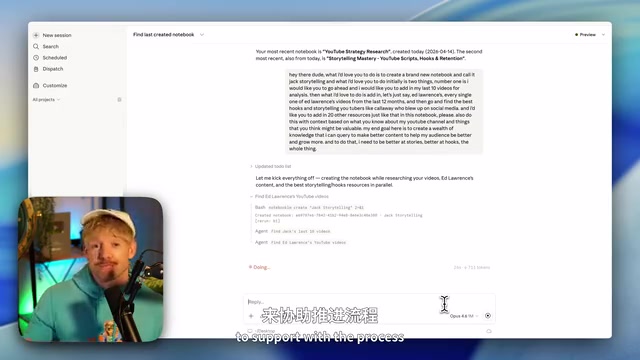
Once connected, you can operate all of Notebook LM's features directly from Claude Code — one command replaces 15 clicks. Claude Code can not only read your Notebooks but also programmatically create new Notebooks, add sources, and execute queries.
Batch-Creating Knowledge Bases
After establishing the connection, you can give Claude Code instructions like:
"Create a new Notebook called 'Jack's Storytelling,' add my latest 10 videos, all of Ed Lawrence's videos from the past 12 months, and find resources from the 20 best hook and storytelling YouTubers to add in."
Claude Code will autonomously devise a strategy and batch-complete the resource additions. In the demo, it added 91 resources at once — something that could take dozens of minutes to do manually.
Step 2: Injecting a Data Layer to Fill the Computation Gap
Fetching API Data
Notebook LM excels at "text," while Claude Code excels at "data." Combining the two gives you the complete picture.
Using YouTube channel analysis as an example, the workflow is:
- Create a project in Google Cloud Console and enable YouTube Data API v3
- Generate an API key
- Provide the key to Claude Code and have it fetch channel data
Claude Code can extract comprehensive metrics for each video — views, likes, comments, publish dates — and calculate various ratios and trends.
Text + Data = Complete Insights
When you have both Notebook LM's textual knowledge and API-sourced data metrics, you can ask truly valuable cross-dimensional questions:
"Based on both data and text analysis, give me three specific recommendations for improving the YouTube channel — combining numerical performance with content strategy."
This kind of cross-dimensional analysis is impossible to achieve with either tool alone. Finally, you can have Claude Code save the entire analysis workflow as a skill for easy future reuse.
Step 3: Liberating the Data and Building a Shareable Application
Extracting All Knowledge from Notebook LM

With Claude Code, you can download the full text of all resources in Notebook LM with a single command. The key tip is to explicitly request "full transcript text" in your command and use the -O parameter to save the complete content; otherwise, you may only get partial content.
Application Architecture Design
The full tech stack for the application is as follows:
- Frontend: Use Lovable to quickly build an attractive Dashboard interface
- Structured Data Storage: Supabase (for storing numerical data like video metrics)
- Vector Database: Pinecone (for storing vectorized versions of video transcripts)
- Model Calls: Claude 4.6 Opus/Sonnet via OpenRouter
Building the Frontend with Lovable
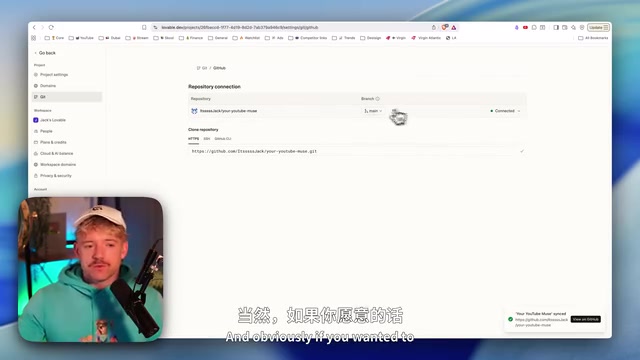
Lovable (formerly GPT Engineer) is a next-generation AI-driven full-stack application building platform, representing the "natural language programming" paradigm.
Related articles
 Tutorials
ChatGPT Plus Subscription Guide: Are GPT-5.5, image-2, and Codex Worth the Upgrade?
A detailed look at ChatGPT Plus features — GPT-5.5, image-2, and Codex — with a Plus vs Pro comparison and a complete step-by-step subscription guide for users outside the US.
 Tutorials
Harness AI Engineering in Practice: Using Claude Code to Master Enterprise-Level E-Commerce Development
Deep dive into Harness AI Engineering: master enterprise e-commerce development with Claude Code using the Rules, Skills, Wiki, and Changes framework.
 Tutorials
Cursor + Codex Dual-IDE Collaboration: A Practical Methodology for Open-Source Project Customization
A complete methodology for open-source project customization based on real-world experience, detailing the Cursor+Codex dual-IDE workflow, seven-stage process, MVP validation, and AI source code reading techniques.