Claude Code Project in Practice: Installation, Requirement Clarification, and Manual Review Bottlenecks

Claude Code practical guide: tool selection, NPM installation alternative, and project bottleneck reminders.
The article covers Claude Code in practice: it recommends Claude Code or Codex over Tree and Cursor for code generation, notes that official install commands often fail due to network issues and suggests the NPM installation path instead, and identifies requirement clarification, task breakdown, and manual review as three key bottlenecks, though the material lacks detail on the latter three.
Claude Code is becoming the go-to tool for many developers working on projects, but when you actually integrate it into a real development workflow, each stage—installation, requirement clarification, task breakdown, and manual review—comes with its own pitfalls.
Tool Selection: Why Claude Code or Codex Is Recommended
On tool choice, the author gives a clear recommendation: if you have the flexibility, prioritize Claude Code or Codex over Tree (Trae) or Cursor. The reasoning centers on actual results in code generation and project development—if you've used each component hands-on, the difference is noticeable.
This judgment is subjective; the author admits that "Tree is probably a bit dumb," but rates Claude Code and Codex as "no problem." He also stresses this isn't self-promotion—good tools deserve respect. For developers whose company environment has no special restrictions, this advice is worth considering; if the team already has an established toolchain, that's another matter.
Installing Claude Code: Why the Official Commands Often Fail
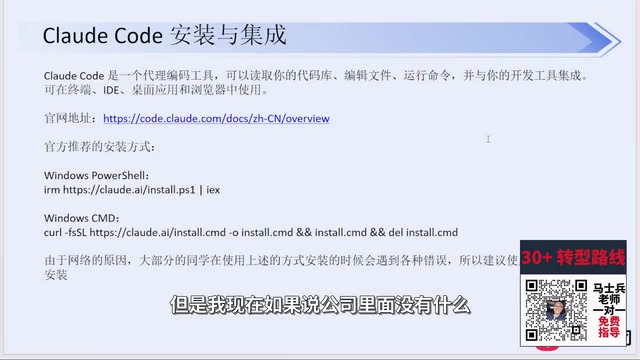
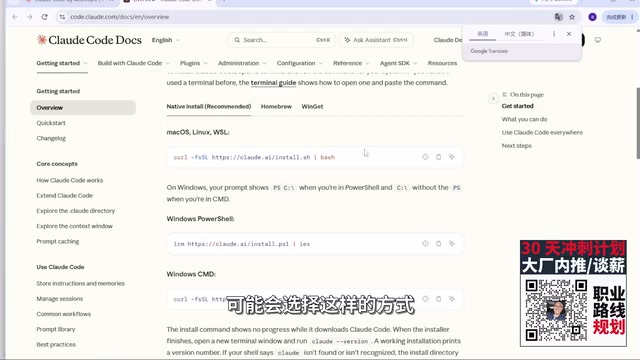
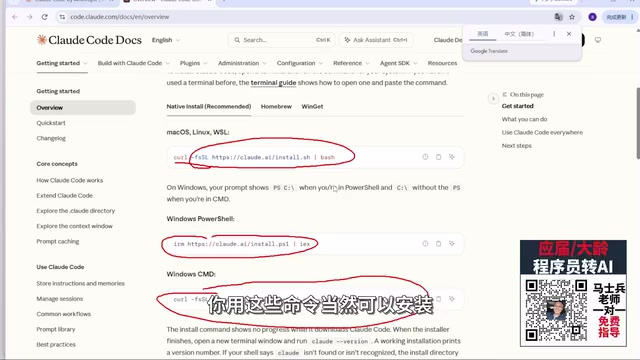
Installation is the first hurdle for many. Most people open the Claude Code website, browse the docs, and install as instructed—using the corresponding commands on Mac/Linux, or running them in PowerShell or CMD on Windows.
The problem is that anyone who has actually run these commands finds they most likely won't succeed. The cause could be the network environment, VPN issues, or other anomalies; in the author's words, "no matter what your problem is, chances are it won't work." If you've confirmed the network is fine, the official commands will of course work; but if execution throws a bunch of exceptions, his advice is not to bang your head against it—you might spend ages tweaking and still not solve it.
A More Reliable Alternative: Install via NPM
When the official commands fail, the alternative given is to install via NPM. This isn't a made-up method—the official docs have clear demos and instructions, just not in an obvious place; you need to search within the docs to find them.
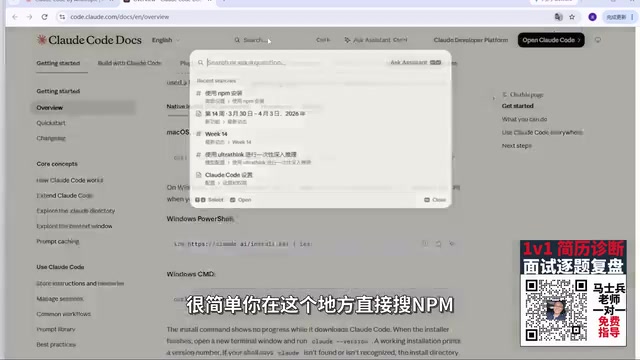
The author's judgment: once you start installing via NPM, the subsequent configuration and modification process goes much more smoothly—"whatever modifications are needed, they can all be done well." For developers stuck on installation issues, this path saves more time than repeatedly debugging the official script.
NPM (Node Package Manager) is the package manager for the Node.js ecosystem, installed alongside Node.js, used to download and manage JavaScript dependencies from the npm registry. Many command-line tools are published as npm packages; users can run npm install -g <package-name> to install globally and invoke them directly in the terminal. Compared to official one-click scripts, NPM installation goes through the standard package distribution channel; in domestic network environments, you can usually configure a mirror (such as the Taobao npm mirror) to avoid download failures, and dependency resolution and version management are more transparent. So when the official installation script errors out due to network or environment issues, switching to NPM installation is often more controllable, and upgrades and uninstalls also follow unified commands.
Requirement Clarification, Task Breakdown, and Manual Review: Where Projects Really Get Stuck
The original title highlights three key stages in project practice—requirement clarification, task breakdown, and manual review. It should be noted that the provided material mainly covers tool selection and installation, with little detail on the specific practices for these three stages. What can be confirmed from the material is only this: the author believes these stages constitute bottlenecks in actual projects and are the parts that need focused handling when using Claude Code for projects.
Combining the discussion of tool selection and installation reveals a tendency: the author is more concerned with engineering execution issues like "can it run smoothly." Installation is the entry point, requirement clarification determines the direction of AI understanding, task breakdown determines the controllability of generated code, and manual review is the final quality gate. If any of these three fails, even the best tool choice will be undermined.
In the context of AI-assisted development, requirement clarification means translating vague business goals into clear inputs and outputs, boundary conditions, and acceptance criteria before letting the model generate code. If this step is done poorly, the model can only fill in the gaps by guessing, greatly increasing the probability that the output deviates from expectations. Task breakdown means splitting a large requirement into several moderately sized, independently verifiable subtasks, each corresponding to one controllable generation-and-review cycle; the coarser the granularity, the more information the model must handle at once, and the higher the cost of locating and rolling back errors. Manual review is the final quality gate, focused on checking whether the generated code meets requirements and whether it introduces security or compatibility issues, rather than rewriting line by line. Together, these three form a collaboration model of "humans lead the direction, AI handles execution."
Summary of Practical Advice
- Tool level: When there are no special restrictions, try Claude Code or Codex first, and compare the actual generation results with Tree and Cursor before deciding.
- Installation level: Don't force the official commands if they fail; switch to the NPM installation path, which is also described in the official docs.
- Process level: Requirement clarification and task breakdown must be completed before handing off to AI, and manual review cannot be skipped—these three are the clear bottlenecks in project practice.
To be frank, the material itself lacks concrete expansion on requirement clarification and task breakdown; the analysis in this part is based on the title's direction and contextual inference, and the actual methodology still needs more first-hand practice to supplement.
One-line Summary
Claude Code practical guide: tool selection, NPM installation alternative, and project bottleneck reminders.
Paragraph Summary
The article focuses on the practical implementation of Claude Code. It first recommends Claude Code or Codex for tool selection when there are no special restrictions, believing their code generation outperforms Tree and Cursor. It then points out that the installation commands given in the official docs likely fail on Mac/Linux and Windows, commonly due to network environment issues, and advises not to struggle—instead switch to the NPM installation path also described in the official docs, which makes subsequent configuration and modification smoother. The article also identifies requirement clarification, task breakdown, and manual review as three clear bottlenecks in project practice, but the material lacks concrete expansion on these three; the related analysis is based on the title and contextual inference. It concludes with a summary of practical advice, emphasizing that installation is the entry point and process stages determine the controllability and quality of generated code.
Related articles

Nothing CMF Buds 2A Drops to $17.89 on Black Friday: A New Low for ANC Earbuds
Nothing CMF Buds 2A wireless earbuds Black Friday deal: just $17.89 on Amazon, about $11 off retail and a record low. ANC earbuds at an entry-level price.

When AI Creation Gets Accused of "Spitting": Hacker News Heats Up Over the Glaude Controversy
A Hacker News post, "Spitting in the Face of Glaude," sparks debate on AI creation transparency and attribution ethics. This analysis examines the blurred creator identity behind the controversy and offers practical advice for AI content production.

Akai Embraces Custom Firmware: MPC Sample 1.4 Lets Users AI-Program Their Sampler
Akai embraces the modding community with MPC Sample 1.4 firmware, supporting vibe-coded custom firmware and effects. We analyze the impact of this open strategy on music hardware and AI-assisted programming.