Claude Code Quota Always Running Out Early? 7 Tips to Make It Last Longer
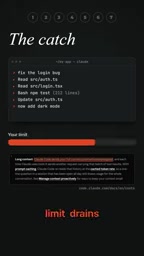
Anthropic CEO shares seven quota-saving tips, all centered on compressing the context carried by each request.
Starting from the pain point of Claude Code's quota draining too fast, the article points out the root cause: every request resends the entire conversation history, so the longer the chat, the higher the cost per interaction. Based on this mechanism, Anthropic CEO Dario Amodei gives seven practical tips in the video: use /clear to start a new conversation when switching tasks; choose between Sonnet and Opus by task difficulty; use /effort to lower thinking intensity for simple tasks; keep CLAUDE.md under 200 lines and move long workflows into on-demand skills; use /context to find and disable redundant MCP servers, preferring command-line tools; plan before coding via plan mode; and use /usage to pinpoint consumption sources and let Claude auto-apply fixes. All seven point to compressing the token volume of a single interaction, and the author suggests building the three high-value habits first: /clear, picking the right model, and checking /usage.
Claude Code's usage quota running dry before noon is a shared pain point for many developers. A short video featuring Anthropic CEO Dario Amodei lays out seven highly practical ways to save quota, all built on a single core logic: every message you send means paying again for the entire conversation history.
Why the quota drains so fast
Every time Claude Code handles a request, it resends the entire conversation—including every file it has read and every tool result it has called. This means the longer the chat, the larger the token cost of each interaction, and the faster the quota drains. Understanding this mechanism is the premise behind all the optimization methods below.
Understanding this mechanism requires knowing the "stateless" nature of large language models: the API itself retains no session memory, so every request must re-send the system prompt, historical messages, and tool call results in full before the model can "see" the context. Token consumption therefore grows roughly quadratically with conversation turns—the cost of the nth request is proportional to the accumulated context length of the previous n-1 turns. To let the model read and write code coherently, Claude Code automatically keeps the contents of files it has read and tool outputs in context, which further amplifies the accumulated volume. This also explains why a lengthy debugging session can exhaust a daily quota within a few dozen minutes: it's not that any single request gets more expensive, but that each one carries an ever-heavier historical burden.
Seven tips to make your quota last longer
1. Run slash clear when switching tasks
When switching between different tasks, simply type /clear to start a brand-new conversation. The source video stresses that "fresh chat costs nothing"—a new conversation carries no historical baggage. If you're worried about losing context, you can rename the current session first and restore it later at any time.
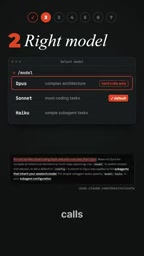
2. Pick the right model
Sonnet is enough for the vast majority of coding tasks, while Opus should be reserved for genuinely thorny problems. Using the expensive model on simple tasks is the easiest waste trap to fall into.
3. Lower the thinking intensity
The model's thinking process also counts toward output tokens. For simple fixes, type /effort and choose a lower thinking level to directly cut costs.
4. Trim your CLAUDE.md
CLAUDE.md is loaded in every session. The source video recommends keeping it under 200 lines and moving lengthy workflows into skills—skills are only loaded when needed.
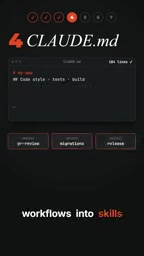
CLAUDE.md is the project-level configuration file that Claude Code automatically reads and injects into the system prompt at the start of each session. It usually sits in the project root and declares code conventions, build commands, directory structure conventions, and so on. Because it exists as part of the system prompt, every line in it is billed again on every request—the 200-line limit is an empirical threshold based on exactly this cost model. Skills, by contrast, are Claude Code's on-demand loading mechanism: skills are described in separate files and are read into context only when the model judges the current task needs them, taking up no tokens the rest of the time. The trade-off logic between the two is this—a small number of high-frequency rules that must always take effect stay in CLAUDE.md, while low-frequency, scenario-specific long workflows (such as release checklists or migration steps for a particular framework) move into skills.
5. Turn off MCP servers you don't use
Type /context to see what's filling the current window, so you can judge which MCP servers are dragging you down. Wherever a command-line alternative exists (for example, using gh for GitHub operations), prefer command-line tools over MCP.
MCP (Model Context Protocol) is an open protocol proposed by Anthropic for connecting external tools and data sources (such as databases, GitHub, file systems, and third-party SaaS) to model clients like Claude in a standardized way. Once connected, each MCP server injects the names, descriptions, and parameter schemas of its available tools into context so the model can decide when to call them. The problem is that this description is a constant overhead: even if a given server is entirely unused in this conversation, its tool definitions are still resent on every request. The more servers you connect, the higher the proportion of context that gets "occupied," which both wastes quota and may dilute the model's attention to genuinely relevant information. The /context command is exactly what visualizes this occupancy distribution, helping you judge which connections are worth keeping. Meanwhile, mature CLI tools like gh already provide structured command-line interfaces that the model can call directly through Bash, with no persistent protocol descriptions needed—so when functionality overlaps, they're usually the more economical choice.
6. Plan before you act
Press shift tab to enter plan mode and have Claude align on an approach with you before writing any code. If the direction is wrong, press Esc to go back and redo it, avoiding repeated quota consumption down the wrong path.
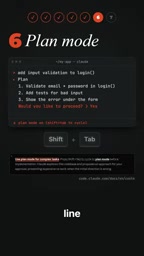
Plan mode is a restricted execution state in Claude Code, toggled with shift tab. In this mode, the model is limited to read-only operations—it can browse the codebase, search files, and analyze dependencies, but won't modify files or run commands with side effects; the output is an implementation plan for you to review. Its cost significance lies in this: output tokens from code generation are far more expensive than analysis and discussion. If the direction itself is wrong, jumping straight into implementation means a large number of tokens are spent on code that ends up discarded—and that erroneous code lingers in context, continuing to push up the cost of every subsequent turn. Aligning on the approach in plan mode first and only releasing execution after confirmation is equivalent to placing the expensive generation step after the direction is settled; pressing Esc to go back lets you iterate cheaply at the planning stage.
7. Use slash usage to pinpoint the source of consumption
The simplest trick: type /usage and it shows precisely what your quota is being consumed by. When it offers a fix suggestion, press F and Claude will apply it for you directly.
The unified logic behind these tips
The seven methods may look scattered, but they all point to the same principle: reduce the context carried by each request. Whether it's clearing sessions, trimming configuration files, turning off redundant MCP servers, or lowering thinking overhead, all of it compresses the token volume of a single interaction.
One detail worth noting: you don't need to enable all of these at once. For most developers, /clear, picking the right model, and regularly checking /usage offer the best return on investment. Build those habits first, then gradually introduce the remaining optimizations.
Related articles
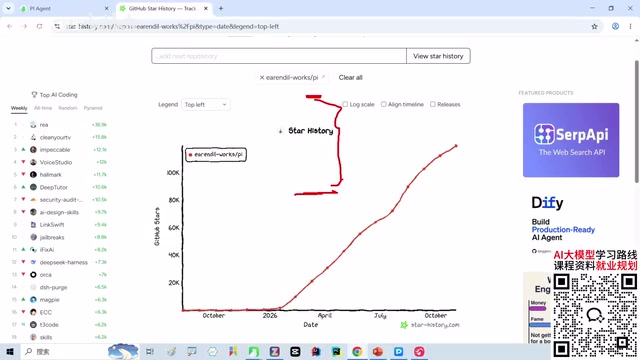
Why Is Pi Agent Going Viral? A Minimalist Core and Extensible New Approach to AI Coding
Why does Pi Agent stand out in AI coding tools? This article analyzes its minimalist core and on-demand extension philosophy, contrasts the feature bloat dilemma of Cloud Code, Codex, and other mainstream tools, and explores the value of developer-controlled agents and the trade-offs of the lightweight path.

Cursor Multi-Agent Collaboration: Watching AI Design Websites from a Browser Extension
A YouTube short shows multi-cursor AI agents collaboratively designing a website in a browser, delivered as a browser extension rather than a standalone platform. This article sorts out the demo's key details, information gaps, and the multi-agent collaboration trend it reflects.

Voice Cursor Hands-On: The AI Voice Dictation Tool That Lets You Write Code With Your Mouth
Voice Cursor is an AI voice dictation tool that supports voice input followed by command-based rewriting, tone adjustment, translation, and per-app tone configurations. This hands-on demo analyzes its differences from WhisperFlow and its use cases.