Claude Code Router: A Complete Guide to Powering Claude Code with Gemini 2.5 Pro for Free

Open-source Claude Code Router enables free use of Gemini and any AI model within Claude Code.
Claude Code is a top-tier AI programming tool but only supports Anthropic's own models at high cost. The open-source Claude Code Router uses a local proxy to perform protocol conversion and request forwarding, letting Claude Code seamlessly connect to Gemini 2.5 Pro, DeepSeek, or any model. It supports four model role assignments (background, thinking, general, long context), and combined with Gemini's 1,500 free daily API requests, developers can get a premium AI coding experience at near-zero cost while fully preserving the MCP toolchain and original interface.
Claude Code has become one of the hottest AI programming tools among developers, thanks to its excellent user interface, superior prompting capabilities, and rich tool ecosystem. However, its biggest pain point is that it only supports Anthropic's own models — not only expensive but completely closed off. Now, an open-source tool called Claude Code Router has emerged to completely break through this limitation, allowing you to freely use Gemini 2.5 Pro, DeepSeek, Mistral, and even local models within Claude Code — and paired with Gemini's free API, you can use it at virtually zero cost.
The Strengths and Limitations of Claude Code
The reason Claude Code is so popular comes down to the polished development experience it provides: a friendly graphical interface, excellent prompt engineering results, and a complete built-in toolchain. The "Prompt Engineering" mentioned here refers to carefully designing the structure, wording, and contextual information of input prompts to guide large language models toward producing more accurate and useful outputs. Claude Code has done extensive underlying optimization in this area — it automatically constructs optimal prompt structures based on different programming tasks, so developers can get high-quality code generation results without manual adjustments. This is especially powerful when paired with Anthropic's $200 or $100 subscription plans, which enable virtually unlimited usage. These subscription plans are essentially Anthropic's Max Plan, where users pay a fixed monthly fee for unlimited model calls within their quota — much more economical for high-frequency users compared to per-token API billing.
But the problems are also obvious:
- Model lock-in: You can only use Claude series models, with no way to connect to third-party AI services like Gemini or DeepSeekAd
- High cost: Claude model API calls aren't cheap — for example, Claude Sonnet 4 charges $3 per million input tokens and $15 per million output tokens, making long-term high-frequency use quite expensive
- Not open source: You cannot extend or modify the underlying logic yourself
In comparison, while Gemini CLI and Codex CLI are open source, they fall far short of Claude Code in terms of maturity and ecosystem completeness. For instance, if you want a graphical interface, Claude Code has a ready-made solution, but it doesn't support third-party models like Gemini.

What Is Claude Code Router?
Claude Code Router is an open-source request routing tool whose core function is to intercept API requests from Claude Code and forward them to any model you specify. From a technical implementation perspective, it's essentially a local proxy server running on your machine that listens for HTTP requests originally destined for the Anthropic API from Claude Code. It then converts the message format in the request body to the API format required by the target model (such as Google's Gemini API or OpenAI-compatible format), and converts the response back to Anthropic API format before returning it to Claude Code. This "protocol conversion + request forwarding" architecture means Claude Code is completely unaware of the underlying model change. Whether it's a local model running through Ollama, Google's Gemini 2.5 Pro, Mistral, or DeepSeek, all can seamlessly integrate into Claude Code's workflow.
Four Model Role Configurations
Here's a detail many people don't know: Claude Code doesn't just use a single model internally — it calls multiple models for different tasks, each with its own responsibility. This multi-model collaboration architecture is increasingly common in modern AI applications — different tasks have vastly different requirements for model capabilities, and using one massive model for everything is both wasteful and uneconomical. By layering tasks — lightweight tasks go to small models, complex reasoning goes to large models — you can maintain quality while significantly reducing cost and latency. When configuring Claude Code Router, you need to assign models to these four roles:
1. Background Model
Handles lightweight tasks like generating loading messages, summaries, and command processing. Since no complex reasoning is involved, you can use extremely small models or even run them locally. Gemini 2.0 Flash is recommended — fast, low-cost, and perfectly suited for these simple tasks. The Gemini Flash series is a lightweight model specifically designed by Google for low-latency scenarios, with response times typically in the millisecond range, and Google AI Studio's free tier offers very generous call quotas.
2. Thinking Model
This is the core reasoning model, called upon when you ask Claude Code to perform deep thinking. "Thinking mode" means the model performs a series of intermediate reasoning steps (Chain of Thought) before generating its final answer — these reasoning processes consume additional tokens but significantly improve accuracy on complex tasks. Gemini 2.5 Pro is recommended, as this model performs exceptionally well on programming tasks — ranking at the top of multiple authoritative coding benchmarks (such as SWE-bench, HumanEval). Moreover, Google currently provides the API completely free, with approximately 1,500 requests per day including thinking quota functionality. Google offers such generous free quotas mainly to rapidly expand its developer ecosystem amid fierce AI model competition — a strategy reminiscent of how Google Maps API was promoted for free in its early days.
3. General Model
The workhorse model for everyday coding tasks — Gemini 2.5 Pro is also recommended here. It delivers stable output quality across code generation, refactoring, debugging, and other scenarios.
4. Long Context Model
Used when processing large amounts of code or lengthy documents. The context window refers to the maximum text length a model can "see" in a single processing pass, directly determining how many code files and conversation history the model can understand simultaneously. Traditional models typically have context windows between 8K-32K tokens, while the Gemini series supports ultra-long context windows (up to 1 million tokens, roughly equivalent to 700,000 English words or hundreds of code files combined), giving it a natural advantage when handling large projects. This means you can provide the model with your entire project codebase at once without worrying about information being truncated or missed.
Installation and Configuration Walkthrough
Quick Installation of Claude Code Router
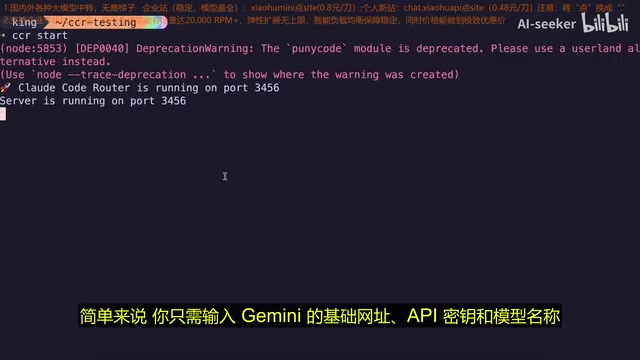
The installation process is very simple — just one command to complete the Claude Code Router installation. After installation, start the router with the ccr start command.
On first launch, the tool will guide you through configuring the default global primary model. You only need to provide three key pieces of information:
- Base URL: The endpoint address of the model API (e.g., Google AI Studio's API address). This is the HTTP interface address provided by the model service provider — different providers have different address formats. For example, Google's format is
https://generativelanguage.googleapis.com/v1beta/, while OpenAI-compatible interfaces typically end with/v1/chat/completions - API Key: The key for the corresponding service (Gemini free API Keys can be obtained from Google AI Studio). The process is very simple: visit Google AI Studio (aistudio.google.com), log in with your Google account, and generate an API Key with one click — no credit card required
- Model Name: The specific model identifier to use (e.g.,
gemini-2.5-pro)
Flexible Model Assignment Strategies
After configuring the global model, you can also assign different models to specific functions. For example:
- Use the free Gemini Flash model for background tasks to save quota
- Use Gemini 2.5 Pro for core reasoning to ensure code quality
- Switch to DeepSeek for specific scenarios, leveraging its strengths in Chinese programming contexts. DeepSeek is a large language model developed by China's DeepSeek company — its DeepSeek-V3 and DeepSeek-Coder series excel in Chinese understanding and code generation, with API pricing at a fraction of comparable models, making it particularly suitable for projects involving Chinese comments, Chinese documentation, or Chinese-facing users
This flexible model assignment strategy is a capability that the original Claude Code completely lacks.
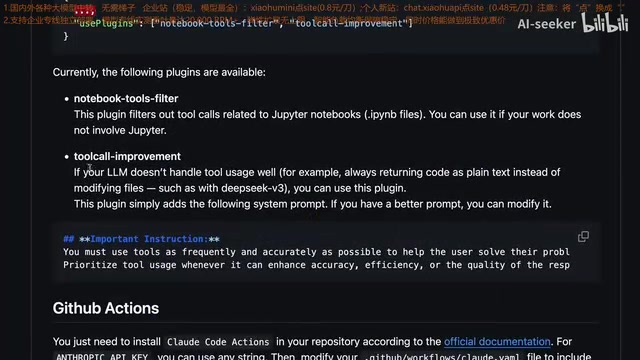
Plugin System Extensions
Claude Code Router also provides a plugin mechanism that can modify requests before they're sent. The most typical use is injecting additional system prompts to optimize performance for specific models. System prompts are hidden instructions sent to the model that define its behavioral norms, output format, and role settings. Since Claude Code's built-in system prompts are specifically optimized for Claude models, forwarding them directly to other models may cause format incompatibilities or instruction interpretation issues. The plugin system's role is to automatically adjust the wording and structure of system prompts before requests reach the target model, making them better suited to the target model's "understanding habits." For example, there are dedicated plugins for the DeepSeek model that significantly improve its compatibility and output quality within the Claude Code workflow.
Real-World Usage Experience
Once configured, simply run the ccr code command to launch Claude Code through the router. From the user's perspective, the entire interface and operational experience is completely identical to the original Claude Code — the only difference is that the underlying model has been swapped to Gemini or whatever service you specified.
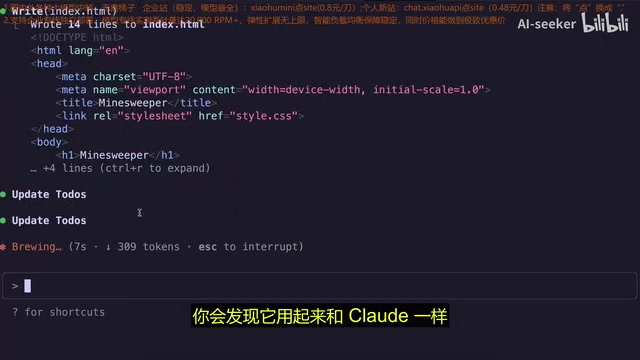
Minesweeper Game Programming Test
The video author demonstrated with a classic test case: building a Minesweeper game using HTML, CSS, and JavaScript. The Claude Code Router using Gemini 2.5 Pro delivered impressive results:
- MCP toolchain working normally: File creation, editing, execution, and other operations all functioned correctly. MCP (Model Context Protocol) is an open standard introduced by Anthropic in late 2024, designed to provide AI models with a unified way to call external tools and access data sources. In Claude Code, MCP enables the model to directly manipulate the file system, run terminal commands, access databases, and more — not just generate text. Claude Code Router's ability to fully preserve MCP toolchain functionality is one of the most critical aspects of its technical implementation
- Excellent code quality: The generated code had no errors, completing the feature development in one pass
- Clear long context advantage: Gemini's ultra-long context window performed even better than the original Claude model when handling complex projects
Across multiple task tests, performance with Gemini 2.5 Pro was on par with or even better than the original Claude model. Occasionally, minor errors may occur during diff editing. Diff editing is a core feature of AI programming tools: when the model needs to modify existing code, it doesn't regenerate the entire file — instead, it only outputs the parts that need to change (similar to Git diff format), and the tool automatically applies the changes to the original file. This approach saves tokens and improves efficiency, but it demands high format compliance from the model — the model must precisely mark the start and end positions of modifications and their content. Different models have varying levels of support for this special output format, which is why occasional minor errors occur. However, these situations are extremely rare and can be specifically addressed through the plugin system.
Performance and Stability
It's worth noting that when using Gemini's free API tier, response speed may have some latency. This is because free-tier requests have lower priority than paid users, and Google applies rate limiting to free requests when server load is high. Switching to a paid model will noticeably improve fluidity. Overall, Claude Code Router runs very stably with virtually no compatibility issues — quite rare among similar model routing tools.
Why Is This Better Than Gemini CLI?
Many developers might ask: if you're going to use Gemini models anyway, why not just use Gemini CLI directly?
The answer lies in the massive ecosystem gap. Gemini CLI is an open-source command-line AI programming tool released by Google in mid-2025, while Codex CLI is a similar product from OpenAI. Although both are open source and free, they're both in early development stages. Claude Code has been refined over a long period and surpasses these emerging tools across multiple dimensions — it has more mature error handling mechanisms, richer third-party integrations (such as VS Code extensions, JetBrains plugins, etc.), and stable workflows validated by millions of developers.
| Feature | Claude Code + Router | Gemini CLI |
|---|---|---|
| GUI | ✅ Comprehensive | ❌ Limited |
| Tool Ecosystem | ✅ Rich | ⚠️ Developing |
| MCP Support | ✅ Complete | ⚠️ Incomplete |
| Prompt Engineering | ✅ Mature optimization | ⚠️ Basic |
| Model Selection | ✅ Any model | ❌ Gemini only |
The gap in MCP support is particularly critical. As the originator of the MCP protocol, Claude Code has the most complete MCP server ecosystem — the community has developed hundreds of MCP servers covering GitHub, Slack, databases, browser automation, and various other scenarios. Gemini CLI's MCP support is still in the experimental stage, with far fewer available MCP servers and less stability compared to Claude Code.
In other words, Claude Code Router lets you enjoy Claude Code's top-tier development experience while freely choosing the most cost-effective models. This is what an ideal AI programming tool experience should look like.
Conclusion
Claude Code Router elegantly solves Claude Code's biggest pain point — model lock-in. Paired with Gemini 2.5 Pro's current free API quota of 1,500 requests per day, developers can obtain a top-tier AI programming environment at virtually zero cost. While Claude Code itself isn't open source — and that can't be changed — at least now you can freely pair it with Gemini, DeepSeek, or any other model you prefer while retaining its excellent experience.
For developers seeking efficient AI programming tools, the Claude Code + Claude Code Router + Gemini 2.5 Pro free API combination may be one of the most cost-effective AI programming solutions of 2025. It's worth noting that this "best frontend + best model" free combination trend is becoming mainstream in the AI tools space — as model capabilities rapidly iterate, no single vendor can maintain leadership across all scenarios at all times. Tools like Claude Code Router allow developers to switch to the strongest model at any given moment, truly achieving decoupling between the tool layer and the model layer.
Related articles
 Tutorials
ChatGPT Plus Subscription Guide: Are GPT-5.5, image-2, and Codex Worth the Upgrade?
A detailed look at ChatGPT Plus features — GPT-5.5, image-2, and Codex — with a Plus vs Pro comparison and a complete step-by-step subscription guide for users outside the US.
 Tutorials
Harness AI Engineering in Practice: Using Claude Code to Master Enterprise-Level E-Commerce Development
Deep dive into Harness AI Engineering: master enterprise e-commerce development with Claude Code using the Rules, Skills, Wiki, and Changes framework.
 Tutorials
Cursor + Codex Dual-IDE Collaboration: A Practical Methodology for Open-Source Project Customization
A complete methodology for open-source project customization based on real-world experience, detailing the Cursor+Codex dual-IDE workflow, seven-stage process, MVP validation, and AI source code reading techniques.