Claude Code Session Rewind Explained: A Practical Guide with Git Workflow Integration

How to use Claude Code's Rewind feature with Git workflows to manage AI context pollution.
Claude Code's Session Rewind feature lets developers roll back conversation context to any previous message, solving the "context pollution" problem in AI-assisted programming. Combined with a Git staging-area workflow — where the staging area acts as a review buffer for AI-generated code — developers can build a flexible, controllable AI collaboration system with clean version history.
Discovering Claude Code's "Time Machine" Feature
Many developers who regularly use Claude Code for AI-assisted programming may have never noticed an incredibly useful hidden feature — Session Rewind. This feature lets you roll back the conversation context to the state before a specific message was sent, effectively solving the "context pollution" problem that plagues AI conversations.
What is context pollution? When a large language model (LLM) generates each response, it takes the entire conversation history as input (the "context window"), and its attention mechanism assigns weights to everything in that history. When a conversation accumulates large amounts of exploratory, verification-based, or erroneous exchanges, those entries continuously influence how the model interprets subsequent instructions — even if they're completely irrelevant to the current task. More practically, mainstream LLMs have a hard limit on context window size (e.g., Claude's 200K tokens), and redundant content crowds out useful information, which becomes especially noticeable during long development sessions.
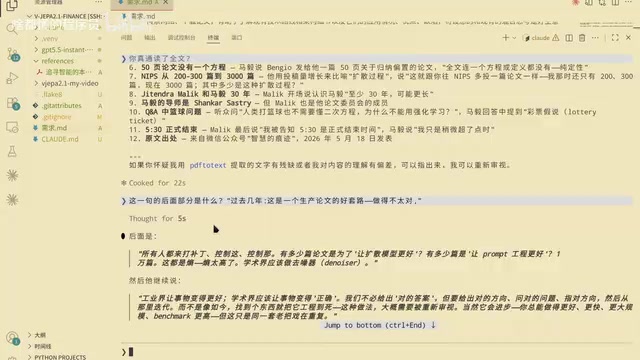
The discovery of this feature came from a classic scenario: a user asked Claude to read an article, Claude claimed to have read the entire thing, but the header showed only 3,000 characters were actually read (the read tool call showed 692 lines), raising suspicion.
This is worth pausing on for an important engineering detail: when Claude Code performs operations like reading files or modifying code, it interacts with external systems through a structured "Tool Use" interface, and the parameters and return values of these calls are theoretically auditable. However, there can be a discrepancy between what the model says in natural language ("I've read the full article") and the actual parameters of the underlying tool call (the line range passed to the read tool) — sometimes this stems from the model's expressive habits, and sometimes it reflects a genuine gap in understanding. Developing the habit of checking tool call logs is an important meta-skill for working effectively with AI coding assistants.
After a round of verification — asking Claude to recite specific paragraphs and cross-checking file line counts against KB size — it was ultimately confirmed that Claude had indeed read the full file. But by then, the conversation context had been polluted by this entire "suspicion and verification" exchange, which is what prompted the exploration of the rewind feature.
How to Use Session Rewind
How to Trigger It
In the Claude Code conversation interface, type the shortcut command \rewind to enter rewind mode. Select the target message you want to roll back to, press Enter to confirm, and the system will present several action options.
The Four Rewind Modes Explained
Claude Code offers the following rewind strategies, each suited to different scenarios:
-
Fork message only: The most commonly used option. "Forks" the message like a Git branch — code files are not affected and remain under Git version control. Ideal when you want to clean up conversation context without touching any code.
-
Summarize and rewind: Summarizes the content after the target message, then brings you back to the specified historical point. Useful when you want to retain some contextual information.
-
Discard all subsequent content: Completely deletes all conversation content after the target message, returning you to a clean starting point.
-
Go back: Equivalent to canceling the operation — exits the rewind interface.
Why is it called "Fork"? Claude Code naming the rewind operation "Fork message" is no accident — it directly borrows from Git's branch concept. In Git, a branch is essentially a movable pointer to a specific commit node; creating a branch means opening a new line of development from a historical point without affecting anything on the original path. The "fork" logic in session rewind is identical: you select a historical message as the new starting point, subsequent conversation proceeds along the new path, and the original conversation branch is discarded or archived. This design lets developers manage conversation history the same way they manage code versions, treating "conversations" themselves as a versionable asset.

Critical Limitation: Rewind ≠ Undoing File Changes
There's a key point that must be emphasized: session rewind only rolls back conversation messages — it cannot undo actual file system operations Claude has performed.
If Claude modified, created, or deleted files during a conversation, those file changes persist after you rewind. When you continue interacting with Claude in the rewound context, it may be confused to find that "this code is already written" — because the files have changed, but the conversation history shows that work was never done.
This is precisely why Git workflow and session rewind must be used together to deliver maximum value.

A Complementary Git Workflow Strategy
The Staging Area as an "AI Output Review Buffer"
A battle-tested Git philosophy centers on this core idea: use the Staging Area to distinguish between "confirmed" and "pending review" AI-generated code.
Git's three-area model (working directory, staging area, repository) was one of Linus Torvalds' core innovations when designing Git, rooted in the philosophy that "commits should be meaningful atomic operations, not random snapshots of file saves." The staging area (Index), as a buffer layer between the working directory and the repository, allows developers to precisely control which changes make it into the next commit. In the context of AI-assisted programming, this design takes on new meaning: AI-generated code varies widely in quality, and developers need a "review buffer" to distinguish between "what the AI produced" and "code I've approved." The staging area naturally fills this role — it's not temporary storage, but an intentional expression of developer approval.
The concrete workflow:
- Working directory (Changes): Holds AI-generated code that hasn't been reviewed yet. This content is "disposable" — it represents output you haven't made a final judgment on.
- Staging area (Staged): Holds code that has been reviewed and deemed acceptable. Once something is staged, you rarely roll it back.
- Commits: Entirely under manual developer control — Claude is never allowed to commit automatically.
The elegance of this approach: suppose you're developing a feature module and Claude modifies the same file a dozen times. All twelve edits pile up in the working directory's "Changes." When you're finally satisfied, run git add to move them to the staging area; if you're not satisfied, simply discard the working directory changes — the already-confirmed content in the staging area remains untouched.

Why Not Let Claude Commit Automatically?
Maintaining complete control over Git commits is the core principle of this workflow. AI might trigger a commit before you've fully reviewed the code, leading to a messy version history. Manually controlling commit points means every commit is a human-confirmed "milestone," not a random AI snapshot.
Three Real-World Use Cases
Scenario 1: Clean Up Context After Verifying AI Understanding
As in the example at the start of this article: you need to verify whether Claude truly understood a piece of content, so you run a "test conversation." Once verification is complete, that test exchange has zero value for subsequent work — it only consumes precious context window space. Using rewind here lets you clear the redundant conversation records while preserving the verification conclusion.
Scenario 2: Exploratory Conversations That Don't Pollute the Main Thread
When you want to discuss uncertain directions, edge-case approaches, or just casually explore a technical topic with the AI, you don't need to worry about that exploratory content interfering with subsequent formal development conversations. Once the exploration is done, simply rewind to the starting point of your formal work.
Scenario 3: Recovery After Accidental Operations
If Claude accidentally deletes a file that wasn't yet tracked by Git, session rewind can't help (the file is already gone). But if you've built the habit of "staging the current state before Claude modifies code," you can restore the file through Git, then use session rewind to clean up the conversation — achieving a complete "undo" effect.
Summary
Claude Code's session rewind feature is fundamentally a tool for decoupling the management of "conversation context" and "code file state." It acknowledges a reality: in AI-assisted programming, not every conversation exchange deserves to be permanently preserved in the context window.
Combining this feature with a disciplined Git workflow — using the staging area to review AI output and manually controlling commit points — lets you build an AI programming collaboration system that is both flexible and controllable. For developers who rely heavily on Claude Code, this combination is well worth putting into serious practice.
Key Takeaways
Related articles

Resume Guide for Programmers Transitioning to AI: From an HR Perspective to Job Requirement Matching
How should programmers transitioning to AI write a resume? This Bilibili tutorial gives five key preparation actions: set aside two or three days to review skills and projects, choose a simple template, reverse-engineer the tech stack from job sites, emphasize LLM capabilities, and do a final check from an HR perspective.

Building a RAG Knowledge Base: A Complete Guide from Architecture to Retrieval Evaluation
A systematic overview of the full RAG knowledge base workflow: from overall architecture and mature retrieval solutions to key details of retrieval evaluation and who should learn it, helping developers build a path from beginner to hands-on practice.

Turn Screenshots into Web Code in Seconds: Anyone Can Write HTML with AI
A Bilibili creator demonstrates using AI to turn webpage screenshots directly into HTML and CSS code without manual coding. The article analyzes the tool's usage, new features like video-based app cloning, iterative refinement, and the real boundaries of AI giving zero-foundation users programming ability.