Claude Code Tutorial: Environment Setup, Command Reference & Git Workflow in Practice

A comprehensive Claude Code tutorial from environment setup to Git workflow automation.
This tutorial walks through Claude Code's complete workflow—from CLI installation and switching to domestic LLMs via CC Switch, to mastering core conversation commands, project analysis, and code generation. It covers the powerful Git integration that enables branch management, automated code review, and fix loops entirely through natural language, demonstrating how Claude Code has evolved into a full engineering collaboration platform.
Claude Code: From Command-Line Tool to AI Development Partner
The popularity of Claude Code speaks for itself—more and more developers are incorporating it into their daily workflows. However, many still perceive it as merely a "command-line code editor." In reality, with rapid version iterations, Claude Code has evolved from a simple command-line tool into a truly engineering-oriented collaboration platform.
In its early days, Claude Code was limited to analyzing project code, understanding file relationships, and offering modification suggestions. Now, its capabilities have been comprehensively enhanced. First is the leap in context awareness—previously limited to understanding individual files, you can now directly ask about the details of an entire project structure and receive thorough analysis. Second is the shift toward engineering orientation: Claude Code no longer focuses solely on coding ability but can implement complete engineering processes like SDD (Specification-Driven Development) and automated testing.
SDD (Specification-Driven Development) is a software development methodology driven by specification documents as its core force. Unlike traditional TDD (Test-Driven Development), which emphasizes "write tests first, then implement," SDD requires writing structured specification documents that precisely describe system behavior, interfaces, and constraints before any coding begins. Tools or AI then automatically generate code and tests based on these specifications. This methodology has gained new life in the era of AI-assisted programming—when developers write detailed specifications in natural language, AI can generate complete implementations that meet the requirements, significantly reducing misunderstandings and rework costs. Claude Code's support for SDD means developers can focus on "defining what to do" while delegating the "how to do it" execution to AI.
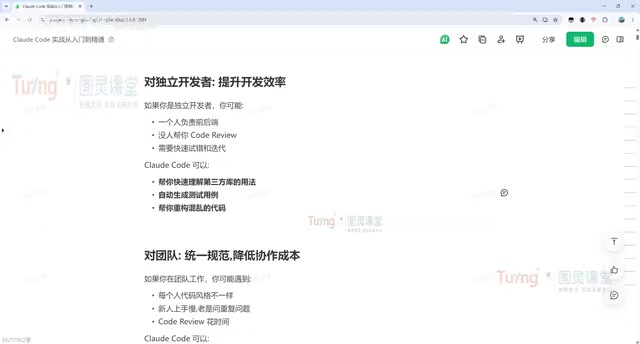
Most importantly is its customization capability. Through the Skill mechanism, you can distill real development experience into reusable skill modules, dramatically improving efficiency. The Skill mechanism is essentially a combination of programmable prompt templates and workflows—developers can encapsulate best practices for specific scenarios (such as code review standards, architecture pattern selection logic, specific framework configuration processes, etc.) as Skills that are automatically invoked in subsequent conversations. This design draws from the "expert system" concept in knowledge management: making tacit experience explicit and structured so AI can reuse accumulated domain expertise rather than reasoning from scratch every time. Claude Code's robust Skill support means it has gradually transformed from a programming-focused tool into a true collaborator. Humans primarily need to establish goals, set constraints, make judgments, and maintain quality standards, while execution, analysis, comparison, and repetitive labor can all be delegated to AI.
Value for Different Roles
For programming beginners, Claude Code helps read complex open-source code that's hard to understand, analyze difficult production errors, and even discover and fix legacy bugs one by one.
For independent developers, it can orchestrate multiple Agents simultaneously—product, development, testing, and operations roles—significantly shortening full-stack development timelines and achieving true engineering implementation. Multi-Agent orchestration refers to simultaneously launching multiple AI agents with different role definitions and capability boundaries within a single task, with agents collaborating through message passing, shared context, or task distribution mechanisms. In Claude Code's implementation, this means simultaneously running an Agent responsible for product requirements analysis, one for code implementation, one for test case writing, and one for deployment configuration—each fulfilling its role while cooperating with others. This architecture borrows from microservices design principles—through separation of concerns and parallel processing, it breaks through the context window limitations and capability boundaries of a single Agent, giving independent developers the collaborative experience of a "virtual team."
For team collaboration, Claude Code can unify development standards through CLAUDE.md, build dedicated Skills for code review, analyze issue specifications, reduce communication costs, and help newcomers quickly understand undocumented projects. CLAUDE.md is a special configuration file in Claude Code projects, similar in positioning to .editorconfig or .eslintrc, but targeting the AI collaborator rather than code editors or static analysis tools. Developers define coding standards, architectural constraints, naming conventions, commit standards, and other information within it, and Claude Code automatically reads this file as behavioral guidelines at the start of each conversation. This design solves the "consistency" challenge in AI collaboration—ensuring that regardless of who initiates the conversation or which branch they're working on, the AI follows unified project standards. All this prerequisite work that previously required installing numerous automated build plugins can now be delegated to AI.
Environment Setup: CLI Installation & Switching to Domestic Models
Claude Code currently has three main versions: the Web version (suitable for simple conversations), the CLI command-line version, and plugin versions integrated into IDEs like VS Code and PyCharm. For enterprise development, the latter two are used more frequently, with the IDE plugin being particularly efficient. However, basic CLI commands are still worth mastering since visual interfaces ultimately call underlying commands.
CLI Installation Steps
CLI installation is straightforward—a single command does the job. Choose the corresponding command for your operating system: Mac, Linux, and Windows WSL environments use the same Linux/Mac commands; pure Windows environments use a dedicated installation command. WSL (Windows Subsystem for Linux) is a Linux compatibility layer built into Windows 10/11 that allows developers to natively run Linux binaries and command-line tools on Windows without launching a traditional virtual machine. WSL2 uses a real Linux kernel, providing complete system call compatibility and near-native I/O performance. For Claude Code, the WSL environment means Windows users can use installation commands and workflows identical to Mac/Linux, avoiding cross-platform compatibility issues.
After installation, run claude -v to check the version number (e.g., 2.1.207)—a normal display confirms successful installation.
The prerequisite is having Node.js configured. Download and install Node.js from the official website, then run node -v to confirm the version (e.g., 22.2.0). Node.js serves as Claude Code's runtime foundation, providing a cross-platform JavaScript execution environment and npm package management. If you encounter network issues during installation, switching to a domestic npm mirror (such as the Taobao mirror) will significantly improve speed. Updates are even simpler—just run claude update, and Claude Code will automatically prompt you about available new versions when executing commands.

Using CC Switch to Switch to Domestic Models
Due to network restrictions, accessing official models can be limited. Here's a practical tool recommendation—CC Switch, which helps quickly switch to domestic large language models. CC Switch is essentially a local proxy routing tool that starts a local proxy server compatible with the OpenAI API format, forwarding Claude Code's requests to specified domestic model API endpoints for seamless switching.
The workflow is as follows:
- Go to the CC Switch project page and download the latest version (e.g., 3.16.5) from the release page. Windows users should use the portable zip package for extract-and-use convenience. Note the distinction between ARM and AMD architectures—generally choose AMD 64 (i.e., x86_64, suitable for the vast majority of PCs with Intel and AMD processors). Those needing traditional installation can download the MSI package.
- Open the CC Switch interface and click the plus icon to add a model configuration. Recommended domestic models include DeepSeek V4, Kimi, Qwen, etc.—just fill in the API key (other addresses don't need modification by default).
- After adding, click "Enable," toggle the switch on, then go to settings and check "Local Routing." Restart Claude Code to use it normally.
After switching, you can see and select the corresponding domestic model in the conversation window. While performance may differ somewhat from official models (primarily in complex reasoning and long-context processing), the stability advantage makes it a more practical choice for domestic users. If you have an official subscription key, you can choose the official login method and check the website for specific subscription plans.
Quick Start: Hands-On with Enterprise Projects
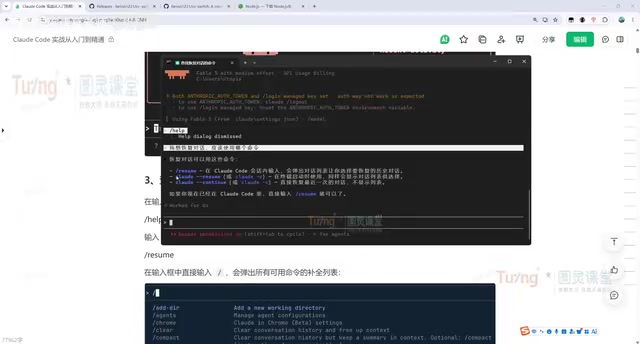
After installation, let's move into practical project applications. Mastering some common commands is necessary. Running help in the conversation window shows all available commands, but a more convenient approach is to ask directly in conversation—for example, "Which command should I use to resume a conversation?" Claude Code will teach you how to operate without consulting official documentation.
Core Conversation Commands
claude --resume(or-r): View history session list and choose which conversation to resumeclaude --continue(or-c): Directly resume the last conversation without showing the list—the most frequently used command- Entering
claudestarts a new conversation
Analyzing Projects: The First Step for Newcomers
In enterprise development, the first step with Claude Code is typically having it analyze the project structure. After switching to the project directory, simply ask "Help me analyze this project," and it will automatically identify the tech stack (e.g., recognizing it as a Vue-based frontend admin system) and analyze each module. Claude Code's project analysis capability is based on comprehensive identification of directory structure, package.json (or other package management configurations), and framework-specific files (such as vue.config.js, tsconfig.json, etc.), quickly building a panoramic view of the project. For interns who just joined or developers encountering an unfamiliar project for the first time, this is the most efficient onboarding method.
Writing Code and Tests
Starting with basics like "Implement a bubble sort algorithm in Python," Claude Code will write the code and then automatically run test verification. You can also add requirements on top of the original file, such as "Add some more comprehensive test files," and it will intelligently locate and modify relevant files.
Claude Code's modification workflow follows a fixed process: find relevant files → automatically locate files needing modification within the project → display modification content → wait for user approval → execute modifications. Users can approve individually or choose to reject, ensuring controllability of the modification process. This "Human-in-the-Loop" design philosophy ensures AI won't modify production code without permission, balancing efficiency and safety.
Git Workflow: Making Version Control as Simple as Conversation
Claude Code's deep integration with Git is a key manifestation of its engineering capabilities. Developers don't need to memorize tedious Git commands—just describe requirements in natural language, and it automatically invokes the corresponding commands. The value of this abstraction layer is that while Git is powerful, its command-line interface (especially advanced operations like rebase, cherry-pick, reflog, etc.) presents a steep learning curve for non-specialists. Claude Code encapsulates these complex operations behind natural language interaction, significantly lowering the barrier to entry.
Complete Git Workflow in Practice
Taking a personal tech blog project as an example, the entire workflow can be completed through conversation:
- Create project: "Help me create a personal tech blog project using only HTML+CSS+JS"
- Clone repository: "Help me clone this GitHub project"—it automatically invokes git commands
- Commit and push: "Help me move files to the test project, then commit and push the code"—one sentence completes the entire add, commit, push workflow
- Query commits: "Query how many commits the test project has, and display each commit's description in table format"

Branch Management and Automated Fixes
A more advanced scenario is the automated bug discovery and fix loop. You can have it create a dev branch and implement new features (such as three different sorting algorithms), automatically test and push upon completion.
Next comes the crucial automated review workflow:
- Have Claude Code analyze what issues exist in the specified branch's code and output an
issue.mddocument - It will automatically identify correctness issues, documentation-implementation mismatches, design and portability problems, etc.
- Finally, execute "Reference issue.md to fix all issues, then commit and push the code"—achieving complete automation from problem discovery to resolution
The entire process can be done without manually changing a single line of code—everything through conversation. Claude Code's problem-handling logic is: locate relevant code → understand context and code logic → analyze root cause → implement solution → display modifications → run tests to verify the fix. This workflow essentially simulates a senior developer's Code Review thought process, but executes far faster than manual review.
Detailed Guide to the Dual Command System
Claude Code's commands are divided into two categories: external commands and internal slash commands.
External commands (executed directly in the terminal):
claude code -p: Headless mode—executes tasks as single commands without entering the conversation window. Headless mode originates from browser automation concepts, referring to programs running without a graphical interface. In Claude Code, the core value of this mode is scriptability—developers can embed Claude Code into CI/CD pipelines, scheduled tasks, or Shell scripts to achieve batch code analysis, automated documentation generation, periodic security audits, and other scenarios, extending AI capabilities from interactive conversation to automated engineering systems. For example,claude -p "Analyze the test directory project structure"outputs results directly to the consoleclaude -r: Switch to the previous conversationclaude commit: Invoke git commands to commit code
Internal slash commands (used within the conversation window): Including /login, /resume, /clear (clear current conversation history and start a fresh session), etc. The /clear command doesn't just clear the screen—more importantly, it releases the context window occupied by the current conversation. When too many conversation turns cause the AI to start "forgetting" earlier information, timely clearing and starting a new session is an effective strategy for maintaining response quality.
This combined internal-external command system allows Claude Code to satisfy both interactive deep development and scriptable batch tasks.
Summary
Claude Code has completed its transformation from a command-line tool to an engineering AI partner. The core path to mastering it is: first establish a stable environment (CLI installation + domestic model switching), then familiarize yourself with the conversation workflow (project analysis, code writing, approval-based modifications), and finally integrate the Git engineering workflow (branch management, automated review and fixes). For both individual developers and teams, mastering Claude Code means not just improved efficiency, but a fundamental shift in development paradigm from "manual coding" to "goal-driven, AI-executed." The essence of this paradigm shift is that developers' core competitiveness transitions from "coding speed" to "precision in problem definition" and "judgment in quality acceptance," while AI handles the execution chain from problem to solution.
Related articles

Kimi K3 Deep Dive: 2.8 Trillion Parameter Open-Source Model Closes the Gap with Closed-Source Frontier for the First Time
Moonshot AI releases Kimi K3 open-weight model with 2.8T parameters and 1M token context. Our deep dive covers coding, 3D dev, agent capabilities, and safety concerns.

How to Choose an AI Agent Platform for Your Team: 5 Evaluation Dimensions and a Decision Framework
Choose the right AI Agent platform by evaluating model flexibility, observability, tool integration, security compliance, and total cost. A complete decision framework to help technical leaders avoid vendor lock-in.

Legora's Legal AI Practice: How Vertical AI Empowers Law Firms and Corporate Legal Transformation
Explore Legora's legal vertical AI practice, covering AI model selection strategies, enterprise legal transformation challenges, and the path to deploying vertical AI in the legal industry.