Claude Code vs Codex vs OpenCode: A Comprehensive Comparison of the Top 3 AI Coding Agents in 2025

Comprehensive comparison of Claude Code, Codex, and OpenCode — the top 3 AI coding agents of 2025.
This article compares Claude Code, Codex, and OpenCode across usability, UI design, model support, tool features, and coding efficiency. Claude Code leads with the strongest Opus model, complete toolchain, and safe defaults; OpenCode excels with a polished UI, rich model selection, and open-source advantages; Codex lags in multiple areas, especially lacking an undo feature. The practical recommendation: use Claude Code as your primary tool and switch to OpenCode when tokens run out.
In the current AI coding agent landscape, Claude Code, OpenAI Codex, and OpenCode are the three most talked-about terminal-based programming tools. What are their respective strengths and weaknesses? Which one best fits your daily development workflow? This article provides a comprehensive comparison across multiple dimensions including usability, model support, tool features, and coding efficiency to help you make the right choice.
Default Settings & Usability: Claude Code Wins
The three AI coding agents differ significantly in their out-of-the-box experience. Claude Code has the friendliest onboarding flow — after logging in, it asks about your preferred theme and recommends a set of default settings (like Shift+Enter for line breaks). More importantly, Claude Code requires users to approve each operation step by step by default, which is crucial for developers who don't want to fully embrace "vibe coding."
In contrast, both Codex and OpenCode default to "fully automatic execution" mode — after entering a prompt, they directly create files and run commands without asking for any permission. While both can be reconfigured through config files (OpenCode only requires a simple configuration in .config/opencode/opencode.json), from a default experience standpoint, Claude Code better aligns with the "human-in-the-loop" safety philosophy.
Terminal UI Design: OpenCode Is the Most Polished
If we're purely comparing the aesthetics and interaction experience of the terminal user interface, OpenCode is the clear winner. It features the most refined terminal interface, including smooth animations, convenient model switching, and elegant code preview functionality.
The ranking is: OpenCode > Claude Code > Codex. Codex's interface feels the most bare-bones and unpolished. Of course, UI design is a highly subjective criterion — actual programming productivity is what truly matters.
Model Exclusivity vs. Diversity: Two Sides of the Same Coin
This is where the three AI coding tools differ the most, and it's the factor that requires the most careful consideration when choosing.
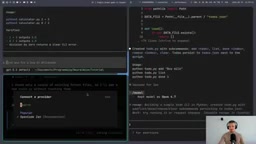
Model Exclusivity: Claude Code's Moat
Claude Code's biggest selling point is that it's the only way to use Anthropic's subscription credits. While you can connect to Anthropic models in OpenCode via API keys, you cannot use subscription credits — meaning API calls to the Opus model will quickly burn through significant funds. Anthropic has actively blocked third-party tools from using its subscriptions, which is understandable as a business strategy but is a negative from a developer-friendliness perspective.
At the current stage, Opus 4/7 is widely considered the strongest coding model, so Claude Code temporarily leads in the "strongest AI coding agent" dimension. But this advantage entirely depends on the dynamic competitive landscape of models — if GPT models surpass Claude in the future, the situation will immediately reverse.
Model Diversity: OpenCode's Absolute Advantage
OpenCode crushes the other two in model selection. Codex can only use the GPT series, Claude Code can only use the Claude series, while OpenCode supports:
- Multiple free models (out of the box)
- OpenAI (supports ChatGPT Plus/Pro subscriptions)
- Anthropic (via API key)
- Google, xAI, OpenRouter, and many other providers
- Local models
If you want the flexibility to switch between models, or pair lightweight models with simple tasks to save costs, OpenCode is the only option.
Tool Feature Comparison: Codex's Fatal Shortcoming

Undo/Rewind: Codex Lacks Rollback Capability
This is Codex's biggest problem — it has no Undo function. Claude Code supports /undo or /rewind commands to roll back both code and conversation history; OpenCode also supports undo and even has a redo command (though redo only restores conversation history, not files).
But Codex completely lacks this feature. There are already GitHub issues requesting it, but it hasn't been implemented. For developers who don't want to manually Git commit after every change, this is a serious workflow obstacle — when the AI agent makes a mistake, you can't simply roll back to a previous state.
Claude Code's Exclusive Features
- Voice input mode: Enabled via
/voice, hold the spacebar to dictate instructions — perfect for vibe coding scenarios like frontend design - Plugin marketplace: Discover and install plugins and MCP servers via
/marketplace - Work Tree support: Built-in
--work-treeparameter with native Git worktree workflow support
OpenCode is also strong in session management (fork session, etc.), and the community-driven development pace ensures rapid feature iteration. Overall, Claude Code and OpenCode are evenly matched in tool features, while Codex clearly lags behind.
Efficiency, Speed & Token Consumption
The community consensus is:
- Codex: Slow responses, deep thinking, tends to fully understand the codebase before acting — suited for deep refactoring
- Claude Code: Fast responses, great for rapid prototyping, but burns through tokens extremely quickly
- OpenCode: Performance depends on the selected model; using GPT feels similar to Codex
In terms of transparency, Claude Code's /usage command clearly shows token usage for the current session and the week. But in practice, two or three slightly complex prompts can exhaust a session's token quota. Codex's token quota is relatively more generous, but usage visibility is poorer.
Real-World Coding Results Comparison
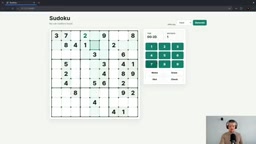
Testing all three AI coding tools with the same prompt ("Build a Sudoku browser game") yielded the following results:
- Claude Code: Used Flask framework, fully functional, includes a solver
- Codex: Used a native HTTP server (not Flask), added a notes feature
- OpenCode + GPT: Also used a native HTTP server, quality comparable to Codex
- OpenCode + free models: MiniMax performed acceptably, Qwen 3 had bugs, DeepSeek failed completely
An interesting finding: regardless of whether GPT was used in Codex or OpenCode, it chose a native HTTP server over Flask — this demonstrates that the model's own behavioral patterns matter more than the tool framework's influence.
Conclusion: The Trade-off Between Ideal and Reality
| Dimension | Claude Code | Codex | OpenCode |
|---|---|---|---|
| Default Settings | ⭐⭐⭐ | ⭐ | ⭐⭐ |
| UI Design | ⭐⭐ | ⭐ | ⭐⭐⭐ |
| Model Exclusivity | ⭐⭐⭐ | ⭐⭐ | ⭐ |
| Model Diversity | ⭐ | ⭐ | ⭐⭐⭐ |
| Tool Features | ⭐⭐⭐ | ⭐ | ⭐⭐⭐ |
| Open Source & Community | ⭐ | ⭐ | ⭐⭐⭐ |
The final conclusion is quite pragmatic: OpenCode is the tool most worth liking, but Claude Code is the tool actually being used. OpenCode has the most beautiful interface, the richest model selection, and open-source community support — it's the project most worth "rooting for." But when real engineering work needs to get done, Claude Code remains the top AI coding agent thanks to the currently strongest Opus model and the most complete toolchain.
The practical workflow recommendation is: Use Claude Code as your primary tool, then switch to OpenCode + GPT when tokens run out. This is perhaps the most rational strategy at the current stage — before the model competition landscape in AI coding tools becomes clear, maintaining flexibility is more important than betting on a single tool.
Related articles
 Tech Frontiers
A Rare Quiet Day in AI: Recursive Self-Improvement Stirs Beneath the Surface
A rare quiet day in AI sees multiple sources go silent simultaneously. Behind the calm, Recursive Self-Improvement (RSI) research continues. What this means for the industry.
 Tech Frontiers
Reve 2 vs. Ideogram 4: A Deep Dive into Layout Control in AI Image Generation
A deep comparison of Reve 2 and Ideogram 4's layout control capabilities, covering technical approaches, real-world use cases, and industry trends for designers and creators.
 Tech Frontiers
In the Weights: Check Your Influence Score in the AI World
In the Weights is an AI influence search engine that quantifies your presence in the AI world with a score. Explore how it evaluates practitioners and what it means for digital identity.