Claude Code with DeepSeek V4: Complete Setup Guide to Save 99% on Costs

Use CC Switch to swap Claude Code's underlying model to DeepSeek V4 for low-cost multi-model AI programming.
This article explains how to use the open-source desktop tool CC Switch to replace Claude Code's default model with the more cost-effective DeepSeek V4 or free OpenRouter models. The core approach is multi-model collaboration: use Claude for visual design and creative work, use DeepSeek V4 for backend logic, scripting, and other tasks that don't require aesthetic judgment, and leverage CC Switch for seamless switching—dramatically reducing AI programming costs.
Why Replace Claude Code's Default Model?
Claude Code is currently the most powerful AI programming terminal tool—it can read code, write code, and call tools, essentially providing an end-to-end service. Its core capability is built on the "Tool Use" mechanism: the model doesn't just generate code, it proactively invokes system-level tools like file read/write, shell command execution, and network requests, forming a closed loop of "perceive-plan-execute." This is fundamentally different from earlier code completion tools (like GitHub Copilot): the latter provides passive auto-completion, while Claude Code is an active task execution agent. Because of this architecture, Claude Code has extremely high requirements for the underlying model's tool-calling capabilities—not every LLM can seamlessly serve as a drop-in replacement.
But here's the problem—it's expensive. Claude Opus 4 can consume several dollars per session. If you use it four or five times a day, your monthly programming costs alone could reach hundreds or even thousands of dollars.
For students, indie developers, and early-stage founders, this barrier is significant. The arrival of DeepSeekAd V4 offers an extremely cost-effective alternative: 1.6 trillion parameters, 1 million context window, MIT open-source license, and full compatibility with the Claude Code ecosystem.

It's worth diving deeper: DeepSeek V4 uses a Mixture of Experts (MoE) architecture, with a nominal 1.6 trillion total parameters, but only about 37 billion parameters are actually activated per inference pass. The core idea behind MoE is "sparse activation"—the model is split into multiple expert sub-networks, and only a few are routed and activated during each inference, striking a balance between parameter scale and computational cost. The 1 million token context window means it can process approximately 750,000 English words or dozens of complete code files in a single pass—critical for holistic understanding of large projects. The MIT open-source license allows commercial use, further lowering compliance barriers for enterprises and indie developers.
Here's an analogy: Claude Opus is like hiring a top-tier designer—expensive but with excellent taste. DeepSeek V4 is an entire construction crew—cheap, fast, and great at doing the heavy lifting. Most importantly, DeepSeek V4 has the strongest tool-calling capabilities among comparable open-source models, capable of reliably executing all of Claude Code's skills, tool calls, and automated tasks.
CC Switch: An Open-Source Tool for One-Click Model Switching in Claude Code
What Is CC Switch?
CC Switch is a cross-platform GUI desktop application built with Tauri + Rust, specifically designed for managing Claude Code's model providers. Unlike Electron (used by VS Code, Slack, etc.), Tauri uses the system's native WebView to render the frontend interface, while the backend logic is written in Rust. The final package size is typically 1/10 to 1/20 of an Electron app (a few MB vs. hundreds of MB). Rust as the backend language provides memory safety guarantees and near-C-level runtime performance without garbage collection. This combination gives CC Switch superior cross-platform compatibility, smaller installation packages, and better runtime efficiency compared to traditional desktop tools—particularly important for a configuration management tool that frequently reads and writes system environment variables.
CC Switch's core advantages:
- No need to manually write configuration files
- No need to clone repositories or set up proxy servers
- Switch between different AI models with a single click
- Supports Claude Code, Codex, and Gemini CLI simultaneously
CC Switch Installation and DeepSeek Configuration Steps
Step 1: Download and Install CC Switch
Go to the GitHub Release page and download the installer for your platform:
- Windows: Download the
.msifile - macOS: Download the
.dmgfile, or install via Homebrew - Linux: Download the
.debfile
Step 2: Add DeepSeek as a Provider
- Go to the DeepSeek developer platform and create an API Key
- In CC Switch, create a new provider and select the DeepSeek type
- Paste your API Key and save
Step 3: Verify the Connection
Open your terminal and type claude to launch Claude Code, then enter "confirm what model you are using" to verify. If you need to switch back to the original Claude model, just toggle the provider in CC Switch—no need to reconfigure environment variables.
Hands-On Demo: Building a Website with Claude + DeepSeek Multi-Model Collaboration
Phase 1: Visual Design with Claude
Let's take building a coffee brand website as an example. First, switch to the original Claude model in CC Switch, give it a design reference repository (Awesome Designer, containing design systems from BMW, Apple, etc.), and have it build the entire website framework using Apple's design language.
What Claude produces is a clean, refined page—in terms of visual quality and creativity, it has no rivals.
Phase 2: Feature Development with DeepSeek
Now that we have the base page, we need to add an ROI calculator: users input how many cups of coffee they drink per day, their hourly wage, working hours, caffeine sensitivity, and sleep duration, and the system automatically calculates the annualized ROI of coffee on productivity.
This task doesn't require design taste—it's purely logic and code volume. Switch to DeepSeek V4 in CC Switch, paste the same project context, and continue development. DeepSeek V4 completes it extremely quickly—the calculator logic is completely correct, and the UI perfectly replicates the Apple style.
This is the core pattern of multi-model collaboration: Claude sets the tone, DeepSeek fills in the content, and CC Switch enables seamless switching.
DeepSeek V4 Model Selection Decision Framework
Scenarios Where DeepSeek V4 Excels
- Automation script writing
- Backend logic development
- Unit test generation
- Algorithm problem solving
- Data processing and batch file operations
- Code review and auditing
In one sentence: All the grunt work that doesn't require visual taste can be handed to DeepSeek.
Scenarios Where DeepSeek Is Not Recommended
- UI/UX Design: Aesthetics still lag behind Claude's top-tier models
- Visual creativity from scratch: Unless Claude has already established the framework
- Tasks involving sensitive information: This point deserves special attention. When you paste API Keys or code into third-party services, risks come from multiple layers: man-in-the-middle interception at the transport layer, server-side database leaks, and the more insidious risk of "Prompt Injection"—malicious code repositories may embed instructions that trick the model into exfiltrating sensitive information from the context. For enterprise code, un-redacted business logic, database connection strings, internal API endpoints, and other information entering a third-party model's logging system could lead to serious intellectual property and data compliance consequences. Best practices include: creating separate API Keys for different purposes, setting spending limits, and rotating keys regularly.
Advanced Approach: Zero-Cost AI Programming with OpenRouter
If you want to use the Claude Code framework completely free of charge, OpenRouter provides a path.
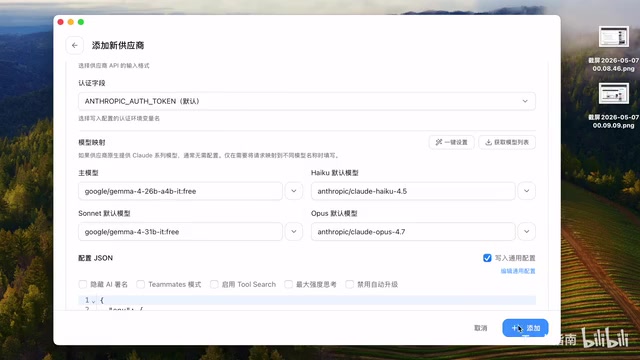
OpenRouter is an AI model aggregation routing platform whose business model resembles a cloud service "broker": it provides unified access to hundreds of large language models from different vendors (including OpenAI, Anthropic, Google, Meta, etc.), offering developers a standardized OpenAI-compatible API interface. Developers only need to integrate with one API to switch between different models on demand, without registering separate accounts with each provider. OpenRouter's free models are typically provided by model vendors as "sponsored traffic" to promote new models, so they come with rate limits and concurrency restrictions.
OpenRouter Configuration Steps
- Visit the OpenRouter website and register an account
- Create an API Key
- In CC Switch, add OpenRouter as a provider and paste your API Key
- Click "Fetch Model List"
Related articles
 Tutorials
ChatGPT Plus Subscription Guide: Are GPT-5.5, image-2, and Codex Worth the Upgrade?
A detailed look at ChatGPT Plus features — GPT-5.5, image-2, and Codex — with a Plus vs Pro comparison and a complete step-by-step subscription guide for users outside the US.
 Tutorials
Harness AI Engineering in Practice: Using Claude Code to Master Enterprise-Level E-Commerce Development
Deep dive into Harness AI Engineering: master enterprise e-commerce development with Claude Code using the Rules, Skills, Wiki, and Changes framework.
 Tutorials
Cursor + Codex Dual-IDE Collaboration: A Practical Methodology for Open-Source Project Customization
A complete methodology for open-source project customization based on real-world experience, detailing the Cursor+Codex dual-IDE workflow, seven-stage process, MVP validation, and AI source code reading techniques.